manuals.online logo
Brands
  1. Home
  2. •
  3. Brands
  4. •
  5. Scosche
  6. •
  7. Cell Phone Accessories
  8. •
  9. Scosche MagicPlate User manual

Scosche MagicPlate User manual

Other Scosche Cell Phone Accessories manuals

Scosche MBM2SM User manual

Scosche

Scosche MBM2SM User manual

Scosche Switchback surge g4 User manual

Scosche

Scosche Switchback surge g4 User manual

Scosche MAGICPLATE MAGRK User manual

Scosche

Scosche MAGICPLATE MAGRK User manual

Scosche PSM31000 User manual

Scosche

Scosche PSM31000 User manual

Scosche MPWDB Instruction manual

Scosche

Scosche MPWDB Instruction manual

Scosche TerraClamp MAGICMOUNT PRO User manual

Scosche

Scosche TerraClamp MAGICMOUNT PRO User manual

Popular Cell Phone Accessories manuals by other brands

HP PhotoSmart user guide

HP

HP PhotoSmart user guide

Valore AC14 user manual

Valore

Valore AC14 user manual

Nokia AD-5B user guide

Nokia

Nokia AD-5B user guide

Bauhn ABSS-1222 user guide

Bauhn

Bauhn ABSS-1222 user guide

ReSound Phone Clip+ user guide

ReSound

ReSound Phone Clip+ user guide

Mpow ISNAP X1 manual

Mpow

Mpow ISNAP X1 manual

Zartek Mobile ZA-350 user manual

Zartek Mobile

Zartek Mobile ZA-350 user manual

Playbrush Playbrush manual

Playbrush

Playbrush Playbrush manual

X-cam X-CAM T3 instructions

X-cam

X-cam X-CAM T3 instructions

SanDisk iXpand user guide

SanDisk

SanDisk iXpand user guide

Motorola PMLN7018 user guide

Motorola

Motorola PMLN7018 user guide

Nokia 8110 installation instructions

Nokia

Nokia 8110 installation instructions

Philips DLA63005 brochure

Philips

Philips DLA63005 brochure

Sony SCR44 user guide

Sony

Sony SCR44 user guide

AIPTEK MobileCinema i15  Brochure & specs

AIPTEK

AIPTEK MobileCinema i15  Brochure & specs

Sony headphone operating manual

Sony

Sony headphone operating manual

maktar Qubii user guide

maktar

maktar Qubii user guide

IndieVice Pro user manual

IndieVice

IndieVice Pro user manual

manuals.online logo
manuals.online logoBrands
  • About & Mission
  • Contact us
  • Privacy Policy
  • Terms and Conditions

Copyright 2025 Manuals.Online. All Rights Reserved.

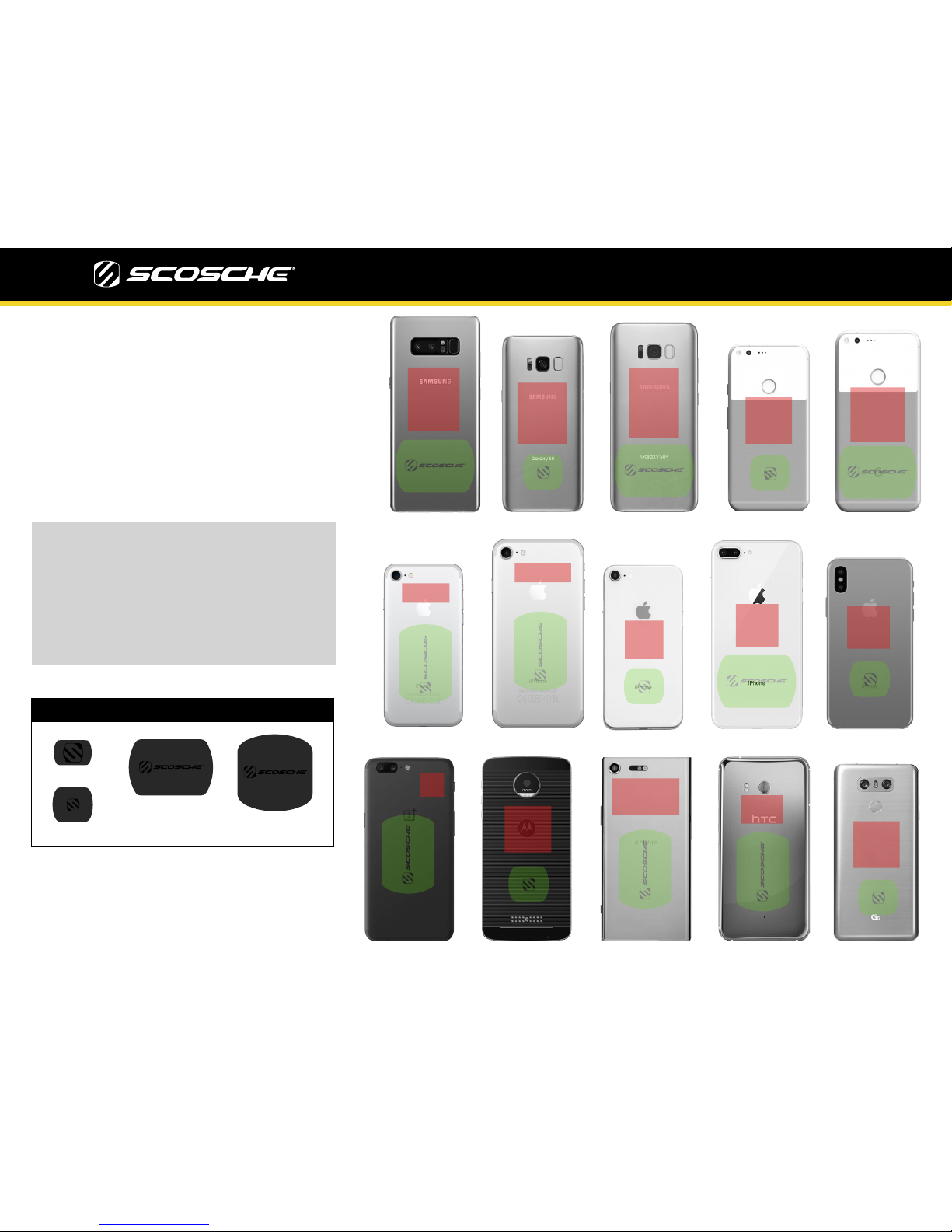
MagicPlate™Placement Revised 11/10/17
iPhone 7 Plus
iPhone 7
Samsung Galaxy S8
Samsung Galaxy S8 Plus
Google Pixel XL
Google Pixel
Motorola Moto Z
OnePlus 5
HTC U11 Sony Xperia XZ Premium
LG 6
Samsung Galaxy 8 Note
iPhone 8 Plus
iPhone 8
iPhone X
MagicPlate™ (non-magnetic metal plates) can interfere
with wireless charging (if available on your device) and
NFC*. Use this handy guide for placing the MagicPlate on
your device. The guide includes MagicPlate optimal
placement locations for a variety of popular smartphones.
Refer to your device manual for its wireless charging and
NFC locations as they vary by device.
The GREEN highlighted area is the safe area to attach the
MagicPlate to your device. Avoid placing the MagicPlate in
the RED highlighted areas.
*Near Field Communications. NFC is a set of standards for
portable devices. It allows them to establish peer-to-peer radio
communications, passing data from one device to another by
touching them or putting them very close together.
MagicPlate™Sizes
XL
Standard
Small
X Small
If you plan to apply the MagicPlate™ directly
to the back of your smartphone or other
mobile device, you must apply the protective
film sticker to the applicable plate mounting
area on your device BEFORE you apply the
MagicPlate. The MagicPlate will then go on
top of the plastic protective film sticker.
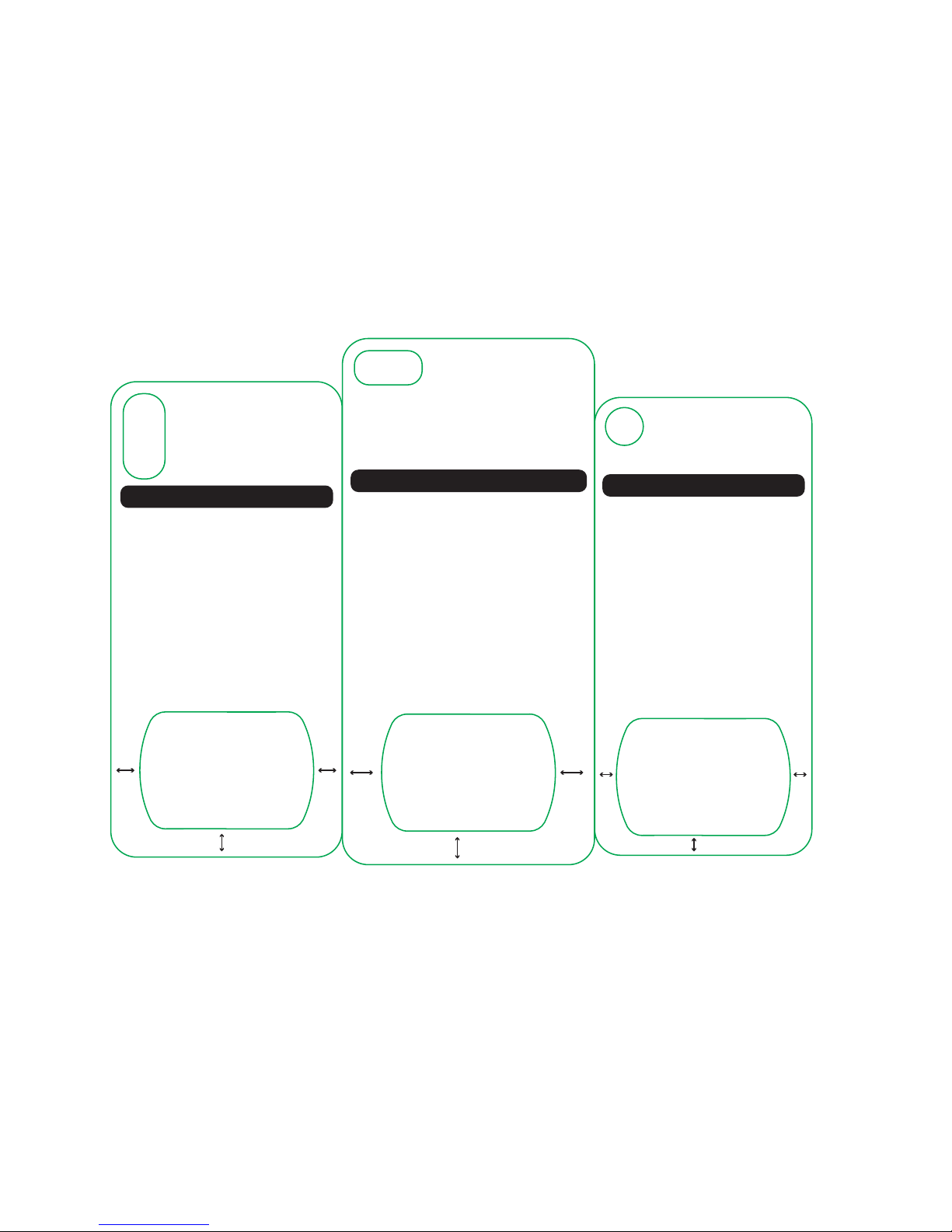
MagicPlate Placement Template
1. Place template on back of the iPhone 8+
2. Remove 3M lm from MagicPlate
3. Place MagicPlate in the designated area below
Visit www.scosche.com/qi
for additional phone templates.
Contact Scosche Customer Service at 800.363.4490
ext. 1, or [email protected]
for additional questions.
For optimal performance, use this template
to install the MagicPlate to your device.
iPhone 8+
11.1
mm
11.1
mm
9.65
mm
MagicPlate Placement Template
1. Place template on back of the iPhone 8
2. Remove 3M lm from MagicPlate
3. Place MagicPlate in the designated area below
Visit www.scosche.com/qi
for additional phone templates.
Contact Scosche Customer Service at 800.363.4490
ext. 1, or [email protected]
for additional questions.
For optimal performance, use this template
to install the MagicPlate to your device.
iPhone 8
6.2
mm
6.2
mm
5.85
mm
MagicPlate Placement Template
1. Place template on back of the iPhone X
2. Remove 3M lm from MagicPlate
3. Place MagicPlate in the designated area below
Visit www.scosche.com/qi
for additional phone templates.
Contact Scosche Customer Service at 800.363.4490
ext. 1, or [email protected]
for additional questions.
For optimal performance, use this template
to install the MagicPlate to your device.
iPhone X
8.05
mm
8.05
mm
7.8
mm
MagicPlate Placement Template
1. Place template on back of the Note 8
2. Remove 3M lm from MagicPlate
3. Place MagicPlate in the designated area below
Visit www.scosche.com/qi
for additional phone templates.
Contact Scosche Customer Service at 800.363.4490
ext. 1, or [email protected]
for additional questions.
For optimal performance, use this template
to install the MagicPlate to your device.
Samsung Galaxy Note 8
11.6
mm
11.6
mm
9.8
mm
Samsung Galaxy S8
MagicPlate Placement Template
1. Place template on back of the S8
2. Remove 3M lm from MagicPlate
3. Place MagicPlate in the designated area below
Visit www.scosche.com/qi
for additional phone templates.
Contact Scosche Customer Service at 800.363.4490
ext. 1, or [email protected]
for additional questions.
8.15
mm
6.65
mm
For optimal performance, use this template
to install the MagicPlate to your device.
8.15
mm
Samsung Galaxy S8 +
MagicPlate Placement Template
1. Place template on back of the S8 +
2. Remove 3M lm from MagicPlate
3. Place MagicPlate in the designated area below
Visit www.scosche.com/qi
for additional phone templates.
Contact Scosche Customer Service at 800.363.4490
ext. 1, or [email protected]
for additional questions.
9.5
mm
8.9
mm
For optimal performance, use this template
to install the MagicPlate to your device.
9.5
mm
Samsung Galaxy S7 Edge
MagicPlate Placement Template
1. Place template on back of the S7 Edge
2. Remove 3M lm from MagicPlate
3. Place MagicPlate in the designated area below
Visit www.scosche.com/qi
for additional phone templates.
Contact Scosche Customer Service at 800.363.4490
ext. 1, or [email protected]
for additional questions.
10.75
mm
8.2
mm
For optimal performance, use this template
to install the MagicPlate to your device.
10.75
mm
Samsung Galaxy S7
MagicPlate Placement Template
1. Place template on back of the Galaxy S7
2. Remove 3M lm from MagicPlate
3. Place MagicPlate in the designated area below
Visit www.scosche.com/qi
for additional phone templates.
Contact Scosche Customer Service at 800.363.4490
ext. 1, or [email protected]
for additional questions.
9.40
mm
7.8
mm
For optimal performance, use this template
to install the MagicPlate to your device.
9.40
mm
Samsung Galaxy S6
MagicPlate Placement Template
1. Place template on back of the Galaxy S6
2. Remove 3M lm from MagicPlate
3. Place MagicPlate in the designated area below
Visit www.scosche.com/qi
for additional phone templates.
Contact Scosche Customer Service at 800.363.4490
ext. 1, or [email protected]
for additional questions.
10.25
mm
9.20mm
For optimal performance, use this template
to install the MagicPlate to your device.
10.25
mm
Samsung Galaxy S6 Edge
MagicPlate Placement Template
1. Place template on back of the Galaxy S6 Edge
2. Remove 3M lm from MagicPlate
3. Place MagicPlate in the designated area below
Visit www.scosche.com/qi
for additional phone templates.
Contact Scosche Customer Service at 800.363.4490
ext. 1, or [email protected]
for additional questions.
9.60
mm
9.30mm
For optimal performance, use this template
to install the MagicPlate to your device.
9.60
mm
Samsung Note 5
MagicPlate Placement Template
1. Place template on back of the Samsung Note 5
2. Remove 3M lm from MagicPlate
3. Place MagicPlate in the designated area below
Visit www.scosche.com/qi
for additional phone templates.
Contact Scosche Customer Service at 800.363.4490
ext. 1, or [email protected]
for additional questions.
12.70
mm
11.85mm
For optimal performance, use this template
to install the MagicPlate to your device.
12.70
mm

8.45
mm
8.75
mm
8.75
mm
MagicPlate Placement Template
1. Place template on back of the G6
2. Remove 3M lm from MagicPlate
3. Place MagicPlate in the designated area below
Visit www.scosche.com/qi
for additional phone templates.
Contact Scosche Customer Service at 800.363.4490
ext. 1, or [email protected]
for additional questions.
For optimal performance, use this template
to install the MagicPlate to your device.
LG G6
MagicPlate Placement Template
1. Place template on back of the Lumia 950
2. Remove 3M lm from MagicPlate
3. Place MagicPlate in the designated area below
Visit www.scosche.com/qi
for additional phone templates.
Contact Scosche Customer Service at 800.363.4490
ext. 1, or [email protected]
for additional questions.
For optimal performance, use this template
to install the MagicPlate to your device.
Windows Lumia 950
10.9
mm
10.9
mm
8.3
mm