manuals.online logo
Brands
  1. Home
  2. •
  3. Brands
  4. •
  5. Sony
  6. •
  7. Camera Accessories
  8. •
  9. Sony HVR-Z1J User manual

Sony HVR-Z1J User manual

Other manuals for HVR-Z1J

2

This manual suits for next models

5

Other Sony Camera Accessories manuals

Sony Wi-Fi Connection/One-touch User manual

Sony

Sony Wi-Fi Connection/One-touch User manual

Sony VG-C90AM User manual

Sony

Sony VG-C90AM User manual

Sony HKCU-IP43F User manual

Sony

Sony HKCU-IP43F User manual

Sony SRK-R302 User manual

Sony

Sony SRK-R302 User manual

Sony Aqty Pack APK-WA User manual

Sony

Sony Aqty Pack APK-WA User manual

Sony XLR-K1M User manual

Sony

Sony XLR-K1M User manual

Sony MPK-P1 User manual

Sony

Sony MPK-P1 User manual

Sony CCU-M5A User manual

Sony

Sony CCU-M5A User manual

Sony MPK-THA User manual

Sony

Sony MPK-THA User manual

Sony FA-TC1AM User manual

Sony

Sony FA-TC1AM User manual

Sony VCT VCT-1500L User manual

Sony

Sony VCT VCT-1500L User manual

Sony VCL-2030 S User manual

Sony

Sony VCL-2030 S User manual

Sony LCM-TRV10 User manual

Sony

Sony LCM-TRV10 User manual

Sony FA-EB1AM User manual

Sony

Sony FA-EB1AM User manual

Sony MPK-WG User manual

Sony

Sony MPK-WG User manual

Sony UNI-PMA1 User manual

Sony

Sony UNI-PMA1 User manual

Sony VCT-VPR10 User manual

Sony

Sony VCT-VPR10 User manual

Sony AJK-THA User manual

Sony

Sony AJK-THA User manual

Sony VCT-550RM User manual

Sony

Sony VCT-550RM User manual

Sony LSF-VHA User manual

Sony

Sony LSF-VHA User manual

Sony SH-L2AM User manual

Sony

Sony SH-L2AM User manual

Sony HDVF-C30WR User manual

Sony

Sony HDVF-C30WR User manual

Sony SPK-WA User manual

Sony

Sony SPK-WA User manual

Sony FA-WRC1M User manual

Sony

Sony FA-WRC1M User manual

Popular Camera Accessories manuals by other brands

CamRanger CamRanger user manual

CamRanger

CamRanger CamRanger user manual

Custom Brackets HDV CAGE KIT Instructions for use

Custom Brackets

Custom Brackets HDV CAGE KIT Instructions for use

Aegis ABL052010P user manual

Aegis

Aegis ABL052010P user manual

Saft SRA Series Installation and operating instructions

Saft

Saft SRA Series Installation and operating instructions

Kodak TIB5200 technical information

Kodak

Kodak TIB5200 technical information

Videotec HEG instruction manual

Videotec

Videotec HEG instruction manual

Ikelite 6171.11 manual

Ikelite

Ikelite 6171.11 manual

Pentax Auto Bellows Slide Copier K user manual

Pentax

Pentax Auto Bellows Slide Copier K user manual

Nikon UT-1 user manual

Nikon

Nikon UT-1 user manual

dji RONIN 4D quick start guide

dji

dji RONIN 4D quick start guide

SLIK ABLE 300DX user manual

SLIK

SLIK ABLE 300DX user manual

Rebelcell 36V70 user manual

Rebelcell

Rebelcell 36V70 user manual

Trojan GC2 48V quick start guide

Trojan

Trojan GC2 48V quick start guide

Calumet 7100 Series CK7114 operating instructions

Calumet

Calumet 7100 Series CK7114 operating instructions

Ropox 4Single Series User manual and installation instructions

Ropox

Ropox 4Single Series User manual and installation instructions

Cambo Wide DS Digital Series Main operating instructions

Cambo

Cambo Wide DS Digital Series Main operating instructions

Samsung SHG-120 Specification sheet

Samsung

Samsung SHG-120 Specification sheet

Ryobi BPL-1820 Owner's operating manual

Ryobi

Ryobi BPL-1820 Owner's operating manual

manuals.online logo
manuals.online logoBrands
  • About & Mission
  • Contact us
  • Privacy Policy
  • Terms and Conditions

Copyright 2025 Manuals.Online. All Rights Reserved.

HVR-Z1J/Z1U/Z1N/Z1E/Z1P/Z1C
©2005 Sony Corporation Printed in Japan 2-631-646-02 (1)
付属の取扱説明書に誤りがありましたので、
おわびするとともに、以下のように訂正いた
します。
x 51ページの手順7
7SEL/PUSH EXECダイヤルを回して
録画コントロールモードを選び、押し
て決定する。
[OFF]
他機で録画を行わない。
[SYNCHRONOUS](同時録画)
本機の録画操作に連動して、他機側でも同時
に映像と音声を記録する。( が表示さ
れます。)
[RELAY](リレー録画)
本機で撮影中のテープが終了近くになった
ら、他機で映像と音声を続けて記録する。
( が表示されます。)
x 52ページの「bご注意」に追加
•[REC CTL MODE]が[OFF]以外のとき、以下の
機能は働きません。
-EXPANDED FOCUSボタン
-[ALLSCAN MODE]に割り当てたASSIGNボタン
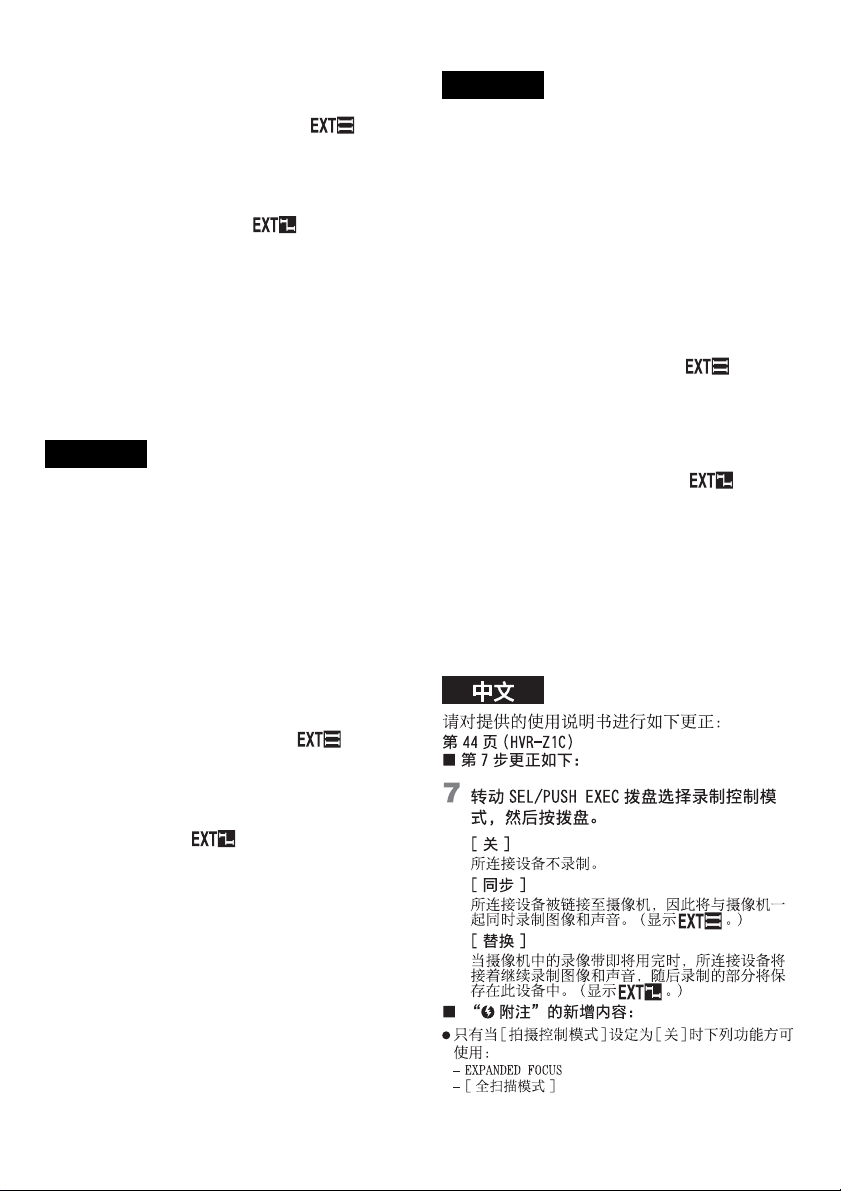
Please correct the supplied Operating Instructions as
follows:
Page 46 (HVR-Z1U/Z1N)/Page 47 (HVR-Z1E/
Z1P)
xStep 7 should read as follows:
7Select a recording control mode by turning
the SEL/PUSH EXEC dial, then press the
dial.
[OFF]
The connected device does not record.
[SYNCHRONOUS]
The connected device is linked to the camcorder, and
therefore records the picture and sound simultaneously
with the camcorder. ( is displayed.)
[RELAY]
When the tape in the camcorder has almost run out,
recording of the picture and sound is relayed to the
connected device and the remainder of the recording is
saved there. ( is displayed.)
xAn addition to “bNote”:
• Following functions work only when [REC CTL MODE]
is set to [OFF]:
– EXPANDED FOCUS
– [ALLSCAN MODE]
xHVR-Z1E Supplied accessories:
• Despite the description on pages 11 and 56, no 21-pin
adaptor is supplied with this model.
Veuillez apporter les modifications suivantes au
Mode d’emploi fourni.
Page 47 (HVR-Z1U)/Page 49 (HVR-Z1E)
xL’étape 7 doit se présenter de la façon la
suivante :
7Sélectionnez un mode d’enregistrement en
tournant la molette SEL/PUSH EXEC, puis
appuyez sur la molette.
[ARRET]
Le périphérique connecté n’enregistre pas.
[SYNCHRONISE]
Le périphérique connecté est raccordé au caméscope,
il enregistre donc l’image et le son simultanément avec
le caméscope. ( s’affiche.)
[RELAIS]
Lorsque le caméscope arrive en fin de bande, le
périphérique connecté prend le relais et se charge de
l’enregistrement de l’image et du son, la suite de
l’enregistrement est donc sauvegardée sur le
périphérique. ( s’affiche.)
xAjout à « bRemarque » :
• Les fonctions suivantes sont disponibles uniquement
lorsque [MODE CTL.ENR] est réglé sur [ARRET] :
– EXPANDED FOCUS
– [MODE ALLSCAN]
x
Accessoires fournis avec le modèle HVR-Z1E :
• En dépit de la description des pages 11 et 59, aucun
adaptateur à 21 broches n’est fourni avec ce modèle.
Corrija el manual de instrucciones suministrado del
modo siguiente:
Página 48 (HVR-Z1E)
xEl paso 7 deberá estar redactado del
siguiente modo:
7Seleccione un modo de control de grabación
girando el dial SEL/PUSH EXEC y, a
continuación, pulse el dial.
[DESACTIV.]
El dispositivo conectado no graba.
日本語
English
Français
Español
[SINCRONIZ.]
El dispositivo conectado está enlazado con la
videocámara y, por tanto, graba simultáneamente con
la videocámara la imagen y el sonido. (
aparece.)
[RELÉ]
Si ya casi se ha agotado la cinta de la videocámara, la
grabación de la imagen y el sonido se pasan al
dispositivo conectado y el resto de la grabación se
guarda en dicho dispositivo. ( aparece.)
xParte añadida a la sección “bNota”:
• Las siguientes funciones se podrán utilizar sólo cuando el
[MOD.CTRL.GR.] está ajustado en [DESACTIV.]
– EXPANDED FOCUS
– [MODO TOD.IM.]
xAccesorios suministrados con el modelo
HVR-Z1E
• A pesar de la descripción que aparece en las páginas 11 y
58, no se suministra ningún adaptador de 21 pines con
este modelo.
Effettuare le seguenti correzioni alle Istruzioni per
l’uso in dotazione.
Pagina 50 (HVR-Z1E)
xAl punto 7 dovrebbe essere riportato quanto
segue:
7Selezionare un modo di controllo della
registrazione ruotando la manopola SEL/
PUSH EXEC, quindi premere la manopola.
[DISATTIV.]
L’apparecchio collegato non effettua la registrazione.
[SINCRONIZZ.]
L’apparecchio è collegato alla videocamera, quindi
registra le immagini e l’audio contemporaneamente
alla videocamera (viene visualizzato ).
[IMP. AVVIO]
Se il nastro inserito nella videocamera ha quasi
raggiunto la fine, la registrazione delle immagini e
dell’audio passa all’apparecchio collegato e in tale
punto viene salvato il promemoria della registrazione
(viene visualizzato ).
xTesto aggiuntivo per “bNote”:
• Le seguenti funzioni sono disponibili solo se
[MOD.CNT.REG.] è impostato su [DISATTIV.]:
– EXPANDED FOCUS
– [SCORR.TUTTO]
xAccessori in dotazione con il modello
HVR-Z1E:
• Nonostante la descrizione alle pagine 11 e 60, con il
presente modello non è fornito alcun adattatore a 21
piedini.
Beachten Sie bitte die folgende Korrektur an der
mitgelieferten Bedienungsanleitung:
Seite 49 (HVR-Z1E)
xSchritt 7 muss folgendermaßen lauten:
7Wählen Sie durch Drehen des Reglers SEL/
PUSH EXEC einen
Aufnahmesteuerungsmodus und drücken Sie
auf den Regler.
[AUS]
Am angeschlossenen Gerät wird nicht aufgenommen.
[SYNCHRON]
Das angeschlossene Gerät wird mit dem Camcorder
synchronisiert und nimmt daher Bild und Ton
zeitgleich mit dem Camcorder auf ( wird
angezeigt).
[NACHEINANDER]
Wenn die Kassette im Camcorder fast am Ende
angelangt ist, wird die Aufnahme von Bild und Ton an
das angeschlossene Gerät weitergeleitet und dort
fortgesetzt. Die restliche Aufnahme wird am
angeschlossenen Gerät gespeichert ( wird
angezeigt).
xErgänzung zu „bHinweis“:
• Die folgenden Funktionen stehen nur zur Verfügung,
wenn [AUF.STRG.MOD] auf [AUS] gesetzt ist:
– EXPANDED FOCUS
– [ALLSCAN MODE]
xBei der HVR-Z1E mitgeliefertes Zubehör:
• Bei diesem Modell wird kein 21-poliger Adapter mitgeliefert,
auch wenn dies auf Seite 11 und 59 erwähnt wird.
Italiano
Deutsch