EnglishDeutsch
 logo
Brands
  1. Home
  2. •
  3. Brands
  4. •
  5. StarTech.com
  6. •
  7. Extender
  8. •
  9. StarTech.com ST121HD20FXA User manual

StarTech.com ST121HD20FXA User manual

Other StarTech.com Extender manuals

StarTech.com HDBOOST4K User manual

StarTech.com

StarTech.com HDBOOST4K User manual

StarTech.com ST124UTPEA User manual

StarTech.com

StarTech.com ST124UTPEA User manual

StarTech.com USBthere USB204EXTFIB User manual

StarTech.com

StarTech.com USBthere USB204EXTFIB User manual

StarTech.com ST121HDBTE User manual

StarTech.com

StarTech.com ST121HDBTE User manual

StarTech.com WIFI2HD2 User manual

StarTech.com

StarTech.com WIFI2HD2 User manual

StarTech.com USBthere USB221EXT User manual

StarTech.com

StarTech.com USBthere USB221EXT User manual

StarTech.com 110VDSLEXT User manual

StarTech.com

StarTech.com 110VDSLEXT User manual

StarTech.com ST121UTP23GB User manual

StarTech.com

StarTech.com ST121UTP23GB User manual

StarTech.com SVA12M5NA User manual

StarTech.com

StarTech.com SVA12M5NA User manual

StarTech.com HD202A User manual

StarTech.com

StarTech.com HD202A User manual

StarTech.com USB2001EXTV User manual

StarTech.com

StarTech.com USB2001EXTV User manual

StarTech.com 0065030863223 User manual

StarTech.com

StarTech.com 0065030863223 User manual

StarTech.com EOC110K User manual

StarTech.com

StarTech.com EOC110K User manual

StarTech.com USBthere USB110EXT User manual

StarTech.com

StarTech.com USBthere USB110EXT User manual

StarTech.com SV565UTPU User manual

StarTech.com

StarTech.com SV565UTPU User manual

StarTech.com ST12MHDLAN User manual

StarTech.com

StarTech.com ST12MHDLAN User manual

StarTech.com ST121HDBT20L User manual

StarTech.com

StarTech.com ST121HDBT20L User manual

StarTech.com IREXT2 User manual

StarTech.com

StarTech.com IREXT2 User manual

StarTech.com 8STSV565DUTPU User manual

StarTech.com

StarTech.com 8STSV565DUTPU User manual

StarTech.com STDHVHDBT User manual

StarTech.com

StarTech.com STDHVHDBT User manual

StarTech.com ST121UTPHDMI User manual

StarTech.com

StarTech.com ST121UTPHDMI User manual

StarTech.com ST121WHD User manual

StarTech.com

StarTech.com ST121WHD User manual

StarTech.com ST121UTPDVI User manual

StarTech.com

StarTech.com ST121UTPDVI User manual

StarTech.com USB110EXT2 User manual

StarTech.com

StarTech.com USB110EXT2 User manual

Popular Extender manuals by other brands

SY HDBT-60T installation guide

SY

SY HDBT-60T installation guide

Appsys ProAudio ADX-16 user manual

Appsys ProAudio

Appsys ProAudio ADX-16 user manual

Atlona RS232 user manual

Atlona

Atlona RS232 user manual

IDK OPF-TH1000-A user guide

IDK

IDK OPF-TH1000-A user guide

Enable-IT 824WP quick start guide

Enable-IT

Enable-IT 824WP quick start guide

Worx Landroid RadioLink WA0864 Get started

Worx

Worx Landroid RadioLink WA0864 Get started

TP-Link TL-WA730RE user guide

TP-Link

TP-Link TL-WA730RE user guide

Camplex CMX-HDMI-SFPL user manual

Camplex

Camplex CMX-HDMI-SFPL user manual

SC&T HE03-4K user manual

SC&T

SC&T HE03-4K user manual

Samsung SCS-26UC4 user guide

Samsung

Samsung SCS-26UC4 user guide

Foxun SX-GES24 operating instructions

Foxun

Foxun SX-GES24 operating instructions

MuxLab 500771 Operation manual

MuxLab

MuxLab 500771 Operation manual

foxunhd SX-AEX01 operating instructions

foxunhd

foxunhd SX-AEX01 operating instructions

TERK Technologies LFIRX2 owner's manual

TERK Technologies

TERK Technologies LFIRX2 owner's manual

Devolo Audio Extender supplementary guide

Devolo

Devolo Audio Extender supplementary guide

Edimax EW-7438RPn V2 instructions

Edimax

Edimax EW-7438RPn V2 instructions

Shinybow USA SB-6335T5 instruction manual

Shinybow USA

Shinybow USA SB-6335T5 instruction manual

SECO-LARM ENFORCER EVT-PB1-V1TGQ installation manual

SECO-LARM

SECO-LARM ENFORCER EVT-PB1-V1TGQ installation manual

https://manuals.online logo
https://manuals.online logoBrands
  • About & Mission
  • Contact us
  • Privacy Policy
  • Terms and Conditions

Copyright 2026 Manuals.Online. All Rights Reserved.

Quick-Start Guide
To view manuals, FAQs, videos, drivers, downloads, technical drawings, and more, visit www.startech.com/support.
Manual Revision: October 23, 2019 3:26 PM
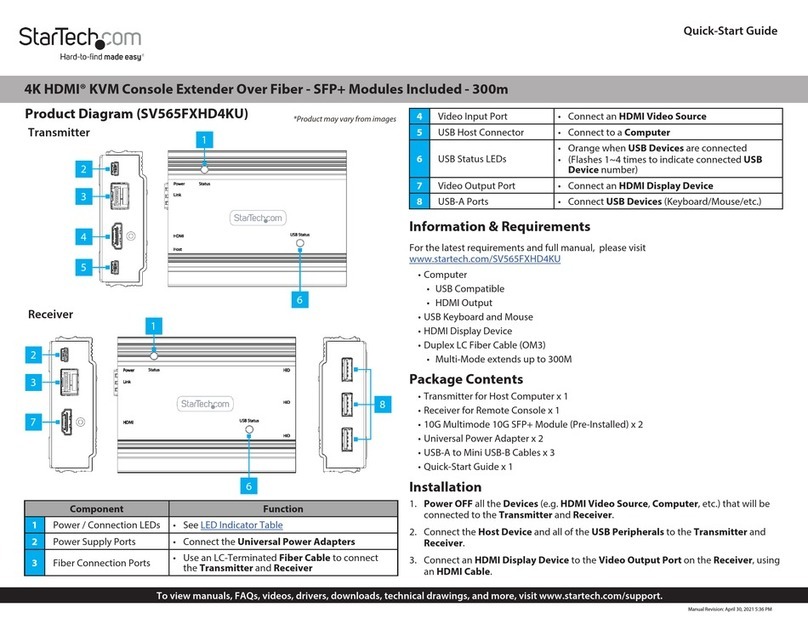
Product Diagram (ST121HD20FXA)
Transmitter (Top) and Receiver (Bottom) Front View
Transmitter (Top) and Receiver (Bottom) Rear View
Component Function
1Power LED Indicator • Transmitter and Receiver: Solid Red when the
Universal Power Adapter is connected
2Optical Signal LED
Indicator
• Transmitter and Receiver: Solid Green when the
Transmitter and Receiver establish an optical link
HDMI over Fiber Optic Extender - 4K 60Hz
3HDMI Signal LED
Indicator
• Transmitter: Solid Green when an HDMI Source
Device is connected to the HDMI Input Port
• Receiver: Solid Green when an HDMI Display Device
is connected to the HDMI Output Port
4DC 5V Port • Transmitter and Receiver: Power the Transmitter
and Receiver
5Optical Output Port
• Connect to the Receiver with a Single or Multi Mode
Fiber Optic Cable
• Removable
6Optical Input Port
• Connect to the Transmitter with a Single or Multi
Mode Fiber Optic Cable
• Removable
7HDMI Input Port • Connect an HDMI Source Device
8HDMI Output Port • Connect an HDMI Display Device
9IR Input Port
• Connect the IR Blaster or IR Receiver for bi-directional
infrared control of the HDMI Source and Display
Devices
10 IR Output Port
• Connect the IR Blaster or IR Receiver for bi-directional
infrared control of the HDMI Source and Display
Devices
11 Serial Terminal
Block
• Transmitter and Receiver: Connect a Serial Cable to
the Terminal Block for bi-directional Serial Extension
12 Service Port • Transmitter and Receiver: For manufacturer use only
Requirements
• HDMI Source Device x 1
• HDMI Display Device x 1
• HDMI M/M Cables (sold separately) x 2
• Single Mode Fiber Optic Cable up to 3300 Feet (sold separately) x 1
• Multi Mode Fiber Optic Cable up to 1000 Feet (sold separately) x 1
• (Optional) Adhesive Pads x 4
For the latest requirements and to view the full User Manual, please visit
www.startech.com/ST121HD20FXA.
3
2
1
6
710
8
9
5
411 12
FCC Compliance Statement
This equipment has been tested and found to comply with the limits for a Class B digital device, pursuant to part 15 of the FCC
Rules. These limits are designed to provide reasonable protection against harmful interference in a residential installation.
This equipment generates, uses and can radiate radio frequency energy and, if not installed and used in accordance with the
instructions, may cause harmful interference to radio communications. However, there is no guarantee that interference will not
occur in a particular installation. If this equipment does cause harmful interference to radio or television reception, which can be
determined by turning the equipment o and on, the user is encouraged to try to correct the interference by one or more of the
following measures:
• Reorient or relocate the receiving antenna.
• Increase the separation between the equipment and receiver.
• Connect the equipment into an outlet on a circuit dierent from that to which the receiver is connected.
• Consult the dealer or an experienced radio/TV technician for help
This device complies with part 15 of the FCC Rules. Operation is subject to the following two conditions:
(1) This device may not cause harmful interference, and (2) this device must accept any interference received, including
interference that may cause undesired operation. Changes or modications not expressly approved by StarTech.com could void
the user’s authority to operate the equipment.
Industry Canada Statement
This Class B digital apparatus complies with Canadian ICES-003.
Cet appareil numérique de la classe [A] est conforme à la norme NMB-003 du Canada.
CAN ICES-3 (A)/NMB-3(A)
This device complies with Industry Canada licence-exempt RSS standard(s). Operation is subject to the following two conditions:
(1) This device may not cause interference, and (2) This device must accept any interference, including interference that may
cause undesired operation of the device.
Le présent appareil est conforme aux CNR d’Industrie Canada applicables aux appareils radio exempts de licence. L’exploitation
est autorisée aux deux conditions suivantes:
(1) l’appareil ne doit pas produire de brouillage, et (2) l’utilisateur de l’appareil doit accepter tout brouillage radioélectrique subi,
même si le brouillage est susceptible d’en compromettre le fonctionnement.
Use of Trademarks, Registered Trademarks, and other Protected Names and Symbols
This manual may make reference to trademarks, registered trademarks, and other protected names and/or symbols of third-
party companies not related in any way to StarTech.com. Where they occur these references are for illustrative purposes only
and do not represent an endorsement of a product or service by StarTech.com, or an endorsement of the product(s) to which
this manual applies by the third-party company in question. StarTech.com hereby acknowledges that all trademarks, registered
trademarks, service marks, and other protected names and/or symbols contained in this manual and related documents are the
property of their respective holders.
Warranty Information
This product is backed by a two-year warranty.
For further information on product warranty terms and conditions, please refer to www.startech.com/warranty.
Limitation of Liability
In no event shall the liability of StarTech.com Ltd. and StarTech.com USA LLP (or their ocers, directors, employees or agents)
for any damages (whether direct or indirect, special, punitive, incidental, consequential, or otherwise), loss of prots, loss of
business, or any pecuniary loss, arising out of or related to the use of the product exceed the actual price paid for the product.
Some states do not allow the exclusion or limitation of incidental or consequential damages. If such laws apply, the limitations
or exclusions contained in this statement may not apply to you.
Safety Measures
• If product has an exposed circuit board, do not touch the product under power.
Mesures de sécurité
• Si l’un des circuits imprimés du produit est visible, ne pas touchez le produit lorsqu’il est sous tension.
安全対策
• 製品に露出した状態の回路基盤が含まれる場合、電源が入っている状態で製品に触らないでください。
Misure di sicurezza
• Se il prodotto ha un circuito stampato visibile, non toccare il prodotto quando è acceso.
Säkerhetsåtgärder
• Rör aldrig vid enheter med oskyddade kretskort när strömmen är påslagen.
FR: startech.com/fr
DE: startech.com/de
ES: startech.com/es
NL: startech.com/nl
IT: startech.com/it
JP: startech.com/jp
StarTech.com Ltd.
45 Artisans Cres
London, Ontario
N5V 5E9
Canada
StarTech.com Ltd.
Unit B, Pinnacle 15
Gowerton Rd,
Brackmills
Northampton
NN4 7BW
United Kingdom
StarTech.com LLP
2500 Creekside
Parkwy
Lockbourne, Ohio
43137
U.S.A.
Connection DiagramInstallation
Note: Ensure the HDMI Display Device and the HDMI Source Device are powered o
before you begin the installation.
1. Connect an HDMI Cable (sold separately) to the HDMI Output Port on the HDMI
Source Device and to the HDMI Input Port on the Transmitter.
2. Connect a Single or Multi Mode Fiber Optic Cable to the Optical Output Port on
the Transmitter and to the Optical Input Port on the Receiver.
3. Connect an HDMI Cable (sold separately) to the HDMI Output Port on the Receiver
and to an HDMI Input Port on the HDMI Display Device.

4. Connect the Universal Power Adapter to an available Power Source and to the
Power Adapter Port on the Transmitter and the Receiver.
5. Power on the HDMI Display Device and the HDMI Source Device.