INSTRUCTIVO DE USO DE CONVERTIDOR DE 3 RCAA COAXIAL
AGIL EN CASCADA
Modelo: 207-390
Marca: Steren
Antes de utilizar su nuevo Convertidor de A/V a RF lea este
instructivo para evitar cualquier mal funcionamiento. Guárdelo para
futuras referencias.
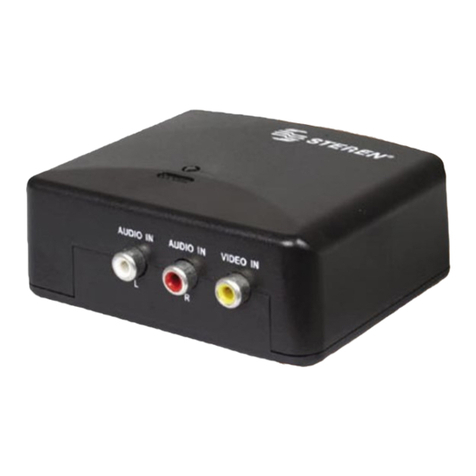
Su nuevo convertidor de AV a RF es perfecto para conectar equipos de
A/V como reproductores de DVD, video juegos, VCRs, y cámaras de
vídeo, entre otros, que cuenten con conectores RCA.
Permite seleccionar los canales desde el 14 al 69 (con ciertas
restricciones).
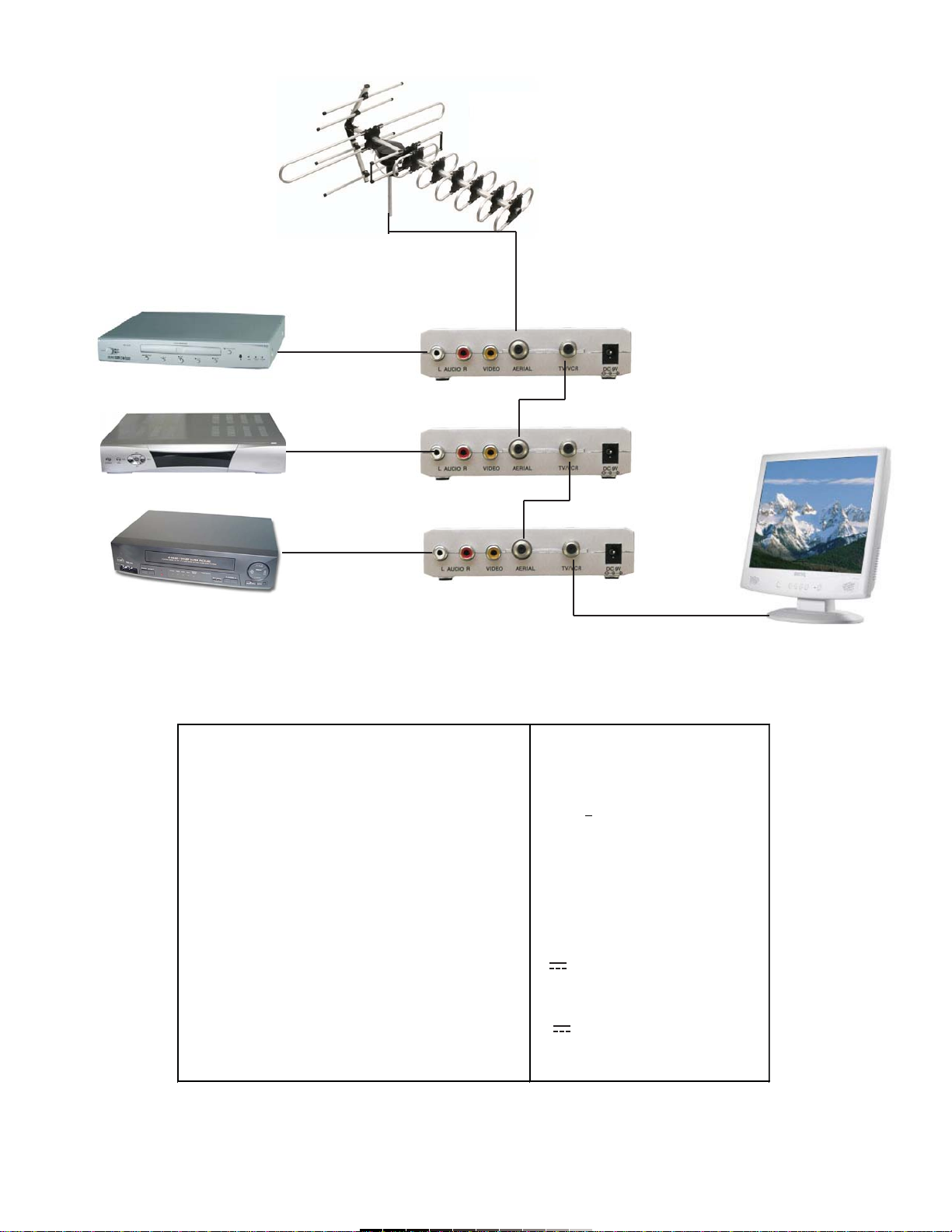
Conecte los equipos que desee (hasta 27 equipos diferentes) utilizando
más convertidores, pero con la facilidad de seleccionar directamente el
equipo a través de un canal de TV.
Además podrá conectar estos equipos a diferentes televisores.
IMPORTANTE
Siempre utilice un paño suave, limpio y seco para limpiar el equipo.
No intente abrir el equipo, puede ocasionar malfuncionamiento y
anulación de la garantía.
No use ni almacene este equipo en lugares donde existan goteras o
salpicaduras de agua.
Se recomienda no utilizar canales consecutivos para seleccionar un
equipo, ya que puede causar interferencias.
Para evitar interferencias, se recomienda también seleccionar canales
nones o pares en todos los convertidores que se utilicen (21, 23,25 o 22,
24, 26, etc.).
CARACTERÍSTICAS
Entrada A/V RCA
Conector para antena externa
Salida de antena RF
Ajuste de canales
Pantalla de LCD de 2 dígitos y 7 segmentos
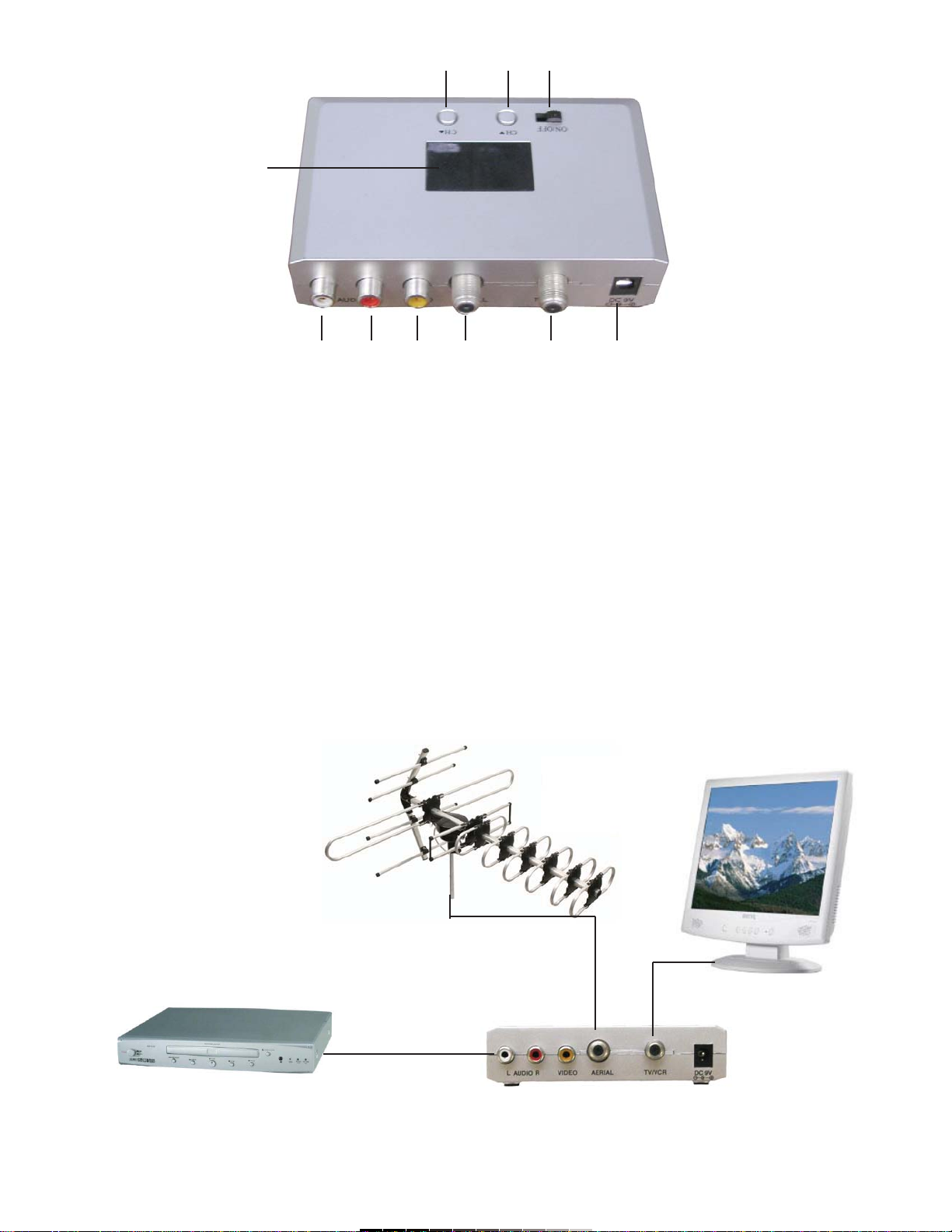
CONTROLES
1.- Encendido / Apagado (On / Off) ................. Enciende / Apaga el
equipo
2.- Selector de canales .................................... Selecciona el canal en
el cual se va a
visualizar el equipo
conectado al
convertidor
3.- Pantalla de LCD ......................................... Despliega el canal
seleccionado
4.- Entrada de canal izquierdo de audio .......... Permite conectar el
canal de audio
izquierdo (L) del equipo
a conectar (DVD, VCR,
etc.)
5.- Entrada de canal derecho de audio ........... Permite conectar el
canal de audio derecho
(R) del equipo a
conectar (DVD, VCR,
etc.)
6.- Entrada de vídeo ........................................ Permite conectar el
cable con la señal de
vídeo del equipo que se
quiere utilizar (DVD,
VCR, etc.)
7.- Conector RF ............................................... Conecte una antena
externa o cable coaxial
de sistemas de cable
8.- Conector de TV / VCR ................................ Utilice esta salida para
conectar el equipo a un
televisor o a otro
convertidor 207-390
9.- Adaptador de corriente ............................... Permite conectar el
adaptador de corriente
suministrado
INSTRUCTION MANUAL FOR 3 RCA TO COAXIAL CONVERTER
Model: 207-390
Brand: Steren
Before using your new 3 RCA to coaxial converter, please read this
instruction manual to prevent any damage. Put it away in a safe
place for future references.
Your new AV to RF converter is perfect for connecting AV devices, such as
DVD players, VCRs, video cameras, etc. that have RCA plugs.
Allows you to select between channels 14 – 69 (with certain restrictions)
Connect the devices you wish to connect (up to 27 devices) using more
converters but with the ease of selecting the device directly through a TV
channel.
You can also connect the devices to different TVs
IMPORTANT
Always use a soft, dry, and clean rag in order to clean this device.
Do not try to open this device. Doing so could cause malfunctions and the
nullification of the warranty.
Do not use or store this device anywhere it might get wet.
It is recommended not to use consecutive channels for device selection.
This might cause interferences.
In order to avoid interferences, it is recommended to use all even
numbers or all odd numbers when selecting the channels (21, 23,25 or 22,
24, 26)
MAIN FEATURES
A/V RCA input
Jack for external antenna
RF antenna output
Channel settings
2 digit 7 section LCD screen
CONTROLS
1.- On / Off ……………………….........… Allows you to power the
device on / off
2.- Channel Selector ………………...….. Allows you to select the
channel in which you
will see the device
connected to the device
3.- LCD Screen ………………………...... Displays the selected
channel
4.- Left Audio Input …………………....… Allows you to connect
the left audio channel
from your equipment
(DVD, VCR, etc.)
5.- Right Audio Input ………………...….. Allows you to connect
the right audio channel
from your equipment
(DVD, VCR, etc.)
6.- Video Input ………………………..…. Allows you to connect
the video channel from
your equipment
(DVD, VCR, etc.)
7.- RF Plug …………………………….… Allows you to connect
an external antenna or
coaxial cable from
cable systems
8.- TV / VCR Plug ……………………… Use this plug in order to
connect this device to a
TV or to another
207-390 device
9.- AC Adaptor …………………………. Allows you to connect
the device to the home
power source