Targus APV10US1 User manual

User Guide
POWER
INVERTER
AUTO/AIR
100W
Model: APV10US1

Targus Power Inverter Auto/Air 100W
2
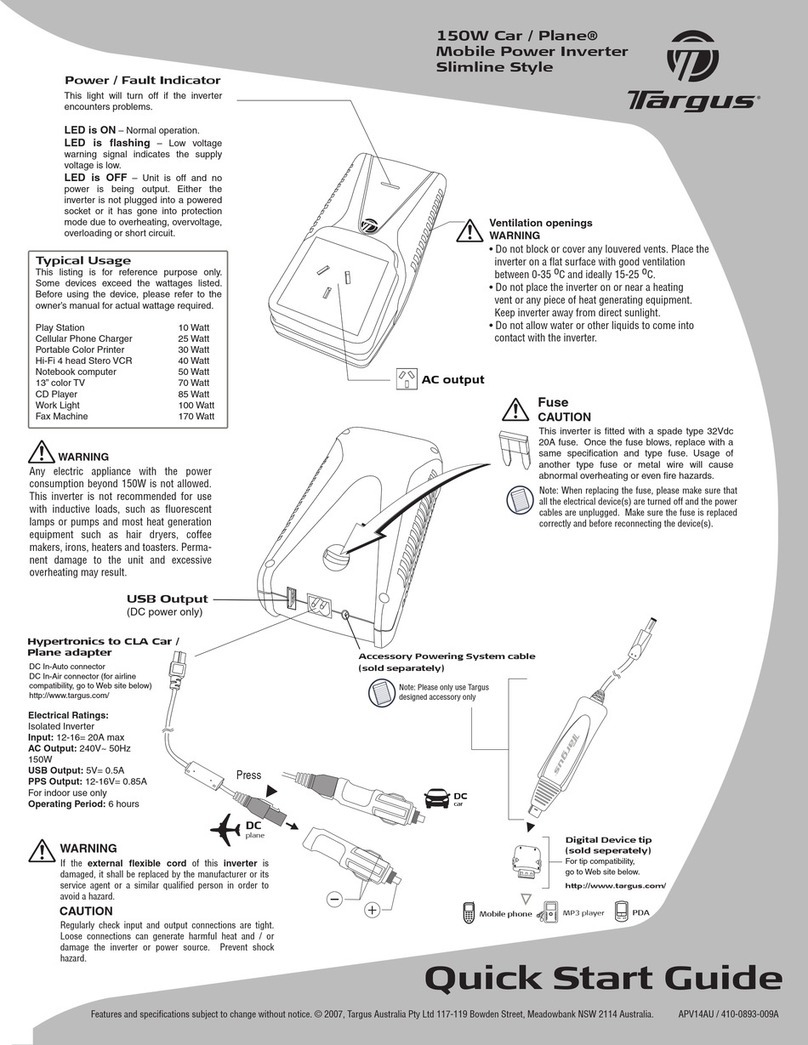
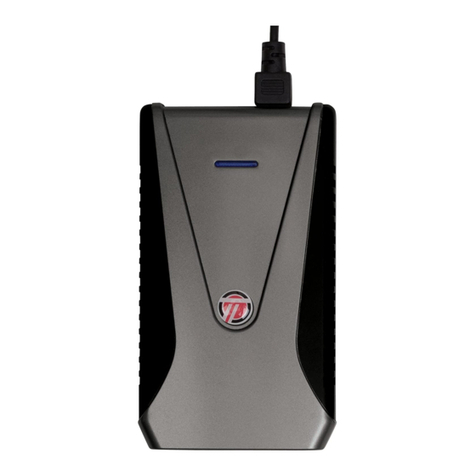
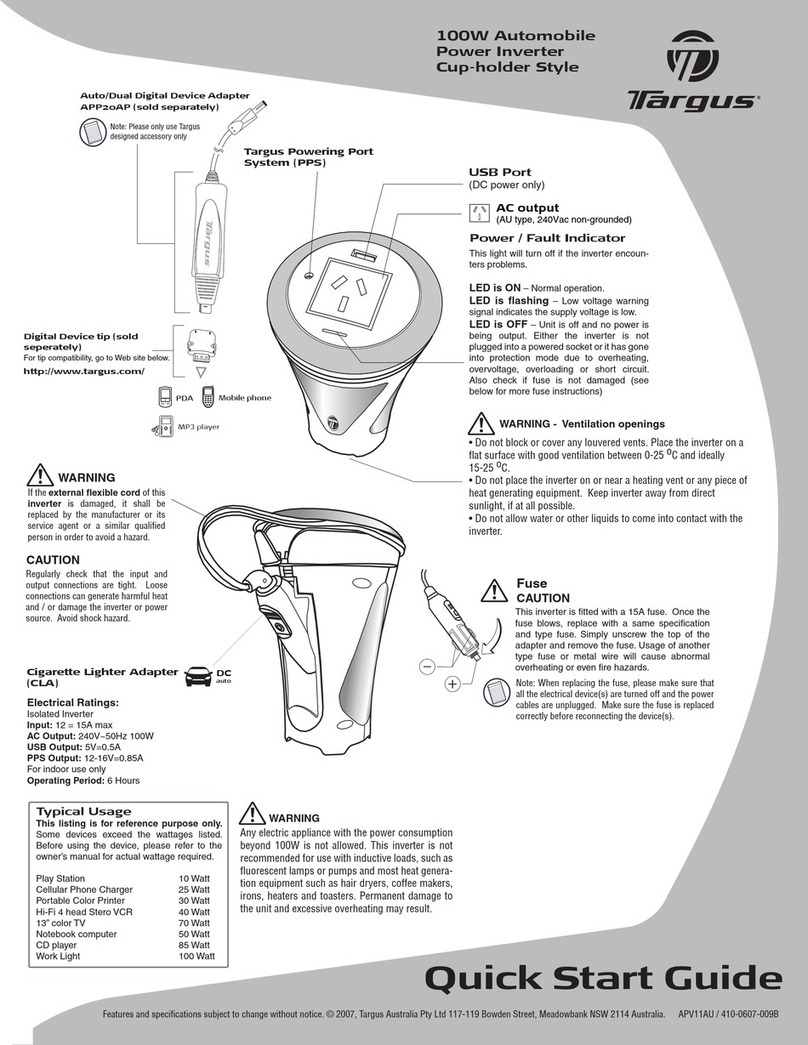
Power / Fault Indicator
This light will ash (blue color) if the inverter encounters problems.
LED is ON – Normal operation.
LED is ashing – Low voltage warning signal indicates the supply voltage is low.
LED is OFF – Unit is off and no power is being output. Either the inverter is not plugged
into a powered socket or it has gone into protection mode due to overheating, overvoltage,
overloading or short circuit.
Ventilation openings
WARNING
• Do not block or cover any louvered vents . Place the inverter on a at surface with good ventila-
tion between 0-35 oC and ideally 15-25 oC.
• Do not place the inverter on or near a heating vent or any piece of heat generating equipment.
Keep inverter away from direct sunlight, if at all possible.
• Do not allow water or other liquids to come into contact with the inverter.
USB Output
(DC power only) AC output

Targus Power Inverter Auto/Air 100W
3
Fuse
CAUTIONS
This inverter is tted with
a spade type 32Vdc 15A
fuse. If the fuse blows,
replace with a same speci-
cation and type fuse. Us-
age of another type fuse or
metal wire will cause ab-
normal overheating or even
re hazards.
Note: When replacing the fuse,
please make sure that all the
electrical device(s) are turned
off and the power cables are
unplugged. Make sure the
fuse is replaced correctly
and before reconnecting the
device(s).
Hypertronics to CLA auto/air adapter
DC In-Auto connector
DC In-Air connector (for airline compatibility, go to Web site below)
http://www.targus.com/
Press
DC
auto
DC
air

Targus Power Inverter Auto/Air 100W
4
Electrical Ratings:
Input: 12-16Vdc
AC Output: 120Vac 60 Hz
(modied sinewave)
100W continuous (150W surge)
USB Output: 5Vdc 500mA
Typical Usage
This listing is for reference purposes only. Some devices exceed the watt-
ages listed. Before using the device, please refer to the owner’s manual for
actual wattage required.
Cellular Phone Charger 25 Watt
Portable Color Printer 30 Watt
Blu-Ray DVD Player 30 Watt
Tablet 30 Watt
32 Inch LCD TV 70 Watt
Portable CD player 85 Watt
Gaming Console 90 Watt
Notebook computer 90 Watt
Work Light 100 Watt

Targus Power Inverter Auto/Air 100W
5
WARNINGS If the external cable of this inverter is damaged, stop using
this and contact the authorized agent to replace it in order to avoid
hazard.
WARNINGS Any electric appliance with the power consumption beyond
100W is not allowed for usage.This inverter is not recommended for use
with inductive loads, such as uorescent lamps or pumps and most heat
generation equipment such as hair dryers, coffee makers, irons, heaters
and toasters. Otherwise, permanent damage to the unit and excessive
overheating may result.
CAUTIONS Regularly check input and output connections are tight.
Loose connections can generate harmful heat and / or damage the
inverter or power source. Prevent shock hazard.

Targus Power Inverter Auto/Air 100W
6
Trouble Shooting
Problem: No Power Output, indicator not ON
Possible causes and suggestions:
• The car’s battery is low (<11.5Vdc) or defective
Start the engine to recharge or replace the car’s battery
if needed. Disconnect the input cable before starting
the car’s engine to minimize power surge. If such a case
occurs, reconnect the cable to resume normal operation.
• Connection cable is not secured
Reconnect the cables and make sure all plugs are
secured.
• Equipment being operated draws too much power
Reduce load to continuous 100 watts or below and use
equipment with starting surge power within inverter
capability.
• Inverter in thermal shut down condition
Allow the inverter to cool down. Ensure there is ventilation
around the unit.

Targus Power Inverter Auto/Air 100W
7
• Inverter fuse blown
Unplug the power cable and replace the fuse following
fuse replacement instruction.
• Automotive fuse for cigarette lighter blown
Check and replace the fuse for your car’s cigarette
lighter following the instructions in your car’s service
manual.
Problem: Low Output Voltage
Possible cause and suggestions:
• Inverter is overloaded
Reduce load to continuous 100 watts or below to
maintain regulation.
• Input voltage below 11.5Vdc
Keep input voltage above 12Vdc to maintain regulation.
Replace the car’s battery if needed.
WARNINGS
Any electric appliance with the power consumption beyond 100W is
not allowed for usage.This inverter is not recommended for use with
inductive loads, such as uorescent lamps or pumps and most heat
generation equipment such as hair dryers, coffee makers, irons, heaters
and toasters. Otherwise, permanent damage to the unit and excessive
overheating may result.

Targus Power Inverter Auto/Air 100W
8
Safety Precautions
• This device outputs 120 Volts of electricity just as a wall
socket does. Exercise extreme care that nothing comes in
contact with the AC connector.
• Do not use in the presence of water or moisture.
• Do not use or place the inverter near ammable materials
or any locations that may accumulate ammable fumes or
gases.
• To avoid potential property damage, do not leave this
inverter or any device operating unattended in vehicle.
• Always disconnect the input to the inverter when it is not
in use.
• Disconnect the input cable before starting your car to
minimize surges.
• Reverse polarity connection will result in a blown fuse and
may cause permanent damage to the inverter (Damage due
to reversed polarity is not covered by our warranty).
• Do not connect to AC distribution wiring.
• Improper use of this inverter can cause personal injury,
property damage, and or loss of life.
• This is not a toy. Keep away from reach of children.
• Indoor use only.

Targus Power Inverter Auto/Air 100W
9
• Do not block or cover any louvered vents. Place the
inverter on a at surface with good ventilation between
0-35 ºC and ideally 15-25 ºC.
• Do not place the inverter on or near a heating vent or any
piece of heat generating equipment. Keep inverter away
from direct sunlight, if at all possible.
• Do not allow water or other liquids to come into contact
with the inverter.
Ventilation openings
WARNINGS
If the external cable of this inverter is damaged, stop using this and
contact the authorized agent to replace it in order to avoid hazard.
CAUTIONS
Regularly check input and output connections are tight. Loose connec-
tions can generate harmful heat and / or damage the inverter or power
source. Prevent shock hazard.

Targus Power Inverter Auto/Air 100W
10
Technical Support
For technical questions, please visit:
US Internet: http://targus.com/us/support
Australia Internet: http://www.targus.com/au/support
Telephone: 1800-641-645
New Zealand Telephone: 0800-633-222
Product Registration
Targus recommends that you register your Targus accessory
shortly after purchasing it.
Go to: http://targus.com/us/product_registration
You will need to provide your full name, email address, country of
residence and product information.
Table of contents
Other Targus Inverter manuals