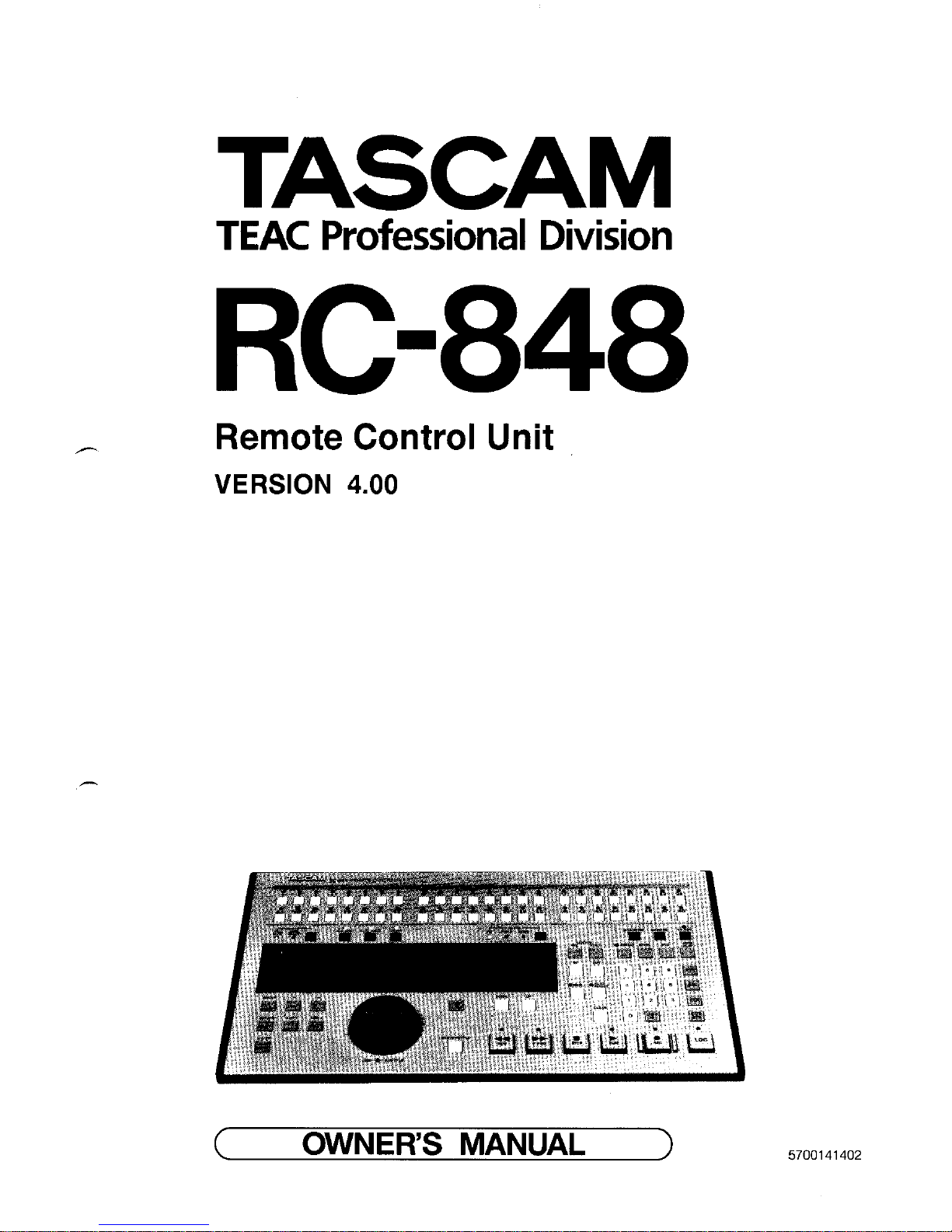
TheRC-848 multi-function remote control unit isthe
heart ofaprofessionalproduction system ofdigital and
analog audio andvideo tapes ; it hasAccessoryI and2
connectors tocontrol TASCAM analog machines,anda
standard RS-422 interfacetocontrol VTRs orothers,
TheRC-848 cancontrol amaximum of6DAsor
synchronize asystem ofup to I6DAstosample acc”mcy.
More specificallytheRC-84X’s capabilitiesinclude the
following:’
0Menu names youusemost frcquemlycanbestored in
battery backup memory forinstant access.
0Battery backup ofthelast menu screen displayed
before selectinganother machine, allowing youto
directly return tothat menu when selectingthe
correspondingmachine again. This isalso true ofthe
LOCATE TIME display.
0Park position,this helps toeliminatealagbetween a
tnaster andslave,
0Crossfadetime forclick free punch-in recordings,
0Instant reset ofsettings atmultiple specific menus
0Automaticoffset entry
099.point autolocator functions
0Jog/Shtmle wheel forlocating specific points onaudio
orvideo tapes atvariable speeds
0Split mode forpunch-in recordingreferenced toa
video picmre.
SOFTWARE UPDATES
Many capabilitieswhich were notavailableonearlier models have been implemented on theRC-X4X ROM
version 4.00 andabove. Information onallchanges and
newfeamres areincluded inthis manual. Ifyouwaxto
make sure oftheversion number ofyour model, simultaneously press REW, IFWD, andSTOP after
switchingon power totheRC-848 andbefore a
momentaryilluminationofallLEDs stops. Theinitial screen will change toread 4.00 orahigher number. To go
back totheinitial screen, switch theunit off, then powa
onagain,
3Using this manual
Before actually using theFlG348, skim throughthis
manual,so you will know where to look to when you
need answers.
Useof capitalletters: Gcncrally, we useallupper case
type todesignateaparticular switch, indicator, control or
connectorlabel, asin:“Press CLOCK until INTlights.”
TABLE OF CONTENTS
Chapter1: Introduction ........................................... I - I
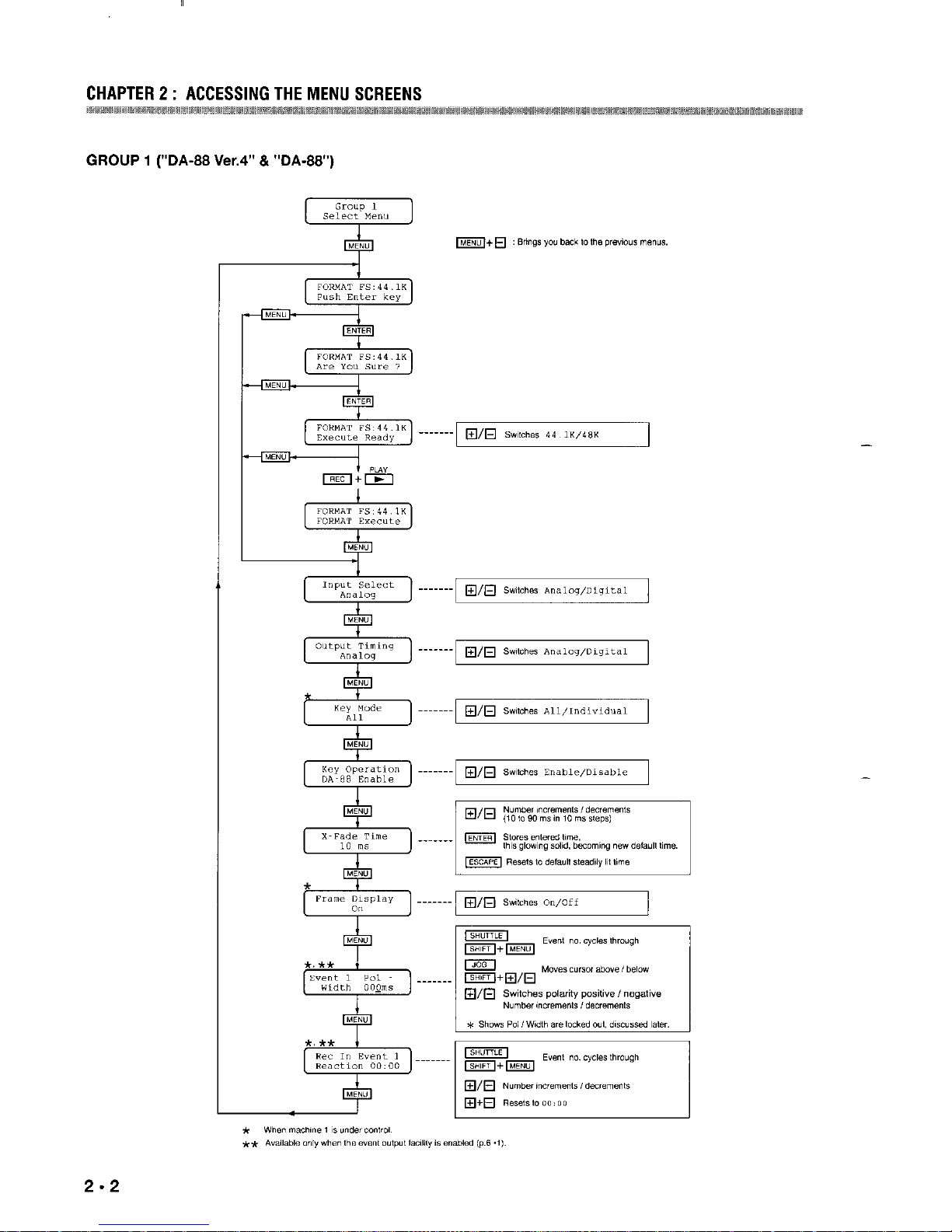
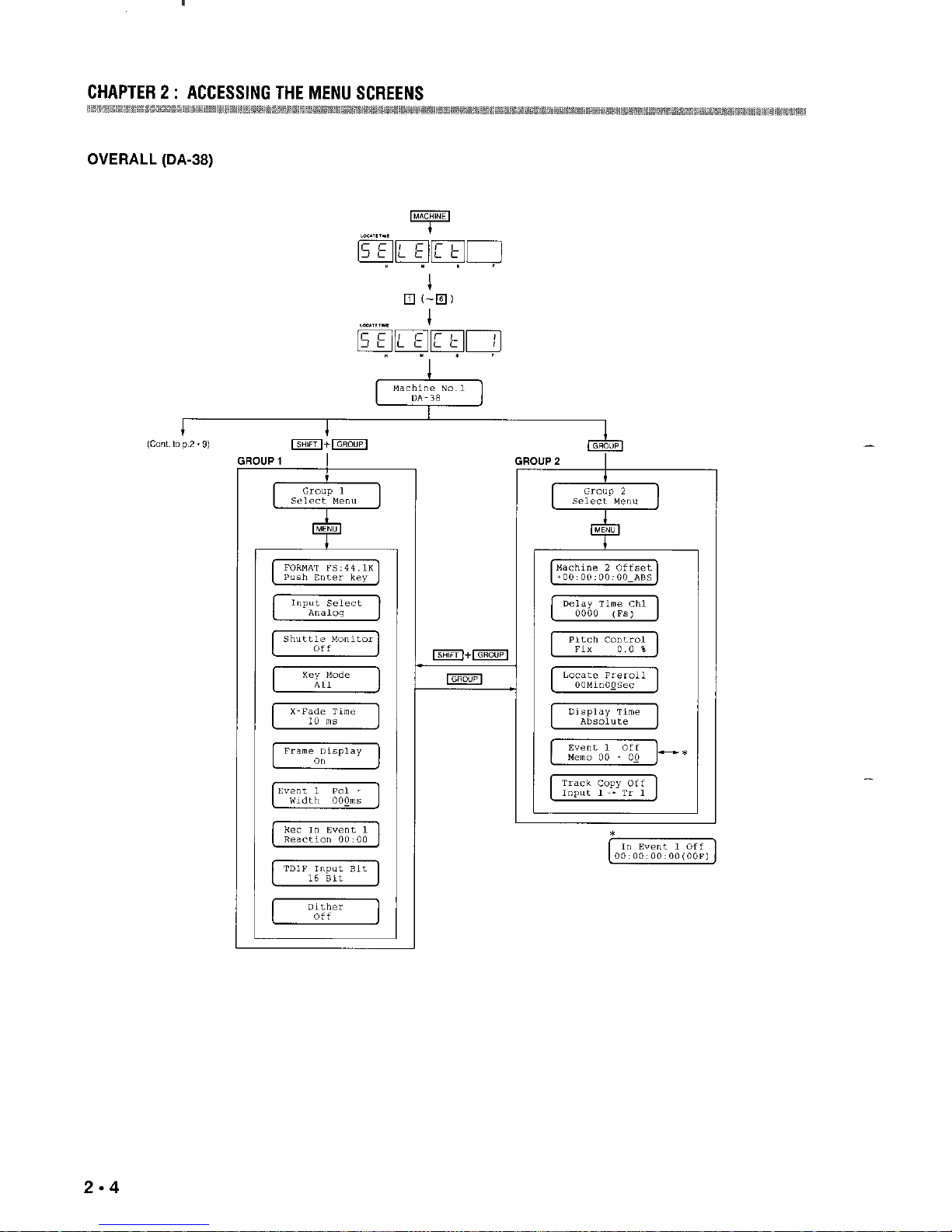
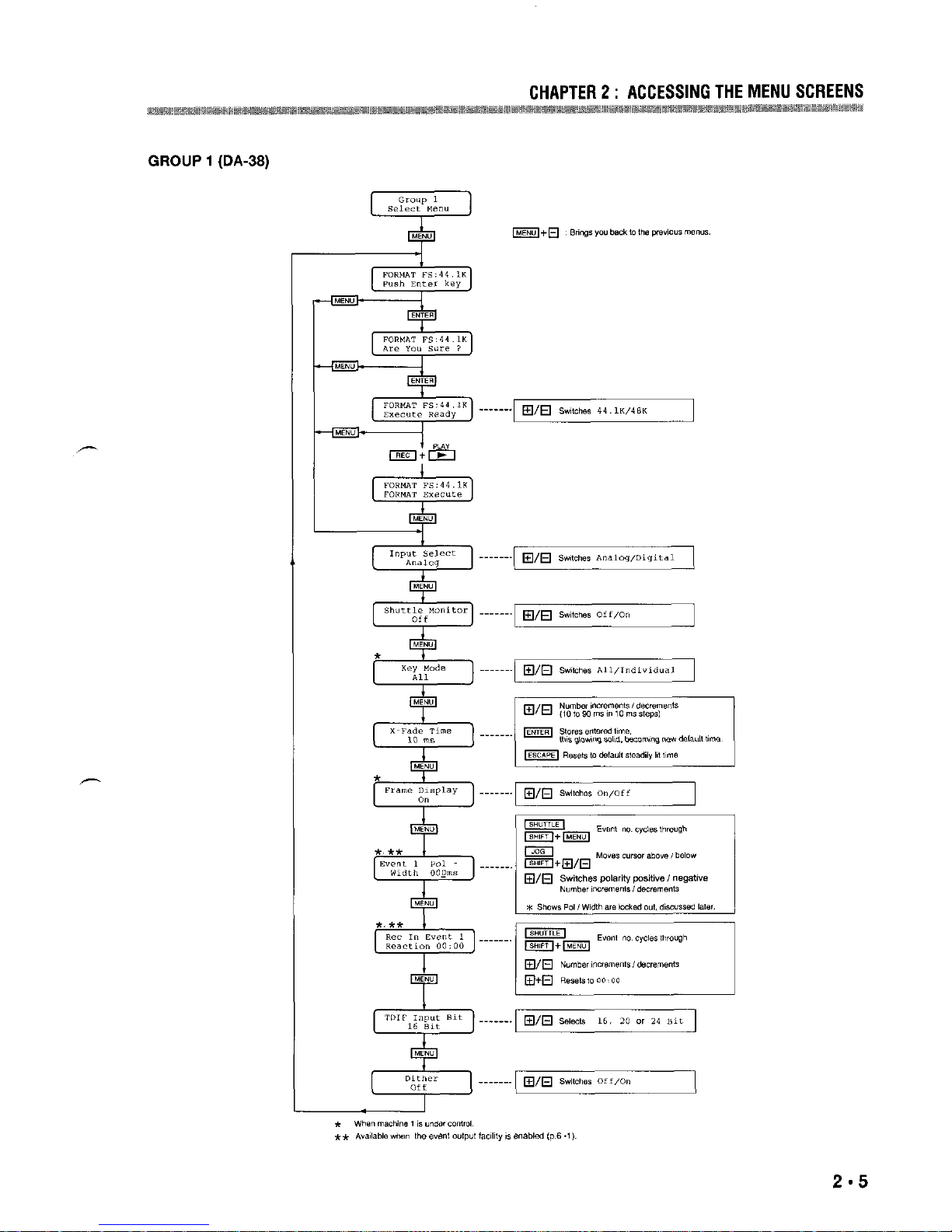
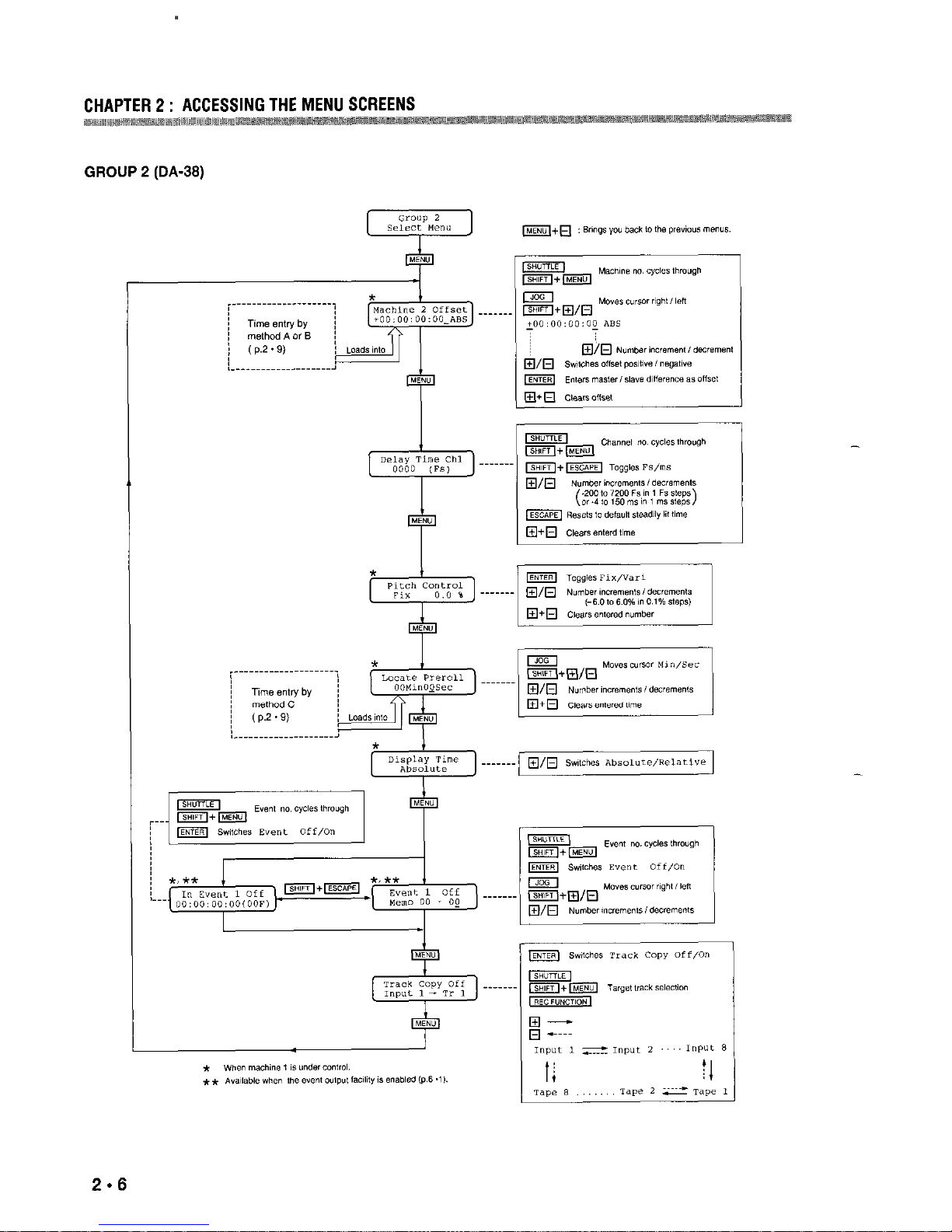
Chapter2: Accessing the Menu Screens
2 ...............I
Chapter3: Featuresand Controls..
........................ 3 . I
Chapter4: OperationsGuide..
................................4 - I
4-1 Pre-OperatingProcedures..
.............................4*I
4-2Autolocator Functions....................................
4*6
4-3Variable Speed Playback ................................4.9
4-4Entering aTrack Delay Time.. 4*........................ 9
4-5Relative ReferenceTime Indication............. 4.IO
4-6Punch-In Recording......................................
4 * 1I
4-7Copying Tracks (DA-3X Only). .................... 4.I4
4-8Shuttle Monitor (DA-38 Only). ..................... 4 I4
4-9SelectingaTDIF Input BitLength
(DA-38 Only). .............................................. 4.I5
4-10 Enabling theDither Function
(DA-38 Only) ............................................. 4.I5
Chapter5 SynchronizingMultipleDAs ................ 5 * I
Chapter6: Controlling Other Equipment
From ACCESSORY “1”. 6 -........................ I
6-1 Machineswith a ParallelPort..
....................... 6 - I
6-2 Event OutputFacility(Availableupon
RequestOnly)................................................. 6 . I
Chapter?Controlling Other Equipment
From ACCESSORY
“2”. ........................ 7.I
7-1TASCAM Multitrack Cassette Recorders.. .... 7 * I
7-2TASCAM Open-ReelRecorders.. 7...................2
7-3TASCAM CD Players
7 .
....................................
3
7-4 RemoteFunctions Not Operational..
..............7 - 4
Chapter8 : Controlling Other Equipment
From RS-422 Port ,X....................................I
S-lTurning theChase Mode ofDA-60 MKII
On or Off....................................................... .8.I
8-2Having aDA/VTR System Drop Into and
OutofRecord (FunctionAvailableUpon
Request Only) ................................................ .S.1
USING THE IX-s46WITH THE SY-68
Chapter9 : Accessing the Menu Screens
.............9 - I
Chapter10 : StripingTimecode..
.......................... IO*I
IO-I Preliminary................................................. IO.1
IO-2 RecordingTimecode ontheDA-XE.. .......... IO s 1
IO-3 Timecodc OutSelect ..................................
IO.2
Chapter11 : Syncingwith DA-88 as Slave ......... 1I - 1
I l-l Settinga Park Position.. II ...............................I
Il.2 Synchronization .......................................... II * I
I I-3Offset sync 11*
................................................. I
1I-4Dubbing Audio andTimecodc
atOneTime Between TwoDA-X&. 11............ 2
Chapter12 : Controlling a VTR.. ........................... 12 - I
Appendix: Pin AssignmentChartsB
Dimensional Drawing
-
-