Temple Touch Premium User manual

Instructions for Use
Digital Temple Thermometer
Thank you for purchasing the Temple Touch Premium
Digital Temple thermometer.
This product enables accurate temperature measurements
from the temple area or underarm in 6-8 seconds, using
simple steps.
Front Cover
temple touch
Temple & Underarm
Thermometer
premium

2
Table of contents:
Safety warnings
Section 1: Quick Start
Section 2: measuring guidelines
Section 3: Directions for use
Section 4: Room Temperature Display
Section 5: Using ODPT
TM
– Medicine Timer
Section 6: Setting the operating scale
o
F or
o
C
Section 7: Installing and replacing the batteries
Section 8: About body temperature measurement
Section 9: Troubleshooting and special indications
Section 10: Care and cleaning
Section 11: Technical Information
Section 12: Warranty and Service Information
IMPORTANT! Read Instructions for Use before using the thermometer.
Safety warnings:
1. Keep the thermometer out of the reach of children.
2. Do not drop the thermometer or expose to heavy shock. The unit is not shock proof.
3. Do not immerse thermometer in water or any other liquid.
The unit is not water proof.
4. Do not store the unit in direct sunlight, at a high temperature, in high humidity or
dust. Performance of the unit may be degraded.
5. Stop using the thermometer if it operates erratically or if display malfunctions.
6. Clean the thermometer probe before storing (see section 10).
7. Do not attempt to disassemble the unit except to replace the batteries.
1. QUICK START
1. Press and release the POWER button.
2. Unit will beep twice when ready.
3. Verify temple or underarm mode: Push the SET button if you wish to change.
4. Hold firmly to temple or underarm, wait for long beep and read results.
2. Measuring guidelines:
1. Measurement body location is the temple, in proximity to the temporal artery,
between the end of the eyebrow and the hairline.
2. Do not place the thermometer on scarred tissue compromised by skin disorder, open
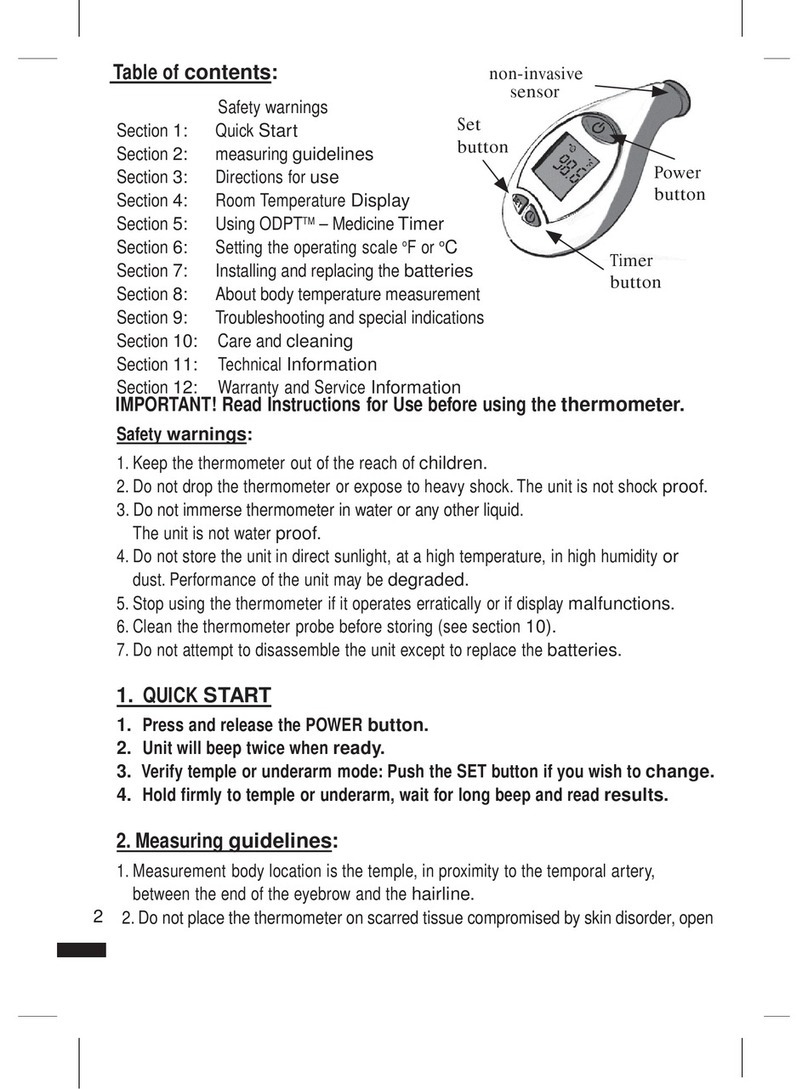
Power
button
non-invasive
sensor
Set
button
Timer
button
inside front cover left

3
sores or abrasions and patients in trauma.
3. Temperature readings are affected by many factors including exercise and drinking
hot or cold beverages prior to taking a reading.
4. Consult your physician when using drug therapies that may raise the local skin
temperature in the forehead; this may lead to incorrect reading.
5. Do not place the thermometer on skin exposed to direct sunlight, fireplace heat, air
conditioner flow and cold/warm compress therapies.
6. Wait at least two minute between consecutive measurements for the unit to readjust
to room temperature.
7. If the thermometer has been stored in a cold temperature, allow the unit to warm
naturally to room temperature before using.
8. Performance of the device may be degraded if operated or stored outside stated
temperature and humidity ranges.
3. Directions for Use:
Use this thermometer on a clean and dry skin surface.
Wipe away any perspiration prior to use.
Taking Temperature:
1. Press and release the Power button, you will hear one short beep.
All segments will be displayed (Figure 1) and the backlight will turn
on automatically.
2. The previous result will be displayed for 2 seconds (Figure 2).
3.The room temperature and the hourglass will be displayed. (Figure 3).
4. Wait for the hourglass icon to disappear, then two beeps will be heard
to indicate that the thermometer is now ready to measure.
Do not take a measurement before the two beeps are heard.
5. Verify that you are in the correct mode: temple or underarm
(figures 4, 5), if you wish to change. Press and release the SET button.
6. For forehead measurement: Move hair aside from the temporal area
and apply the probe to bare skin, in the center of the temple area,
between the end of the eyebrow and the hairline (Figures 6a + 6b). Gently press
and hold to ensure good contact with the skin is maintained.
6a
inner pages
6b
Temple area
3
4
5
1
2

4
For underarm measurement:
a. Place the thermometer probe in the center of the armpit as shown
(figure 7).
Gently press the thermometer's probe in an upward motion.
b. leave the patient's arm raised up until completed.
Correct placing and good contact with the skin ensure reliable
readouts.
7. As soon as the thermometer is in place, the measurement will
start automatically. A running circle will appear indicating that the
measurement is progressing successfully (Figure 8).
Make sure that the thermometer and the patient do not move while
measurement is in progress.
8. A temperature reading will be displayed within 6-8 seconds. One long beep will be
heard to indicate that measurement is complete and temperature will be displayed
for about 1 minute. The backlight will stay on until the device is shut down.
9. Press and release the Power button to turn the thermometer off, or it will shut off
automatically within 1 minute.
If you need to take another reading – wait 2 minutes after turning the
thermometer off and then begin again.
4. ROOM TEMPERATURE DISPLAY:
1. When the thermometer is OFF, continuously press the power button.
2.
The last body temperature will be displayed, and then will switch
to the room temperature. (see figure 9)
The room temperature will be displayed unless you press the
power button again and switch off the thermometer.
5. Using ODPTTM – Over Dose Protection Timer:
The ODPT
TM
timer is designed to track the time elapsed between giving medicine
dosages to patient and to act as an alert to parents as to when next medicine dosage
should be given (based on time cycle set by parent).
inner pages
7
8
9

5
How to Set & Start Timer
a. Setting- up the time cycle:
The ODPT
TM
timer is set for 6 hours by default.
To change the cycle (from 1-8 hours):
1. Switch OFF the thermometer.
2. Press and hold the SET button.
3. Continue pressing the SET button, then press the timer button once and release
both buttons.
4. The interval time value will blink on the display.
5. Press the “Timer” button to scroll through time interval options.
The display will show time values between 1-8 hours
(1, 2, 3, 4, 5, 6, 7, 8) and then back to 1 hour (starting over again).
(See figure 10).
6. Release the “Timer” button when the desired value appears on the display. Then
press the SET button in order to set the desired value.
b. Operating the timer:
1. To start the timer press and release the “Timer” button. The timer's
display will show "0:00" (See figure 11) . Press again and the timer
will start counting seconds until "0:01" minute and then minutes.
2. To reset the timer press and hold the “Timer” button.
(Press the “Timer” button until display changes to “0:00”).
3. To start the timer again, press the “Timer” button again. The count will start
from “0:00”.
IMPORTANT NOTES:
• The ODPT
TM
timer can be used while the thermometer is on or off.
• The ODPT
TM
timer continues to count the time elapsed even if the thermometer is
turned off.
• It is not possible to turn on the timer when conducting temperature measurement.
Temperatures can be taken while the timer is running.
• If the ODPT
TM
timer is stopped mid-cycle, cycle must be reset by pressing and
holding the timer button for 3 seconds. To resume the timer press the timer
button again.
• When the time cycle has ended the thermometer will beep. The display will blink
the pre-set time cycle for 60 seconds.
For example, if the timer was set to 6 hours, the image “6:00” will blink on the
display.
inner pages
10
11

6
6. Setting the operating scale °F or °C
The device setting is by default Fahrenheit (°F).
To change the scale to °C, or back to °F:
1. While OFF, press and hold the SET button.
2. Continue pressing SET, then press the POWER button.
3. Continue pressing both buttons until the scale changes and then
release.
4. Wait for 2 beeps and measure temperature (see section 3)
7. Installing and replacing the Batteries:
The thermometer uses 2 standard AAA 1.5v batteries. To install/replace, first switch
off the device:
1. Using a screwdriver, loosen the screw on the battery cover and lift it off the
thermometer.
2. Remove the drained batteries and place new batteries in the battery compartment,
matching polarity according to the diagram.
3. Secure the battery cover using the screw.
IMPORTANT: It is recommended to remove the batteries from the
thermometer when it is not used for a long period.
WARNING: Do not dispose of batteries in fire, recharge, put in backwards,
disassemble, mix with used or other battery types – they may explode or leak and
cause injury. Waste batteries should be deposit in a batteries recycling trash only.
8. About body temperature measurement:
How does the thermometer work?
The accurate measurement is obtained
by using a unique probe, which
measures the heat flow from the blood
vessels to the skin and converts it
to body temperature.
Information about Body Temperature
What is “normal” body temperature?
“Normal” body temperature varies from person to person, changes according to time
Skin
Energy Flow
Blood
vessels
inner pages

7
of day and body location. Hot or cold baths, physical exercise, smoking and drinking,
hot or cold drinks may change body temperature by one degree or more.
The following table shows the temperature ranges:
*Fever definitions according to the American Medical Association
The thermometer is designed to measure the temperature in the forehead, in proximity
to the temple area, between the eye socket and the hairline. It is important to know
that the thermal characteristics of each measurement body location – temporal, axillar,
oral or rectal - are unique. The variance in temperature measurement in different body
locations is due to the human body and not the thermometer.
IMPORTANT: It is recommended to measure the body temperature when
healthy to establish the specific “normal” temperature
9.Troubleshooting and special indications
The thermometer has been designed to display feedback-warnings to ensure proper
usage and accurate temperature measurement. When an error appears, the device
will "beep" 5 times, and then the thermometer will turn off automatically. In the event
of a malfunction or incorrect temperature measurement, the following warnings will be
displayed:
Indication:
The measured temperature is below 95°F (35°C) and the
display presents: LO.
Instruction: 1. Turn the unit OFF and then ON again.
2.
Retake temperature using proper placement technique
(see section 3),
while ensuring normal room temperature
(73°F – 77°F / 23°C – 25°C).
3. If still reads LO, this indicates that the patient has a low body
temperature.
What is fever? Average normal temperature ranges
Forehead Over 37.8°C/100°F 36.1°C–37.8°C / 97.0°F-100.0°F
Rectal* Over 38°C/100.4°F 36.3°C–38°C / 97.3°F-100.4°F
Oral* Over 37.8°C/100.0°F 36.1°C–37.8°C / 97.0°F-100.0°F
Axilla* (armpit) Over 37.2°C/99.0°F 35.2°C–37.2°C / 95.4°F-99.0°F
inner pages

8
Indication:
The measured temperature is above 107.6°F (42°C) and the
display presents: HI
Instruction: 1. Turn the unit OFF and then ON again.
2. Retake temperature using proper technique (see section 3).
3. If still reads HI, this indicates that the patient has a high fever.
WARNING! A high fever or low body temperature requires seeking
immediate medical attention
Indication 1:
The thermometer is too cold or too hot to operate.
Instructions:
1. Verify room temperature within product
range 60.8°F-104°F (16° C - 40° C)
2. Retake temperature using proper technique (See section 3).
Indication 2:
Temperature did not register because of poor contact, patient
movement or poor placement.
Instruction:
Turn the unit OFF, wait 2 minutes, turn it ON again and retake
temperature using proper technique.( See section 3).
Indication 3:
Unit malfunctioned.
Instruction:
Do not use the thermometer – contact service. (See section 9).
Indication 4:
Low battery - Battery icon is on continuously.
Instruction:
The battery has enough remaining life for approximately
10 more measurements
Indication 5:
Drained battery – only Battery icon is on when thermometer is turned
on and the device turns itself OFF.
Instruction:
The battery is drained - replace battery.(See section 4)
inner pages

9
10. Care and Cleaning
* Wipe the tip and probe with an alcohol swab or a cotton swab moistened with 70%
isopropyl alcohol before & after each use.
After cleaning, wait at least 2 minutes before taking a measurement for the unit to
readjust to room temperature.
* Use only a soft dry cloth to clean the body of the thermometer (if necessary). Never
use an abrasive cleanser or submerge the thermometer in water or other liquids.
* Do not expose the thermometer to extreme temperatures, humidity, direct sunlight or
shock. Store at room temperature.
11.Technical Specifications
Feature Performance / Data
Measurement time 6-8 seconds
Measurement
locations Temple area of the forehead and underarm
Measurement range 95°F-107.6°F (35°C-42°C)
Operation
environment 60.8°F-104°F (16°C-40°C)
Humidity: 15-95% (non condensing)
Storage environment -4°F-122°F (-20°C-50°C),
Humidity: 15-95% (non condensing)
Measurement scales Celsius or Fahrenheit
Accuracy Complies with ASTM E 1112-00 standard requirements
Display TN LCD 0.78" X 0.77" (20 mm X 19.6 mm)
Batteries 2 AAA 1.5volt batteries
Battery life Minimum 1000 full duty cycles over 24 month period
Weight 2oz (56gr) including batteries
Dimensions 3.9" X 2.05" X 1.25" (10x5.2x3.2 cm)
Memory Last reading display when turned on
Auto shut off After 60 seconds
Case material Food grade ABS plastic
Probe material Food grade Stainless steel, silicone
inner pages

10
12. Warranty and Service Information:
This thermometer has a one year warranty against manufacturers defect under normal
use. Following the directions closely will ensure years of dependable operation. If
the thermometer does not function properly, first check the batteries (see section 7).
Replace if necessary.
If the thermometer does not function properly, please write to us at:
Our representatives will provide further instructions on how to correct the trouble or will
ask you to return it for repair/replacement.
* Internally powered device
* Type - BF Applied part.
* Degree of protection against ingress of water: Ordinary
Distributed by: Medisim Ltd., G.G Communication Center, Neve ilan 90850 Israel.
Protected by US patents # 6,280,397 B1 and # 7,597,668 B2.
Made in China
Read the Instructions for Use
Applied part type BF equipment
inner pages
Table of contents
Languages:
Other Temple Touch Thermometer manuals