
Tiny Traveler TTPBB User manual
Important, retain for future reference:
Read carefully
WP ITM. TTPBB / TTPBW
Portable Power Bank
For your Tiny Traveler
Care & Use Instruction for TTPBB / TTPBW

2
1. Introduction ............................................................................................................................. 3
2. Technical Specications ......................................................................................................... 4
3. Feature Overview .................................................................................................................... 5
4. Package Contents.................................................................................................................... 5
5. Checking The Battery Level .................................................................................................... 6
6. Charging Your Baby Cam ....................................................................................................... 7
7. Charging Your Power Bank ..................................................................................................... 8
8. Power Button Functionality ................................................................................................... 10
9. Warning ................................................................................................................................. 10
10. Warranty .............................................................................................................................. 12
11. General Information ............................................................................................................. 14
TABLE OF CONTENTS

3
Thank you for purchasing the Tiny Traveler™ Portable Power Bank. Designed by our family with your family
in mind. Tiny Traveler is set out to create simplied tech to keep your little ones safer. The Portable Power
Bank is essential for making your on-the-go charging free of wires and hassle. It’s packed with features
such as compact design, easy attachment and rechargeable battery. Whether it’s a quick run to the grocery
store, driving to the park or road trips, you’ll be able to take your Tiny Traveler wherever you go. Please read
all of the operating instructions carefully before using your Portable Power Bank. Improper use will void the
manufacturer’s warranty. Welcome to the Tiny Traveler family!
1. INTRODUCTION

4
2. TECHNICAL SPECIFICATIONS
Product Dimensions:
Product Weight
Battery Capacity:
USB-C Input:
Micro-USB Input:
Interchangeable Micro-USB /
USB-C Output
USB-C Output:
Operating Temperature:
Storage Temperature:
Charging Temperature:
Charging Time:
4.09 x 3.72 x 1.14 in (104 x 94.5 x 29 mm)
0.45 lbs (206g)
5000mAh 3.6V 18Wh
5V 2A
5V 2A
5V 2.4A
5V 2.4A
-10°C~40°C (14°F~104°F)
0°C~35°C (32°F~95°F)
0°C~40°C (32°F~104°F)
1.5 hours

5
➊Lock / Unlock Switch
➋Power Button
➌Micro-USB Connector (Pre-installed) /
USB-C Connector
➍LED Indicators
➎Micro-USB Input
➏USB-C Output / Input
3. FEATURE OVERVIEW
➊
➋
➌➍
➎
➏
4. PACKAGE CONTENTS
Tiny Traveler™
Portable Power Bank
Micro-USB
Connector
USB-C
Connector
33” USB to USB-C
Charging Cable
Quick Installation
Guide
6
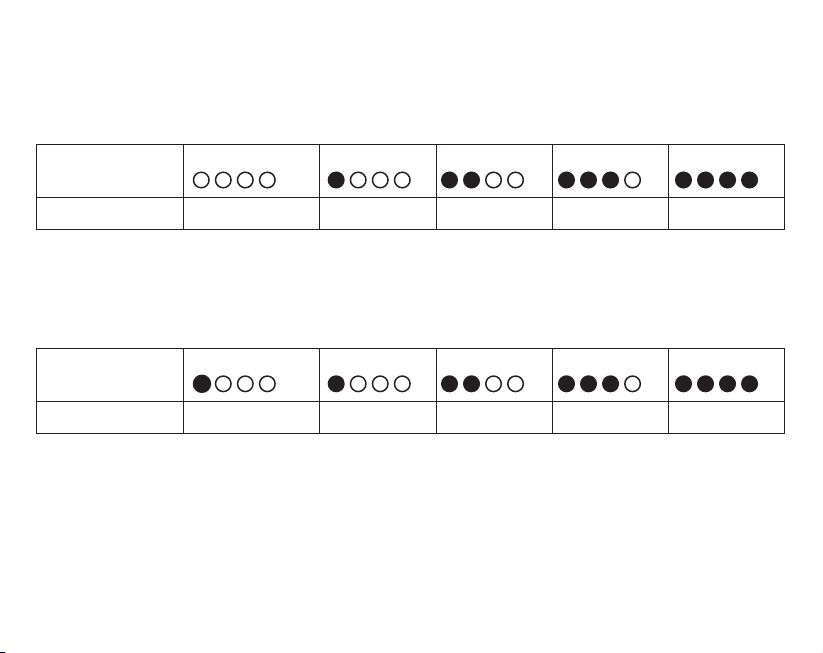
LED Status 1 Flashing Light 1 Solid Light 2 Solid Lights 3 Solid Lights 4 Solid Lights
Battery Capacity: 0-25% 25-50% 50-75% 75-99% Full
5. CHECKING THE BATTERY LEVEL
Battery Level
Connect your device to the Power Bank to check the current battery capacity. Once the device is connected,
the Power Bank will automatically begin charging the device.
Charging
When charging, the LED Indicators will ash in succession to indicate the current charge level. All lights will
stay on solid when the Power Bank is fully charged
LED Status No Light 1 Solid Light 2 Solid Lights 3 Solid Lights 4 Solid Lights
Battery Capacity: Fully Discharged 0-25% 25-50% 50-75% 75-99%

7
6. CHARGING YOUR BABY CAM
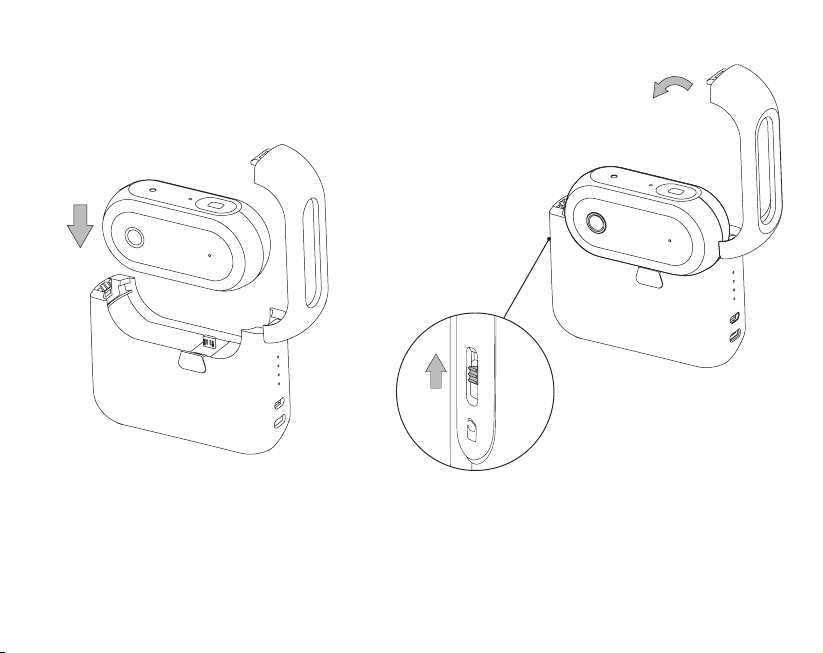
1. Slide the switch down and press the
button below to unlatch the housing of
the Power Bank.
2. Make sure the inserted connector is compatible with
your baby cam. Replace the original Micro-USB
Connector with the USB-C Connector provided for
baby cams with USB-C input ports.
8
3. Attach your baby cam onto the Power
Bank using the connector.
4. Close the housing of the
Power Bank to begin charging.
Caution: The Power Bank should not be used to charge a device when the Power Bank is being used
with the baby cam. If you want to use the Power Bank to charge an additional device, we recommend
disconnecting the baby cam.
5. Slide the switch up to
lock the housing.

9
USB to USB-C Charging Cable
1. Plug the USB end of the charging cable included into a USB port on a computer or 2A USB wall adapter
(not included).
2. Connect the USB-C end of the charging cable to the USB-C input port on the Power Bank.
3. Disconnect the Power Bank when it is fully charged. Store the Power Bank in a safe place when not
in use.
USB to Micro-USB Charging Cable (not included)
1. Plug the USB end of the charging cable (not included) into a USB port on a computer or 2A USB wall
adapter (not included).
2. Connect the Micro-USB end of the charging cable to the Micro-USB input port on the Power Bank.
3. Disconnect the Power Bank when it is fully charged. Store the Power Bank in a safe place when not
in use.
We recommend using the USB to USB-C Cable provided in this package or the USB to Micro-USB Cable
that comes with your baby cam as your charging cable.
NOTES: Fully charge the Power Bank before rst use. To preserve the battery life and performance,
check the battery status regularly, charge when needed. Recharge every 2-3 months if Power Bank is not
being used.
In order to reduce the risk of re or electric shock, an adapter shall be chosen that is suitable for the
application and is certied as a Class 2 or LPS power supply or power adapter.
7. CHARGING THE POWER BANK
USB
IN
USB-C
USB
IN
MICRO USB

10
8. POWER BUTTON FUNCTIONALITY
9. WARNING
INSTRUCTIONS PERTAINING TO RISK OF FIRE, ELECTRIC SHOCK, OR INJURY TO PERSONS
• Do not allow this product to become wet. Exposure to excessive moisture will damage the unit.
• Do not immerse the product in water.
• Do not operate the product in explosive atmospheres, such as in the presence of ammable liquid, gas or dust.
• Do not modify or disassemble this product.
• Do not store in locations where the temperature may exceed 95ºF (35ºC).
• Under extreme heat conditions, battery leakage may occur. Avoid contact with your skin. In case of skin or
eye contact, rinse immediately with clean water and seek medical attention.
• If battery leakage occurs, take it to your local battery recycling center for disposal. Do not attempt to use.
BATTERY DISPOSAL
The battery is self-contained and not consumer replaceable. The battery must be disposed of properly when
it no longer holds a charge. Proper charging practices will increase the life of the product. For information
on battery recycling, call toll-free 800-822-8837.
For information regarding air travel safety with batteries, please check the U.S. Department of Transportation
prior to travel at http://phmsa.dot.gov/safetravel/batteries or contact your airline if traveling from a country
outside the U.S.
NOTE: The Portable Power Bank gives 18 Watt hours of power.
Action Behavior
Press once Turn on the Power Bank and LED Indicators.
Press twice Turn off the Power Bank and LED Indicators.
This manual suits for next models
1
Table of contents















