manuals.online logo
Brands
  1. Home
  2. •
  3. Brands
  4. •
  5. Tylt
  6. •
  7. Batteries Charger
  8. •
  9. Tylt TRAY PIVOT User manual

Tylt TRAY PIVOT User manual

Other Tylt Batteries Charger manuals

Tylt Wireless Charger User manual

Tylt

Tylt Wireless Charger User manual

Tylt Pivot User manual

Tylt

Tylt Pivot User manual

Tylt sabre User manual

Tylt

Tylt sabre User manual

Popular Batteries Charger manuals by other brands

EVBox BusinessLine manual

EVBox

EVBox BusinessLine manual

Goobay 71808 user manual

Goobay

Goobay 71808 user manual

Kogan KACRDQIS4XA user manual

Kogan

Kogan KACRDQIS4XA user manual

Sealey WCB3 quick start guide

Sealey

Sealey WCB3 quick start guide

Vanner SP00143/181 owner's manual

Vanner

Vanner SP00143/181 owner's manual

KeyOuest KO037515 quick start guide

KeyOuest

KeyOuest KO037515 quick start guide

Enplus Silk Series user manual

Enplus

Enplus Silk Series user manual

Intermec SF51 user guide

Intermec

Intermec SF51 user guide

Colorovo PowerBox 6800 user guide

Colorovo

Colorovo PowerBox 6800 user guide

Smartech WBC-250 Operator's manual

Smartech

Smartech WBC-250 Operator's manual

PIXO C-USB instruction manual

PIXO

PIXO C-USB instruction manual

Gunson G4104 quick start guide

Gunson

Gunson G4104 quick start guide

Dometic NDS SCE320 Short Operating Manual

Dometic

Dometic NDS SCE320 Short Operating Manual

ABB HT572708 Operation manual

ABB

ABB HT572708 Operation manual

EVOline Square80 manual

EVOline

EVOline Square80 manual

Redarc SBC24025 Operating instructions and owner's manual

Redarc

Redarc SBC24025 Operating instructions and owner's manual

Absaar HV04 manual

Absaar

Absaar HV04 manual

DazeTechnology Cover Dazebox Home installation manual

DazeTechnology

DazeTechnology Cover Dazebox Home installation manual

manuals.online logo
manuals.online logoBrands
  • About & Mission
  • Contact us
  • Privacy Policy
  • Terms and Conditions

Copyright 2025 Manuals.Online. All Rights Reserved.

TYLT
USER GUIDE
! " #!
TRAY PIVOT - USER GUIDE
!"#
!!"
#$%&'"(%)&"*'(+,"-%./+"0/1"'$-!
" ./+.1'"$2'"$&0(
$!"3'1.-0$'1"45"6.&'7'++"-20&8'&"9%&"
" 2'01:2%/'"0/1"%$2'&":'&.:2'&07+
%!"
;<=.'/$"7.82$./8
&!"
>%:"$&0(":.?%$+"9%&"1'+.&'1"
 VSDFHFRQJXUDWLRQ
Wireless Charger
12
4
3
/ 08/20/20 /2133_TRAY PIVOTUSER GUIDE_R1 / 2
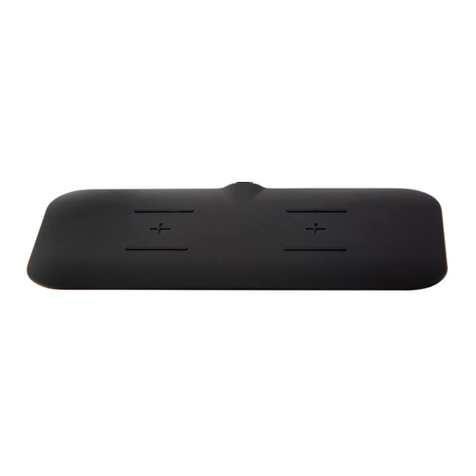
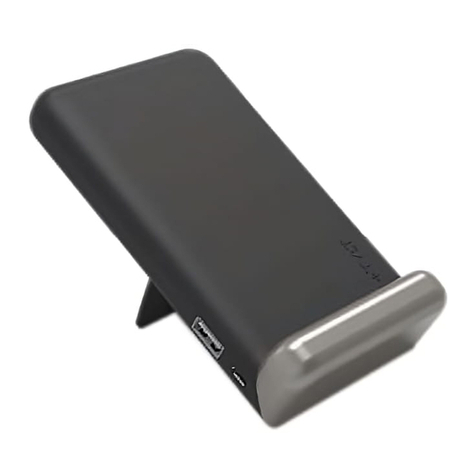
This is a wireless charger that will charge any device that supports the Qi standard, Please read the user manual
before using and keep itfor future reference.
Specifications:
Input: 9V/2A
Wireless Charging Output: Output1 : 10W Output2 : 5W
Wireless Distance: ≦6 mm
Efficiceny: ≧7 1%
Dimension: 180 x 80 x 40.5 mm
Weight: 75g
Use procedure
1. Connect the device to the adapter with USB cable.
2. Power up the adapter.
3. We can put the mobile phone or iPad right above the device
4. The device is charging
! " #!
TRAY PIVOT - USER GUIDE
!"#
tray pivot
!"####
!!"
#$%&'"(%)&"*'(+,"-%./+"0/1"'$-!
" ./+.1'"$2'"$&0(
$!"3'1.-0$'1"45"6.&'7'++"-20&8'&"9%&"
" 2'01:2%/'"0/1"%$2'&":'&.:2'&07+
%!"
;<=.'/$"7.82$./8
&!"
>%:"$&0(":.?%$+"9%&"1'+.&'1"
 VSDFHFRQJXUDWLRQ
!"#$%$&&'()*+$','-$./0)*+$'
1).#2$#'3'4.+"56'7#.6
4
/ 08/20/20 /2133_TRAY PIVOTUSER GUIDE_R1 / 2
FCC Statement:
This device complies with part 15 of the FCC
Rules. Operation is subject tothe following two
conditions:
(1) This device may not cause harmful interfer-
ence, and (2) this device must accept any inte-
rference received, including interference that
may cause undesired operation.
This equipm-ent has been tested and found to
comply with the limits for a Class B digital dev-
ice, pursuant to part 15 of the FCC Rules.
These limits are designed to provide reasonable
protection against harmful interference in a resi-
dential installation. This equipment generates,
uses and can radiate radio frequency energy
and, if not installed and used in accordance with
the instructions, may cause harmful interference
to radio communications. However, there is no
guarantee that interference will not occur in a
particular installation. Ifthis equipment does
cause harmful interference to radio or television
reception, which can be determined by turning
the equipment off and on, the user is encouraged
to try to correct the interference by one or more
of the following measures:
—Reorient or relocate the receiving antenna.
—Increase the separation between the equipm-
ent and receiver.
—Connect the equipment into an outlet on a
circuit different from that to which the receiver
is connected.
—Consult the dealer or an experienced radio/
TV technician for help.
Caution: Any changes or modifications not
expressly approved by the party responsible
for compliance could void theuser's authority
to operate the equipment.
This equipment should be installed and
operated with minimum distance 20cm
between the radiator&your body.

&@ABA%CABDEFB%GHA%HAIHABAFJGJDKA%LM%
DFMLHNGJDLF%GHO@DJAOJPHAQ%DFCDOGJDFE%IHDLHDJR%
GFC%SGRLPJ%LM%IGEA%OLNILFAFJB<%
7KH\GRQRWFRQVWLWXWHWKHƓQDOORRN(
RUIHHORIWKHGHVLJQ
&'$&"'$!()*'(
&'(&
-*+#"-#(
-GTFDA%UGHB@D%
IGTFDAVWSGXDFO<OLN%
"YYZ=$[Z$=$=%6\J<%Y!0
B7UD\3LYRW8VHU*XLGHBU(
!"#$!#$!%%#%%]%$!$!%/SGX%+FO<%%#%%ZZZEODNLQFFRP3URSULHWDU\DQG&RQƓGHQWLDO