manuals.online logo
Brands
  1. Home
  2. •
  3. Brands
  4. •
  5. UEi
  6. •
  7. Measuring Instrument
  8. •
  9. UEi DMG150 User manual

UEi DMG150 User manual

Other UEi Measuring Instrument manuals

UEi DMG100 User manual

UEi

UEi DMG100 User manual

UEi MCP4 User manual

UEi

UEi MCP4 User manual

UEi DIGI COOL User manual

UEi

UEi DIGI COOL User manual

UEi DAFM2 User manual

UEi

UEi DAFM2 User manual

UEi C164 User manual

UEi

UEi C164 User manual

UEi DL469 User manual

UEi

UEi DL469 User manual

UEi C165 User manual

UEi

UEi C165 User manual

UEi DL579 User manual

UEi

UEi DL579 User manual

UEi DL489 User manual

UEi

UEi DL489 User manual

UEi DL569 User manual

UEi

UEi DL569 User manual

UEi EM151 User manual

UEi

UEi EM151 User manual

UEi H26-475 User manual

UEi

UEi H26-475 User manual

UEi C165 User manual

UEi

UEi C165 User manual

UEi ATTPC3 User manual

UEi

UEi ATTPC3 User manual

UEi DL419 User manual

UEi

UEi DL419 User manual

UEi DTH10 User manual

UEi

UEi DTH10 User manual

UEi DL479 User manual

UEi

UEi DL479 User manual

UEi MM100 User manual

UEi

UEi MM100 User manual

UEi PET1 User manual

UEi

UEi PET1 User manual

UEi DL599 User manual

UEi

UEi DL599 User manual

UEi ECT690 User manual

UEi

UEi ECT690 User manual

UEi C165 User manual

UEi

UEi C165 User manual

UEi EM720 User manual

UEi

UEi EM720 User manual

UEi KM940 User manual

UEi

UEi KM940 User manual

Popular Measuring Instrument manuals by other brands

Powerfix Profi 278296 Operation and safety notes

Powerfix Profi

Powerfix Profi 278296 Operation and safety notes

Test Equipment Depot GVT-427B user manual

Test Equipment Depot

Test Equipment Depot GVT-427B user manual

Fieldpiece ACH Operator's manual

Fieldpiece

Fieldpiece ACH Operator's manual

FLYSURFER VIRON3 user manual

FLYSURFER

FLYSURFER VIRON3 user manual

GMW TG uni 1 operating manual

GMW

GMW TG uni 1 operating manual

Downeaster Wind & Weather Medallion Series instruction manual

Downeaster

Downeaster Wind & Weather Medallion Series instruction manual

Hanna Instruments HI96725C instruction manual

Hanna Instruments

Hanna Instruments HI96725C instruction manual

Nokeval KMR260 quick guide

Nokeval

Nokeval KMR260 quick guide

HOKUYO AUTOMATIC UBG-05LN instruction manual

HOKUYO AUTOMATIC

HOKUYO AUTOMATIC UBG-05LN instruction manual

Fluke 96000 Series Operator's manual

Fluke

Fluke 96000 Series Operator's manual

Test Products International SP565 user manual

Test Products International

Test Products International SP565 user manual

General Sleep Zmachine Insight+ DT-200 Service manual

General Sleep

General Sleep Zmachine Insight+ DT-200 Service manual

Sensa Core Lacto Spark user manual

Sensa Core

Sensa Core Lacto Spark user manual

VOLTCRAFT UTS-1980 operating instructions

VOLTCRAFT

VOLTCRAFT UTS-1980 operating instructions

EBCHQ 94915 Operation manual

EBCHQ

EBCHQ 94915 Operation manual

Balluff BIP LD2-T017-01-EP-S4 Series user guide

Balluff

Balluff BIP LD2-T017-01-EP-S4 Series user guide

Pulsar IMP Lite Series instruction manual

Pulsar

Pulsar IMP Lite Series instruction manual

ETCR 6800 user manual

ETCR

ETCR 6800 user manual

manuals.online logo
manuals.online logoBrands
  • About & Mission
  • Contact us
  • Privacy Policy
  • Terms and Conditions

Copyright 2025 Manuals.Online. All Rights Reserved.

DMG150
mbar Pa
mm
-Hg Microns mTorr /sec
Set Leak RateTemp Run
MODE
MENU
DMG150
Digital Micron Gauge
INSTRUCTION MANUAL
ENGLISH
IMPORTANT SAFETY WARNINGS
WARNING
Read entire Safety Notes section regarding potential
hazard and proper instructions before using this meter.
In this manual the word “WARNING” is used to indicate
conditions or actions that may pose physical hazards
to the user. The word “CAUTION” is used to indicate
conditions or actions that may damage this instrument.
WARNING
To ensure safe operation and service of the tester, follow
these instructions. Failure to observe these warnings can
result in severe injury or death.
WARNING
This gauge is designed for trade professionals who
are familiar with the hazards of their trade. Observe all
recommended safety procedures that include proper use
of personal protective equipment that includes safety
glasses and gloves.
FEATURES
• Measures in microns, pascals, Millibar, mmHg, mTorr
• Range 0 to 15,000 microns
• Maximum over pressure 700 psi
• Instant warm-up time
• Instant response time
• Backlit display
• Compact and light weight
• Oil contamination detection
• Sleep mode
• Ambient temperature measurement
• 5 units of measurement
• Real time leak measurement
• Time period leak measurement
• Sensor fail detection
GENERAL SPECIFICATIONS
• Operating Temperature: 10˚ to 122˚F (-12˚ to 50˚C)
• Backlight: Yes
• Over-range: “OL” is displayed
• Dimensions: 4.3’ X 1.3’ X 1’
• Item Weight: 2.7 oz
• Calibration: Recommended annually
• Accuracy: 0 to 9,999 ±5%rdg ±5 microns
10,000 to 15,000 ±10% rdg
OVERVIEW
DMG150
mbar Pa
mm
-Hg Microns mTorr /sec
Set Leak RateTemp Run
MODE
MENU
D. Menu/Check
Button
E. Change/X
Button
F. Dust Cap
A. LCD
Display
B. Power/
Backlight
Button
C. Mode
Button
G. Battery
Cover
H. Vacuum Port J. Dust
Cap Removed
I. Serial Number
OPERATING INSTRUCTIONS
Basic Operation Mode
1. Press Power button to power on the gauge.
2. Press Mode Button to change the operation to Vacuum
Reading, Temperature Reading, Leak Rate Test, Leak Test or
Run mode.
Vacuum Reading Mode
1. The Vacuum reading is shown on the display with Vacuum
unit.
CAUTION:
“OL” will be shown if maximum Micron or
psi limit is exceeded (15,000 Micron/700 psi or unit reading
of equal value).
2. User may press Mode Button to skip Vacuum Reading mode
or enter Temperature Reading mode.
3. In Vacuum Reading mode, press Menu Button or Change
Button to select the unit to mBar, Pa, mmHg, mTorr or Micron.
The Vacuum indicator will be shown to indicate the Vacuum
unit selected.
Temperature Reading Mode
1. The Vacuum reading is shown on the display with
Temperature measurement unit.
2. User may press Mode Button to skip Temperature Reading
mode or enter Leak Rate Test mode.
3. In Temperature Reading mode, press Menu/Check Button
or Change/X Button to select temperature measurement
unit to ˚F or ˚C
Leak Rate Test Mode
1. In Leak Rate Test mode, the leak rate test time base is 1
second.
2. The indicator “Leak Rate” and “/sec” will be shown. The
real time leak rate is updated on the display once per second.
3. User may press Mode Button to skip Leak Rate Test mode
and enter Leak Test mode.
4. In Leak Rate Test mode, press Menu/Check Button or
Change/X Button to select vacuum.
Leak Test Mode
1. In the Leak Test mode, the leak test time may be
programmed for a set duration. Only the icon “LEAK” will
be shown.
2. In Leak Test mode, press the Menu Button to change the
parameter to set in order. Vacuum unit, Minute, Second of
time duration can be set. 3 parameters are shown on the
display. The parameter flashes when it is selected to be
set. If there are no changes to the 3 parameters, user may
skip to step 6.
3. While the vacuum unit be set, press the Change/X
Button to select the vacuum unit.
4. While the Minute of time duration can set, press the
Change/X Button, to select the minute value.
5. While the Second of time duration can be set, press the
Change/X Button to select the second value.
6. When all 3 parameters are confirmed, Press and hold
the Menu/Check Button to start Leak Test. “Start” will
be shown on the display for 2 seconds and then the Leak
Test starts. During the Leak Test, the vacuum reading and
time left on test are shown on the display in order.
7. User may press Mode Button to interrupt Leak Test mode
before test time expires and go back to Vacuum Reading
Mode. “Quit?” will be shown on display to confirm
interrupting test. Press Menu/Check Button to end test
or Change/X button to continue test.
8. When the test time ends, “End”, the start vacuum reading,
end vacuum reading and vacuum drop value will be shown
on the display in order. User may press Menu/Check
Button or Change/X Button to scroll between 4
readings.
9. Press Mode button to go back to Vacuum Reading mode.
10. User may press Mode Button to skip Leak Test mode
and enter Programming mode before doing leak test.
Programming Set Mode
1. In Programming mode, user sets the target vacuum value
and time duration. The vacuum value and time duration
are shown on the display in order.
2. User may press Mode Button to enter Run mode without
setting in programming mode if the parameters are
confirmed before setting.
3. In Programming mode, press Menu/Check Button to
select the parameter to be set in order. Vacuum value,
unit, Minute, Second of time duration can be set. The
parameter flashes when it is selected to be set. If the
4 parameters are all set, user may press Mode Button at
anytime to leave Programming mode and enter
Run mode. “Save?” will be shown on display. Press
Menu/Check Button to save or press Change/X Button
to quit without saving.
4. User may press and hold Menu/Check Button to hold
and save and enter Run mode without “Save?”
5. While the target vacuum value can be set, press the
Change/X Button to select the vacuum value.
6. While the target vacuum unit can be set, press the
Change/X Button to select the vacuum unit.
7. While the minute of time can be set, press the Change/X
Button to select the minute value.
8. While the second of time can be set, press the
Change/X Button to select the second value.
99 Washington Street
Melrose, MA 02176
Phone 781-665-1400
Toll Free 1-800-517-8431
Visit us at www.TestEquipmentDepot.com

WARRANTY
The DMG150 is warranted to be free from defects in
materials and workmanship for a period of one year from
the date of purchase. If within the warranty period your
instrument should become inoperative from such defects,
the unit will be repaired or replaced at UEi’s option. This
warranty covers normal use and does not cover damage
which occurs in shipment or failure which results from
alteration, tampering, accident, misuse, abuse, neglect or
improper maintenance. Batteries and consequential damage
resulting from failed batteries are not covered by warranty.
Any implied warranties, including but not limited to implied
warranties of merchantability and fitness for a particular
purpose, are limited to the express warranty. UEi shall not be
liable for loss of use of the instrument or other incidental or
consequential damages, expenses, or economic loss, or for
any claim or claims for such damage, expenses or economic
loss.
A purchase receipt or other proof of original purchase date
will be required before warranty repairs will be rendered.
Instruments out of warranty will be repaired (when
repairable) for a service charge.
For more information on warranty and service, contact:
This warranty gives you specific legal rights. You may also
have other rights, which vary from state to state.
DISPOSAL
CAUTION: This symbol indicates that equipment
and its accessories shall be subject to separate collection
and correct disposal.
CLEANING
Periodically clean your meter’s case using a damp cloth. DO NOT
use abrasive, flammable liquids, cleaning solvents, or strong
detergents as they may damage the finish, impair safety, or affect
the reliability of the structural components.
STORAGE
Remove the batteries when instrument is not in use for a
prolonged period of time. Do not expose to high temperatures
or humidity. After a period of storage in extreme conditions
exceeding the limits mentioned in the General Specifications
section, allow the instrument to return to normal operating
conditions before using it.
Run Mode
1. In Run mode, the elapsed time is accumulated when
vacuum reading is less than target vacuum value.
2. User may press Mode Button to enter Vacuum Reading
mode without changes in Run mode.
3. In Run mode the icon “Run” is shown on the display.
“Ready” is shown on the display after entering Run
mode.
4. User powers on the vacuum source and then presses
the Menu/Check Button to start monitoring the
vacuum. “Run” is shown on the display for 2 seconds
when monitoring begins. When the vacuum value is less
than target value, the vacuum gauge counts elapsed time
and accumulated. During the monitoring, the vacuum
value and the time count are shown on the display in
order.
5. Press the Mode Button to skip monitoring before
the elapsed time expires and go back to Vacuum Reading
mode. “Quit?” is shown on the display for confirming
the interrupt. Press Menu/Check Button to confirm
quit or press Change/X Button to cancel quit. When
the accumulated elapsed time is greater than the set
time duration, “End” flashes on the display. Press the
Mode Button to end monitoring and go back to Vacuum
Reading mode.
6. The Sleep mode is disabled in Run mode. User should
check battery life in before and during long monitoring
times.
Sleep Mode
1. The gauge will enter Sleep mode if the reading is over
limit and continues for 5 minutes. “Sleep” will be
shown on the display when the gauge is in Sleep mode.
After 5 minutes of Sleep mode, Auto power off powers
off the gauge. The down-count timer is shown on the
display to alert user of sleep mode and Auto power off
time.
Oil Detection
1. When the vacuum sensor has contamination like oil or
other material, “Oil” is shown on the display.
2. The gauge will Auto power off after 5 minutes.
Sensor Fail
1. If the sensor wire is broken or fails, “Fail” will be shown
on the display.
2. The gauge will Auto power off after 5 minutes.
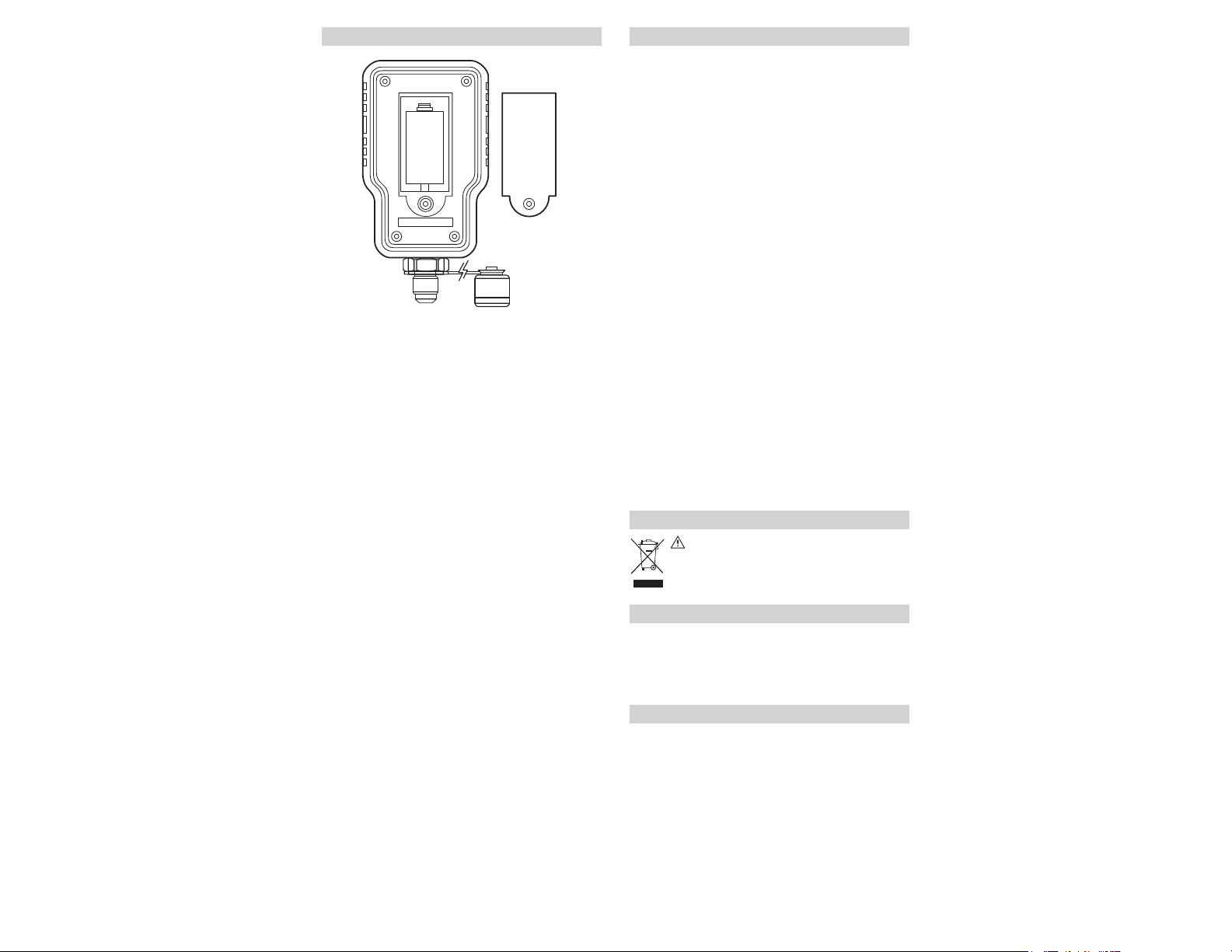
BATTERY REPLACEMENT
When the batteries are too low for safe operation, the Low
Battery indicator will display.
• Remove screw. Remove battery cover.
• Replace the old batteries with 1 new (CR123A) battery.
• Place the battery cover.
New
(CR123A)
battery
Copyright © 2017 Kane USA Inc. All Rights Reserved.
Test Equipment Depot - 800.517.8431 - 99 Washington Street Melrose, MA 02176
TestEquipmentDepot.com