manuals.online logo
Brands
  1. Home
  2. •
  3. Brands
  4. •
  5. Utax
  6. •
  7. Printer Accessories
  8. •
  9. Utax CLP 3721 Service manual

Utax CLP 3721 Service manual

This manual suits for next models

3

Other Utax Printer Accessories manuals

Utax DF 420 User manual

Utax

Utax DF 420 User manual

Utax PF 520 User manual

Utax

Utax PF 520 User manual

Utax PF 420 User manual

Utax

Utax PF 420 User manual

Utax CD 1118 User manual

Utax

Utax CD 1118 User manual

Utax PF 730 User manual

Utax

Utax PF 730 User manual

Utax PF 100 C C User manual

Utax

Utax PF 100 C C User manual

Utax PF 320 User manual

Utax

Utax PF 320 User manual

Utax DP 770 User manual

Utax

Utax DP 770 User manual

Utax PF 740 User manual

Utax

Utax PF 740 User manual

Utax Utax PF 791 User manual

Utax

Utax Utax PF 791 User manual

Utax PF-3100 User manual

Utax

Utax PF-3100 User manual

Popular Printer Accessories manuals by other brands

Epson T078620 Product information sheet

Epson

Epson T078620 Product information sheet

Brother TN630 instructions

Brother

Brother TN630 instructions

Formax 6204 Series Maintenance manual

Formax

Formax 6204 Series Maintenance manual

Xerox C11 - DocuPrint Color Inkjet Printer user manual

Xerox

Xerox C11 - DocuPrint Color Inkjet Printer user manual

REA JET HR pro 2K user manual

REA

REA JET HR pro 2K user manual

HP Laserjet,Color Laserjet 4si user guide

HP

HP Laserjet,Color Laserjet 4si user guide

oliser MS 45 instructions

oliser

oliser MS 45 instructions

Xerox EFI EXP6000 Specification sheet

Xerox

Xerox EFI EXP6000 Specification sheet

Epson T6248 Product information sheet

Epson

Epson T6248 Product information sheet

Canon TonerRobot EP-27 instruction manual

Canon

Canon TonerRobot EP-27 instruction manual

Kyocera KM-6230 Instruction handbook

Kyocera

Kyocera KM-6230 Instruction handbook

Triumph Adler DF-710 Instruction handbook

Triumph Adler

Triumph Adler DF-710 Instruction handbook

Star Micronics TSP800 Series install guide

Star Micronics

Star Micronics TSP800 Series install guide

Citizen CBM-202PC Series user manual

Citizen

Citizen CBM-202PC Series user manual

Canon Color imageCLASS MF8170c installation instructions

Canon

Canon Color imageCLASS MF8170c installation instructions

Codonics Virtua 1VCX-LR833 Technical brief

Codonics

Codonics Virtua 1VCX-LR833 Technical brief

Roland DU2-64 Supplementary manual

Roland

Roland DU2-64 Supplementary manual

TonerRefillKits ReChargX RX126 instructions

TonerRefillKits

TonerRefillKits ReChargX RX126 instructions

manuals.online logo
manuals.online logoBrands
  • About & Mission
  • Contact us
  • Privacy Policy
  • Terms and Conditions

Copyright 2025 Manuals.Online. All Rights Reserved.

1/1
Technical Bulletin
UTAX
UTAX
CLP 3721
CLP 3726
TA
TA
CLP 4721
CLP 4726
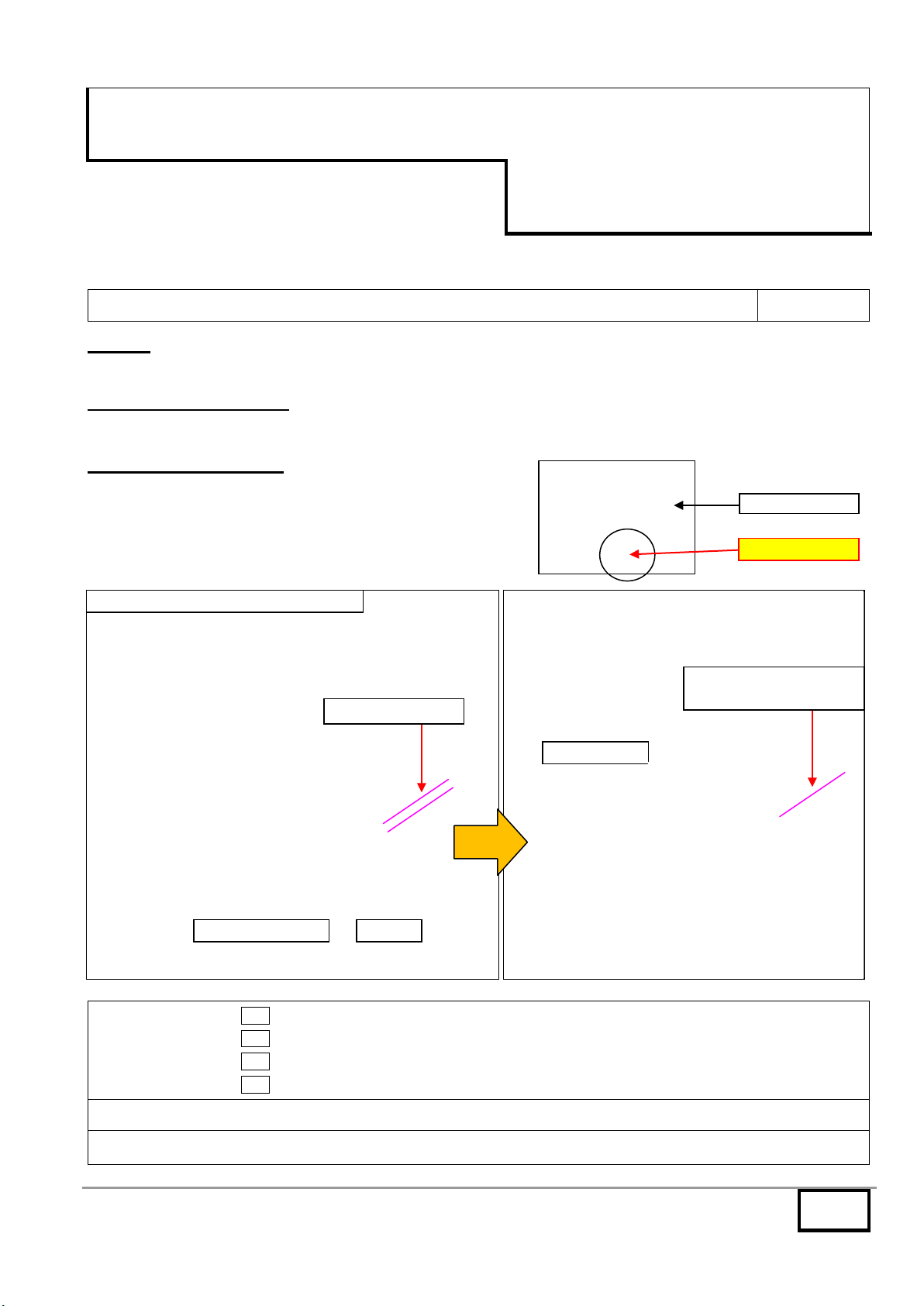
TB 01 / Note for the toner installation error 2KW-B081/M
Date: 18-03-2011
T
OPIC
:
Following error message may appear when installing the new toner container. This may be corrected as below.
M
ESSAGE DISPLAYED
:
MFP : “The toner container is improperly installed” Printer : “Check the toner container”
C
ORRECTIVE ACTION
:
Once take out the toner container from the machine. Rotate
the coupling at the right side of the toner container clockwise
to eliminate the gap between the hook of the coupling and the
latch. Then, reinstall it in the machine.
Classification:
Entire Stock Rework
In-Field modification at next visit
X
In-Field modification by case
No modification necessary
Field Measure:
Please check the above and act correctively.
Serial Nos.:
n/a
Toner container
Latch
Hook of coupling
Eliminate the gap
Rotate the coupling CW
to eliminate the gap
Error message may appear
Coupling
Coupling
Enlarged view of section
1/2
Technical Bulletin
UTAX
UTAX
CLP 3721
CLP 3726
TA
TA
CLP 4721
CLP 4726
TB 02 / Firmware Upgrade (MAIN 02.005 / ENG. 03.003) 2KV-B085/M
Date: 18-04-2011
T
OPIC
:
The firmware is upgraded as follows.
C
ONTENT OF CHANGES
:
Garbled characters.
Characters in the maintenance report may be garbled. - Therefore, this is corrected.
Error occurring with a certain PCL data.
F24B error appears when sending a certain PCL date while setting BW mode. - Therefore, this is corrected.
T7toner disposal control prolongs too long.
T7 toner disposal control prolongs too long until color calibration is executed when turning power on with 50 degree C or more of fusing
temperature. - Therefore, this is corrected.
Measure against failure at initial toner install mode.
Number of the initial drum refresh out of box is recorded in the EEPROM. The number is counted up at every drum refresh. Remaining
numbers of drum refresh are executed when resuming.
Change of toner disposal at initial machine aging out of box.
Toner disposal at drum refresh is changed from twice to once to reduce amount of toner disposed at drum refresh. Drum refresh,
however, is executed twice while tone is not disposed in the 2nd time.
Amount of toner disposal is reduced by half the amount. While the aging time remains unchanged.
Adding auto color registration adjustment timing.
Auto color registration adjustment is performed at the print 3 hours or more after the last print job.
DDNS cannot be registered.
DDNS cannot be registered In DHCP. - Therefore, this is corrected.
Measure against Kerberos authentication failure.
Kerberos authentication from MFP may fail when the expiry date for use of the user account approaches. - Therefore, this is corrected.
C/M/Y coverage does not become 0.
C/M/Y coverage does not become 0 with pure black data not being composite black. - Therefore, this is corrected.
Logo mark area is filled in black.
Logo mark area is filled in black when printing with an application named Formtastic.
Measures against error with a certain file.
CF248 error appears with a certain user file. - Therefore, this is corrected.
Characters garble with a certain CAD file.
Characters partially garble with a certain CAD file according to output size. - Therefore, this is corrected.
Umlaut font failure with PDF data.
Umlaut fonts are not partially printed with PDF data using Adobe Reader/Acrobat (9.2.0) + PCL-XL driver (KX v5.0.1930). - Therefore, this
is corrected
Code39 barcode print failure with a certain file.
Code39 barcode is not printed but printed as text. - Therefore, this is corrected.
Image failure printing backside Image with a certain file.
Leading edge of the image may shift or the image at the center may be dropped out when printing the backside image of the certain file in
duplex mode. - Therefore, this is corrected.
Failure of undesired lines with a certain file.
Undesired lines may be printed when continuously printing certain 2 files. - Therefore, this is corrected.
Print failure with the data including a certain Prescribe command (corrected).
Preventing the data at the left edge from dropping out when outputting the PS data.
Data at the left edge may be dropped out and the character pitch may be broadened when outputting PS data. - Therefore, this is
corrected.
2/2
Print failure when printing a certain file with KPDL(AUTO).
A certain file may not be printed with KPDL (AUTO). - Therefore, this is corrected.
Failure with a certain PS data.
Image may not be partly printed when outputting a certain PS data. - Therefore, this is corrected.
PS error when printing a certain data.
PS error may appear and print may be terminated when printing a certain data from Unix. - Therefore, this is corrected.
TIF image failure when printing the data containing TIF image.
TIF image may be printed in twice of the size when printing the data containing TIF image. - Therefore, this is corrected.
Character drop-out with a certain file.
Characters line may drop out with a certain file. - Therefore, this is corrected.
Measure against white spots around the characters with a certain file.
White spots may appear around the outline characters with a certain data. - Therefore, this is corrected.
Problem when printing with a certain macro.
The characters may be partly overlapped when printing with a certain macro. - Therefore, this is corrected.
Improving performance of outputting a certain data.
Performance is improved because it was pointed out that outputting a certain file from the special application is slow compared with output
from other models.
Measure against problem when outputting a certain PDF data.
Print out of a certain PDF data may be interrupted, and it may be stopped at the state of waiting print. - Therefore, this is corrected.
Preventing command from printed as text in the print data.
Command may be printed as text. - Therefore, this is corrected.
Measure against lock-up with a certain macro data.
When calling a certain macro data, the system may lock up while showing "Processing". - Therefore, this is corrected.
Print position shifting with a certain file.
Print position may shift with a certain file. - Therefore, this is corrected.
Failure when printing a certain file in duplex.
Upper part image of the 2nd side is not printed when printing a certain file in duplex.
Measure against problem when outputting a certain PDF data.
Error* may appear when directly printing a certain PDF data. - Therefore, this is corrected.
* System error, Processing lock-up and F030 error, etc.
F000 error with a certain PS data.
F000 error appears with a certain PS data. - Therefore, this is corrected.
Character drop-out with a certain PCL data.
Characters drop out with a certain PCL data. - Therefore, this is corrected.
Measure against output failure with Big5 font.
Big 5 font may not be printed out. - Therefore, this is corrected.
Measure against garbled characters with a certain file containing PJL.
FIRMWARE
Program No. Ver. Remarks
MAIN 2KV_3F00.002.005 002.005 New (CLP 3721, CLP 3726 / CLP 4721, CLP 4726)
ENGINE 2KT_1000.003.003 003.003 New (CLP 3721 / CLP 4721)
ENGINE 2KV_1000.003.003 003.003 New (CLP 3726 / CLP 4726)
Classification:
Entire Stock Rework
In-Field modification at next visit
X
In-Field modification by case
No modification necessary
Field Measure:
Please upgrade the firmware when the phenomena arise.
Serial Nos.:
CLP 3721 / CLP 4721
CLP 3726 / CLP 4726
Planned in March 2011 production

1/3
Technical Bulletin
UTAX
UTAX
CLP 3721
CLP 3726
TA
TA
CLP 4721
CLP 4726
TB 03 / Colour background after setup NPresson/M
Date: 17-05-2011
T
OPIC
:
Colour background after setup.
C
ORRECTIVE ACTION
:
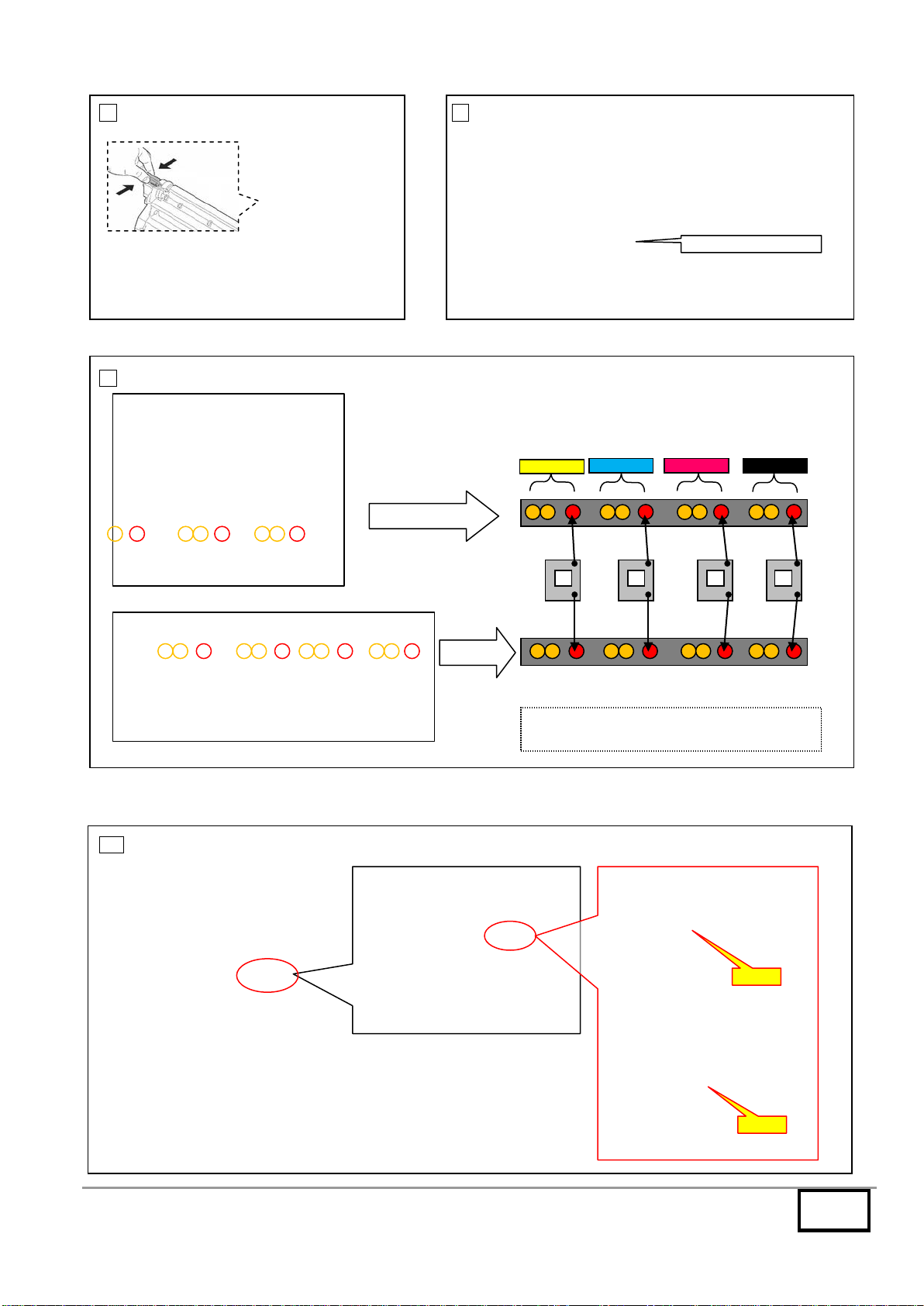
Check the contact springs of the drum units.
1 Open the top cover and 2 Slide the container guide and 3 Open the RFID holder.
remove the toner containers. remove it.
4 Slide the shutter and remove 5 Remove the transfer unit. 6 Remove the drum units.
the screw.
remove
Sample
2/3
7 Remove the developing units. 8 Remove the right cover and the >HIGH VOLTAGE PWB<.
9 Check the resistor from the drum contacts.
10 Resistor > 1 Ohm set the correct position of the drum springs.
HIGH VOLTAGE PWB
Figure right side
Figure inner side
CYAN
BLACK
MAGENTA
YELLOW
Ω
Ω
Ω
Ω
right side
inner side
The resistor between the contact springs
(red) must be < 1 Ohm.
wrong
OK
3/3
Classification:
Entire Stock Rework
In-Field modification at next visit
X
In-Field modification by case
No modification necessary
Field Measure:
Please check the above and act correctively.
Serial Nos.:
n/a
1/2
Technical Bulletin UTAX
UTAX CLP 3721
CLP 3726
TA
TA
CLP 4721
CLP 4726
TB 04 / Corrective measures for C0150 error with… 2KT-B120/M
Date: 30-05-2011
T
OPIC
:
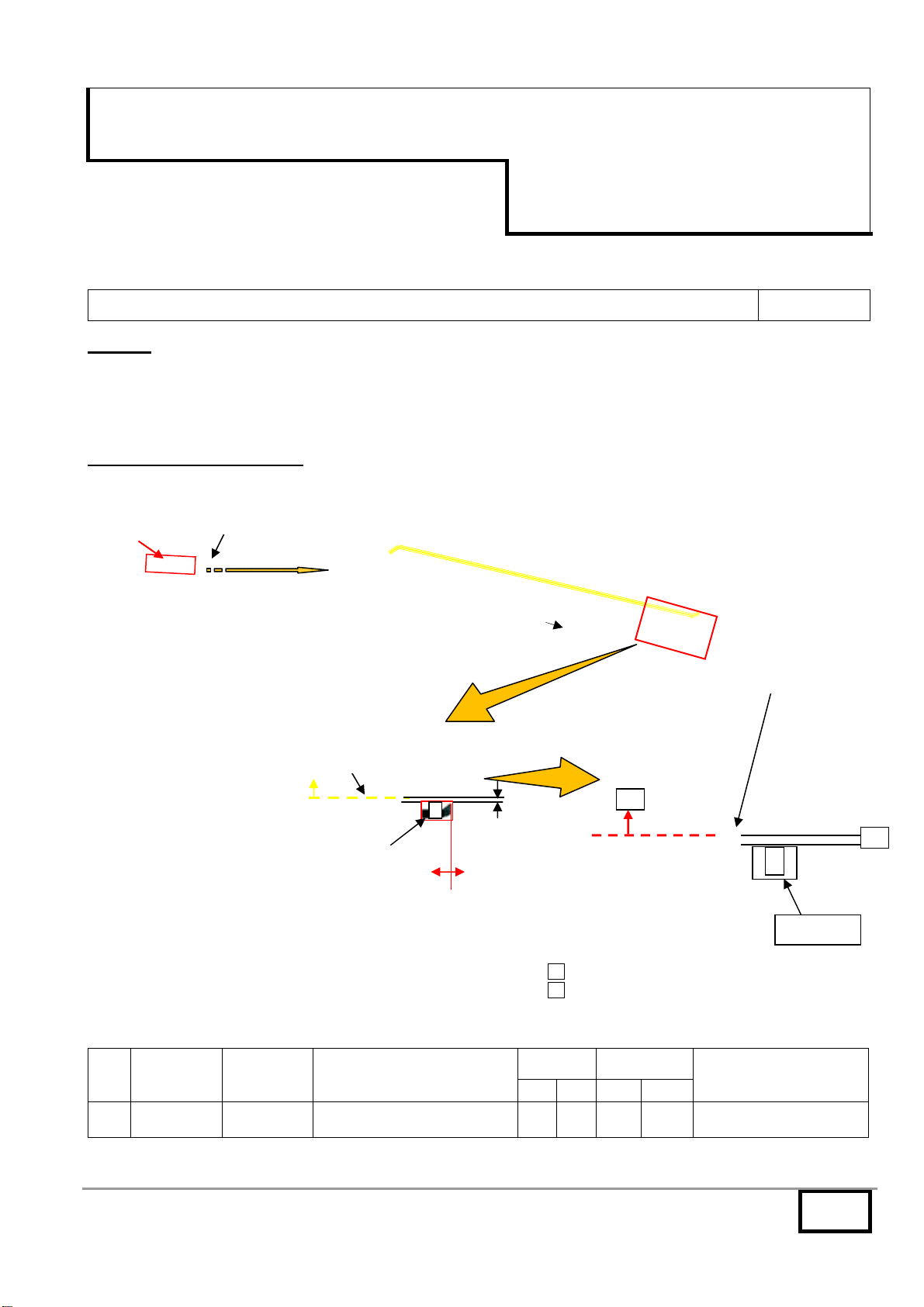
C0150 error may appear with the wire (EXIT-ENGN) pinched by the rib on COVER TOP P. Therefore, the following are
changed.
[C0150: Backup memory read/write error (engine PWB)]
C
ONTENT OF CHANGES
:
A clamp (ACCESS CLAMP (No.1)) is added to the wire (EXIT-ENGN) to attach it.
Clamp added
No. Old Part
No.
New Part
No. Description Q’ty Compatibility Remarks
Old New Old New
1 -------- YZ112220 ACCESS CLAMP - 1 - O
STAY REAR TOP
COVER TOP P
A
Hole of STAY
B
The edge of the hole of the STAY
A 1mm or more gap with the edge of the CLAMP
B The wire should not get over the dotted line
ACCESSS CLAMP
(No.1)
Where to affix
ACCESSS.CLAMP
Enlarged
view of A
2mm 0mm
1mm gap
or more
The wire should not get over
the arrow mark side
ACCESSS CLAMP
(
No.1
)
2/2
Classification: Entire Stock Rework
In-Field modification at next visit
X In-Field modification by case
No modification necessary
Field Measure: Please take good care when attaching the clamp to avoid the wire pinch when attaching COVER
TOP P.


Serial Nos.: CLP 3721 - CLP 4721
CLP 3726 - CLP 4726

From available timing in April 2011 production on.
1/2
Technical Bulletin UTAX
UTAX CLP 3721
CLP 3726
TA
TA
CLP 4721
CLP 4726
TB 05 / Corrective measures for the color dot images 2KV-B215/M
Date: 19-07-2011
T
OPIC
:
The drum change and firmware upgrade.
C
ONTENT OF CHANGES
:
1. Change of the drum unit
The color dot image may appear and the treatment for the
drum photo-conductive layer is changed as the corrective
measures. (Refer to the image sample)
2. Firmware upgrade
 Corrective measures for the color dot image.
A weak main charge is impressed during “Adding toner”in the drum protective environment.
A weak main charge is impressed during the start-up aging out of box.
 Corrective measures for the band image on the drum.
A band image is formed in between the color calibration and color registration adjustment. Therefore, this is corrected.


 Drum refresh mode supported
FIRMWARE
Program No. Ver. Remarks
MAIN 2KV_3F00.002.005 002.005 (all) CLP 3721, CLP 3726 / CLP 4721, CLP 4726
ENGINE 2KT_1000.004.003 004.003 New only CLP 3721 / CLP 4721
ENGINE 2KV_1000.004.003 004.003 New only CLP 3726 / CLP 4726
No. Old Part
No.
New Part
No. Description Q’ty Compatibility Remarks
Old New Old New
1 2KV93013 2KV93014 DK-590 1 1 X O only CLP 3726 / CLP 4726
2 2KT93013 2KT93014 DK-591 1 1 X O only CLP 3721 / CLP 4721
発生画像発生画像
Color dot
Sample image
2/2
Classification: Entire Stock Rework
In-Field modification at next visit
X In-Field modification by case
No modification necessary
Field Measure: Please replace with the new type unit when the problem arises.
Please upgrade the engine firmware together with replacing with the new unit.


Serial Nos.: CLP 3721 - CLP 4721
CLP 3726 - CLP 4726

From available timing in June 2011 production.