EnglishDeutsch
 logo
Brands
  1. Home
  2. •
  3. Brands
  4. •
  5. Vax
  6. •
  7. Vacuum Cleaner
  8. •
  9. Vax Force 10 Super Power V-091SP User manual

Vax Force 10 Super Power V-091SP User manual

Other Vax Vacuum Cleaner manuals

Vax H90-LF Series User manual

Vax

Vax H90-LF Series User manual

Vax AirMini C88-AM-B User manual

Vax

Vax AirMini C88-AM-B User manual

Vax bubble vs-21 Product information sheet

Vax

Vax bubble vs-21 Product information sheet

Vax power 7 VCP7P2400 User manual

Vax

Vax power 7 VCP7P2400 User manual

Vax C87-ZM-B User manual

Vax

Vax C87-ZM-B User manual

Vax VCST-01 User manual

Vax

Vax VCST-01 User manual

Vax V-043 User manual

Vax

Vax V-043 User manual

Vax H86-S6-B Installation instructions

Vax

Vax H86-S6-B Installation instructions

Vax VZL-7017 SERIES User manual

Vax

Vax VZL-7017 SERIES User manual

Vax Rapide Spring V-021 User manual

Vax

Vax Rapide Spring V-021 User manual

Vax Rapide 5110 Product information sheet

Vax

Vax Rapide 5110 Product information sheet

Vax VHFM700 User manual

Vax

Vax VHFM700 User manual

Vax Vivality V-0071 Product information sheet

Vax

Vax Vivality V-0071 Product information sheet

Vax CARVAX 6135 Product information sheet

Vax

Vax CARVAX 6135 Product information sheet

Vax U90-P2 Series User manual

Vax

Vax U90-P2 Series User manual

Vax Power Advance VX77 Installation instructions

Vax

Vax Power Advance VX77 Installation instructions

Vax U88-W1 User manual

Vax

Vax U88-W1 User manual

Vax Rapide User manual

Vax

Vax Rapide User manual

Vax h85-ga-b10 Installation instructions

Vax

Vax h85-ga-b10 Installation instructions

Vax Rapide Spruce V-022 User manual

Vax

Vax Rapide Spruce V-022 User manual

Vax Oasis User manual

Vax

Vax Oasis User manual

Vax G2 V-107 User manual

Vax

Vax G2 V-107 User manual

Vax C90-M1 Series User manual

Vax

Vax C90-M1 Series User manual

Vax 8131 MULTIFUNCTION User manual

Vax

Vax 8131 MULTIFUNCTION User manual

Popular Vacuum Cleaner manuals by other brands

Bissell LittleGreen Proheat 1425 Series user guide

Bissell

Bissell LittleGreen Proheat 1425 Series user guide

Panasonic MC-YL637S147-AE Service manual

Panasonic

Panasonic MC-YL637S147-AE Service manual

LG A9 Series owner's manual

LG

LG A9 Series owner's manual

Oreck Cordless Captura BK51700 Series user guide

Oreck

Oreck Cordless Captura BK51700 Series user guide

Kogan KAVACROBVWA user manual

Kogan

Kogan KAVACROBVWA user manual

Kränzle VENTOS 50 ID Use and maintenance

Kränzle

Kränzle VENTOS 50 ID Use and maintenance

NEFF N17XH10 0 Series instruction manual

NEFF

NEFF N17XH10 0 Series instruction manual

EVVO Ai35 instruction manual

EVVO

EVVO Ai35 instruction manual

DeWalt DWH200D instruction manual

DeWalt

DeWalt DWH200D instruction manual

Pontec Pondomatic Vacuum Cleaner operating instructions

Pontec

Pontec Pondomatic Vacuum Cleaner operating instructions

Cleanmaxx PC-P007E instruction manual

Cleanmaxx

Cleanmaxx PC-P007E instruction manual

RIDGID WD1685AU0 owner's manual

RIDGID

RIDGID WD1685AU0 owner's manual

Ezviz RE4P manual

Ezviz

Ezviz RE4P manual

STG global TANVAC HDV3000 Operator's manual

STG global

STG global TANVAC HDV3000 Operator's manual

Shark ROTATOR PRO COMPLETE NV550 Series manual

Shark

Shark ROTATOR PRO COMPLETE NV550 Series manual

Factory M3340 operating manual

Factory

Factory M3340 operating manual

Shop-Vac VN92 SERIES user manual

Shop-Vac

Shop-Vac VN92 SERIES user manual

Nobles 608669 Operator and parts manual

Nobles

Nobles 608669 Operator and parts manual

https://manuals.online logo
https://manuals.online logoBrands
  • About & Mission
  • Contact us
  • Privacy Policy
  • Terms and Conditions

Copyright 2026 Manuals.Online. All Rights Reserved.

www.vax.co.uk Please read carefully before using this cleaner.
Always fully extend the mains cable before use.
Retain for future reference.
Vax careline
0870 6061248
instruction manual
Bagless cylinder
Vax model number:
V-091SP
Va V-091SP User Guide v2.q d:V-091SP User Guide 2/6/08 13:40 Page 1
V-091SP
1. Diagram
www.vax.co.uk
2parts overview
1
6
13
7
8
2
3
4
5
Fig.1/1
1 Hose inlet
2 On/off button
3 Floor tool parking slot
4 Post-motor filter cover
5 Wheel
6 Cord rewind button
7 Variable power dial
8 Power level indicator
9 Carry handle
10 Quick-release dirt container
button (located under safety latch)
11 Dirt container release button
12 Dirt container handle
13 Central HEPA filter
9
10
11
12
Va V-091SP User Guide v2.q d:V-091SP User Guide 2/6/08 13:40 Page 2
3
Vax Careline 0870 606 1248
safety information
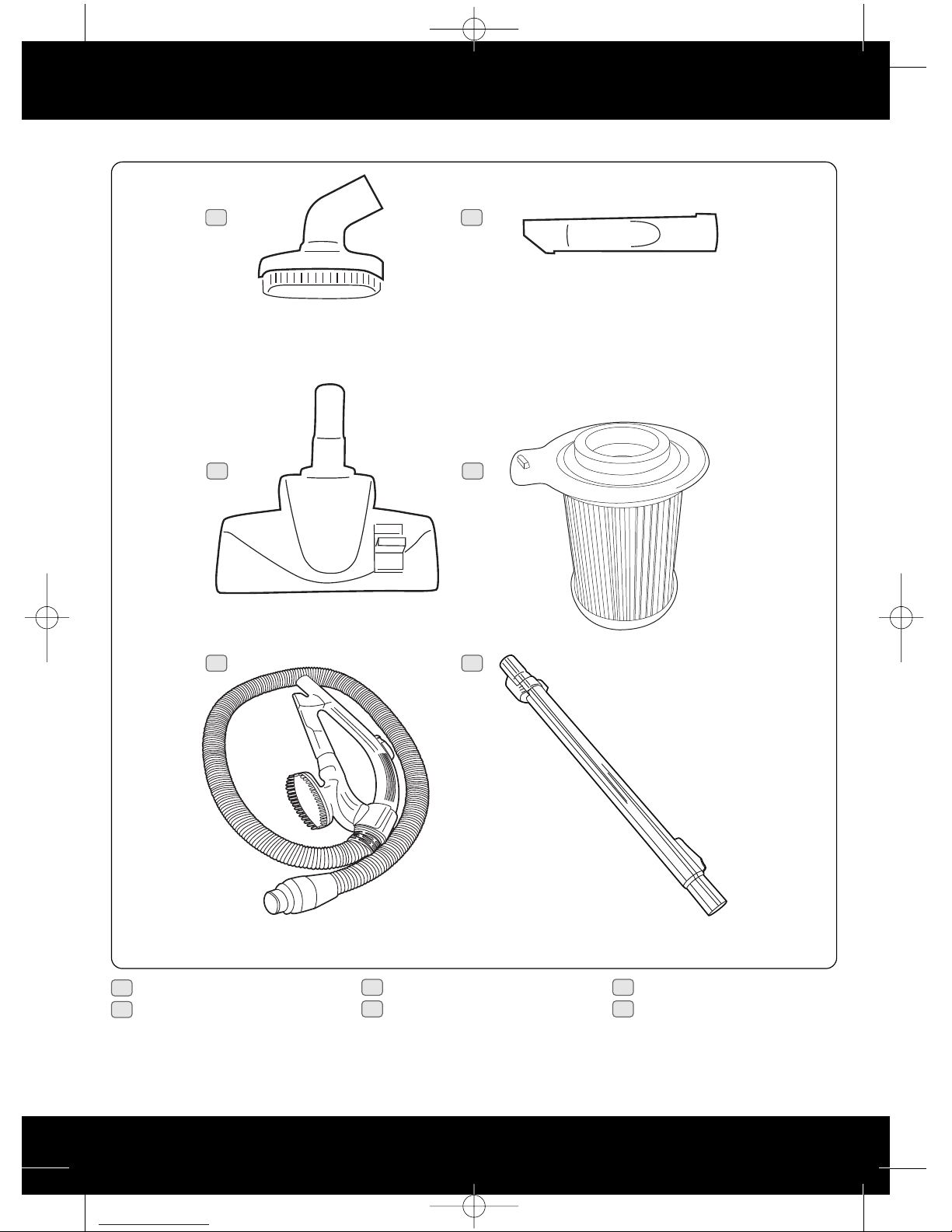
1 2 in 1 tool
2 Crevice tool
3 Combination floor tool
4 Central HEPA filter (spare)
5 Hose
6 Telescopic tube
Accessories
Fig.1/2
1 2
3 4
5 6
Va V-091SP User Guide v2.q d:V-091SP User Guide 2/6/08 13:40 Page 3
www.vax.co.uk
4assembly
2. Safety Information
For Household Use nly
When using the vacuum cleaner, basic safety precautions
should always be observed, including the following:
1. Only use the vacuum cleaner indoors on dry
surfaces.
2. Turn off the vacuum cleaner controls before
connecting or disconnecting from the mains supply.
3. Always unplug the vacuum cleaner before
connecting or disconnecting the vacuum hose and
accessories.
4. Children should be supervised to ensure that they
do not play with the appliance.
5. The appliance is not intended for use by persons
(including children) with reduced physical, sensory or
mental capabilities, or lack of experience and
knowledge, unless they have been given supervision
or instruction concerning use of the appliance by a
person responsible for their safety.
6. Use only as described in this manual.
Use only the manufacturer’s recommended
attachments.
7. Do not use the vacuum cleaner if it has been
dropped, damaged, left outdoors or dropped into
water. Do not use the vacuum cleaner with a
damaged cord or plug. If the supply cord or plug is
damaged, return the vacuum cleaner to a Vax
Authorised Service Agent or suitably qualified
person for examination, repair or adjustment.
8. Do not pull or carry by the cord. Do not use the cord
as a handle, close a door on the cord or pull the cord
around sharp edges or corners. Do not run the
vacuum cleaner over the cord. Keep the cord away
from heated surfaces.
9. Do not handle the plug or vacuum cleaner with wet
hands. Do not use outdoors or on wet surfaces.
10. Do not put any objects into openings. Do not use
with any openings blocked and do not restrict air
flow. Keep all openings free of dust, lint, hair or
anything that may reduce airflow.
11. Keep hair, loose clothing, fingers and all parts of the
body away from openings and moving parts.
12. Do not pick up hot coals, cigarette butts, matches or
any hot, smoking or burning objects.
13. Do not pick up flammable or combustible materials
(lighter fluid, petrol, kerosene, etc) or use in the
presence of explosive liquids or vapours.
14. Do not vacuum up harmful or toxic material (chlorine
bleach, ammonia, drain cleaner, etc).
15. Do not vacuum up hard or sharp objects such as
glass, nails, screws, coins, etc.
16. Do not use without the filters in place.
17. Take extra care when vacuuming on stairs.
18. Keep vacuuming area well lit.
19. Store the vacuum cleaner indoors in a cool, dry area.
20. Turn off the on/off switch before unplugging the
vacuum cleaner.
21. Use only CE-approved 13 amp extension cords. on-
approved extension cords may overheat. Care should
be taken to arrange the cord so that the cord cannot
be pulled or tripped over.
WARNING: Always switch off and unplug the
vacuum cleaner from the electrical outlet
before assembling, opening or emptying the dirt
container, or before connecting/disconnecting the
attachments.
CAUTI N: The vacuum cleaner is a very
powerful unit. Before plugging the cord into
the electrical outlet, make sure the switch is in the
‘off’ position.
IMP RTANT: If the inlet, hose or telescopic
tube is blocked, switch off the vacuum cleaner
and remove the blockage(s) before re-starting the
vacuum cleaner.
IMP RTANT: Cleaning filters improves vacuum
performance. Make sure all the filters are
completely dry before inserting back into the vacuum
cleaner.
This vacuum cleaner is intended for household use only
and not for commercial or industrial use.

!
!
!
!
Motor Thermostat
IMP RTANT: The motor is equipped with a thermal
cut-out. If for any reason, the vacuum cleaner should
over-heat, the thermostat will automatically turn the
unit off. Should this occur, unplug the vacuum cleaner
from the electrical outlet and turn off the switch.
Remove the dirt container and empty. Clean the
filters. Allow the cleaner to cool for approximately one
(1) hour. To re-start, plug into an electrical outlet and
switch back on.
Va V-091SP User Guide v2.q d:V-091SP User Guide 2/6/08 13:40 Page 4
5
Vax Careline 0870 606 1248
operation
3. How to Assemble
IMP RTANT: Always unplug the vacuum cleaner
from the electrical outlet before assembling or
removing the accessories.
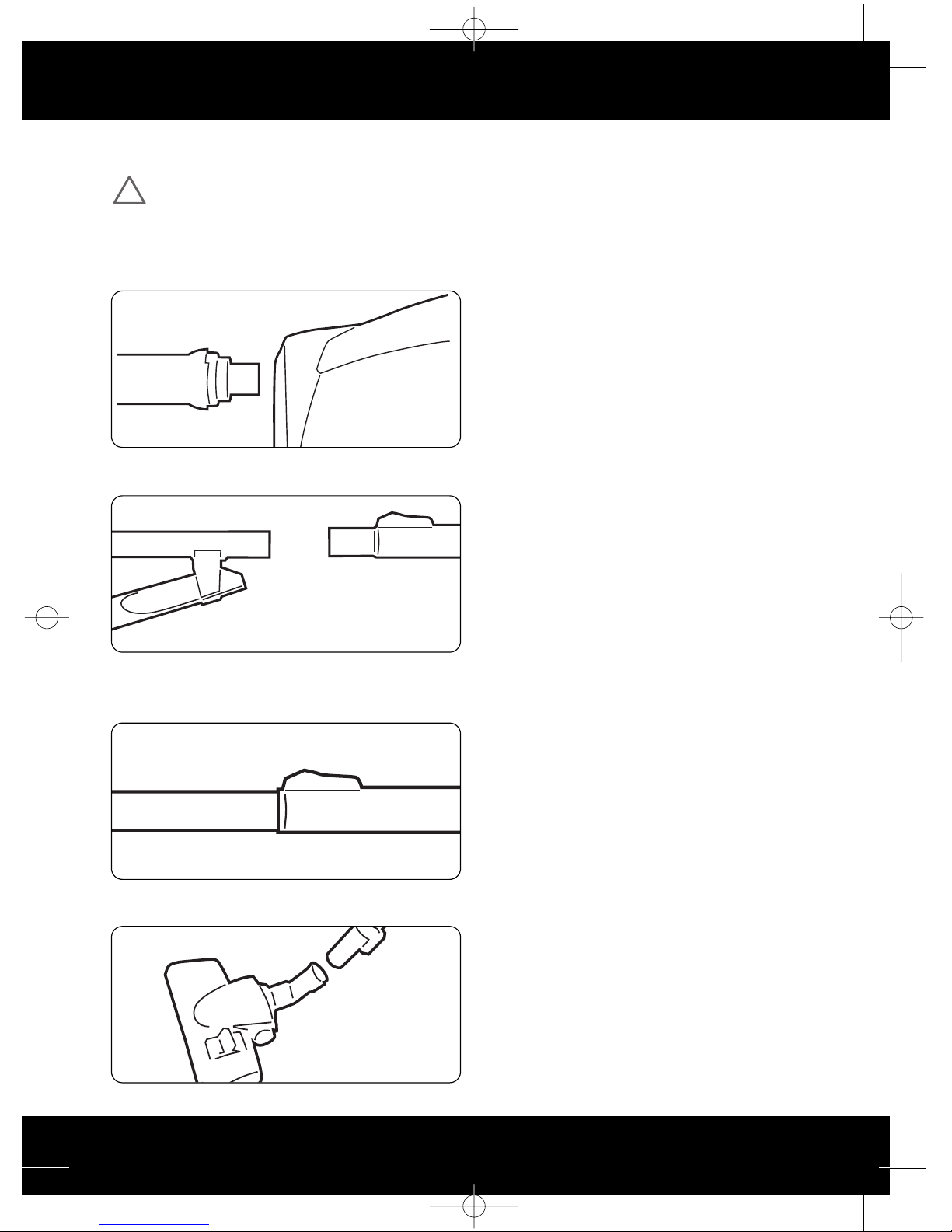
1. Insert the flexible hose into the inlet on the main body
of the vacuum cleaner. Push in until it clicks into
position (Fig.3/1).
2. Push the telescopic extension tube on to the end of
the handle (Fig.3/2).
3. The telescopic extension tube can be lengthened or
shortened by pushing the button in and sliding the
tube apart or together as required (Fig.3/3).
4. Fit the combination floor head by pushing onto the
extension tube (Fig.3/4).
4. How to Operate
Cord Release
Fully unwind the power cord. A yellow mark on the power
cord indicates the recommended cord length. Do not
exceed the cord length beyond the red mark.
n/ ff Button
Insert the power plug into the electrical outlet. Ensure the
vacuum cleaner is switched off.
Press the on/off button located on the top of the vacuum
cleaner and press the button again to turn the vacuum
cleaner off.
Carpet Cleaning
For carpet and rug cleaning press the rocker switch on the
combination floor head to raise the brushes.
Hard floor cleaning
For hard floor cleaning, press the rocker switch on the
combination floor head to lower the brushes.
Cord Rewind
To rewind the power cord, press the cord rewind button,
located on the top of the vacuum cleaner, and guide the
power cord with one hand. This will prevent the cord from
whipping which could cause damage or injury.
Variable Power
Located between the cord rewind button and the on/off
button there is a variable power dial. Rotate this clockwise
and anti-clockwise to adjust the suction power, LEDs will
light up dependant on power level.
Carry Handle
Use the carry handle located behind the cord rewind
button and on/off button to move the vacuum cleaner
from room to room.
Hose Storage
For convenience there is a slot located on either side of
the vacuum cleaner where the floor tool and hose can be
parked for carrying and storage.
Fig.3/1
Fig.3/2
Fig.3/3
Fig.3/4
!
Va V-091SP User Guide v2.q d:V-091SP User Guide 2/6/08 13:40 Page 5
www.vax.co.uk
6accessories / dirt container & filter
5. Accessories
The accessories can be attached directly to the handle by
removing the telescopic tube and pushing in the desired
accessory.
The accessories can also be attached to the telescopic
tube for extra reach. Remove the combination floor head
and push on the desired accessory.
2-in-1 Tool
Dusting brush: for delicate surfaces.
Upholstery tool: for carpet, upholstery, stairs, etc.
Crevice Tool
Use the crevice tool for crevices, corners and cracks, etc.
6. Dirt Container & Filter:
Removal and Replacement
IMP RTANT: The dirt container must be
emptied every time dirt in the container
reaches the MAX mark.
WARNING: Always unplug the vacuum cleaner
from the electrical outlet before removing the
dirt container.
WARNING: Do N T use the vacuum cleaner
without ALL of the filters in place.
N TE: For best performance, replace filters annually.
Emptying the Dirt Container
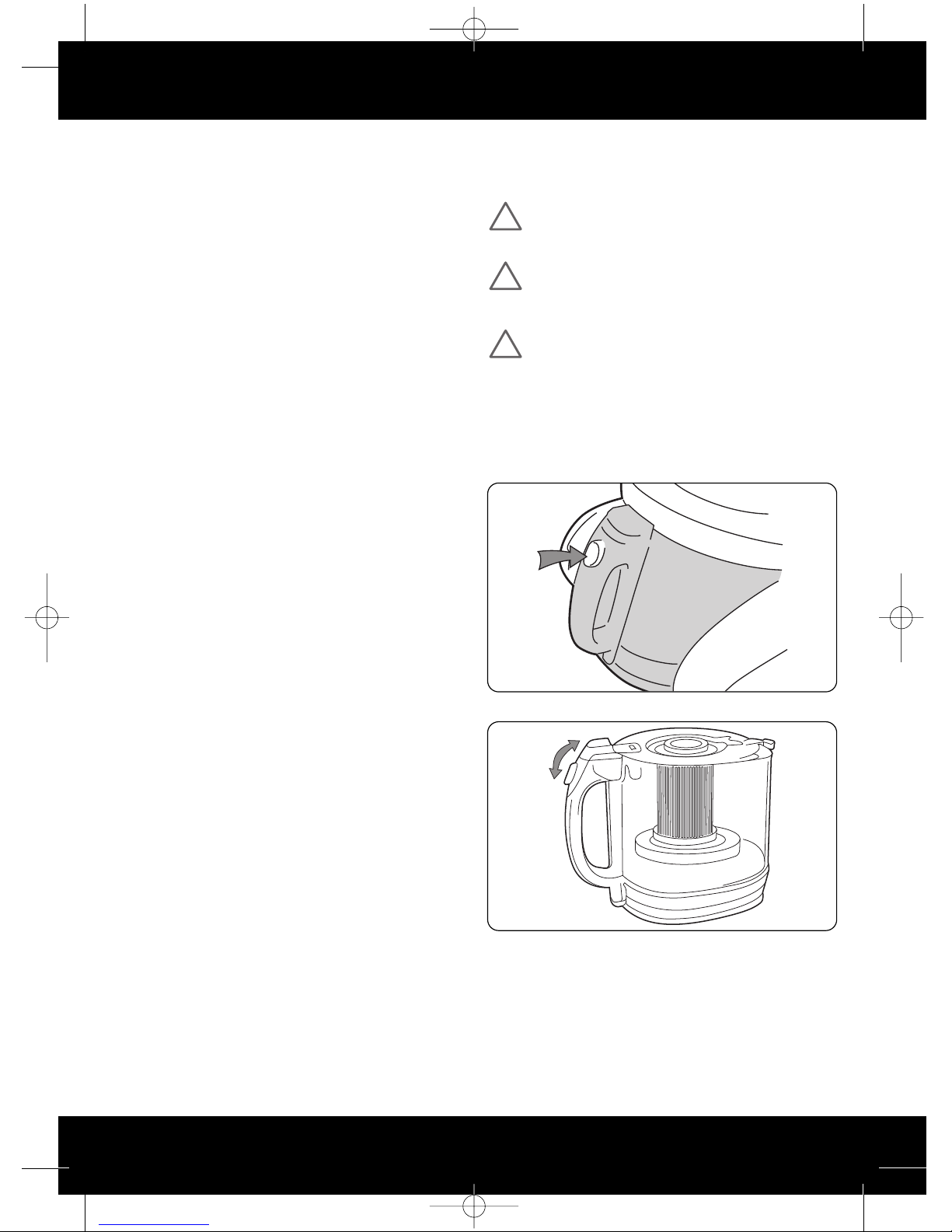
Press the button located on the dirt container handle to
pull out the dirt container (Fig.6/1)
Lift up the safety latch (Fig.6/2)
Press the button located under the safety latch to empty
the dirt into a rubbish bin. When all of the dirt has fallen,
close the dirt container flap, close the safety latch and
replace the dirt container.
Fig.6/1
Fig.6/2
!
!
!
Va V-091SP User Guide v2.q d:V-091SP User Guide 2/6/08 13:41 Page 6
7
Vax Careline 0870 606 1248
dirt container & filter / clearing blockages
Cleaning the Filter
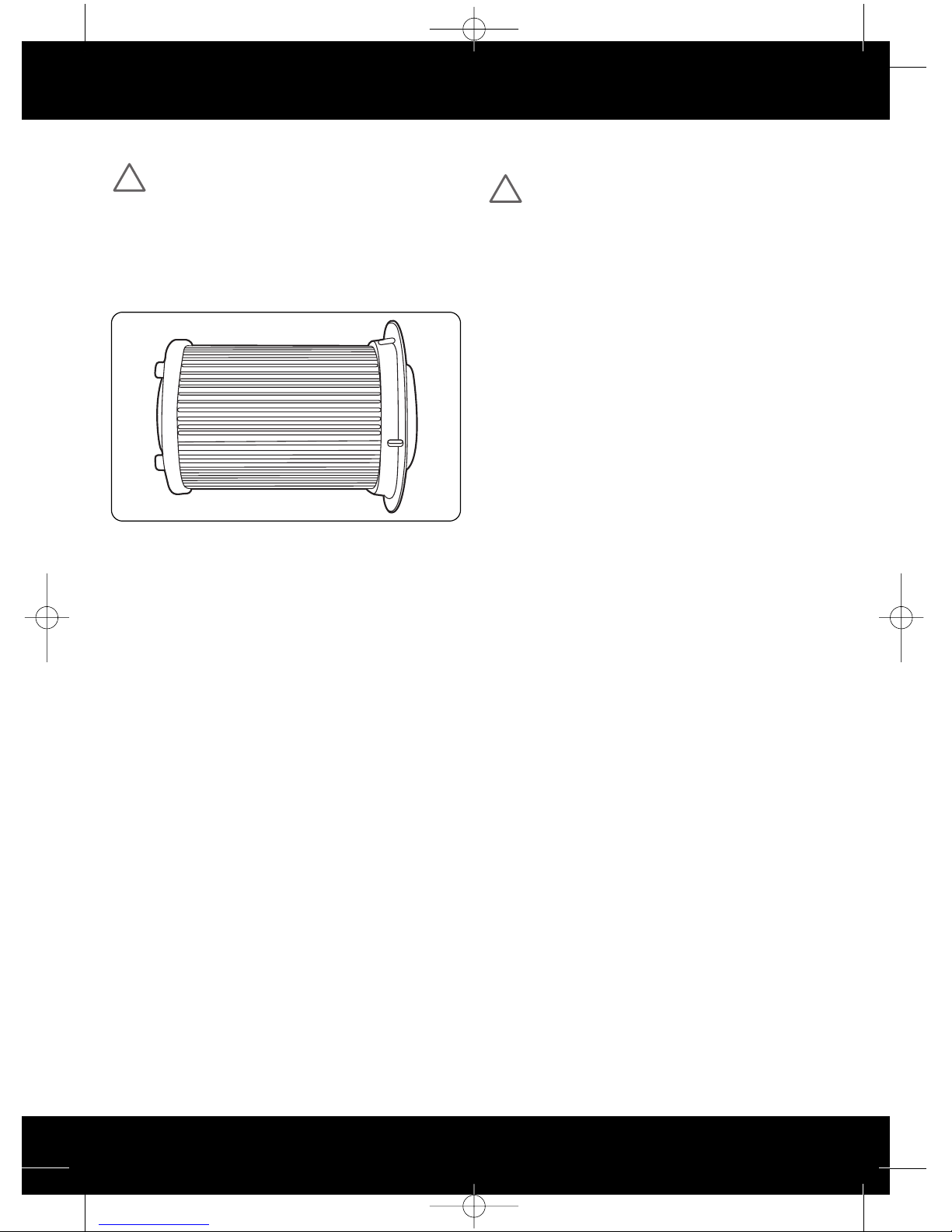
IMP RTANT: An extra central HEPA filter has
been included in the carton packaging. Vax
recommends replacing the central HEPA filter every
6-12 months.
Remove the dirt container as directed.
Release the filter safety latch located on top of the dirt
container and pull out the central filter (Fig.6/3).
Gently tap the filter against the side of a rubbish bin to
remove excess dirt.
The central filter can be washed in warm water (max
40°C). Allow to air dry completely before replacing.
N TE: Do N T use any detergents or boiling water to
wash the filter. Vax recommends washing the filter
every time you empty the dust container.
Return the central filter to the dirt container ensuring the
filter safety catch has been reset.
Replace the dirt container as directed.
Post-motor Filter
N TE: This is located on the right hand side of the
vacuum cleaner.
Release the post-motor cover and remove the filter by
pressing in the catch on the left hand side.
Replace the post-motor filter every 9-12 months.
Replace the post-motor filter and cover before re-starting
the vacuum cleaner.
7. Clearing Blockages
WARNING: To reduce the risk of electric shock,
the power cord must be disconnected before
performing maintenance or troubleshooting checks.
Turn the vacuum cleaner off and unplug from the electrical
outlet.
The flexible hose, stretch hose (Model:V-091S only) and
X-tend (Model: V-091X only) can be disconnected from the
vacuum cleaner by pushing in the button on the hose and
pulling away from the machine. Remove any blockages
found then re-connect the hose securely.
Fig.6/3
!
!
Va V-091SP User Guide v2.q d:V-091SP User Guide 2/6/08 13:41 Page 7
www.vax.co.uk
8storage/ troubleshooting
8. Storage
IMP RTANT: Always unplug the vacuum cleaner
from the electrical outlet and rewind the power
cord as directed before storing.
N TE: Always store the vacuum cleaner base down.
9. Troubleshooting
WARNING: To reduce the risk of personal injury,
unplug the vacuum cleaner before performing
maintenance or troubleshooting checks.
PR BLEM: Vacuum cleaner won't run
Cause: ot properly plugged into electrical outlet.
Solution: Plug in securely.
Cause: o electricity in the electrical outlet.
Solution: Check fuse or breaker.
Cause: On/off switch not turned on.
Solution: Push on/off switch to ‘on’.
Cause: Motor thermostat has tripped.
Solution: Switch off and unplug the vacuum cleaner.
Leave for one (1) hour before switching the
vacuum cleaner back on.
Cause: Blown fuse/tripped breaker.
Solution: Reset circuit breaker or replace fuse.

PR BLEM: Cleaner won’t pick up/loss of suction.
Cause: Dirt container not installed properly.
Solution: Review dirt container replacement.
Cause: Dirt container full or blocked.
Solution: Empty dirt container.
Cause: Clogged filters.
Solution: Remove, clean and replace filters.
PR BLEM: Accessories won’t pick up.
Cause: Accessories are not attached correctly.
Solution: Refer to section 5.
Cause: Hose is not installed correctly.
Solution: Refer to section 7.
PR BLEM: Dust escaping from the vacuum cleaner.
Cause: Dirt container full.
Solution: Empty dirt container.
Cause: Dirt container not installed correctly.
Solution: Review dirt container replacement.
Cause: Hose is not installed correctly.
Solution: Review installation.
Cause: Filter not installed completely.
Solution: Remove, clean and replace filters.
!
!
Va V-091SP User Guide v2.q d:V-091SP User Guide 2/6/08 13:41 Page 8
10. UK Service & Help
Vax Care 0870 6061248
Monday-Friday 9.00am to 5.00pm.
An answerphone is available outside of these hours. Any
queries or concerns about using the Vax, call the Vax
Careline. Calls are charged at the UK national rate.

Please make a note of the serial number and model
number of the carpet cleaner before calling. There are
over 400 approved Vax Service Agents in the UK. For the
nearest Service Agent, please call the Vax Careline.
www.vax.co.uk
11. Technical Specification
Voltage: 220-240V ~50Hz
Wattage: 2400W
Capacity: 3 litres approx
Filters: Washable central HEPA filter
Post-motor filter
Cord length: 6m approx
Weight: 7.5kg
Subject to technical change without notice.
9
Vax Careline 0870 606 1248
uk service & help/ technical specification
Va V-091SP User Guide v2.q d:V-091SP User Guide 2/6/08 13:41 Page 9
www.vax.co.uk
10
This page has been left intentionally blank
Va V-091SP User Guide v2.q d:V-091SP User Guide 2/6/08 13:41 Page 10