
VAXIS STORM 500+ User manual

VAXIS STORM 500+
INSTRUCTIONS
GM-innovations
Phone: +86 731-83998739
Website: www.vaxis.cn
ADD: 8F, N0.2,Huachen Century Square,Wanjiali Street,Yuhua District,Changsha City,Hunan Province,China.

Introduction................................................................................................. 1
1.Cautions................................................................................................... 2
2.About........................................................................................................3
3.Installation............................................................................................. 10
4.Operation instruction.............................................................................12
5.Maintenance.......................................................................................... 16
6.Truble shooting......................................................................................17

1
Introduction
Thank you for choosing our long-range wireless HDMI / SDI HD
products. Before you install the product, please read the user manual
carefully and follow the manual of the user manual to avoid product
damaged or other safety accidents.
Due to product version upgrade or other reasons, the contents of this
manual will be updated from time to time. Unless otherwise agreed,
this manual is used only as a guide, and all statements, information
and recommendations in this manual do not constitute any guarantee
either express or implied.

2
1. Cautions
■Logo and meaning
Careful, warning, dangerous, Pay attend to following items.
■Cautions
Do not use this product in the extreme hot, cold, dusty or humid
environments.
Prevent friction with hard objects.
Avoid the product falling down from a high place, or it may damage
the hardware.
The product is not water proofed. So do not get any liquid into the
unit please.
Do not dismantle, assemble or alter the product arbitrarily.

3
2. About
■Product Model and standard
The VAXIS STORM 500FT+ Wireless HDMI/SDI Transmission Suite
utilize today’s most advanced wireless video transmission technology,
which can realize the broadcast-class and uncompressed 3G SDI/HDMI
HD video signal transmitted with no compression and zero delay. The
suite includes one transmitter and one receiver, both of them provides a
3G/HD SDI interface and a HDMI interface. The transmitter with 2
sword antennas, and 5 antennas built-in receiver, and it can work in
5.1-5.9GHz frequency band and be flexibly software configured to
licensed or ISM band of global different regions. Meanwhile,on the front
of the transmitter and receiver have been installed a control panel with
OLED and channel adjustment button, which provides maximum 10
workable frequency channels. The product supports maximum 4 sets
working simultaneously and in same place(Multi-point to multi-point to
transmit different images).
The wireless suite can accept wide range DC power input, which is
suitable for many kinds of camera battery model. The suite also can
sustain ±4 kV ESD (HBM, contact discharge), the industry class metal
case and professional heat design would guarantee most robust reliability.

4
■Main features:
HDMI 1.3 spec supports
HDMI and 3G SDI input and output
Highest resolution 1080p 60,no delay and no compression
Support audio formats include Dolby True HD, DTS-master, etc.
AES-128 encryption with air interface HD video data stream
Support point to point, and point to multi points network topology
5GHz ISM frequency band,
maximum 10 frequency channels selected
by user knob, coexist with WIFI.
Maximum transmission distance 180meters
OLED screen display the current channel,power status,signal stength
Wide range power voltage input , adapt most kinds of camera battery
Transmitter with Sony F97 battery plate,Receiver with V-lock or
AB-lock,easy to install and replace in the shoot site
Any input and output ports with ±4 kV ESD protection level (HBM,
contact discharge)
Industrial metal shell for easy installation
■Parameters:

5
Transmitter
Receiver
Interface
SDI Input (BNC Female); HDMI
Input(Type A Female);2 Antenna
Interfaces;DC Input(2 Pin LEMO
Female);Add a USB port to
upgrade
SDI Output (BNC Female); HDMI
Output(Type A Female);2 Antenna
Interfaces;DC Input(2 Pin LEMO
Female);Add a USB port to upgrade
Supply Voltage
Range
6.5-16.8V DC
6.5-16.8V DC
Power consumption
<6W
<6W
Size
(LxWxH):115x67x23mm,Not
including the external antennas
(LxWxH):152x95x23mm
Mass
270g
355g
Input Video Format
HDMI:525i, 625i, 720p
50/59.94/60,1080i
50/59.94/60,1080p23.98/24/25/2
9.9/30/50/59.94/60;HDMI Type
A
SDI :3G, HD, and SD-SDI
(auto-selected),
SMPTE-259/274/292/296/372/42
4/425;1x BNC
/
Output Video
Format
/
HDMI:525i, 625i, 720p
50/59.94/60,1080i
50/59.94/60,1080p23.98/24/25/29.9
/30/50/59.94/60;HDMI Type A
SDI :3G, HD, and SD-SDI
(auto-selected),
SMPTE-259/274/292/296/372/424/4
25;1x BNC
Input Audio Format
SDI embedded 4 channel 24
bit/48KHz
/
Output Audio
Format
/
SDI embedded 4 channel 24
bit/48KHz
Signal Indicator
OLED Display
OLED Display
Frequency Band
5.1-5.9GHz,configurable with
China, North American, Europe,
etc
5.1-5.9GHz,,configurable with China,
North American, Europe, etc
6
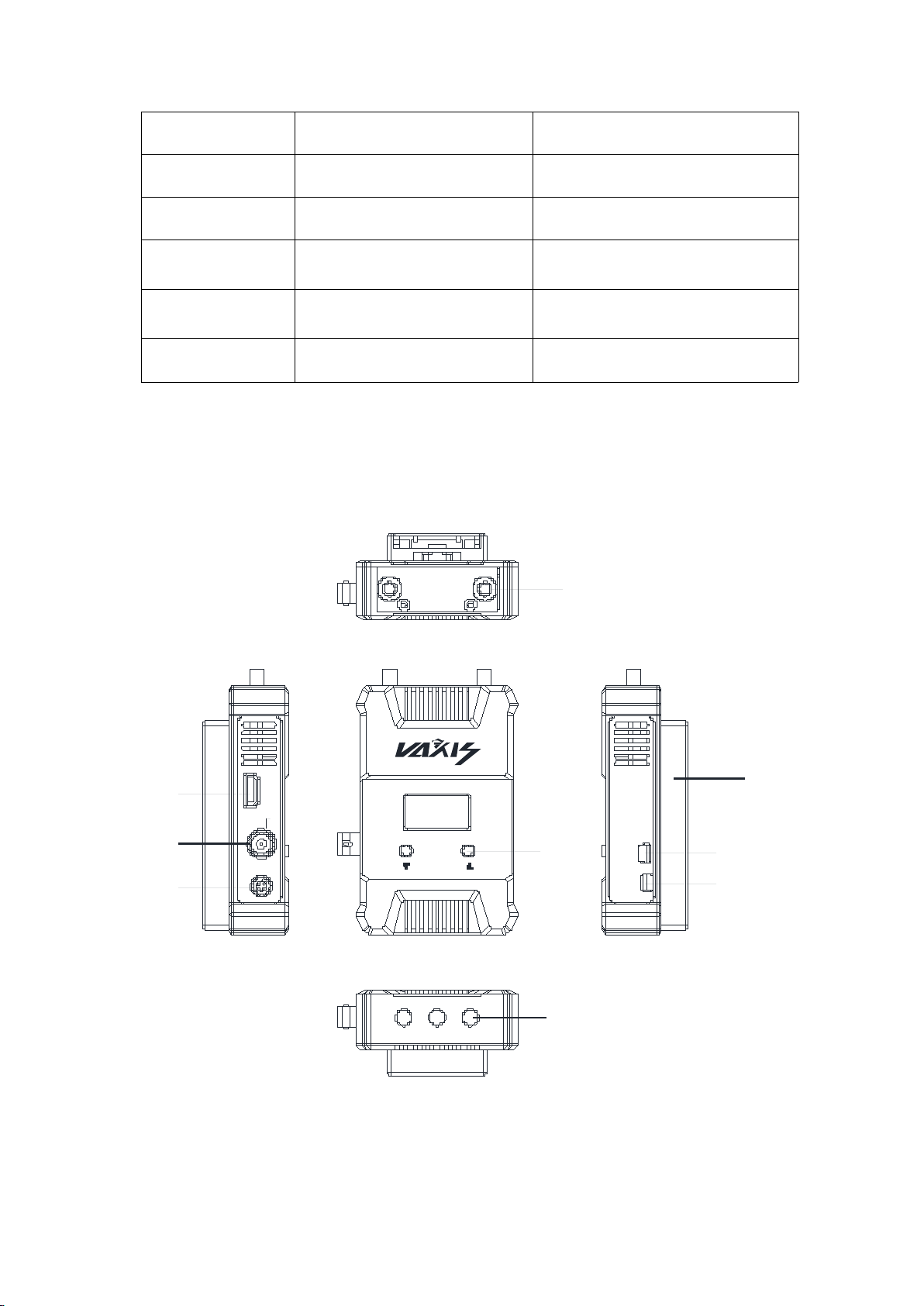
■Name of the product parts
Transmitter:
USB ON/OF F
HDMI IN
SDI IN
DC IN
1
2
3
4
9
5
6
7
8
①RP-SMA Antennae connector
②HDMI Input
Modulation Mode
OFDM 16QAM
OFDM 16QAM
Transmitted Power
Maximum 20dBm
/
Receive inspiration
/
-75dBm
Occupied
Bandwidth
20/40MHz
20/40MHz
Temperature Range
0~40°C(operating condition);
-20~60°C(Storage)
0 ~ 40°C (operating condition);
-20~60°C(Storage)
Compliance
FCC;CE.
FCC;CE.

7
③SD/HD/3G SDI Input
④DC Input, LEMO 2 Pin B series connector
⑤Screen control button
⑥Optional battery buckles
⑦USB interface to upgrade
⑧DC switch
⑨1/4-20 threaded hole
Receiver:

8
USB
SDI OUT
HDMI OUTON/OFF
DC IN
1
2
3
4
5
6
7
8
9
①Built-in Antennas
②USB interface to upgrade
③SD/HD/3G SDI output
④HDMI output
⑤DC switch
⑥DC Input, LEMO 2 Pin B series connector
⑦V-LOCK or AB-LOCK optional plate
Table of contents
Popular Transmitter manuals by other brands







Dejero
Dejero EnGo 3x manual

Rosemount
Rosemount 4600 Reference manual

Speaka Professional
Speaka Professional 2342740 operating instructions

trubomat
trubomat GAB 1000 instruction manual

Teledyne Analytical Instruments
Teledyne Analytical Instruments LXT-380 instructions

Rondish
Rondish UT-11 quick start guide





