FM8
04.07.2011 5 ©Velleman nv
4. Overview
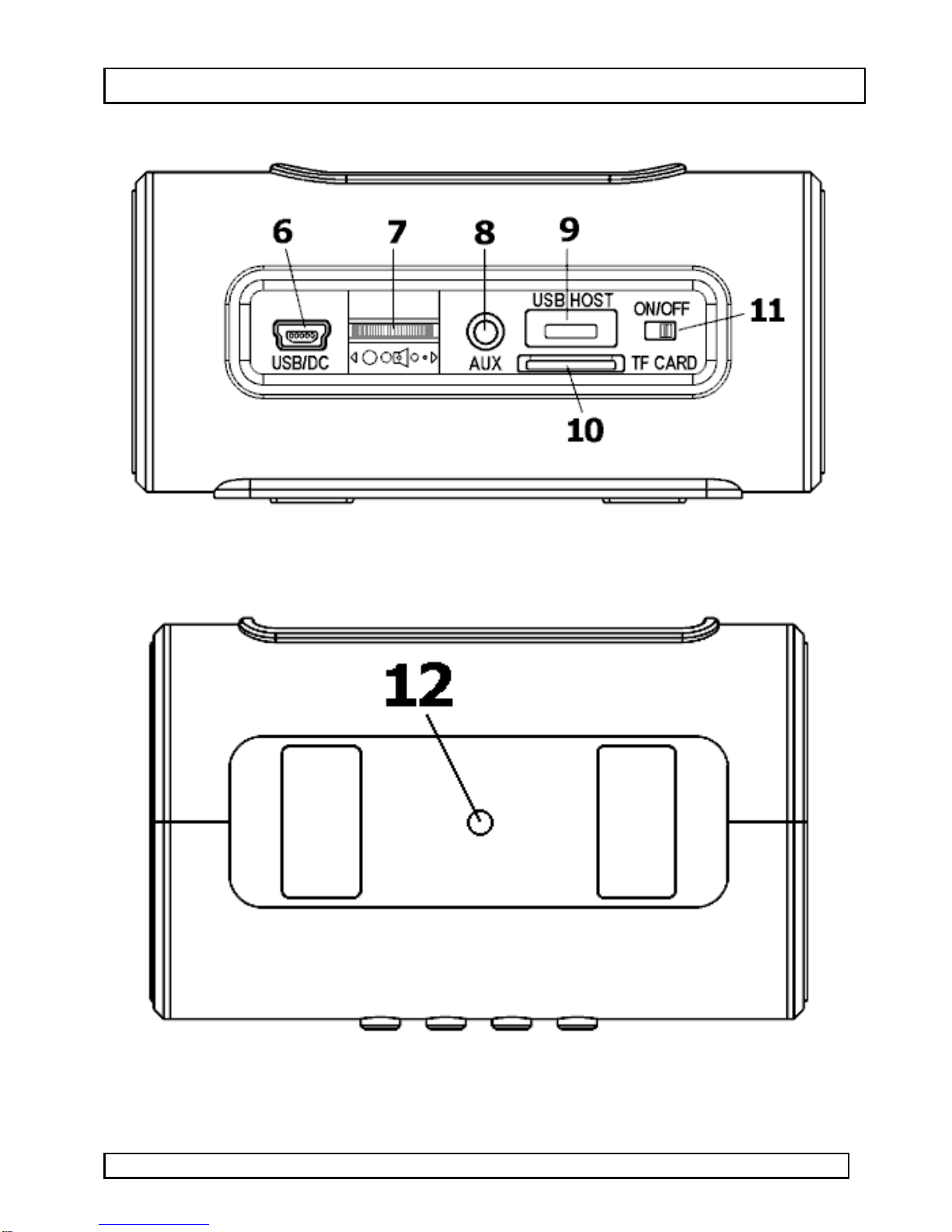
Refertotheillustrationsonpage2ofthismanual.
1Previousbutton 7Volumecontrol
2Modebutton 8Line‐injack(3.5mm)
3Play/Pausebutton 9USBport
4Nextbutton 10 TFcardslot
5LCD11 Powerswitch
6Powerconnector(MiniUSB) 12 StatusLED
5. Use
Refertotheillustrationsonpage2ofthismanual.
Charging
•PlugoneendoftheincludedUSBpowercableintoapoweredUSB
port,plugtheotherendintothepowerconnector[6].Thestatus
LED[12]lightsupred.
•Duringchargingitispossibletolistentomusic.
Playingmusic
•Setthepowerswitch[11]intheON‐position.
•Thereare4waysofplayingmusic.Either:
olistentotheFMradio,
oconnectaUSBdisk(notincl.)totheUSBport[9],
oinsertaTFcardintotheTFcardslot[10],
oconnectasuitabledevice(notincl.,e.g.mp3‐player)totheline‐in
jack[8]usingtheincludedcable.
Notes:
•thefileformatisMP3.
•TheUSBporttakespriority.
•Toselecttheplayingmode,pressthemodebutton[2]repeatedly
untilthedesiredplayingmodeisshownintheLCD[5].
•Usethevolumecontrol[7]tosetthedesiredoutputvolume.
Radiomode
•Inradiomode,thefrequencyisshownonthedisplay[5].
•Connecttheincludedline‐incabletotheline‐injack[8];itwillserve
asanantenna.
•Pressandholdtheplay/pausebutton[3]toautomaticallyscanand
storechannels.Note:previouslystoredchannelsaredeleted.Once
channelsarestored,presstheplay/pausebutton[3]shortlyto
advancetothenextstoredchannel.
•Presstheprevious[1]ornext[4]buttontomanuallysetthedesired
frequency.Pressandholdtosearchforthepreviousornext
availableradiochannel.