STARTING TREATMENT
Note: You may be asked to answer questions at the beginning
and end of each treatment.Press the + and −to scroll though
answers and the to select an answer.
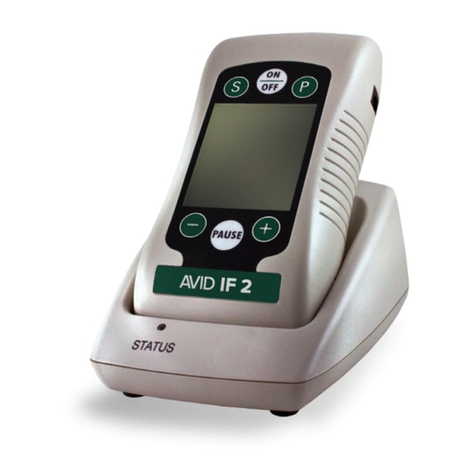
STEP 1: Press the button at the bottom of the device.
STEP 2: To select a preset, press the or arrow until the
preset number you want is shown on the screen. Press to
select.
• Preset #1 provides 40 minutes of treatment (two 20-minute
segments) for circulation and pain control. Use this preset
two to three times per day, as needed throughout your
rehabilitation.
• Preset #2 provides continuous pain control. Use this preset
as needed for pain control throughout the day or night.
• Preset #3 provides 20 minutes of treatment for circulation
followed by continuous treatment for pain control.
STEP 3: Press the +to start treatment by increasing the
stimulation to a comfortable intensity. To reduce intensity,
press the −. The screen will display the intensity and count
down your treatment time (for continuous presets, the timer
counts up). If there is an asterisk after the timer, it means that
another preset will follow once the time reaches 0.
NOTE: The Avid IF2 has a patient safety feature that locks
the screen after about 30 seconds to prevent accidental
increases in intensity. If you get a icon on the screen, press
the button, then press the +and −to adjust intensity.
To Pause treatment: Press the button on the screen. To
unpause, press the button
Vectoring: Vectoring the stimulation changes the intensity
of the stimulation of each channel to “target” your pain.
Vectoring is an option on the Avid IF2 when the intensity is
greater than 10 mA. To vector, press the symbol in the
upper right corner of the treatment screen. Then press either
the or arrow to vector towards one channel (either reds or
blacks). Press to return to the treatment screen.
STEP 4: To stop treatment and return to the main menu:
Press the symbol at the top of the screen. Then press
either to go to the main menu or to resume treatment.
COMPONENT USE AND CARE
ELECTRODES: IMPORTANT — Read the instructions for the
application and use of electrodes found on the electrode
package and in the Patient Operating Manual.
• Reusable, self-adhering electrodes are included in the kit.
ENGLISH
INICIO DEL TRATAMIENTO
Nota: Se le puede pedir que responda preguntas al principio
y al final de cada tratamiento. Presione + y−para
desplazarse por las respuestas y el para seleccionar una
respuesta.
PASO 1: Oprima el botón en la parte inferior del
dispositivo.
PASO 2: Para seleccionar un protocolo preestablecido,
oprima la flecha o hasta que aparezca en la pantalla el
ESPAÑOL
• Download the Avid IF2 app from the App Store or Google Play.
• Sign up and complete the information requested. Confirm
your registration via e-mail.
• Keep the app open and it will connect to the device overnight.
• The app will not disrupt your treatment and will not shut
the device o to upload information.
• You may receive reminders to upload your data.
TO MANUALLY UPLOAD YOUR INFORMATION:
• Turn on your Avid IF2 device and go to settings . Choose
Bluetooth. Make sure Bluetooth is enabled.
• Do not use alcohol to clean skin surface.
• Apply electrodes to dry, clean, unbroken skin surfaces
only, checking all edges for proper adhesion.
• Do not apply skin lotion prior to application of electrodes.
• Electrodes should always be placed at least one inch apart
to reduce risk of skin irritation.
• Remove electrodes before showering.
• Once electrodes are removed from skin, adhesive remover
towelettes can be used to clean o any adhesive residue.
• If you experience symptoms of skin irritation while using
the Avid IF2, discontinue use immediately and contact VQ
OrthoCare’s Patient Care Department at 800.452.7993, or
consult your physician.
• Do not remove electrode by pulling wire; peel away from
skin by grasping the edge of the electrode
CAUTION: Electrodes should be discarded and replaced
if damaged, when proper adhesive tack can no longer be
obtained, the gel has separated, or you sense a change in
stimulation intensity. If in doubt about the integrity or proper
function of any electrode, replace it before proceeding with
treatment. IF USING PAIN MEDICATION AND/OR OTHER
PAIN MANAGEMENT DEVICES, EXERCISE CAUTION WHEN
INCREASING AMPLITUDE ON THE Avid IF2.
WARNING: This device is designed for use only with elec-
trodes approved for medical electrical stimulation.
BATTERIES AND AC ADAPTER
• The Avid IF2 can be operated with two types of power
sources: an internal, rechargeable, 7.4V Lithium Ion battery
or an AC adapter.
• A low-battery indicator is shown in upper left corner of
screen when battery is low. Plug in the AC adapter.
• A completely drained battery will take approximately 6
hours to charge.
• The Avid IF2 can be used while the battery is charging but
will take longer to charge.
APP INSTRUCTIONS
ENGLISH • Open the app on your phone. It should connect automatical-
ly. If not, press “connect” next to your device. After upload,
press the two plugs at the top to disconnect .
• For complete instructions on the app, see the patient man-
ual. If you have any problems with the app, please contact
customer service at (800) 452-7993.
INSTRUCCIONES DE LA
APLICACIÓN MÓVIL
ESPAÑOL
• Descargue la aplicación móvil Avid IF2 de la App Store o
Google Play.