SETTING THE TEMPERATURE CONTROL
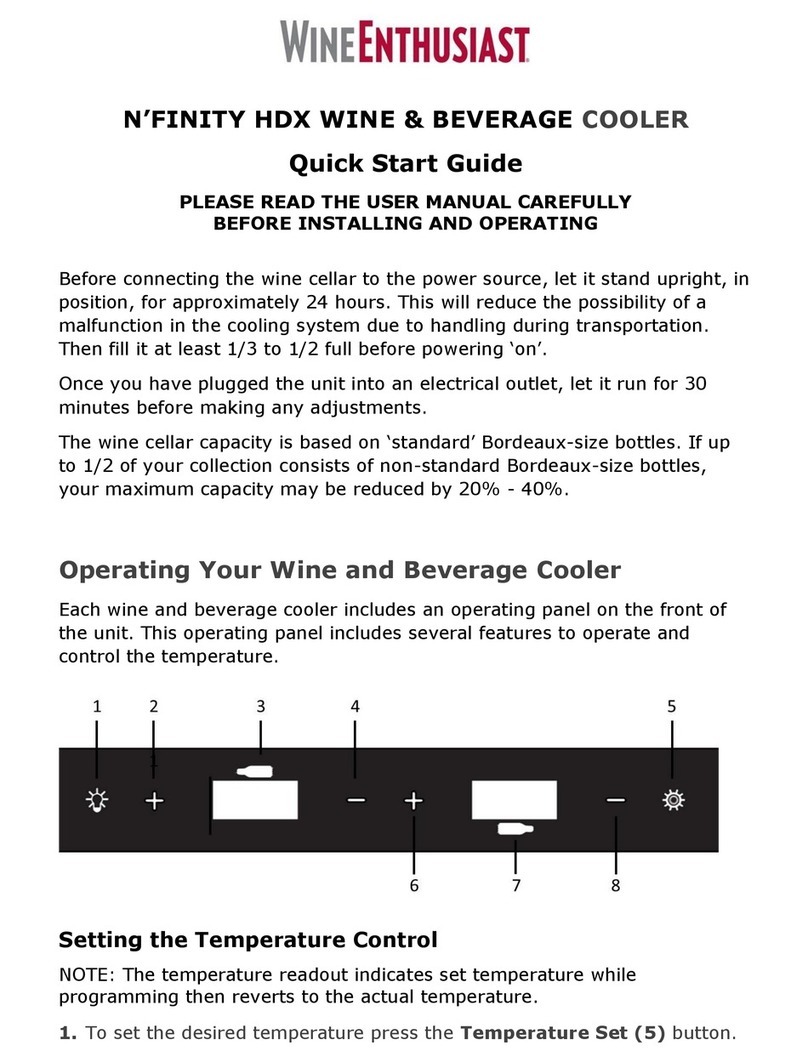
NOTE: TEMP SET indicates selected preferred temperature. DISPLAY indicates current temperature
IMPORTANT: IN ORDER FOR THIS UNIT TO FUNCTION AT OPTIMUM LEVEL, THE UPPER COMPARTMENT
SHOULD BE SET AT LEAST 4-DEGREES (F) COLDER THAN THE LOWER COMPARTMENT.
1. Make sure power cord is connected to a properly grounded outlet.
2. Turn power ON.
3. Each zone is independently controlled.
Upper Zone:The temperature setting can be adjusted from 41°F to 50°F
Lower Zone:The temperature setting can be adjusted from 50°F to 64°F
4. Set the desired temperature of the UPPER zone pushing the left side UP ( + ) or DOWN ( - ) button.
5. Set the desired temperature of the LOWER zone pushing the right side UP ( + ) or DOWN ( - ) button.
6. Temperatures increase or decrease 1°F with each push of the UP ( + ) or DOWN ( - ) button.
7. NOTE: Temperatures may fluctuate depending on whether the interior light is ON or OFF and depending on the
position of the bottles.
TEMPERATURE SETTINGS FOR SERVING WINE
1. Although optimal storage temperature is generally regarded to be 53-57°F, different varietals of wine require
different service. The recommended temperature ranges for serving different varietals of wine are listed below.
Your wine cellar will indicate when you have set the Upper/Lower zones to the below temperature ranges.
Red Wines: 60-66°F
White Wines 45-52°F
Sparkling Wines 40-45°F
NOTE:
In the event of a power interruption, all previous temperature settings will automatically be saved, and each
compartment will return to the previous temperature setting.
If the unit is unplugged, loses power, or is turned off, you must wait 3 to 5 minutes before restarting.
Attempting to restart the wine cellar before this time has elapsed may prevent the wine cellar from starting.
When you use the wine cellar for the first time or restart the wine cellar after having been shut off for a long time,
there will be a few degrees variance between the temperature you select and the one indicated on the LED
readout for the first few hours of operation. After a few hours of operation, the temperature will normalize to the
displayed temperature.
DOOR LOCK
This unit comes with key lock.
The keys are located inside the plastic bag that contains the user manual. To unlock the door, insert the key into
the lock and turn counterclockwise.
To lock the door, simply reverse the operation making sure the metal pin is engaged completely. Then remove
the key and place it is a secure place for safekeeping.