manuals.online logo
Brands
  1. Home
  2. •
  3. Brands
  4. •
  5. Yli Electronic
  6. •
  7. Lock
  8. •
  9. Yli Electronic YM-180M Instruction manual

Yli Electronic YM-180M Instruction manual

This manual suits for next models

5

Other Yli Electronic Lock manuals

Yli Electronic YM-180M User manual

Yli Electronic

Yli Electronic YM-180M User manual

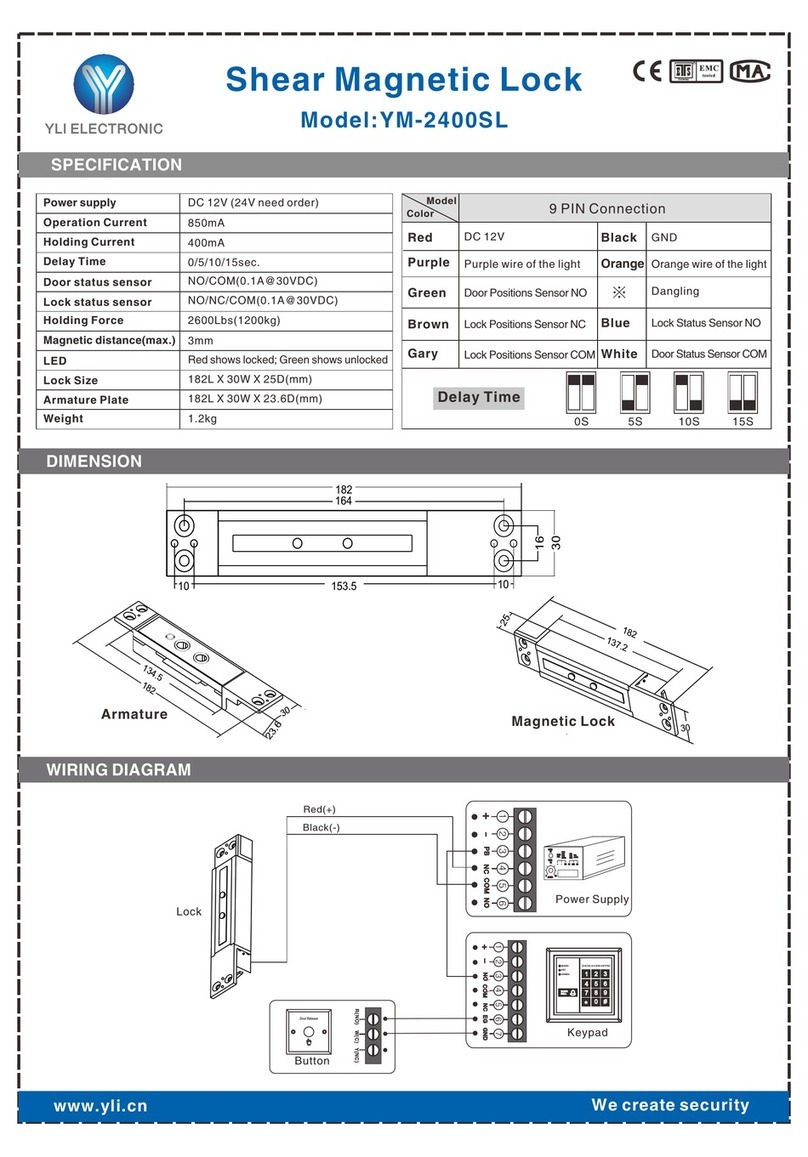
Yli Electronic YM-2400SL Quick start guide

Yli Electronic

Yli Electronic YM-2400SL Quick start guide

Yli Electronic YM-180M User manual

Yli Electronic

Yli Electronic YM-180M User manual

Yli Electronic YM-2400SL User manual

Yli Electronic

Yli Electronic YM-2400SL User manual

Popular Lock manuals by other brands

Magic 105 manual

Magic

Magic 105 manual

Gantner GAT NET.Lock 7020 System Installation, configuration & operation

Gantner

Gantner GAT NET.Lock 7020 System Installation, configuration & operation

Dorma Studio Classic Installation instruction

Dorma

Dorma Studio Classic Installation instruction

Securam ECSL-601 quick start guide

Securam

Securam ECSL-601 quick start guide

Sudhaus 3003 operating manual

Sudhaus

Sudhaus 3003 operating manual

Safety 1st 48517 user guide

Safety 1st

Safety 1st 48517 user guide

Pado FDS-10 user manual

Pado

Pado FDS-10 user manual

Esco systeQ Series installation instructions

Esco

Esco systeQ Series installation instructions

COMPX National D8951 instruction sheet

COMPX

COMPX National D8951 instruction sheet

secureo Key Box instruction manual

secureo

secureo Key Box instruction manual

Stock Loks C8713 instruction sheet

Stock Loks

Stock Loks C8713 instruction sheet

COMPX 1T-058 Information

COMPX

COMPX 1T-058 Information

Auslock T11 user manual

Auslock

Auslock T11 user manual

Stealth SAFES ShadowVault Instructions & Troubleshooting

Stealth SAFES

Stealth SAFES ShadowVault Instructions & Troubleshooting

Knox KeySecure 5 Admin & user guide

Knox

Knox KeySecure 5 Admin & user guide

Kwikset 48334/01 Quick installation guide

Kwikset

Kwikset 48334/01 Quick installation guide

Metra Electronics Door Access Terminal Combo Technical manual

Metra Electronics

Metra Electronics Door Access Terminal Combo Technical manual

Kilitronik miniK10m operating manual

Kilitronik

Kilitronik miniK10m operating manual

manuals.online logo
manuals.online logoBrands
  • About & Mission
  • Contact us
  • Privacy Policy
  • Terms and Conditions

Copyright 2025 Manuals.Online. All Rights Reserved.

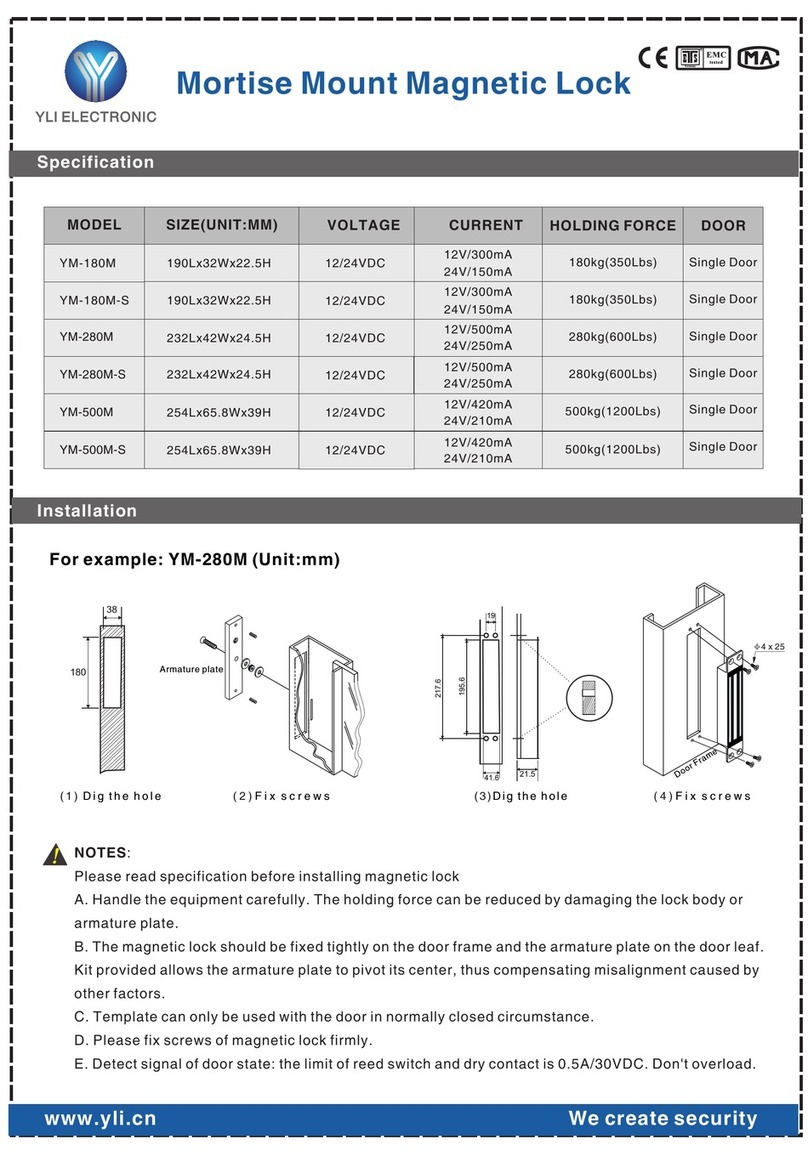
Specification
www.yli.cn
Installation
SIZE(UNIT:MM) VOLTAGE
180kg(350Lbs)
12/24VDC
12/24VDC
280kg(600Lbs)
CURRENT HOLDING FORCE
12/24VDC
12/24VDC
12/24VDC 500kg(1200Lbs)
232Lx42Wx24.5H
254Lx65.8Wx39H
190Lx32Wx22.5H
232Lx42Wx24.5H
180kg(350Lbs)
280kg(600Lbs)
For example: YM-280M (Unit:mm)
MODEL
12V/300mA
24V/150mA
12V/500mA
24V/250mA
12V/420mA
24V/210mA
12V/300mA
24V/150mA
12V/500mA
24V/250mA
190Lx32Wx22.5H
12/24VDC 500kg(1200Lbs)
254Lx65.8Wx39H
YM-180M
YM-180M-S
YM-280M
YM-280M-S
YM-500M
YM-500M-S 12V/420mA
24V/210mA
DOOR
Single Door
Single Door
Single Door
Single Door
Single Door
Single Door
We create security
!NOTES:
Please read specification before installing magnetic lock
A. Handle the equipment carefully. The holding force can be reduced by damaging the lock body or
armature plate.
B. The magnetic lock should be fixed tightly on the door frame and the armature plate on the door leaf.
Kit provided allows the armature plate to pivot its center, thus compensating misalignment caused by
other factors.
C. Template can only be used with the door in normally closed circumstance.
D. Please fix screws of magnetic lock firmly.
E. Detect signal of door state: the limit of reed switch and dry contact is 0.5A/30VDC. Don't overload.
tested
Ger many
EMC
R
Mortise Mount Magnetic Lock
( 1 ) D i g t h e h o l e (2)F i x s c r e w s
Armature plate
(3)D i g t h e h o l e ( 4 ) F i x s c r e w s
180
38
21.5
217.6
195.6
41.6
19
Door Frame
φ4 x 25
All manuals and user guides at all-guides.com
all-guides.com

www.yli.cn We create security
Circuit board diagram
Wire Connection
Cautions:
A. The screw of armature plate should not be fixed too tight. Proper elasticity
should be guaranteed for the rubber ring so that the armature plate can adjust
itself to the appropriate position.
B. Check the jumper's position before connecting. Figure out it represents 12VDC
or 24VDC.
!
Power Selector
Jumper
Red:
Black:
Blue:NC
Green:NO
White:COM
POWER
RED(+)
BLACK (-)
12VDC
24VDC
12VDC
24VDC
BLACK
BLACK (COM)
(NO)
YM-180M-S YM-180M,YM-280M,YM-500M YM-280M-S,YM-500M-S
Power Selector
Jumper
Power Selector
Jumper
POWER
RED(+)
BLACK (-)
All manuals and user guides at all-guides.com