TIME and ALARM CLOCK
RECEPTION OF THE RADIO SIGNAL
•The clock automatically starts the DCF77 signal search on any restart (power-up or RESET)
within approx. 5 minutes. The radio mast symbol starts to flash.
•At 1:00AM to 5:00AM the Radio Controlled clock automatically carries out a synchronization
procedure with the DCF77 signal to correct any deviations to the exact time. If this
synchronization attempt is unsuccessful (the radio mast symbol disappears from the display),
the system will automatically attempt a new synchronization at the next full hour. This
procedure is repeated automatically up to four times (latest at 5 am).
•To start manually the DCF77 signal reception, press and hold the
+
and
–
buttons together. If
no signal is received within seven minutes, then the DCF signal search stops (the radio mast
symbol disappears) and starts again at 1 am.
INFORMATION:
•A flashing radio mast symbol indicates that the DCF77 signal reception has started.
•A continuously displayed radio mast symbol indicates that the DCF77 was received
successfully.
•We recommend a minimum distance of 2.5 meters (8.2 Feet) to all sources of interference such
as televisions or computer monitors.
•Radio reception is weaker in rooms with concrete walls (e.g. in cellars) and in offices. In
extreme cases, place the system at a window.
•As there is less atmospheric interference at night, radio reception is normally possible at this
time. A single synchronization each day is sufficient to keep the time display accurate to one
second.
DAYLIGHT SAVINGS TIME: The radio controlled clock will automatically set itself in the spring (the
Sicon will appear next to the time) and then again in the fall for the winter/summertime change.
MANUAL TIME SETTING
•Press and hold down the MODE button for three seconds.
•The year display starts to flash. Now use
+
or
–
to set the correct year.
•Press MODE to confirm your setting.
•The month display starts to flash. Now use
+
or
–
to set the correct month.
•Press MODE to confirm your setting.
•The date display starts to flash. Now use
+
or
–
to set the correct date.
•Press MODE to confirm your setting.
•The time zone display starts to flash, Now use
+
or
–
to set the correct time zone.
•Press MODE to confirm your setting.
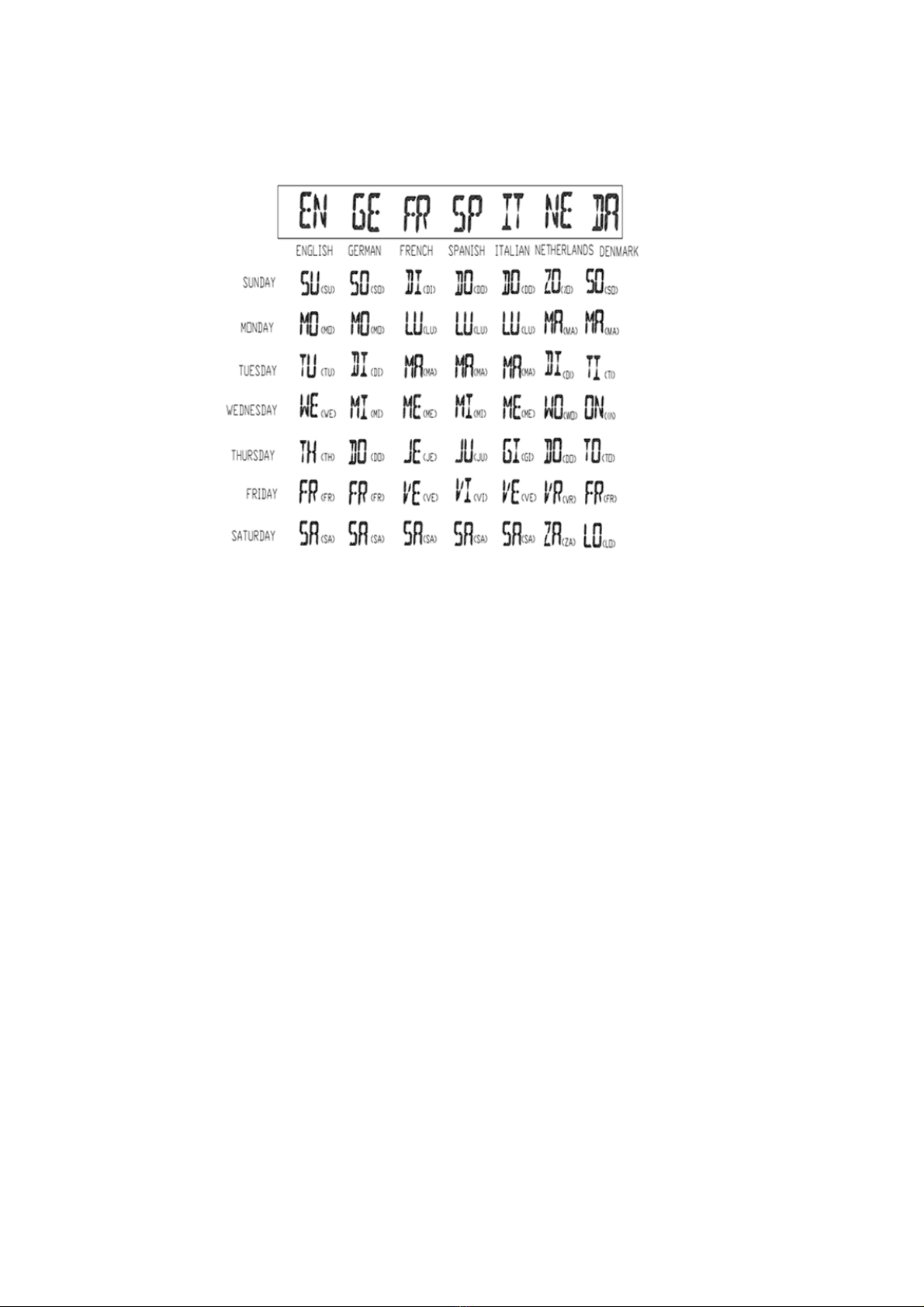
•The weekday starts to flash. Now use
+
or
–
to set your want language. There are seven
languages available for the day display: German, English, Italian, French, Dutch, Spanish or
Danish.
•Press MODE to confirm your setting.
•The 24Hr display starts to flash. Now use
+
or
–
to set the 12Hr or 24Hr for the time format. In
the 12Hr mode, the symbol AM (before midday) or PM (after midday) will be shown in the
display.
•Press MODE to confirm your setting.
•The hour display starts to flash. Now use
+
or
–
to set the correct hour.
•Press MODE to confirm your setting.
•The minute display starts to flash. Now use the
+
or
–
to set the correct minute.
•Press MODE to confirm your setting.
INFORMATION:
•After approx. 20 seconds without a button being pressed, the clock switches automatically from
setting mode to Normal clock mode.