iGlgre may euse the ercneous operation of these electron,c
e4lfrrEr6 q other prcblems. Special attention is required when near
fe eqqffib like: hearing aids, pacemakers and other mediml
(bvi6. fire de{ectoB, automatic doo6 aad other automatic control
bc Plee @ll the manufacturer or its lo€l agents for
bErag DE irpacts m ttE equipments.
i@ df usrlg S.rst Wddt Ph@e
Ee & rd dsryItle d @odel the Smart Watch phone,
o[ErE€ il d @ drrqe, leakage of the Smart Watch phone. lf
,E! need b e-a* a pl6e *nd it to the professional repair
F[ lbr pEftseiEl pssnd shall mt dismande the Smart Watch
PtoE
FEe 6 rd kd o ItE LCD w q knock other things with the
E\ dErie a rl (re the lekage of liquid crystal. lt,s
d-Ere atE fqil q)rialfio6 into the eyes which will be riskity
bhded- If a (b6 iil inb llE ey6, pleas immed;ately flush eyes with
€s (do d rub lhe e)€) and ask for help of the docto6.
Pl@ do rct u* nedle orsharp pen to touch the screen, otheruise it
will damage the SmartWatch Phone or @use misoperation.
Please avoid the Smart Watch Phone is too close to the magnetic
objects, like magnetic €rds, be@use watch phone radiation may
remove the infomation stored on the floppy disk, stored value ca.d or
credit card.
Please avoid the moisture, water or other liquid into the machine
be€use it may cause short circuit, leakage and other troubles to the
1: Camera; 2l
Microphone
The USB interfa@ on the side, €n be used for earphone, usb @ble,
charger.
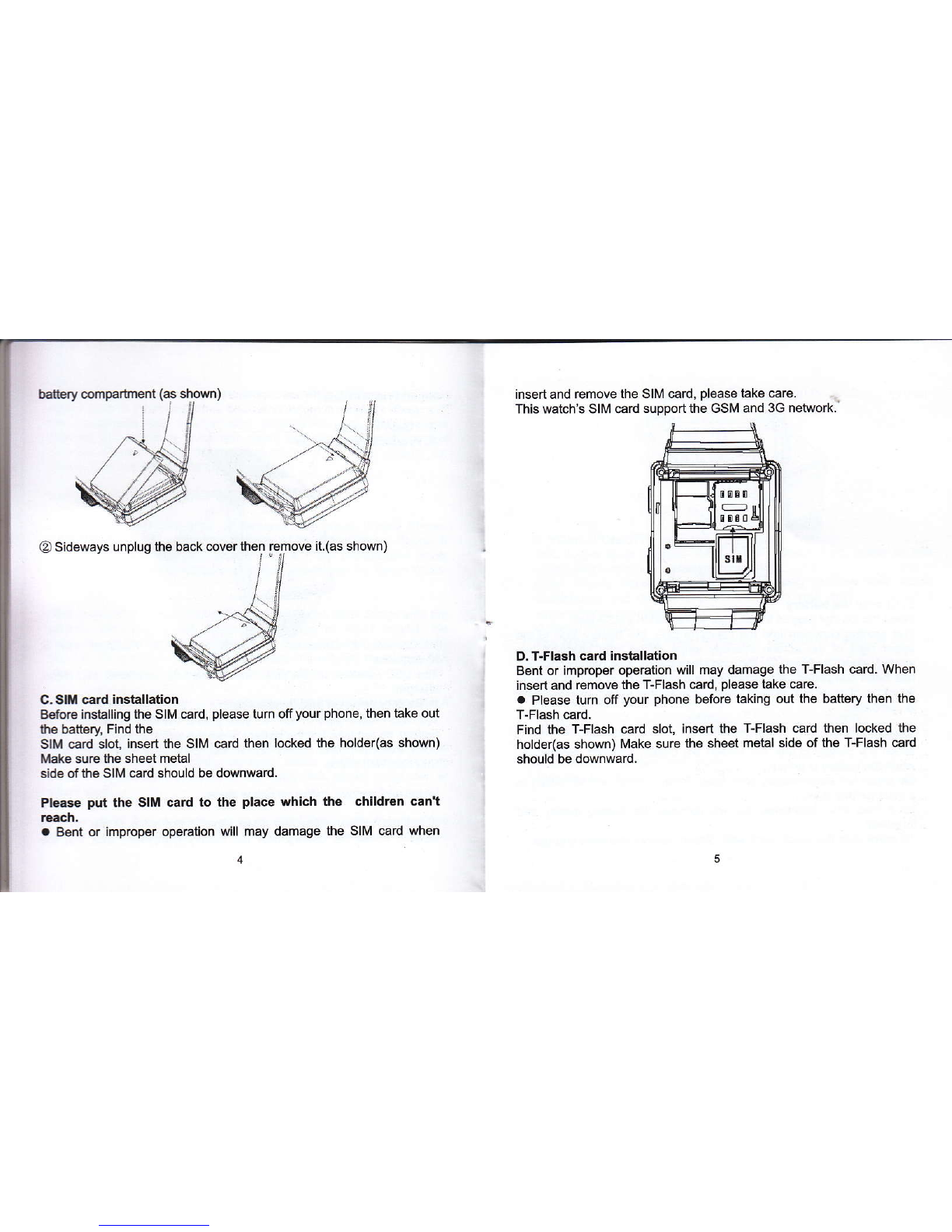
B. Battery removal and installation
Waming: Make sure to turn off your phone before you removlng the
battery do not take out the battery when the watch in the boot or have
other extemal power supply @nnection. OtheNise may damage the
Sll\4 card and watch.
lnstall and remove, follow as below steps:
OLet the battery cover two clasp align at the clasp of the body of
watch : Press the baftery until the battery completely Iock into the
-01
4: Function key 5: