manuals.online logo
Brands
  1. Home
  2. •
  3. Brands
  4. •
  5. Abitana
  6. •
  7. Telephone System
  8. •
  9. Abitana ABI-ET2001 User manual

Abitana ABI-ET2001 User manual

Popular Telephone System manuals by other brands

Panasonic EASA-PHONE KX-T2310 operating instructions

Panasonic

Panasonic EASA-PHONE KX-T2310 operating instructions

AT&T Network Adapter 25 user guide

AT&T

AT&T Network Adapter 25 user guide

Panasonic KX-TSC11AGW Service manual

Panasonic

Panasonic KX-TSC11AGW Service manual

Panasonic KX-TD612 Getting started

Panasonic

Panasonic KX-TD612 Getting started

AT&T Network Adapter 25 user guide

AT&T

AT&T Network Adapter 25 user guide

Bticino PABX 28D User instructions

Bticino

Bticino PABX 28D User instructions

NEC SL 2100 user guide

NEC

NEC SL 2100 user guide

Ericsson DCT1800-S user guide

Ericsson

Ericsson DCT1800-S user guide

NEC Electra Elite 192 Hardware manual

NEC

NEC Electra Elite 192 Hardware manual

Alcatel EASY REFLEXES 4200 Admin & user guide

Alcatel

Alcatel EASY REFLEXES 4200 Admin & user guide

Panasonic KX-TDA50 operating manual

Panasonic

Panasonic KX-TDA50 operating manual

Sonifex Phone In 6 User handbook

Sonifex

Sonifex Phone In 6 User handbook

Teleco Perfect Voice Tis 16 installation manual

Teleco

Teleco Perfect Voice Tis 16 installation manual

TransTel Communications TD-824i Installation and programming manual

TransTel Communications

TransTel Communications TD-824i Installation and programming manual

Nortel BCM50 Installation and maintenance guide

Nortel

Nortel BCM50 Installation and maintenance guide

Panasonic KX-TS25B user guide

Panasonic

Panasonic KX-TS25B user guide

Tynetec Advent xt user guide

Tynetec

Tynetec Advent xt user guide

Karel MS26S Easy to use owner's guide

Karel

Karel MS26S Easy to use owner's guide

manuals.online logo
manuals.online logoBrands
  • About & Mission
  • Contact us
  • Privacy Policy
  • Terms and Conditions

Copyright 2025 Manuals.Online. All Rights Reserved.

090810_ABI-ET2001_QSG_ML
English Page9 N.V. abitana S.A.
ENGLISH
ABI-ET2001
Telephone Connection Module
4lines
Quick StartGuide
1 PackageContents
• TelephoneConnection Module4lines
• QuickStart Guide
2 Introduction
TheABI-ET2001isapassivetelephonedistribution modulesuitablefor
standard(PSTN)anddigital(ISDN)phonelines.
ThisunitprovideseasyconnectionofTelephone,FAXand/orISDN
equipment likeTelephones,modemsorbankterminals
TheABI-ET2001doesnothaveaprivacyprotection device
incorporated.
3 HardwareIntroduction
P1
P2
P3
ISDN
L1
L2
P4
Positie
A<->B
Figure1
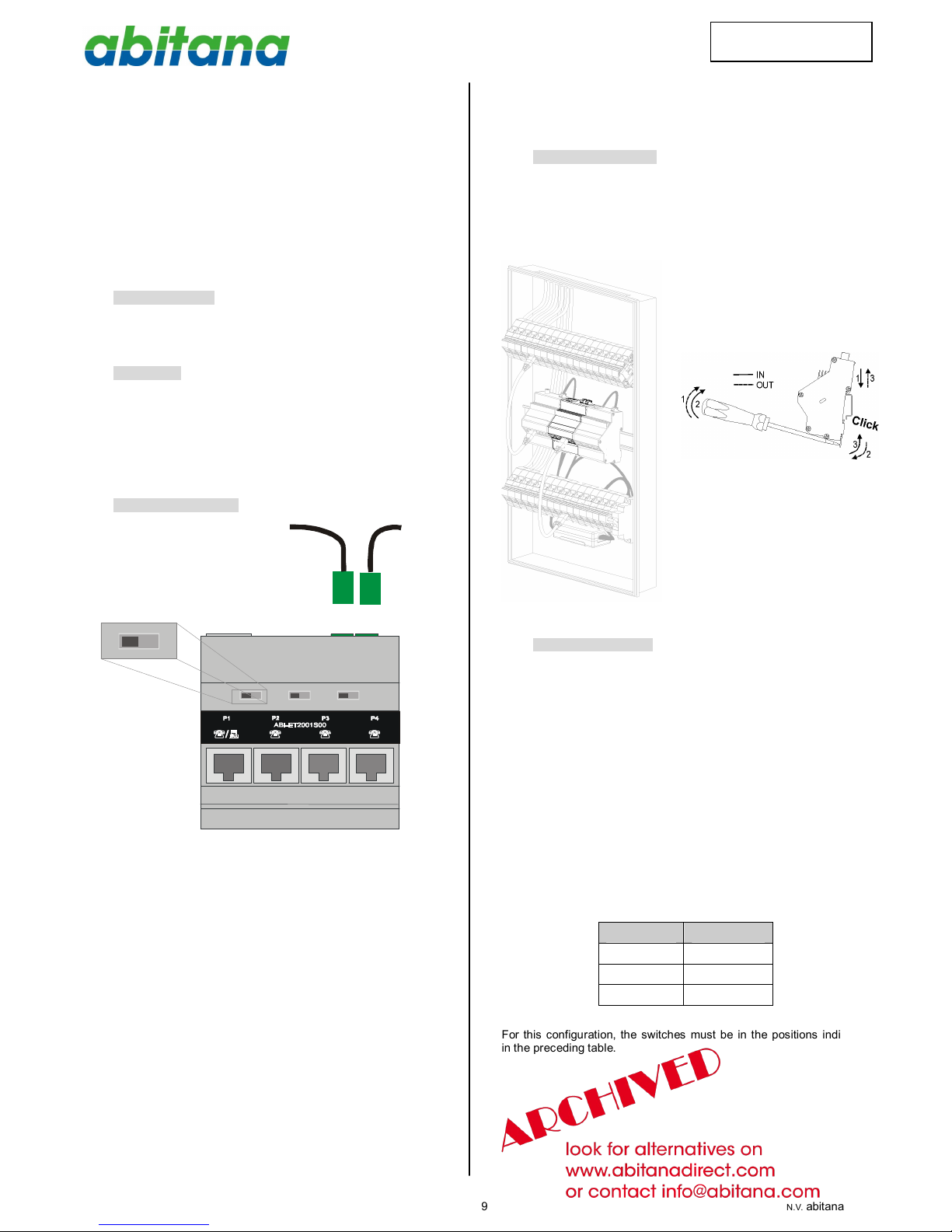
TheDIN-Rail mountableABI-ET2001 isequippedwith4RJ45 jackson
thefront oftheunit. (P1~P4)
Threeswitcheson thefrontoftheunitareused toconfiguretheunit
accordingtotheneedsofyourinstallation.Differentconfiguration
scenariosareexplained laterinthismanual.
Onthetop oftheunityou’llfindtheconnectionsforthe‘incoming’
phonelines
Theswitchesand theincomingphonelineconnectionsareonly
accessiblewhenthefrontof the‘Comm CenterCabinet’isremoved.
Theunitwillprobablybeconfigured duringinstallation.Makesureto
takenoteoftheconfiguration(Connectionstotherearportsandswitch
settings). Attheendof thismanual,you willfind atablewhereyou can
writedowntheconfiguration.
4 Installation andpower
Nopowerneeded.
Load ratioforthismodule=0.
Maximumallowedloadratio(sumof theloadratiosforallmodules)for
powersupplyABI-PS1001S00=4.
Clickthemoduleon theDIN-Railasshowninthepicturesbelow:
5 Installation scenarios
The switcheson thefrontoftheunit(see Figure1))can beplaced in
twopositions(Aand B). Anumberofcombinationsispossible,butnot
all possiblecombinationsareallowed (dependingon theexternal
connectionstoISDN,L1 andL2,andtheconnecteddevicestoP1~
P4)
5.1 Oneanalog(PSTN)phoneline
Whenyouhaveoneincoming telephoneline(standardPSTN),you
can distributethesignal to4locationsinparallel.
Whenacallarrives,allphoneswill ringatthesametime.Youcanpick-
up anyof thefourphonestoanswerthecall.
Ifduring acall asecond phoneisunhooked,thisphonewill jointhe
ongoingconversation.
Nointernal callsbetweenthelocationsarepossible(NOPABX
function).
SwitchNr. Position
S1 A
S2 A
S3 A
Forthisconfiguration,theswitchesmustbein thepositionsindicated
in thepreceding table.

090810_ABI-ET2001_QSG_ML
English Page10 N.V. abitana S.A.
ENGLISH
P1
P2
P3
ISDN
L1
L2
P4
A
N.C.
N.C.
L1
L1
L1
L1
L1PUBLICanalog(PSTN)line
A
A
Remark: Thereshould benoconnectionstotheISDN(RJ45).
Inthisconfiguration,itispossibletoextendthenumberofphones
connected tothephonelinebijconnectingL2of thefirstET2001toL1
ofthesecond one.
P1
P2
P3
ISDN
L1L2
P4
A
N.C. N.C.
L1 PUBLICanalog(PSTN)line
L1 L1 L1 L1
AA
P1
P2
P3
ISDN
L1
L2
P4
A
N.C. N.C.
L1
L1
L1
L1
AA
FirstET2001 module
Second ET2001 module
5.2 Two analog (PSTN)phonelines
Thisconfiguration isused when youhavetwoincomingtelephone
lines(standardPSTN).Theselinescaneithercomedirectlyfromyour
operator,orfroman ISDN to2PSTNlines(TA) adapter.
SoBUS TA
NT
L1
L2
L1
L2
TELECOM
OPERATOR
ISDNLine
TELECOM
OPERATOR
PSTN Lines
-OR-
Line2connectstooneport(P1),and Line1connectstotheother
three portsin parallel(P2, P3, P4)
WhenacallarrivesonlineL1,allphoneson P2~P4willringatthe
sametime.You can pick-upanyofthethree phonesconnected tothat
linetoanswerthecall.
Ifduring acall asecond phoneisunhooked,thisphonewill jointhe
ongoingconversation.
Nointernal callsbetweenthelocationsarepossible(NOPABX
function).
You can makeaphonecall fromaphoneconnected toline1toa
phoneconnected toline2,butthisisnotafree call,asthecallis
processed byyourphonecompany
Inthisconfiguration,L2isusuallyusedforaFAXoraMODEM.
SwitchNr. Position
S1 A
S2 B
S3 B
Forthisconfiguration,theswitchesmustbein thepositionsindicated
in thepreceding table.
P1
P2
P3
ISDN
L1
L2
P4
A
N.C.
L2
BB
L1
L1
L1
L1PUBLICanalog(PSTN)line
L2PUBLICanalog(PSTN)line
5.3 ISDN
5.3.1 3ISDN Phones and onePSTNline
Thissettingprovidesconnectionsfor3digital (ISDN)phones,andone
standard(PSTN)phone.
Thisconfiguration mightbeasfollows:
• OneISDN line,andonePSTNline,supllied byyourPhone
company
• OneISDN line,supplied byyourPhonecompany,an onePSTN
line, commingfromaTA, connectedtoyourISDNline.
SoBUS TA
NT
L2
L2
- OR -
TELECOM
OPERATOR
ISDN
NT
ISDN
PSTNLine
ISDNLine
TELECOM
OPERATOR ISDNLine
090810_ABI-ET2001_QSG_ML
English Page11 N.V. abitana S.A.
ENGLISH
P1
P2
P3
ISDN
L1
L2
P4
A
L2
ISDN-So
NT
SoBUS B
TA
ISDN-So
ISDN-So
B
TA
TOTELECOM
OPERATOR (ISDN)
SwitchNr. Position
S1 A
S2 B
S3 B
Forthisconfiguration,theswitchesmustbein thepositionsindicated
in thepreceding table.
5.3.2 All ISDN connections
Thisconfiguration distributestheISDN (SoBus)tothe4ports
P1
P2
P3
ISDN
L1
L2
P4
A
ISDN-So
NT
SoBUS A
ISDN-So
ISDN-So
A
ISDN-So
TOTELECOM
OPERATOR (ISDN)
SwitchNr. Position
S1 A
S2 A
S3 A
Forthisconfiguration,theswitchesmustbeinthepositions,indicated
in thepreceding table.

5.4 Onephonelines(PSTN)connectedtoapriority
FAX/Modem
Ifyouhaveoneincoming lineL2,andyouhaveaFAX/Modem
connected tothatline,youcan usethefeed-thrufeatureofthat
equipmenttodisconnecttherestofthephoneswhen aFAX
communication isin progress,orwhen thephonelineisin usebya
Modem.Thispreventsdisruption of thecommunication when someone
picks-up aphonewhilethelineisin usebythosedevices.Thefeed-
thrulinebecomesL2’inthedrawing.
Whenacall arrives,allphoneswillring (including FAX/Modem).
Depending on theconfiguration oftheFAX/Modem,itwillanswerthe
callafteraspecified numberofrings.Anytimebetweenthefirstring
andthatspecificnumberofrings,you can answerthecallbypicking
up anyof thephonesconnectedtoP2~P4.
WhenthecallhasbeenansweredbytheFAXorModem,phones
connected toP2~P4(21’)willbedisconnected.
P1
P2
P3
ISDN
L1
L2
P4
B
B
B
L2
L2’
L2’
L2’
NC
NC
L2 PUBLICanalog(PSTN)line
SwitchNr. Position
S1 B
S2 B
S3 B
Forthisconfiguration,theswitchesmustbeinthepositions,indicated
in thepreceding table.

ImportantRemark:
Thisconfiguration isonlyvalid in caseetheFAXconnectedtoP1
returnsL2’onpins3and6oftheRJ45 connector.
P1 P2 P3
P4
L2
L2’
L2’
L2’
L2
L2’
RJ11/RJ12
WhenevertheFAXisdisconnected,allthephonesconnected toP2~
P4aredisconnected also.
IftheFAXisdisconnected (repair,maintenance,…) theconfiguration
mustbechanged (Select settingAAA).
090810_ABI-ET2001_QSG_ML
English Page12 N.V. abitana S.A.
ENGLISH
6 Yourconfiguration
Port Nr Connected to
1 cISDN cL1cL2
Tel #:
2 cISDN cL1cL2
Tel #:
3 cISDN cL1cL2
Tel #:
4 cISDN cL1cL2
Tel #:
ISDN (Top)
cISDN cL1cL2cNoConnection.
Tel #:
L1 (Top) cNoConnection
Tel #:
L2 (Top)
cNoConnection
Tel #:
cConnecedtoasecond ET2001
Positionoftheswitches
AS1 B AS2 B AS3 B
cccccc