
AccuBANKER D500 User manual

1
www.AccuBANKER.com
1
wwwAccuBANKER.co
m
D500
Super Dollar Authenticator
www.AccuBANKER.com
USER GUIDE

Thank you for trusting AccuBANKER with your cash
handling needs. In order to optimize the performance
of your equipment, we encourage you to thoroughly
read this user guide prior to use.
®

3
Table of Contents
Table of Contents .............................................................................................3
Introduction......................................................................................................4
Safety Instructions............................................................................................4
Other Safety Considerations.............................................................................5
Box Contents....................................................................................................6
Cleaning of the Machine ..................................................................................7
1. General Controls and Parts...........................................................................8
1.1 Specific Controls ..................................................................................10
2. Features ......................................................................................................11
2.1 Automatic Feed.....................................................................................11
2.2 Banknote Ejection Direction ................................................................11
2.3 Report Function....................................................................................11
2.4 Counterfeit Detection ...........................................................................11
3. Operation....................................................................................................12
3.1 Basic Operation ....................................................................................12
3.2 Banknote Ejection Direction ................................................................12
3.3 Report Function....................................................................................12
3.4 Counterfeit Detection ...........................................................................13
4. Solutions to Operational Problems.............................................................14
4.1 Preventive Measures.............................................................................14
4.2 Jamming................................................................................................15
5. Error Messages...........................................................................................16
6. Specifications .............................................................................................17

4
Introduction
The D500 Super Dollar Authenticator is part of our next generation in
micro-technology. The streamlined design allows for simple banknote
processing. Multiple counterfeit detection functions provide added
security.
Safety Instructions
Warning
Do not use this product in areas where it may be exposed to water or otherliquids.
Unplug this product from the electric outlet before cleaning. Do not use liquid or
aerosol cleaners. To clean, use a damp cloth.
To reduce the risk of electric shock, do not disassemble this product. Take
it to qualified service personnel when service or repair work is required. Opening or
removing covers may expose you to dangerous voltages or otherrisks. Incorrect
reassembly can cause electric shock when the appliance is subsequently used.
Only use the cable provided with the unit. The use of other cables may result
in electric shock, fire, or cause serious damage to the unit.
Do not operate the unit in areas with high temperature or high humidity sinceit may
prevent it from working correctly.
Caution
When unplugging the power cord, do not pull it by the cord, but rather grip the plug
to pull it out. Not following these instructions may result in electricshock, fire, or
damage to the unit.
Do not use the unit if the power cord is damaged or if the plug socket contactis loose.
Not following these instructions may result in electric shock, fire, or other hazards.
Do not place heavy objects over the cord and do not bend it excessively sinceit could
get damaged. Not following these instructions may result in electric shock, fire, or
other hazards.
When not using the unit for a long time, remove the power plug from the electric outlet.
!
!

5
Other Safety Considerations
•Read and understand all the safety instructions.
•Follow all warnings and instructions marked on the unit.
•Do not place near direct sunlight, heat sources, air conditioners, or in
an enclosed space unless proper ventilation is provided.
•This product should be operated only from the type of power source
indicated in this user’s guide. If you are not sure of the type of power
supply in your location, consult your dealer or local power company.
•Never push objects of any kind into the unit through the case slots or
openings, since they may touch dangerous voltage points or shortcut
parts, resulting in a risk of fire or electric shock.
•Never spill liquids of any kind on the product.
•Unplug this product from the electric outlet and refer to servicing by
qualified service personnel under the following conditions:
-When the power supply cord or plug is damaged or frayed*
-If liquid has been spilled into the unit or it has been exposed to
rain or water*
-If the unit has been dropped or the case has been damaged*
-If the equipment shows a noticeable change in performance
*Not covered under warranty
!
If the unit does not operate normally while following the
instructions, adjust only those controls covered by the operating
instructions. Improper adjustment of other controls may result in
damage and will often require extensive work by a qualified
technician to restore the product to normal operation.

6
Box Contents
When opening the box, verify that all the items described below are included.
If any item is damaged or missing, contact the place where the unit was
purchased.
1.
2.
3.

7
Cleaning of the Machine
WARNING: BEFORE DOING ANY CLEANING, TURN THE POWER SWITCH
OFF AND DISCONNECT THE POWER CORD FROM THE MACHINE. KEEP IN
MIND THAT PROBLEMS OR DEFECTS THAT ARISE FROM LACK OF
PERIODIC MAINTENANCE ARE NOT COVERED BY THE WARRANTY.
A) Cleaning the Optical Sensors
Cleaning should be performed by an authorized service center.
B) Cleaning the Inside of the Machine Periodically
It is necessary to clean the inside of the machine once a month or when
needed. Cleaning should be done by an authorized service center only.
C) Additional Recommendations
Avoid operating the machine in a dusty or dirty room. To guard the machine
against the elements always keep it protected when not in use.
!

8
1. General Controls and Parts
1. Display Screen
2. Function Buttons
3. Input Tray
1
2
3

9
1. General Controls and Parts (continued)
4. Ejection Slot
5. Power switch (On/Off)
6. Power socket for 12V adapter
4
6
5

10
1. General Controls and Parts (continued)
1.1 Specific Controls
1. Value Number Display
2. Counting Number Display
3. Currency/Denomination Display
4. Error Code Display
4
2
1
3
Other manuals for D500
1
Table of contents
Other AccuBANKER Security Sensor manuals
AccuBANKER
AccuBANKER D700 User manual
AccuBANKER
AccuBANKER LED61 User manual
AccuBANKER
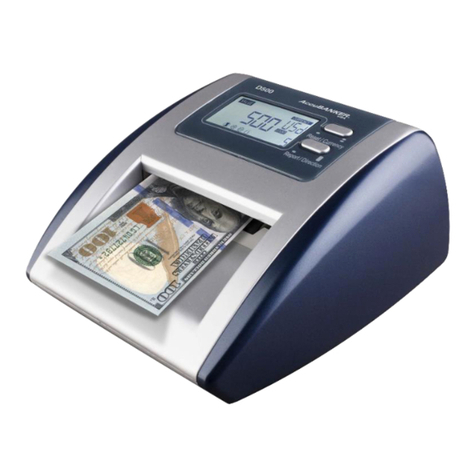
AccuBANKER D500 User manual
AccuBANKER
AccuBANKER LED440 User manual

AccuBANKER
AccuBANKER LED430 User manual
AccuBANKER
AccuBANKER D450 User guide
AccuBANKER
AccuBANKER QuadScan D470 User manual
AccuBANKER
AccuBANKER D450 User manual

















