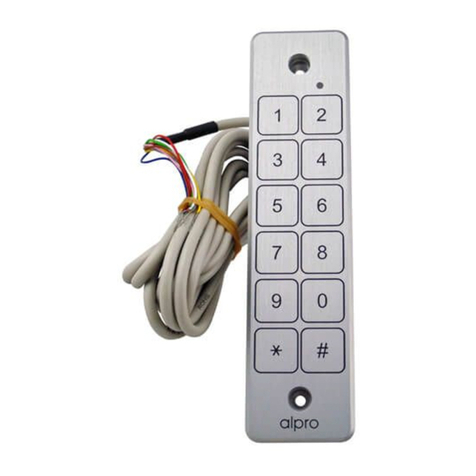
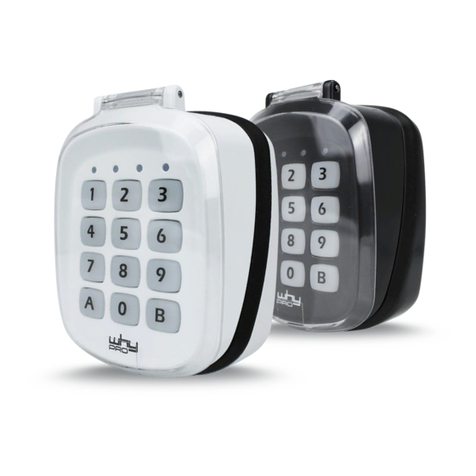
Backlit Braille Waterproof Keypad
AS-ATP2S200
Read all instructions before starting installation
To set new master code
TAKE TIME TO ALLOW EACH BUTTON INPUT / LED TO REGISTER
Enter H H 1 2 3 4 H H The keypad enters programming mode,
the Red LED flashes
Enter 2 The Red LED illuminates for 2 seconds and
then flashes
Enter 0-0-0# The Red LED illuminates for 2 seconds and
then flashes
Enter new 4-8 digit code This is the new master code, record the
number and keep it safe
Enter # The Red LED illuminates for 2 seconds and
then flashes
Re-enter the new master code The Red LED illuminates for 2 seconds and
then flashes
Enter #
Enter # To exit programming mode
To set a new master code of 112233
Enter H H master code H H 2 000# 112233# 112233# #
To set a new user code
Enter H H master code H H The keypad enters programming mode,
the Red LED flashes
Enter 2 The Red LED illuminates for 2 seconds and
then flashes
Enter address of new user code i.e. 001 (001-200 accepted)
Enter # The Red LED illuminates for 2 seconds and
then flashes
Enter new 4-8 digit user code This is the new user code, record the
number and keep it safe
Enter # The Red LED illuminates for 2 seconds and
then flashes
Re-enter
the new 4-8 digit user code
The Red LED illuminates for 2 seconds and
then flashes
Enter # The new code is added, to add new codes
continue from second step, changing the
address each time. When finished enter an
additional # to exit programming mode.
Re-Enter 2 to set the next code or # to EXIT
To set a new user code of 6626 in address 1
Enter H H master code H H 2 001# 6626# 6626# #
To set a new user code of 6626 in address 1 & 7788 in address 2
Enter H H master code H H 2 001# 6626# 6626# 2 002# 7788# 7788# #
To remove an individual user code - Only the user code addresses are
removable, the master code may be changed but not removed
Enter H H master code H H The keypad enters programming mode,
the Red LED flashes
Enter 3 The Red LED illuminates for 2 seconds and
then flashes
Enter address of user code to
be removed Example 001 (001-200 accepted)
Enter # The red LED illuminates for 2 seconds and
then flashes (Address accepted)
Enter address of user code to
be removed Example 001 (001-200 accepted)
Enter # The red LED illuminates for 2 seconds and
then flashes the code is removed
Enter # Exit programming mode
To remove all user codes
Enter H H master code H H The keypad enters programming mode,
the red LED flashes
Enter 4 The Red LED illuminates for 2 seconds and
then flashes
Enter master code
Enter # The Red LED illuminates for 2 seconds and
then flashes 40 sec. All user code addresses
are removed
Enter # For exit programming
To set lock open time
Enter H H master code H H The keypad enters programming mode,
the Red LED flashes
Enter 1 The Red LED illuminates for 2 seconds and
then flashes
Enter door open time (01-99) Ex. 05 = 5 seconds
Enter # The Red LED illuminates for 2 seconds and
then flashes
Enter # For exit programming
To set the door open time to 10 seconds
Enter H H master code H H 1 10 # #
To set output relay to latching mode (On-Off)
Enter H H master code H H The keypad enters programming mode,
the Red LED flashes
Enter 1 The Red LED illuminates for 2 seconds and
then flashes
Enter 00
Enter # The Red LED illuminates for 2 seconds and
then flashes
Enter # The relay is set to latching mode
TO PROGRAM THE RELAY FOR A TIMED FUNCTIONING PLEASE PERFORM
PROCEDURE 5.
To set remote door opening time
Enter H H master codeH H The keypad enters programming mode,
the Red LED flashes
Enter 5 The red LED illuminates for 2 seconds and
then flashes
Enter door opening time (01-99) 05 = 5 seconds
Enter # The Red LED illuminates for 2 seconds then
flashes
Enter # Exit the programming mode
To set the door opening time to 10 seconds Enter H H master code H H 5 10 # #
To set remote to latch mode (On-Off)
Enter H H master code H H The keypad enters programming mode,
the Red LED flashes
Enter 5 The Red LED illuminates for 2 seconds and
then flashes
Enter 1
Enter # The Red LED illuminates for 2 seconds then
flashes
Enter # Exit the programming mode
OPERATING THE KEYPAD
Enter user code # The relay operates and Green LED
illuminates
If three incorrect attempts are made to enter a user code, the keypad will lock
out for 30 seconds
DATA RESET
In the event that programming administration is lost, or errors have been made
in the programming, it is possible to set the keypad master back to the factory
default:
Power up the unit During the first 3 seconds. The Red LED is ON
Turn power off, then power on
Enter H H 1-2-3-4 #The unit will sound 3 times and the Data will
During the first 3 seconds be restored as follows
FACTORY DEFAULT SETTINGS
Master code 1-2-3-4
User code 5-6-7-8-9-0 Please erase this code at address 200
Door opening time 5 seconds
TROUBLE SHOOTING
The keypad does not “respond” when activating the keys.
1. Make sure the electronic unit has been properly wired to the mains and the
power has not been cut-off.
The keypad “responds” but the door does not open.
1. Make sure the green LED is lit up.
2. If not the entered code has not been programmed yet. Please refer to
“Programming”.
3. Enter the Master Code and make sure the door opens correctly. If not check
the wiring and Strikes integrity.
Warranty
This product is guaranteed for a period of 5 years against defects in manufacture,
workmanship or materials provided that all electrical and mechanical installation
requirements are adhered to as per this instruction sheet. All third party and
consequential claims are expressly excluded from this warranty.
16
3
4
5
7
8
2
PROGRAMMING THE KEYPAD CONTINUED...
Harwell Road Nufeld Estate Poole Dorset BH17 0BD Great Britain
Registered in England & Wales 1925537 © July 2017 IEC. All rights reserved. All dimensions are nominal and subject to tolerances.