Setup Menu
PAGE 8
Setting Up Via Front Panel Menu :
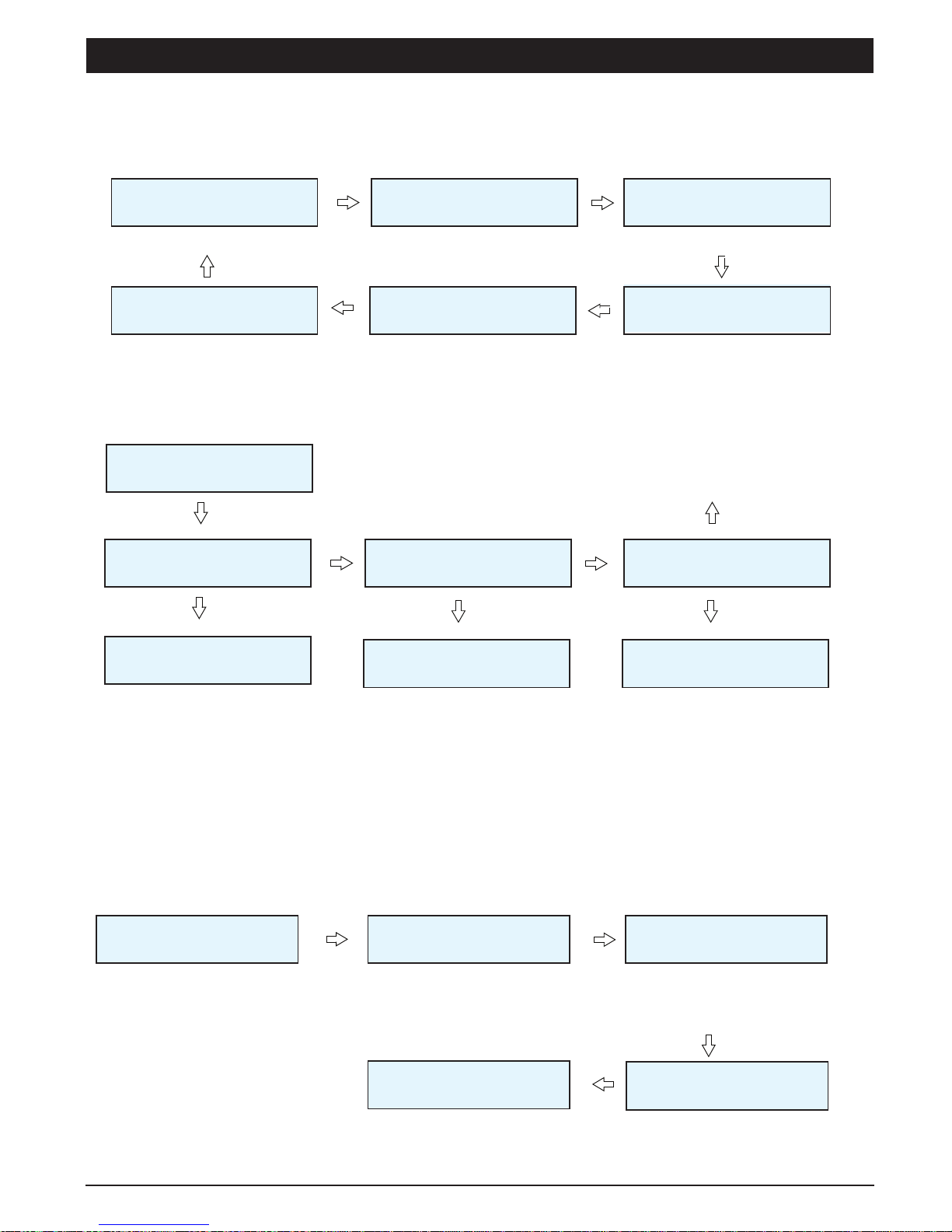
The Menu Flowchart :
Opening display Setting output volume, bass
and treble Message playback setting
To configure button & assign media
System Info
ANNOUNCEMENT
SYSTEM 1. AUDIO
Shift + Enter / Menu 2. MEDIA
3. CONFIGURATION
4. SYSTEM
To exit the system menu
EXIT
Next
Next
Next
Next
Next
1. Audio
It is used to set the output volume, bass and treble of pre-recorded messages.
2
1. AUDIO
Enter / Menu
1.1. VOLUME
SET VOLUME
Use Next or Prev button to
select the volume level ; from
Mute to 9 and Max.
Once selected, press Enter
and the display shall return to
Audio Menu.
1.2. BASS
Next 1.3. TREBLE
Next
SET BASS
Use Next or Prev button to
select the bass level ; from -7
to 7dB.
Once selected, press Enter
and the display shall return to
Audio Menu.
SET TREBLE
Use Next or Prev button to
select the treble level ; from -7
to 7dB.
Once selected, press Enter
and the display shall return to
Audio Menu.
EXIT
Exit toMain Menu
Enter / Menu Enter / Menu Enter / Menu
2. Media
To record live voice file and to play recorded media in the SD Card.
2. MEDIA 2.1. RECORD
Next 2.2. PLAY
Next
Exit to Main Menu
Enter to record and stop the
recording. Select the media want to play.
For exit play press shift + Enter /
Menu. Next
2.3. DELETE YES/NO
EXIT
Select the media want to delete.
For exit play press shift + Enter /
Menu.
MR1301 MESSAGE RECORDER / PLAYER