manuals.online logo
Brands
  1. Home
  2. •
  3. Brands
  4. •
  5. ANT+
  6. •
  7. Safety Equipment
  8. •
  9. ANT+ CSN515 User manual

ANT+ CSN515 User manual

Popular Safety Equipment manuals by other brands

Lanex PB-20 instruction manual

Lanex

Lanex PB-20 instruction manual

SKYLOTEC ANCHOR ROPES Instructions for use

SKYLOTEC

SKYLOTEC ANCHOR ROPES Instructions for use

Besto Buoyancy Aid 50N Instructions for use

Besto

Besto Buoyancy Aid 50N Instructions for use

TEUFELBERGER NODUS Manufacturer's information and instructions for use

TEUFELBERGER

TEUFELBERGER NODUS Manufacturer's information and instructions for use

Troy Lee Designs Tbone Product owners manual

Troy Lee Designs

Troy Lee Designs Tbone Product owners manual

Innova Xtirpa Instruction and safety manual

Innova

Innova Xtirpa Instruction and safety manual

bolle SAFETY B810 quick start guide

bolle SAFETY

bolle SAFETY B810 quick start guide

SHENZHEN FANHAI SANJIANG ELECTRONICS A9060T instruction manual

SHENZHEN FANHAI SANJIANG ELECTRONICS

SHENZHEN FANHAI SANJIANG ELECTRONICS A9060T instruction manual

Hiltron security POWER8E Installation and use manual

Hiltron security

Hiltron security POWER8E Installation and use manual

Salewa MTN SPIKE user manual

Salewa

Salewa MTN SPIKE user manual

Hatco B-950P installation guide

Hatco

Hatco B-950P installation guide

Sitec TX MATIC operating manual

Sitec

Sitec TX MATIC operating manual

TEUFELBERGER GRIP 12 Manufacturer's information and instructions for use

TEUFELBERGER

TEUFELBERGER GRIP 12 Manufacturer's information and instructions for use

MSA PremAire System Operation and instructions

MSA

MSA PremAire System Operation and instructions

AMC 1022M Series instruction manual

AMC

AMC 1022M Series instruction manual

Trinity CASS S3 Assembly manual

Trinity

Trinity CASS S3 Assembly manual

CMC Helitack HotSeat quick guide

CMC

CMC Helitack HotSeat quick guide

ACM SAFETY D200 Instructions and warnings

ACM

ACM SAFETY D200 Instructions and warnings

manuals.online logo
manuals.online logoBrands
  • About & Mission
  • Contact us
  • Privacy Policy
  • Terms and Conditions

Copyright 2025 Manuals.Online. All Rights Reserved.

:
1
ANT ELECTRONIC CO., LTD
NINGBO,CHINA
Tel: 86-0574-87164103
Fax: 86-0574-87150953
Http: www.ant-china.com
Email: ant@ant-china.com
888@ant@ant-china.com
ANT Electronic Co., Ltd possesses the copyright
8. Guarantee
The guarantee is 18 months. In guarantee period, ANT repair or change the
damaged goods for the original buyer..
The buyer offers the damaged evidence and ANT offer the new one or new
components after checking the fault.
ANT do not have responsibility to the damaging caused by improper using,
accident or negligence.
System configuration and accessories
System type
Optional accessories
1
1
Adhesive disk
1 0
1 0
1 0
1 0
1
5.
5.1
5.3
5.4
240
420
310
2000
21.5
9.3
420
5-4
420
240 420 31 0
2000
21.5
9.3
420
5-4
420
Size and installation
7.
Beam number: 154
5.2 Sensor number: 32 pairs
The signal of emitter and receiver is open/The zero line is open
2
No power supply
1. Principle
The system include the emitter and receiver, power supply box, flexible cables.
When the power is turned on, there will generate infrared screen between two
doors. If any ray of infrared is blocked by any object or person, the doors stops
closing immediately and open to protect people.
2. Technical parameter
2.1 Detector
Voltage: 12VDC
Power: ≤5W
Response time: 61ms
Highest beam: 1860mm
Lowest beam: 25mm
Protection distance: 0~5m
Allow error: Alternative LED
Protection grade: IP 65(moisture proof)
2.2 Power supply
Output voltage:
Rated power: 5W
Relay: 1A, 125VAC/2A,30VDC
Operating tem.: -20℃~85℃
Size:154X50X31mm
2X12V
3. Installation
3.1 Installation
Put the detector on the door edge, 10mm away from the bottom.
Mark the fixing holes on the door edge.
Move away the detector and drill 4mm holes on the edge.
Fix the detector with fixers in accessory bag.
Connect two cables with power supply: model 368.
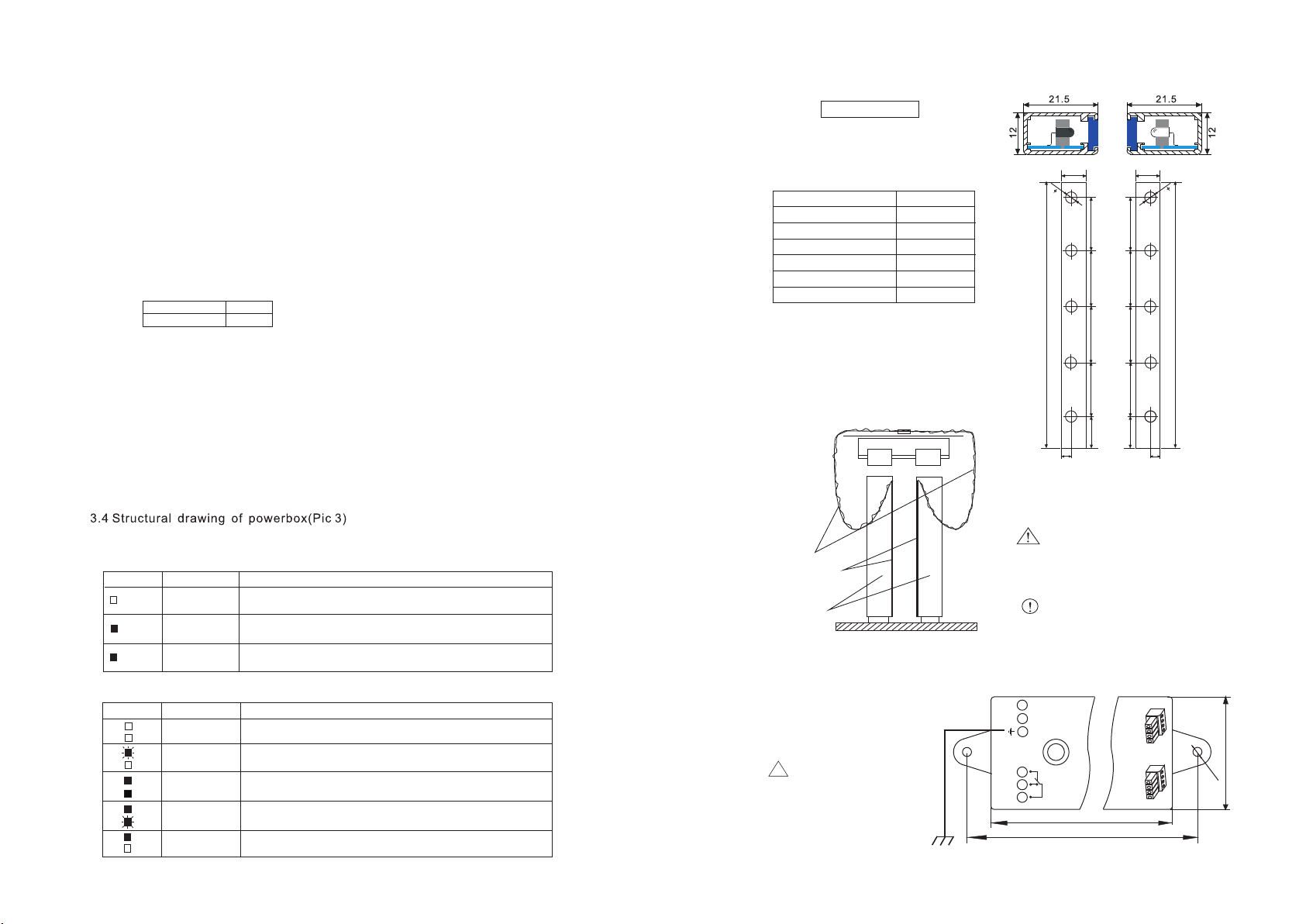
3.2 Sectional view(Pic 1)
3.3 Installation figure(Pic 2)
4. Fault detection and solution
4.1 Mode 368 power supply
PROBLEM SOLUTION
Green
Orange
Green
INDICATOR
System is normal
The beam is blocked or problems with the detector
Green LED is
not lighted
Green LED is
lighted
Orange LED is
lighted
4.2 Receiver
INDICATOR PROBLEM SOLUTION
Both are not
lighted
Light
No light
Flash
Flash
No light
Light
Both are
lighted
Wrong connection
The ray is blocked,The buzzer gets into alarm condition after
15 sencond' continuous blocking
Single ray is blocked
System is normal
CSN515
Model
Manual
Guarantee
Cable clip R
Cable strip 10cm
Bolt, nut, washer
Power supply
Installation drawing
Picture 2
Cable
Door
Detector
Controller
Caution
Compulsory
Caution
Avoid strongly bending
or twisting the cables.
Compulsory
The power to the controller
is the same with the lighting
power in car.
Picture 1
Please ground the control
good conductive
the
box with
earth wire to improve
light resistance and the
functionof the system.
!
Caution
LN C N O C O M
POWER INPUT RELAY OUTPUT
5 0
A C 65~2 85 V
N
S T A T U S
T R A V E L L I N G C A B L E I N P U T
1 2 5
2
-
φ
4
138
Picture 3
3
Redundancy
6.
AC65~285V
AC/DC16~65V
√
Input voltage:
One transmitter shielded after 120s
detected absent.