manuals.online logo
Brands
  1. Home
  2. •
  3. Brands
  4. •
  5. BeoPlay
  6. •
  7. Speakers
  8. •
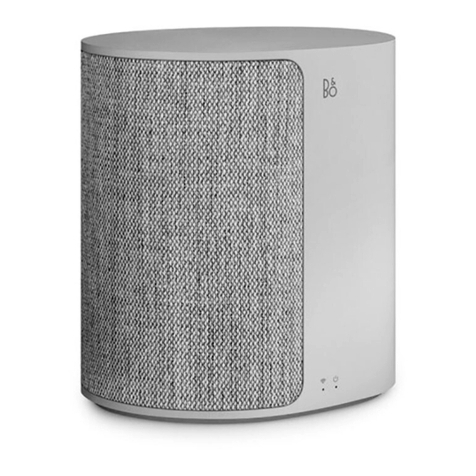
  9. BeoPlay M3 User manual

BeoPlay M3 User manual

Other manuals for M3

1

Other BeoPlay Speakers manuals

BeoPlay A2 User manual

BeoPlay

BeoPlay A2 User manual

BeoPlay A2 User manual

BeoPlay

BeoPlay A2 User manual

BeoPlay A2 User manual

BeoPlay

BeoPlay A2 User manual

BeoPlay S3 User manual

BeoPlay

BeoPlay S3 User manual

BeoPlay M3 User manual

BeoPlay

BeoPlay M3 User manual

BeoPlay A9 User manual

BeoPlay

BeoPlay A9 User manual

BeoPlay P2 User manual

BeoPlay

BeoPlay P2 User manual

BeoPlay H3 User manual

BeoPlay

BeoPlay H3 User manual

BeoPlay A9 User manual

BeoPlay

BeoPlay A9 User manual

BeoPlay Beolit 17 User manual

BeoPlay

BeoPlay Beolit 17 User manual

BeoPlay A2 User manual

BeoPlay

BeoPlay A2 User manual

BeoPlay Beolit 17 User manual

BeoPlay

BeoPlay Beolit 17 User manual

Popular Speakers manuals by other brands

Yamaha DXR10 null

Yamaha

Yamaha DXR10 null

argon audio IE20 quick start

argon audio

argon audio IE20 quick start

Denon SC-N7 owner's manual

Denon

Denon SC-N7 owner's manual

Gemline Ace 3952 user manual

Gemline

Gemline Ace 3952 user manual

Focal ON WALL 300 User manua

Focal

Focal ON WALL 300 User manua

HEADRUSH Maximus HRSP 5024 manual

HEADRUSH

HEADRUSH Maximus HRSP 5024 manual

SoundLogic BCCS-6/6395 instruction manual

SoundLogic

SoundLogic BCCS-6/6395 instruction manual

Peavey DTH 218 Specification sheet

Peavey

Peavey DTH 218 Specification sheet

Avantree Pluto Air user guide

Avantree

Avantree Pluto Air user guide

Morel Integra Series INTEGRA OVATION 4 install guide

Morel

Morel Integra Series INTEGRA OVATION 4 install guide

Oppo SONICA quick start guide

Oppo

Oppo SONICA quick start guide

Bose SoundLink Wireless Music System owner's guide

Bose

Bose SoundLink Wireless Music System owner's guide

Rocksteady Stadium owner's manual

Rocksteady

Rocksteady Stadium owner's manual

Bowers & Wilkins 4 owner's manual

Bowers & Wilkins

Bowers & Wilkins 4 owner's manual

Sonance SONOS OUTDOOR Series installation manual

Sonance

Sonance SONOS OUTDOOR Series installation manual

Electro-Voice EVID FM4.2 Brochure & specs

Electro-Voice

Electro-Voice EVID FM4.2 Brochure & specs

Pioneer XW-HTD630 manual

Pioneer

Pioneer XW-HTD630 manual

Onn BWA16AA002 Product guide

Onn

Onn BWA16AA002 Product guide

manuals.online logo
manuals.online logoBrands
  • About & Mission
  • Contact us
  • Privacy Policy
  • Terms and Conditions

Copyright 2025 Manuals.Online. All Rights Reserved.

Beoplay M3
Quick Start Guide
Lynguide
Kurzanleitung
Guía De Inicio Rápido
Guide De Démarrage Rapide
Guida Di Avvio Rapido
クイックスタートガイド
빠른 시작 가이드
Snelstartgids
Guia De Início Rápido
Краткое Руководство Пользователя
Snabbstartguide
快速入门指南
快速入門指南
3
Setting up and configuring your M3
EN The box contains Beoplay M3 and up to three power cables.
M3 can be set up as an individual speaker or in a speaker
network. Use the BEOPLAY app to configure and connect
your Beoplay M3.
Beoplay beoplay.com/APP
4
DA Kassen indeholder Beoplay M3 og op til tre strømledninger.
M3 kan konfigureres til at arbejde som en enkelt højttaler eller
i et højttalernetværk. Brug appen BEOPLAY til at konfigurere
og forbinde din Beoplay M3.
DE Die Verpackung enthält den Beoplay M3 und bis zu drei
Stromkabel. Der M3 lässt sich als einzelner Lautsprecher oder
in einem Lautsprecher-Verbund einrichten. Verwenden Sie
die BEOPLAY-App um den Beoplay M3 zu konfigurieren und
zu verbinden.
ES La caja contiene el Beoplay M3 y hasta tres cables de
alimentación. El M3 se puede configurar como altavoz
individual o dentro de una red de altavoces. Utilice la
BEOPLAY App para configurar y conectar su Beoplay M3.
FR La boîte contient votre Beoplay M3 et jusqu’à trois câbles
d’alimentation. Le M3 peut être configuré comme un haut-
parleur individuel ou dans un réseau de haut-parleur. Utilisez
l’application BEOPLAY pour configurer et connecter votre
Beoplay M3.
5
IT La scatola contiene il Beoplay M3 e fino a tre cavi di
alimentazione. È possibile impostare l'M3 come diffusore
singolo o in una rete di diffusori. Per configurare il Beoplay M3,
usare la app BEOPLAY.
JA Beoplay M3 には、最大で 3 本の電源ケーブルが同梱され
ています。M3 は、独立したスピーカーとして、またはネ
ットワーク内のスピーカーとして設定することができま
す。Beoplay M3 の設定や接続には、BEOPLAY アプリを使
用します。
KO 상자에는 Beoplay M3 와 최대 3 개의 전원 케이블이 들어
있습니다 . M3 는 개별 스피커로 설정하거나 스피커
네트워크 내에 설치할 수 있습니다 . Beoplay M3 를
구성하고 연결하려면 BEOPLAY 앱을 사용합니다 .
NL De verpakking bevat de Beoplay M3 en maximaal drie
stroomkabels. De M3 kan als aparte luidspreker of in een
luidsprekernetwerk worden geïnstalleerd. Gebruik de
BEOPLAY-app om de Beoplay M3 te configureren en aan
te sluiten.
6
PT A caixa contém o Beoplay M3 e até três cabos de alimentação.
O M3 pode ser configurado como um altifalante individual
ou pode ser adicionado a uma rede de altifalantes. Utilize a
aplicação BEOPLAY para configurar e ligar o Beoplay M3.
RU
Комплект поставки включает в себя устройство Beoplay
M3 и до трех силовых кабелей. Устройство M3 может
настраиваться как автономный громкоговоритель, так
и в сети громкоговорителей. Используйте приложение
BEOPLAY для конфигурации и подключения Вашего
устройства Beoplay M3.
SV Förpackningen innehåller Beoplay M3 och upp till tre
strömförsörjningskablar. M3 kan ställas in för att fungera
fristående eller i ett nätverk av högtalare. Använd BEOPLAY-
appen för att konfigurera och ansluta Beoplay M3.
ZH产品包装盒内附 Beoplay M3 以及最多三根电源线。可按照单
个扬声器或在扬声器网络中对 M3 进行设置。使用 BEOPLAY
应用程序配置来连接 Beoplay M3。
7
ZHTW 
盒內包含 Beoplay M3 以及最多三條電源線。可以將 M3
設定為個別喇叭使用,或在喇叭網路中使用。請使用
BEOPLAY 應用程式來組態與連接您的 Beoplay M3。
8
EN Connect Beoplay M3 to the mains supply. Wait for 1 minute
while both the connectivity indicator and the product
indicator are flashing white. After the connectivity indicator
flashes orange and a sound prompt is heard, the product is
booted up and ready to be set up with the BEOPLAY app.
Connecting your M3
9
DA Slut Beoplay M3 til forsyningsnettet. Vent 1 minut på, at
både forbindelsesindikatoren og produktindikatoren blinker
hvid. Når forbindelsesindikatoren skifter til at lyse orange,
og der afspilles en lyd, er produktet startet op og klart til
konfiguration sammen med appen BEOPLAY.
DE Schließen Sie den Beoplay M3 an eine Netzstromsteckdose an.
Warten Sie 1 Minute, während die Konnektivitätsanzeige und die
Geräteanzeige weiß blinken. Wenn die Konnektivitätsanzeige
zu Orange wechselt und ein Signalton erklingt, wurde das
Gerät hochgefahren und ist für die Einrichtung mithilfe der
BEOPLAY-App bereit.
ES Conecte el Beoplay M3 a la corriente. Espere 1 minuto
hasta que el indicador de conectividad y el indicador del
producto parpadeen en color blanco. Cuando el indicador
de conectividad cambie al color naranja y se escuche una
indicación sonora, el producto habrá arrancado y estará listo
para configurarse con la BEOPLAY App.

10
FR Connectez Beoplay M3 à l’alimentation secteur. Attendez
1 minute jusqu’a ce que les témoins de connectivité et du
produit clignotent en blanc. Une fois que le témoin de
connectivité devient orange et que l’on entend une invite
sonore , le produit démarre et prêt pour être installé avec
l’application BEOPLAY.
IT Connettere il Beoplay M3 all’alimentazione di rete. Attendere
1 minuto mentre la spia di connettività e la spia del prodotto
lampeggiano in bianco. Quando la spia di connettività diventa
arancione e si ode un suono di avviso, il prodotto viene
avviato ed è pronto a essere impostato con la app BEOPLAY.
JA Beoplay M3 を電源に接続します。接続インジケータと製
品インジケータの両方が白色に点滅している間(1 分間)
はお待ちください。接続インジケータがオレンジ色に変
化し、音声による指示があった後、本体の起動が完了し、
BEOPLAY アプリを使用して設定することができます。