manuals.online logo
Brands
  1. Home
  2. •
  3. Brands
  4. •
  5. Bogen
  6. •
  7. Control Panel
  8. •
  9. Bogen ATP10 Guide

Bogen ATP10 Guide

This manual suits for next models

1

Other Bogen Control Panel manuals

Bogen MCP35A Instructions for use

Bogen

Bogen MCP35A Instructions for use

Bogen ATP10 Guide

Bogen

Bogen ATP10 Guide

Bogen AT10A User manual

Bogen

Bogen AT10A User manual

Bogen RVCP Instruction Manual

Bogen

Bogen RVCP Instruction Manual

Bogen AT10A Guide

Bogen

Bogen AT10A Guide

Bogen ATP10 User manual

Bogen

Bogen ATP10 User manual

Popular Control Panel manuals by other brands

GENEVO PRiMA 6 installation manual

GENEVO

GENEVO PRiMA 6 installation manual

NAPCO X 255 - Programming instructions

NAPCO

NAPCO X 255 - Programming instructions

Next Systems UNIR1 230 instruction manual

Next Systems

Next Systems UNIR1 230 instruction manual

HORNER HE-XPW1E0 user manual

HORNER

HORNER HE-XPW1E0 user manual

DSC CLASSIC PC1555 instruction manual

DSC

DSC CLASSIC PC1555 instruction manual

Bosch Solution 2000 installation guide

Bosch

Bosch Solution 2000 installation guide

VRinsight MS Panel user manual

VRinsight

VRinsight MS Panel user manual

Zeiss SYCOP 3 Quick reference guide

Zeiss

Zeiss SYCOP 3 Quick reference guide

HULTSTEINS ECOFRIDGE DISPLAY user manual

HULTSTEINS

HULTSTEINS ECOFRIDGE DISPLAY user manual

Elkron C420 Programming manual

Elkron

Elkron C420 Programming manual

GST GST200-2 Installation and operation manual

GST

GST GST200-2 Installation and operation manual

Efka Variocontrol V810 instruction manual

Efka

Efka Variocontrol V810 instruction manual

RDZ PC-HRX user manual

RDZ

RDZ PC-HRX user manual

STG-BEIKIRCH MZ3 operation instruction

STG-BEIKIRCH

STG-BEIKIRCH MZ3 operation instruction

AMX AutoPatch CP-15 instruction manual

AMX

AMX AutoPatch CP-15 instruction manual

Cebora 208-10 instruction manual

Cebora

Cebora 208-10 instruction manual

Satel CA-6 KLED-S user manual

Satel

Satel CA-6 KLED-S user manual

Evolution IQ plus 800 installation manual

Evolution

Evolution IQ plus 800 installation manual

manuals.online logo
manuals.online logoBrands
  • About & Mission
  • Contact us
  • Privacy Policy
  • Terms and Conditions

Copyright 2025 Manuals.Online. All Rights Reserved.

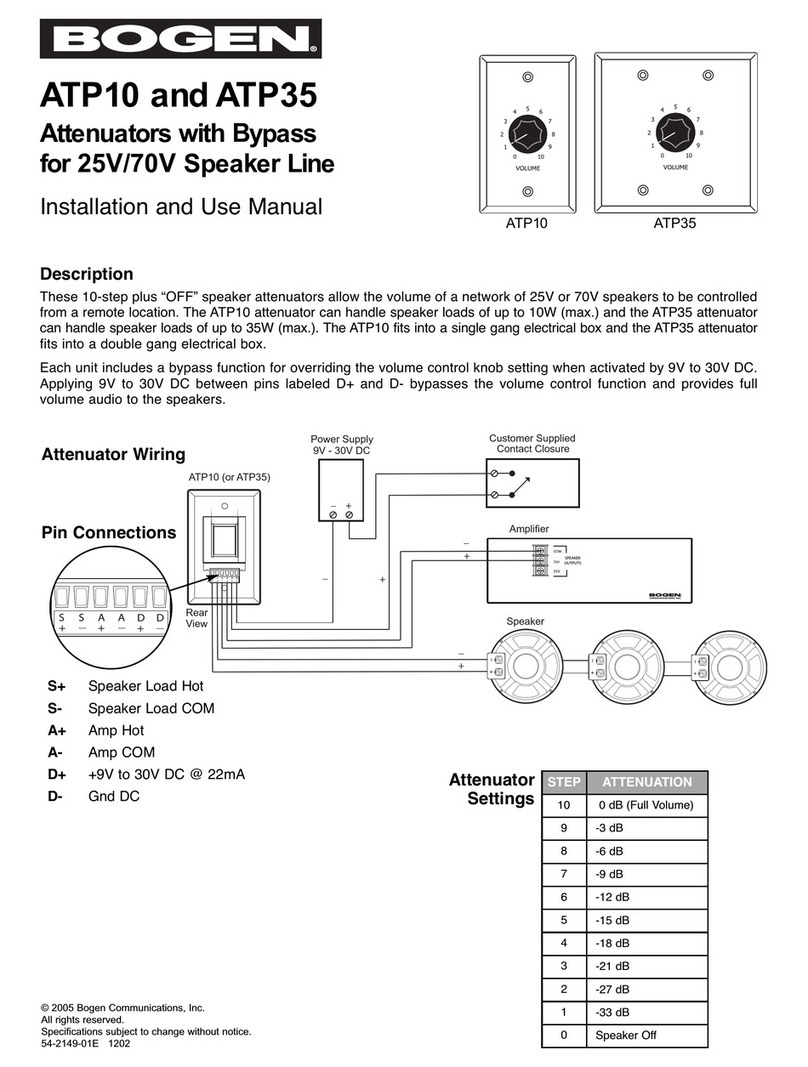
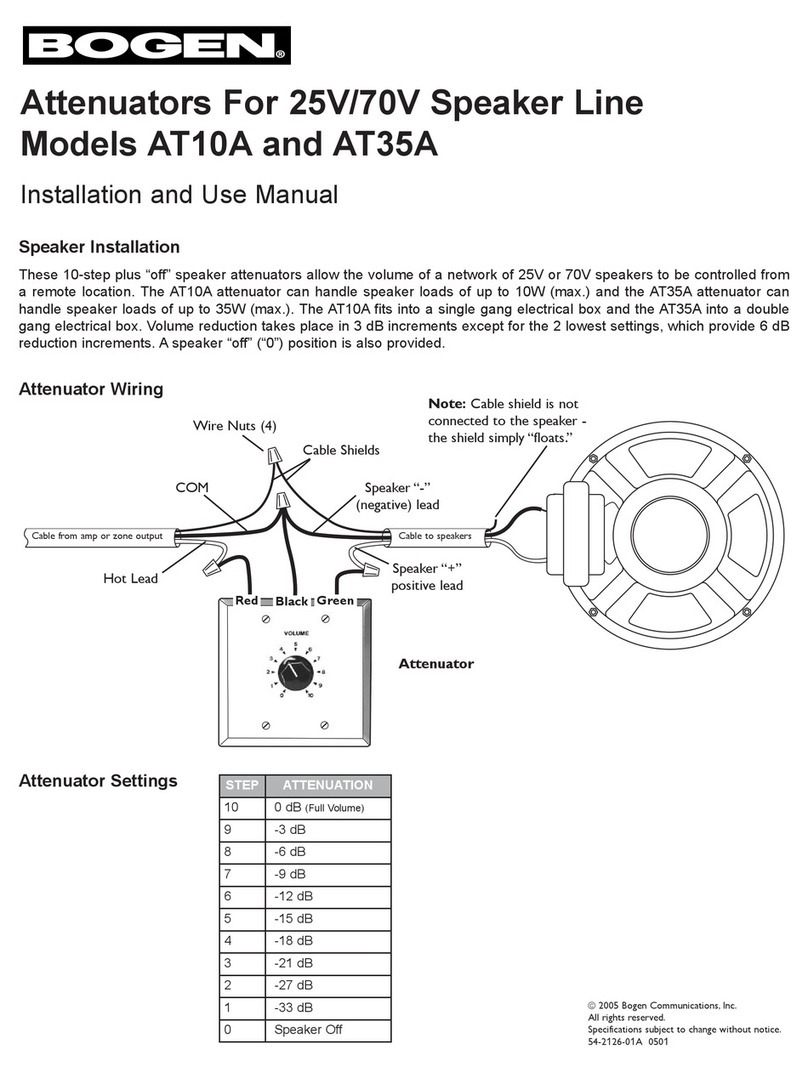
STEP ATTENUATION
100 dB (Full Volume)
9-3 dB
8-6 dB
7-9 dB
6-12 dB
5-15 dB
4-18 dB
3-21dB
2-27 dB
1-33 dB
0Speaker Off
ATP10 and ATP35
Installation and Use Manual
Description
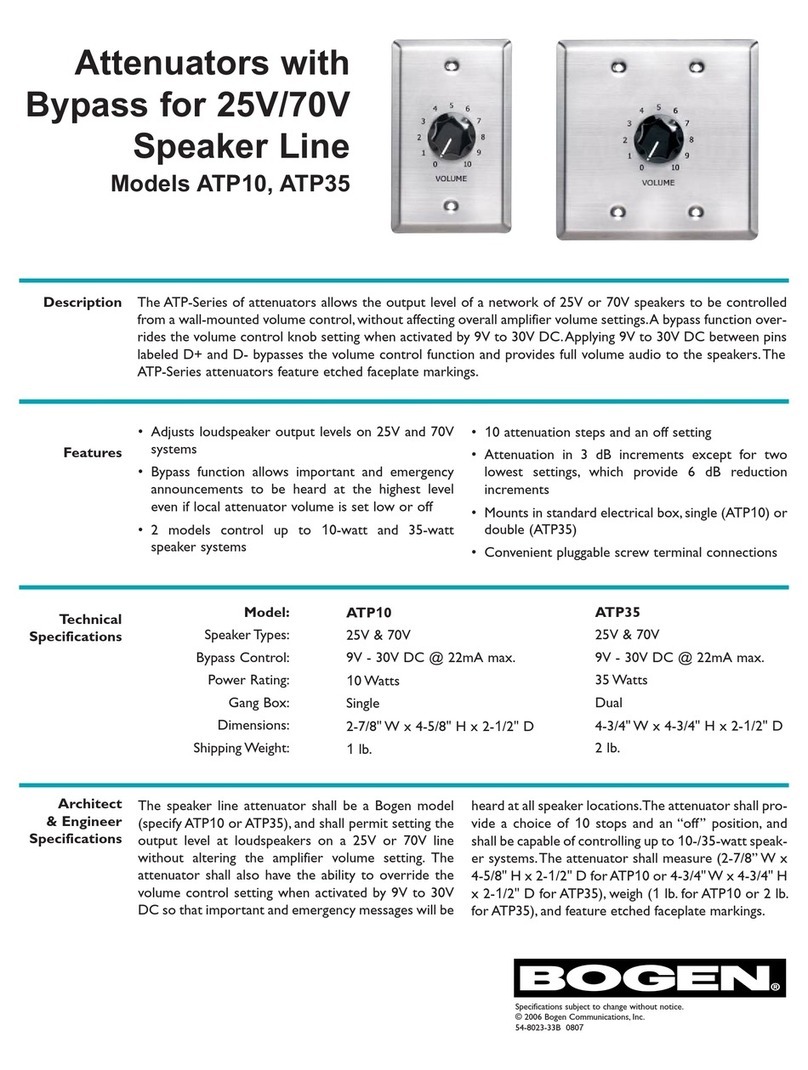
These 10-step plus “OFF” speaker attenuators allow the volume of a network of 25V or 70V speakers to be controlled
from a remote location. The ATP10 attenuator can handle speaker loads of up to 10W (max.) and the ATP35 attenuator
can handle speaker loads of up to 35W (max.). The ATP10 fits into a single gang electrical box and the ATP35 attenuator
fits into a double gang electrical box.
Each unit includes a bypass function for overriding the volume control knob setting when activated by 9V to 30V DC.
Applying 9V to 30V DC between pins labeled D+ and D- bypasses the volume control function and provides full volume
audio to the speakers.
© 2005 Bogen Communications, Inc.
All rights reserved.
Specifications subject to change without notice.
54-2149-01D 0805
Speaker
+
+
+
_
_
_
Power Supply
9V - 30V DC
+
_
Amplifier
ATP10 (or ATP35)
Customer Supplied
Contact Closure
SPEAKER
OUTPUTS
Rear
View
Pin Connections
Attenuators with Bypass
for 25V/70V Speaker Line
S+ Speaker Load Hot
S- Speaker Load COM
A+ Amp Hot
A- Amp COM
D+ +9V to 30V DC @ 25mA
D- Gnd DC
Attenuator Wiring
Attenuator
Settings
ATP10 ATP35
Bypass Connection Examples
In the example below the AUX contacts of the Universal Telephone Interface (UTI1) are programmed to close when the
UTI1’s Override (Emergency) input becomes active. The AUX contacts switch 24V from the UTI1power supply terminals
to the Bypass input of the ATP10 or ATP35, allowing a full volume page to be heard regardless of the volume setting of the
attenuator. See front page for amplifier and speaker wiring.
The bypass terminals override the volume control setting
whenever 9V to 30V DC (at 25mA) is applied to the D+
and D- terminals. See front page for amplifier and speak-
er connections.
In this configuration the Bypass feature activates when the
zone is being paged, but allows volume control when the
zone is inactive and background music is playing. See PCM
Manual for amplifier connections and front page for speaker
connections.
* Use a 12V regulated power
supply. Non-regulated supplies
may provide significantly more
than 12V when not fully loaded.
Greater than 12V supply will
cause relay driver to conduct
even when not active. A 9V
unregulated power supply will
typically work appropriately.
Power Supply
12V DC Max*
(9V Recommended)
Limited Warranty
The ATP10 and ATP35 are warranted to be free from defects in material or workmanship for two
(2) years from the date of sale to the original purchaser. Any part of the product covered by this
warranty that, with normal installation and use, becomes defective will be repaired or replaced by
Bogen, at our option, provided the product is shipped insured and prepaid to: Bogen Factory Service
Department, 50 Spring Street, Ramsey, NJ 07446, USA. The product will be returned to you freight
prepaid. This warranty does not extend to any of our products that have been subjected to abuse,
misuse, improper storage, neglect, accident, improper installation or have been modified or repaired
or altered in any manner whatsoever, or where the serial number or date code has been removed
or defaced.
THE FOREGOING LIMITED WARRANTY IS BOGEN'S SOLE AND EXCLUSIVE
WARRANTY AND THE PURCHASER'S SOLE AND EXCLUSIVE REMEDY. BOGEN
MAKES NO OTHER WARRANTIES OF ANY KIND, EITHER EXPRESS OR IMPLIED,
AND ALL IMPLIED WARRANTIES OF MERCHANTABILITY OR FITNESS FOR A
PARTICULAR PURPOSE ARE HEREBY DISCLAIMED AND EXCLUDED TO THE
MAXIMUM EXTENT ALLOWABLE BY LAW. Bogen's liability arising out of the manufacture,
sale or supplying of products or their use or disposition, whether based upon warranty, contract, tort
or otherwise, shall be limited to the price of the product. In no event shall Bogen be liable for spe-
cial, incidental or consequential damages (including, but not limited to, loss of profits, loss of data or
loss of use damages) arising out of the manufacture, sale or supplying of products, even if Bogen has
been advised of the possibility of such damages or losses. Some States do not allow the exclusion or
limitation of incidental or consequential damages, so the above limitation or exclusion may not apply
to you. This warranty gives you specific legal rights, and you may also have other rights which vary
from State to State.
Products that are out of warranty will also be repaired by the Bogen Factory Service Department --
same address as above or call 201-934-8500. The parts and labor involved in these repairs are war-
ranted for 90 days when repaired by the Bogen Factory Service Department. All shipping charges in
addition to parts and labor charges will be at the owner's expense. All returns require a Return
Authorization number.
UTI1Example:

+
_
PCM2000 Example:
50 Spring Street, Ramsey, NJ 07446, U.S.A.
Tel. 201-934-8500 • Fax: 201-934-9832
www.bogen.com