manuals.online logo
Brands
  1. Home
  2. •
  3. Brands
  4. •
  5. Bullard
  6. •
  7. Protection Device
  8. •
  9. Bullard R400 User manual

Bullard R400 User manual

Popular Protection Device manuals by other brands

Merlin Gerin Sepam series 20 Quick start quide

Merlin Gerin

Merlin Gerin Sepam series 20 Quick start quide

OUTSTEEL VENITIAN installation instructions

OUTSTEEL

OUTSTEEL VENITIAN installation instructions

Kemo Electronic M148-24 instructions

Kemo Electronic

Kemo Electronic M148-24 instructions

Endress+Hauser HAW569 quick start guide

Endress+Hauser

Endress+Hauser HAW569 quick start guide

SK ClickClick user manual

SK

SK ClickClick user manual

Ultrasonic SonicPRO installation manual

Ultrasonic

Ultrasonic SonicPRO installation manual

nxt BIA-nXt-DPC 1-22 Installation and operation manual

nxt

nxt BIA-nXt-DPC 1-22 Installation and operation manual

TFortis SG-Switch operating manual

TFortis

TFortis SG-Switch operating manual

BERNINI DESIGN Be172 instruction manual

BERNINI DESIGN

BERNINI DESIGN Be172 instruction manual

Rayleigh Instruments RI-ENERGYSET-3P-ESS-50-100 manual

Rayleigh Instruments

Rayleigh Instruments RI-ENERGYSET-3P-ESS-50-100 manual

E.K.T. ke-DP01 quick start guide

E.K.T.

E.K.T. ke-DP01 quick start guide

Sola HD STV100K Series instruction manual

Sola HD

Sola HD STV100K Series instruction manual

socomec COUNTIS AMd operating instructions

socomec

socomec COUNTIS AMd operating instructions

Siemens SIPROTEC 7SD80 manual

Siemens

Siemens SIPROTEC 7SD80 manual

cias MICRO-RAY installation manual

cias

cias MICRO-RAY installation manual

Sungrow PVS-16MH user manual

Sungrow

Sungrow PVS-16MH user manual

Reer 32010 instruction manual

Reer

Reer 32010 instruction manual

STI STI-7560AC Mounting instructions

STI

STI STI-7560AC Mounting instructions

manuals.online logo
manuals.online logoBrands
  • About & Mission
  • Contact us
  • Privacy Policy
  • Terms and Conditions

Copyright 2025 Manuals.Online. All Rights Reserved.

4" Leather Front Mount Kit
User Manual
4" Leather Front Mount Kit – Part Number R400
For FX, PX, LT and USRX Model Helmets
Installation Instructions
Contents
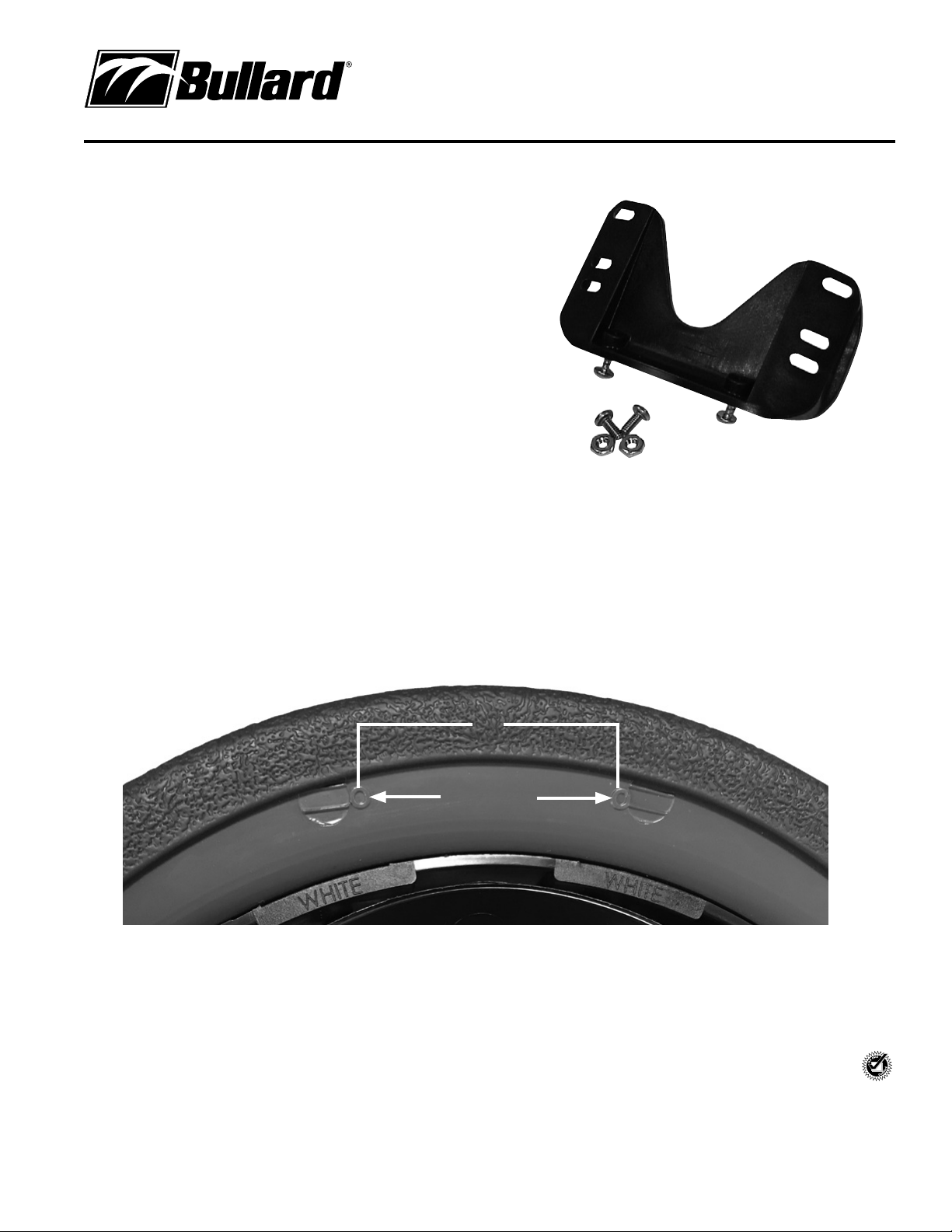
This Bullard Leather Front Mount Kit contains:
1 Leather Front Mounting Bracket
2 Sheet Metal Screws
2 Machine Screws
2 Hex Nuts
Installation
Step 1: Locate the drill guide marks on the underside of the helmet brim (Figure 1).
Step 2: Drill two holes through the drill guide marks with a 3/16" drill bit.
Step 3: Attach the 4" leather front to the mount using the two machine screws to the hex nuts on the back side of the mount with a Phillips head screw driver.
Use the middle two slots for standard 4" fronts and use the top and bottom four slots for LA style fronts. Do not over tighten to prevent stripping of
screw threads.
Step 4: Attach the complete 4" front and mount to the brim of the helmet with the two sheet metal screws from the underside of the brim. Hand tighten screws
with a Phillips head screw driver to a snug fit. Do not over tighten to eliminate possible damage to the helmet shell.
©2018 Bullard. All rights reserved.
6027006179C (0618)
ISO 9001
certified
Figure 1
Front of Helmet
2”
Guide marks
www.bullard.com
Americas:
Bullard
1898 Safety Way
Cynthiana, KY 41031-9303 • USA
Toll-free within USA: 877-BULLARD (285-5273)
Tel: +1-859-234-6616
Fax: +1-859-234-8987
Europe:
Bullard GmbH
Lilienthalstrasse 12
53424 Remagen • Germany
Tel: +49-2642 999980
Fax: +49-2642 9999829
Asia-Pacific:
Bullard Asia Pacific Pte. Ltd.
LHK Building
701, Sims Drive, #04-03
Singapore 387383
Tel: +65-6745-0556
Fax: +65-6745-5176