EINLEITUNG
Der BHC4002-ER ist ein mikroprozessorbasierter Leistungsregler, der entwickelt wurde, um eine variable Regelung
von 2 getrennten 2-kW-Lasten an einer 1-phasigen Stromzufuhr (230V)
zu ermöglichen. Die Einheiten wurden für eine
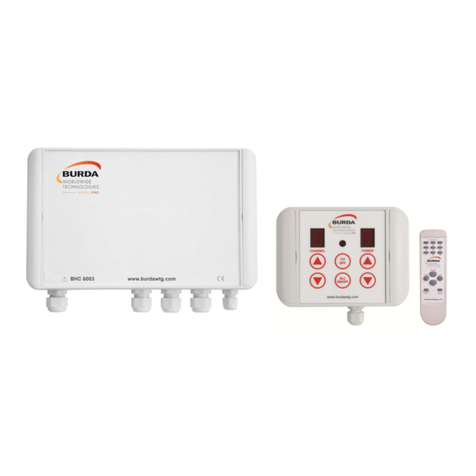
einfache Installation und Funktionalität konzipiert. Das System setzt sich aus drei Elementen zusammen: Eine
Bedieneinheit1(HMI), die mit einem vieradrigen Niederspannungskabel an die Hauptleistungseinheit2angeschlossen
ist. Dies ermöglicht der Bedienperson, die Leistung über eine 10-stufige Leistungsregelung von 30 % bis auf 100 % zu
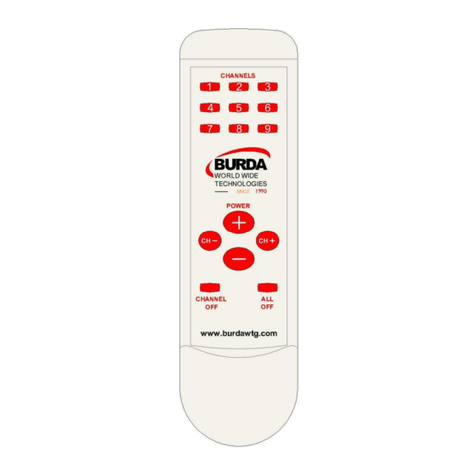
regeln. Alle Funktionen der Bedieneinheit sind auch über die Infrarot-Fernbedienung3verfügbar.
Zusätzlich können Sie nach Bedarf einzelne oder alle Kanäle über die Bedieneinheit ausschalten. Die
Hauptleistungseinheit, die in ein praktisches stabiles Gehäuse der Schutzart IP65 eingebaut wurde, kann getrennt
von der Bedieneinheit angebracht werden. Die Hauptleistungseinheit kann auch an zusätzliche Leistungseinheiten
angeschlossen werden. Dies ermöglicht die Regelung von 6 einzelnen 2-kW-Anschlüssen mit insgesamt 3
Leistungseinheiten oder insgesamt 9 Leistungseinheiten mit insgesamt 18 Anschlüssen von jeweils 2kW Leistung.
Das Leistungsniveau beider Anschlüsse jeder Leistungseinheit wird in dieser Konstellation gleichzeitig angepasst,
damit kann eine Leistung bis zu 36kW (2kW x 2 Anschlüsse x 9 Leistungseinheiten) geregelt werden.
Hinweis: Siehe Installationshinweise für die verschiedenen Anschlussmöglichkeiten.
•HMI KNÖPFE
CHANNEL + In der Kanalauswahl hochzählen (1 bis 6)
CHANNEL - In der Kanalauswahl herunterzählen (1 bis 6)
CHANNEL OFF Aktuellen Kanal ausschalten
ALL ON/OFF Alle Kanäle EIN oder AUS schalten
POWER + Ausgangsleistung von 0 auf F erhöhen (0,1,2,3,4,5,6,7,8,9,F)
POWER - Ausgangsleistung von F auf 0 verringern (F,9,8,7,6,5,4,3,2,1,0)
•FERNBEDIENUNGSKNÖPFE
CHANNEL Tasten 1 bis 9 für Kanalauswahl
CHANNEL+ Kanalauswahl hochzählen (1 bis 9)
CHANNEL- Kanalauswahl herunterzählen (1 bis 9)
CHANNEL OFF Aktuellen Kanal ausschalten
ALL ON/OFF Alle Kanäle EIN oder AUS schalten
POWER + Ausgangsleistung des aktuellen Kanals erhöhen
POWER - Ausgangsleistung des aktuellen Kanals verringern
•ANSCHLÜSSE DER LEISTUNGSEINHEIT
STROMZUFUHR 1 Phase 230V AC +/-10% (L1, N, E)
Lastausgänge 2x Heizstrahler 230V (T1,N,Erdung),(T2,N, Erdung)
SW1 4-Wege DIP-Schalter für verschiedene Kanaleinstellungen
HMI Communication RS485 Kommunikationsanschlüsse A & B
HMI Niederspannungsleistung Anschlüsse +24V DC & COM
SUPPLY GREEN LED Stromzufuhr von der Leistungseinheit vorhanden
STATUS RED LED Bestätigung, dass serielle Steuerdaten empfangen wurden
EINSATZGEBIETE
Alle Anwendungen, bei denen ein hoher Einschaltstrom ein Problem darstellt oder eine Regelung erforderlich ist.
Typische Einsatzgebiete sind Infrarotheizstrahler und Gartenbeleuchtungen.
FUNKTIONEN
Sanftanlauf Bis zu 30 % verlängerte Lebensdauer der Lampe
Variable Steuerung Möglichkeit, eine möglichst angenehme Einstellung zu finden
Fernbedienung Einfache Bedienung
Bedieneinheit Leistung regeln und Kanäle ein- und ausschalten
IP-Schutzart Die Bedieneinheit und die BHC4002-ER entsprechen der Schutzart IP65 und
sind für die Installation im Außenbereich geeignet
Zusätzliche Kanäle Es können mehrere Einheiten hinzugefügt und mit einer Bedieneinheit und
einer Fernbedienung bedient werden.
SET UP
CAUTION! Ensure the main supply is disconnected before proceeding.
Connect the 1 phase supply 230VAC with Neutral and Earth to the terminals marked ‘L1, N and Earth’.
Connect the 2 x 2KW Lamp Loads to the terminals marked ‘T1 and T2’.
Configure the oscilloscope to measure AC mains voltage and connect one of the scope’s channels across a
lamp load.
Connect the HMI unit to the main controller using four core twisted cable to the terminals marked A, B, 24V and
COM on both units.
Set DIP SW1 to 1000, this sets the controller to operate on channels 1 and 2 using either the handset or HMI
unit, see Table A and B on the control pcb.
Test
CAUTION! Beware of hazardous voltages while testing!
Switch on the main supply to the BHC4002-ER and verify the green ‘POWER’ LED is lit and the HMI digits are
lit. When the main power controller is sending data back to the HMI unit the red ‘STATUS’ LED will pulse.
Using the HMI push buttons step through the channels and power levels indicated by the UP and DOWN arrows
on the fascia.
Leave all three channels powered up to three different output levels, press the ALL ON/OFF button once this will
turn all three channels off, press the button again this will reinstate the outputs to the power levels previously
selected.
Pressing the CH OFF button turns the indicated channel off, to turn it on again use the POWER up button.
Switch off the mains power to the controller and wait a few seconds then re-apply the mains power, all the
controller outputs will be in the off state, when the ALL ON/OFF button is pressed the previously selected
channels and output levels will be re-instated.
These tests can also be done using the handset, with the handset the channels can be selected individually by
pressing the buttons numbered 1 and 2.
With the DIP switch code set to 1000 the HMI unit will scroll around channels 1 and 2, with the code set to 1100
the HMI unit will display and scroll around channels 3 and 4. With the code set to 1110 channels 5 and 6 will be
activated in the same manner.
Next set the controller to two tracking where both outputs are controlled as one channel this mode is selected by
setting the DIP switch code to 0001.
With DIP switch code set to 0001 channel 1 will be selected and displayed on the HMI unit. Adjusting the
POWER up and down buttons will result in both putputs having the same output levels through 0 to F.
Check that the HMI unit does not respond to any other channel selection.
After testing return the DIP SW1 code to 1000.
Switch off the main supply and disconnect the BHC4002-ER - the test is now complete.