INFORMATION
• Before using this product, please read this manual
carefully. And keep it on hand for future reference.
CAUTION
1) Avoid using, placing or storing the calculator in
places subject to strong sunlight, rapid
temperature change, humid or dusty areas.
2) Use a dry cloth to clean the casing of the unit. Do
not use water, organic solvents or detergents.
3) Avoid using the calculator in places where there
are iron filings, as this may affect the electrical
circuits of the calculator.
4) Do not twist or bend the calculator.
5) Do not attempt to open the calculator.
6) Do not let the product come into contact with
water or other liquids.
POWER SUPPLY
This calculator has two power sources: battery and
solar. The duration of the battery depends on
individual usage.
(Note: Do not attempt to change the battery. Please
have a Canon Service Center technician to
change the battery.)
Electromagnetic interference or electrostatic
discharge may cause the display to malfunction
or the contents of the memory to be lost or
altered. Should this occur, press the key
and re-start your calculation from the
beginning.
AUTOMATIC POWER-OFF FUNCTION
When the power is turned “ON” and none of the keys
are pressed for more than 7 minutes, the calculator
turns off automatically to save power. Press key
to re-start the calculator.
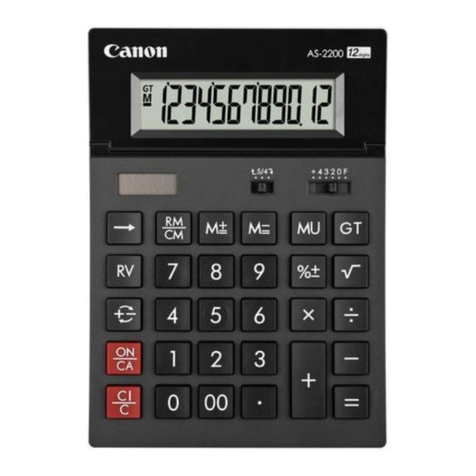
DECIMAL POINT SELECTOR SWITCH
Used for designating the decimal point
position (+ 4 3 2 0 F) for calculated
results.
+ (Add-Mode): Addition and subtraction
functions are performed with an
automatic 2-digit decimal. This mode is
convenient for currency calculations.
F (Floating Decimal Point): All effective
number up to 12 digits are printed or
displayed.
ROUNDING SWITCH
Used to round-up [ ], round-off [5/4] or
round-down [ ] to the pre-selected
decimal digits in the result.
GRAND TOTAL FUNCTION
The totals are accumulated in the grand
total memory. Press to get the grand
total. Press twice to clear the grand
total memory.
TAX FUNCTION
Store the Tax Rate: Enter the tax rate
amount, then press to store.
Recall the Tax Rate: Press
to recall the stored tax rate.
Add Tax Key: Used to add the tax
amount to the displayed figure.
Deduct Tax Key: Used to deduct the
tax amount from the displayed figure.
OVERFLOW FUNCTIONS
In the following cases, error message (E) will be
shown on the display. The keyboard is electronically
locked, and further operation is impossible. Press
to clear the overflow. The overflow occurs when:
1) The result or the memory content exceeds 12
digits to the left of the decimal point.
2) Dividing by “0”.
SPECIFICATIONS
Power Source: Solar cell and alkaline battery (LR44 x 1)
Operating Temperature : 0oC to 40oC
Dimension: 198mm(L) x 150mm (W) x 38mm (H)
Weight : 263g
All specifications and contents of this instruction are
subject to change without notice
© CANON ELECTRONIC BUSINESS MACHINES (H.K.) CO., LTD. 2022
Printed in China / Made in China E-IE-519
SET
RATE
RECALL
RATE
SET
RATE
RECALL
RATE
CANON ELECTRONIC BUSINESS
MACHINES (H.K.) CO., LTD.
17/F., Tower One, Ever Gain Plaza,
82-100 Container Port Road, Kwai Chung,
New Territories, Hong Kong
CANON AUSTRALIA PTY. LTD.
Building A, The Park Estate, 5 Talavera Road,
Macquarie Park, NSW 2113, Australia
Tel: 13 13 83
Website: www.canon.com.au
CANON NEW ZEALAND LTD.
Akoranga Business Park, 28 The Warehouse Way,
Northcote, Auckland 0627, New Zealand
Tel: 0800 222 666
Website: www.canon.co.nz
https://ebmhk.canon
For Australia only
PRODUCT CONTAINS BUTTON/COIN CELL BATTERY
Button/coin cell batteries are hazardous and must be kept out of
reach of children at all times, whether new or used. These
batteries can cause severe injuries if swallowed or placed inside
any part of the body. If it is suspected a button/coin cell battery
has been swallowed or placed inside any part of the body, seek
medical attention immediately
WARNING