
Casa Leo's Loo Too User manual

AUTOMATIC WIFI-ENABLED LITTER BOX
USER MANUAL

Letter from our CEO......................................................................................................................1
Safety Instructions........................................................................................................................2
Inside the Box ................................................................................................................................... 3
Components Guide...................................................................................................................4
Power button and indicators ...........................................................................................5
Set up.......................................................................................................................................................6
Notications.......................................................................................................................................9
Voice control....................................................................................................................................10
Acclimating Kitty........................................................................................................................... 11
Waste removal ..............................................................................................................................12
Cleaning the Loo..........................................................................................................................13
Contact Us .........................................................................................................................................14
Warranty ..............................................................................................................................................14
Product Specications...........................................................................................................15
REGISTER
YOUR LEO’S
LOO TOO
Serial number is located on underside of the unit
base, or below the drum, depending on your
region. We suggest recording this information
before setup.
Serial number:
Date of purchase:
WELCOME
GET TO KNOW YOUR LOO
USAGE & MAINTENANCE
MORE

Dear fellow cat parent,
Welcome to the Smarty Pear family! It means a great deal to us that you’ve
chosen the Leo’s Loo Too automatic litter box. We are excited for you to enjoy
more time with your fur baby and less time scooping (and smelling!) litter waste.
I know rsthand how unpleasant the litter box can be. After a lifetime of sharing
my home with cats I knew it was time for a solution that worked better, and
looked better, than anything else on the market.
Developing the Leo’s Loo was a labor of love—which is why I named it after my
rescue cat Leo. He was found in a dumpster, badly injured. He was nursed back
to health and went on to live 18 years, and brought joy to everyone he met. I hope
the Leo’s Loo Too will also bring joy to your home and the special bond you share
with your fur babies.
At Smarty Pear we are cat parents ourselves and want you and kitty to be happy.
and we’ll do whatever it takes to support you.
Here’s to no more scooping!
Chris Madeiras
Founder/CEO
Thank you for purchasing a Leo’s Loo Too by Smarty Pear. Please carefully
read the following safety instructions before using the machine. Using your
Leo’s Loo is an acknowledgement that you have read and agreed to all the
safety instructions written in this user manual.
• Do not use this machine in Automatic Mode for cats weighing 1 lbs or less.
• Do not power on while your cat is inside or on top of the machine.
• When rst powered on, the machine will complete a rotation to calibrate
sensors. Do not allow your cat to enter the machine at this time or the
calibration process will be interrupted.
• Use only clay clumping cat litter that absorbs moisture.
• Place the machine on a solid and level surface. Soft or uneven surfaces will
impede weight sensors and proper operation.
• For indoor use only. Do not place in direct sunlight.
• Do not soak the base of the machine in water.
• Empty the waste drawer frequently; minimum of once per week for one cat.
• Compatible with 2.4G WiFi networks.
For safety or support related questions please contact Smarty Pear customer
interpret and amend this document at any time.
LETTER FROM OUR CEO SAFETY INSTRUCTIONS
12

• Leo’s Loo Too
• Power adapter with 6’ anti-chew cord
• Drawstring waste drawer liners
• Charcoal air lters (underside of waste drawer)
Bundle boxes also include litter mat, plushies, and
extra drawstring liners
1. Top cover
2. Drum
3. Sifter
4. Drum oor
5. Base
6. Silicone step
7. Power button
8. Waste drawer
9. Carbon lters
10. Power receptacle
11. Weight sensors
IN THE BOX COMPONENTS GUIDE
1
2
3
4
11
9
10
8
5
7
6
34
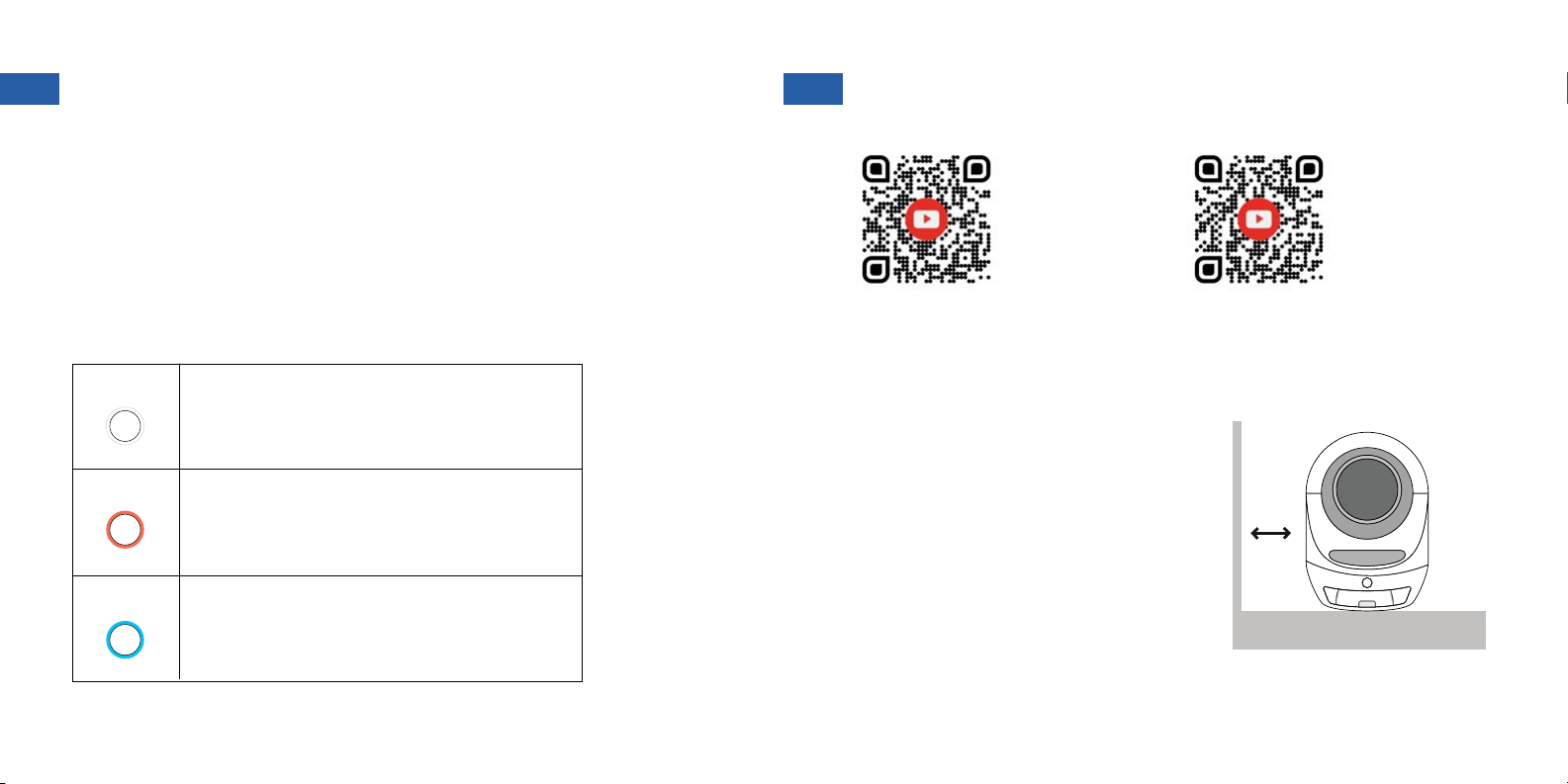
Button controls
Turn on/off: Press and hold 3 Seconds (1 Beep)
Pairing with app: Press and hold 5 Seconds (3 Beeps)
Start or pause cleaning cycle: Press briey
Change between auto & manual mode: Press twice
Steady On: Automatic mode
Blinking Slowly: Connect failure
Flashing Quickly: Ready to pair with app
Steady On: Manual mode
Blinking Slowly: Waste drawer full
Flashing Quickly: Hardware error
Steady On: UV sterilization cycle running
Blinking Slowly: Weight sensor calibration
WHITE
RED
BLUE
Light indicators
Place unit on a at even surface to ensure
all sensors function properly. Do not place
unit directly on carpet or rugs. If your unit
must go in a carpeted area, please use a
rm base underneath.
Allow at least 1 inch of distance from walls
and furniture.
1. PLACEMENT
WATCH:
Setting up your
Leo’s Loo Too
WATCH:
Pairing your
Leo’s Loo Too
with the app
POWER BUTTON AND INDICATORS SET UP INSTRUCTIONS
SOLID FLAT SURFACE
1+ INCH
56

Verify the rotating drum is secure, as
it may have shifted during shipping.
1. Detach top cover and inspect
2. Drum should be seated evenly in
the gear track, with spindle aligned in
holder
3. Remove to adjust if needed. Replace
drum and top cover before continuing.
Plug power adapter into an outlet
and wait for a beep. Then turn the
unit on by pressing the power button
for 3 seconds. The drum will rotate
and light will ash. 3 seconds
Add 10-12lbs (4.5-5.5kg) of litter. Do
not ll beyond the indicator sticker.
Use only clumping clay litter.
Line waste drawer with the included
bags. Make sure to spread evenly
along the bottom and smooth the
edges.
In the app, tap on “Add Device” and
enter your Wi-Fi password.
Long press the Leo’s Loo Too power
button for 5 seconds and wait for the
light to ash quickly. The Loo is now in
pairing mode.
Download the Smarty Pear app and
create an account.
2. PREPARE THE UNIT 3. PAIRING
MAX
5 seconds
Add Device
78

NOTIFICATIONS VOICE CONTROL
“Kitty just used the Loo”
While in Automatic Mode you will
receive a notication each time kitty
nishes using the Loo.
“Waste drawer is full”
When the waste drawer is full your
Loo will send a notication and pause
future cleaning cycles until emptied
and reset. After removing and
replacing the liner bag, reset cleaning
cycles and weight sensors by turning
the unit off and on again.
“Failure to initiate cleaning”
Your Loo will send a notication if kitty
is detected inside during a cleaning
cycle and pause operation. Normal
operation will resume after kitty has
exited and is no longer detected by
the triple-protection safety sensors.
“Too many cleaning cycles run”
You may receive this notication if
your Loo senses an unusual number
of cleaning cycles have been run in a
short period of time. We recommend
manually inspecting the Loo and
temporarily switching to Manual
mode to identify any potential issues.
“Machine is off”
Please turn the machine back on
by pressing the power button for 3
seconds.
“Cleaning recommended”
For odor control and cleanliness we
recommended monthly cleaning,
including replacing all litter and
carbon lters. To clear this notication
tap Settings, navigate to the bottom,
then tap the lter replacement icon.
Voice commands:
“Turn on (Your Loo’s Name)”
“Turn off (Your Loo’s Name)”
“Set (Your Loo’s Name) to Automatic”
“Set (Your Loo’s Name) to Manual”
WATCH:
Adding your Leo’s Loo
Too to Google Home
WATCH:
Linking your Leo’s Loo
Too with Alexa
910
ACCLIMATING KITTY WASTE REMOVAL
Introducing kitty to a new litter box can take time. Here
are a few tips we’ve found to help:
Create a familiar scent: Use a small amount of
litter from the old litter box as a topper within the Loo.
Demonstration: Run the machine in manual mode
while your cat is present to show there is no danger.
If your cat tolerates being picked up, try placing kitty
inside after the cycle has run.
Encouragement: Place treats or toys near the
entrance of the machine to encourage kitty to get
closer and explore.
Placement: Place the Loo near the location of your
old litter box. Refrain from cleaning the old litter box.
This will encourage your cat to migrate to the clean
environment in the Loo. After kitty begins using the
Loo it is safe to remove the old litter box.
Try Dr. Elsey’s Cat Attract: this unique formulation
of litter is an ideal hard clumping clay style, blended
with a natural herbal attractant to encourage
appropriate litter box use.
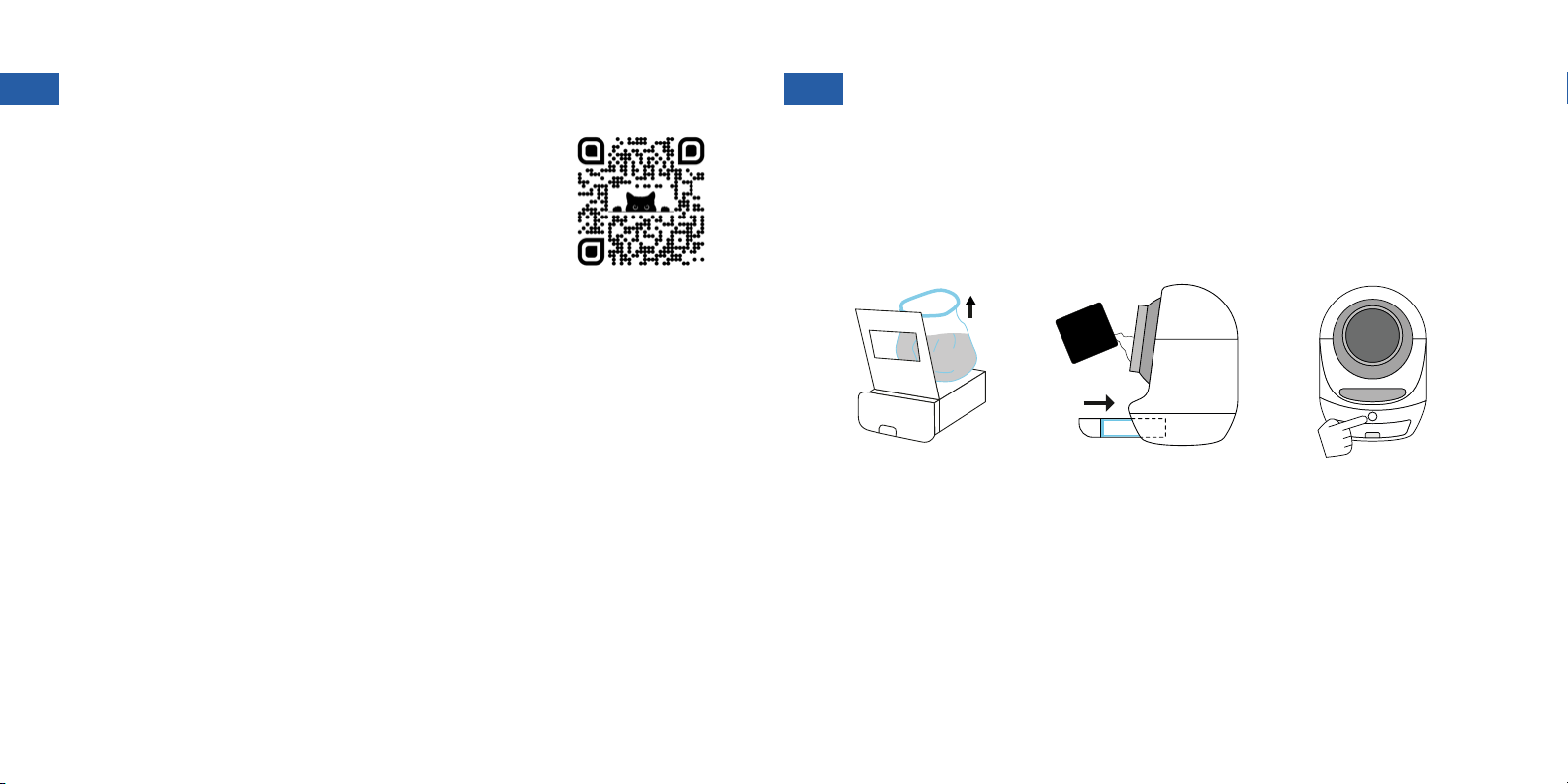
The Leo’s Loo Too will tell you when the waste drawer is full with an
app notication. The unit power button light will also turn red and
blink slowly and pause cleaning cycles until the drawer is emptied.
Remove and replace the drawer liner, then turn the unit off and on
again to reset cleaning cycles and weight sensors.
WATCH:
Acclimating Kitty
clay
litter
Remove and replace
the drawer liner Reinsert drawer and top
off litter inside the drum Turn off and on again
to reset
11 12
CLEANING THE LOO CONTACT US
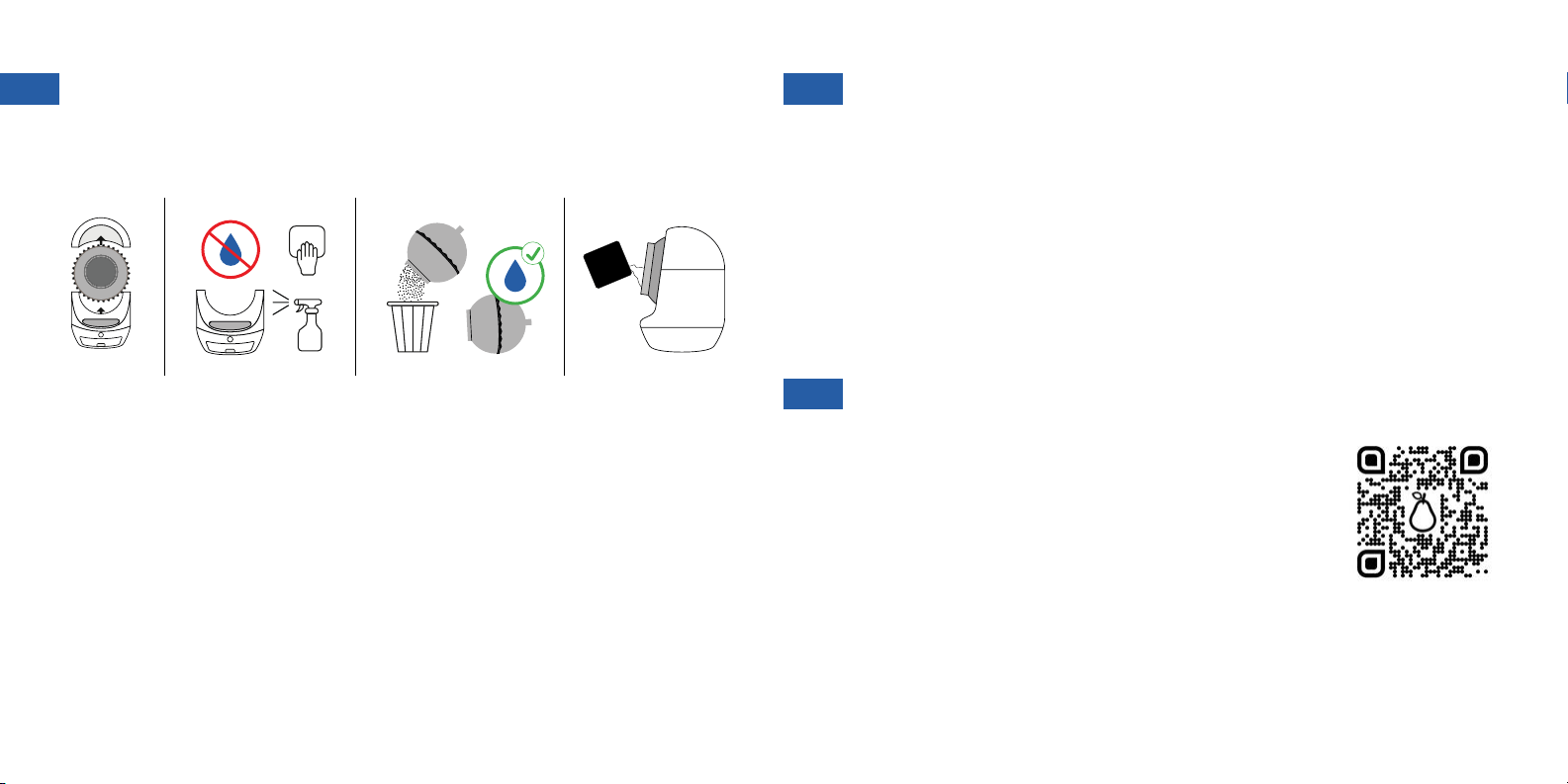
The Leo’s Loo Too should be cleaned, and litter changed, once per month. Questions? Smarty Pear is based in California and offers US-based customer
support staffed entirely by fellow cat parents. We use the product ourselves and
would love to help with any product or kitty adjustment questions you may have.
clay
litter
1. Detach top cover and remove drum from base.
2. Vacuum base then wipe with a cloth and cleaning solution. Do NOT
use water directly on the base as it will damage electronics.
3. Empty drum then wash with soap and water. Allow to dry thoroughly.
4. Return drum to unit base, ll with fresh litter, and replace top cover.
13 14
WARRANTY
Your Leo’s Loo Too comes with a 1-year warranty
when purchased from Smarty Pear or an authorized
reseller, and protects against defects in materials or
workmanship. For extra peace of mind you can add the
Extended Warranty to cover your Loo for a full 3 years
from date of purchase. The extended warranty must be
purchased within the 90-day trial period.
Please note use of anything other than clumping clay
litter, or any unauthorized modication or repair, will void
the warranty.
For questions please contact us:
SHOP:
Extended
Warranty
PRODUCT SPECIFICATIONS
Model: LLT
The complete limited warranty, warnings and cautions are available at
www.smartypear.com
© PurLife Brands Inc. / Palo Alto, CA, USA
Made in China
FCC Compliance: This device complies with Part 15 of the FCC Rules. Operation
is subject to the following two conditions: (1) This device may not cause harmful
interference, and (2) this device must accept any interference received, including
interference that may cause undesired operation.
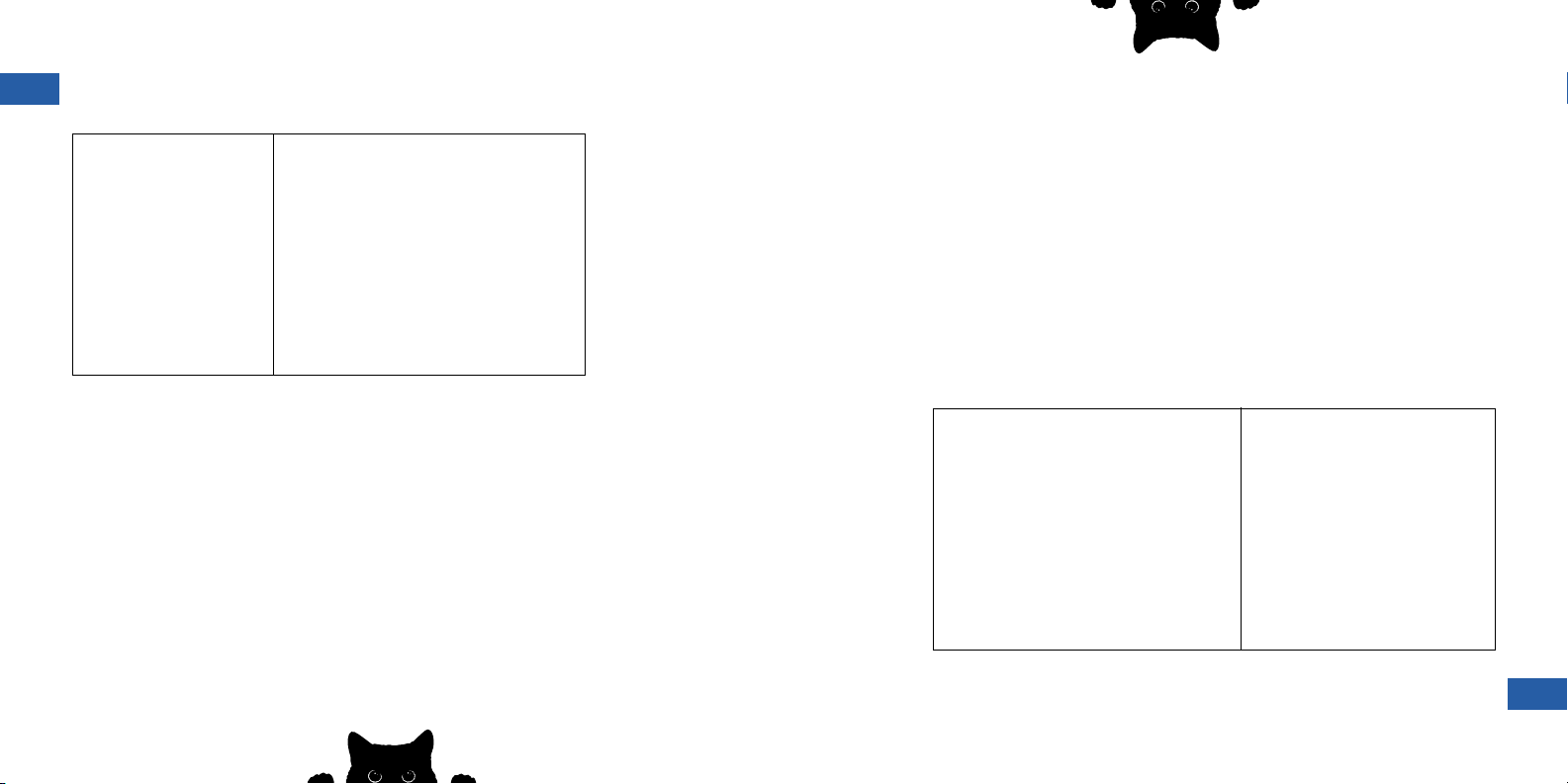
Product Name
Dimensions
Input Voltage
Max Weight Capacity
Max Litter Capacity
Material
Product Weight - Net
Product Weight - Gross
Power - Operating
Power - Standby
Scale Accuracy
Leo’s Loo Too
22 x 24 x 27.6 in (56 x 61 x 70 cm)
12 V
55 lb (25 kg)
1.5 gal (6 L)
PP
27.5 lb (12.5 kg)
37.4 lb (17 kg)
53 kWh per year
9 kWh per year
± 1 lb (0.5 kg)
15
SPÉCIFICATIONS DU PRODUIT
Modèle: LLT
La garantie limitée complète, les avertissements et les mises en garde sont disponibles
sur le site www.smartypear.com
© PurLife Brands Inc. / Palo Alto, CA, USA
Fabriqué en Chine
Conformité FCC : Cet appareil est conforme à la partie 15 des règles de la FCC. Son
fonctionnement est soumis aux deux conditions suivantes : (1) Cet appareil ne doit pas
causer d’interférences nuisibles, et (2) cet appareil doit accepter toute interférence
reçue, y compris les interférences susceptibles de provoquer un fonctionnement
indésirable
Nom du produit
Dimensions
Tension d’entrée
Capacité de poids maximale
Capacité maximale de la litière
Matériau
Poids du produit - net
Poids du produit - brut
Alimentation - Fonctionnement
Alimentation - Veille
Précision de la balance
Leo’s Loo Too
22 x 24 x 27.6 in (56 x 61 x 70 cm)
12 V
55 lb (25 kg)
1.5 gal (6 L)
PP
27.5 lb (12.5 kg)
37.4 lb (17 kg)
53 kWh par an
9 kWh par an
± 1 lb (0.5 kg)
15
Table of contents
Popular Pet Care Product manuals by other brands













ubbink
ubbink KoiFeeder Solar operating instructions

CADOCA
CADOCA Deuba 106911 instructions

Dogtra
Dogtra RR Deluxe owner's manual
Carson
Carson CONVERTIBLE PET YARD 2200 owner's manual
Creative Cedar Designs
Creative Cedar Designs K-9 Kabin Assembly instruction
Petdwell
Petdwell ON2PETS Canopies Assembly instructions