manuals.online logo
Brands
  1. Home
  2. •
  3. Brands
  4. •
  5. Casio
  6. •
  7. Watch
  8. •
  9. Casio 2952 User manual

Casio 2952 User manual

This manual suits for next models

16

Other Casio Watch manuals

Casio 5371 User manual

Casio

Casio 5371 User manual

Casio 5526 User manual

Casio

Casio 5526 User manual

Casio STG-110 Troubleshooting guide

Casio

Casio STG-110 Troubleshooting guide

Casio G-Shock GW-9500-1A4 User manual

Casio

Casio G-Shock GW-9500-1A4 User manual

Casio WSD-F30 User manual

Casio

Casio WSD-F30 User manual

Casio 3257 User manual

Casio

Casio 3257 User manual

Casio 2866 User manual

Casio

Casio 2866 User manual

Casio 5623 User manual

Casio

Casio 5623 User manual

Casio 5027 User manual

Casio

Casio 5027 User manual

Casio 5061 User manual

Casio

Casio 5061 User manual

Casio 3277 User manual

Casio

Casio 3277 User manual

Casio 4355 User manual

Casio

Casio 4355 User manual

Casio 3444 User manual

Casio

Casio 3444 User manual

Casio 5230 User manual

Casio

Casio 5230 User manual

Casio 5512 User manual

Casio

Casio 5512 User manual

Casio WTP-150 User manual

Casio

Casio WTP-150 User manual

Casio W753-1AV User manual

Casio

Casio W753-1AV User manual

Casio 3318 User manual

Casio

Casio 3318 User manual

Casio Databank DBC30 User manual

Casio

Casio Databank DBC30 User manual

Casio 2532 User manual

Casio

Casio 2532 User manual

Casio 3554 User manual

Casio

Casio 3554 User manual

Casio EDIFICE EQS-930NIS-1A User manual

Casio

Casio EDIFICE EQS-930NIS-1A User manual

Casio 5226 User manual

Casio

Casio 5226 User manual

Casio 2556 User manual

Casio

Casio 2556 User manual

Popular Watch manuals by other brands

Piaget 560P Instructions for use

Piaget

Piaget 560P Instructions for use

Armitron pro sport MD0346 instruction manual

Armitron

Armitron pro sport MD0346 instruction manual

West Marine BlackTip 13411293 Instruction Booklet and Care Guide

West Marine

West Marine BlackTip 13411293 Instruction Booklet and Care Guide

Jaeger-leCoultre HYBRIS MECHANICA CALIBRE 184 manual

Jaeger-leCoultre

Jaeger-leCoultre HYBRIS MECHANICA CALIBRE 184 manual

FOREVER iGO PRO JW-200 user manual

FOREVER

FOREVER iGO PRO JW-200 user manual

Relic OS10 quick start guide

Relic

Relic OS10 quick start guide

MyKronoz ZeClock manual

MyKronoz

MyKronoz ZeClock manual

Strikes and Spares SASM80 E-manual

Strikes and Spares

Strikes and Spares SASM80 E-manual

Christopher Ward C1000 Owner's handbook

Christopher Ward

Christopher Ward C1000 Owner's handbook

Lotus ILMFS01 instruction manual

Lotus

Lotus ILMFS01 instruction manual

Chronos Manufactures Chrono Diamond Thyrso 10400 instruction manual

Chronos Manufactures

Chronos Manufactures Chrono Diamond Thyrso 10400 instruction manual

Pandora WATCH2 quick guide

Pandora

Pandora WATCH2 quick guide

Suunto X6 user guide

Suunto

Suunto X6 user guide

Seiko N830 instruction manual

Seiko

Seiko N830 instruction manual

MotionX 365 user guide

MotionX

MotionX 365 user guide

Aplus GV18 user guide

Aplus

Aplus GV18 user guide

Garmin VENU SQ 2 owner's manual

Garmin

Garmin VENU SQ 2 owner's manual

QCY Watch GTC manual

QCY

QCY Watch GTC manual

manuals.online logo
manuals.online logoBrands
  • About & Mission
  • Contact us
  • Privacy Policy
  • Terms and Conditions

Copyright 2025 Manuals.Online. All Rights Reserved.

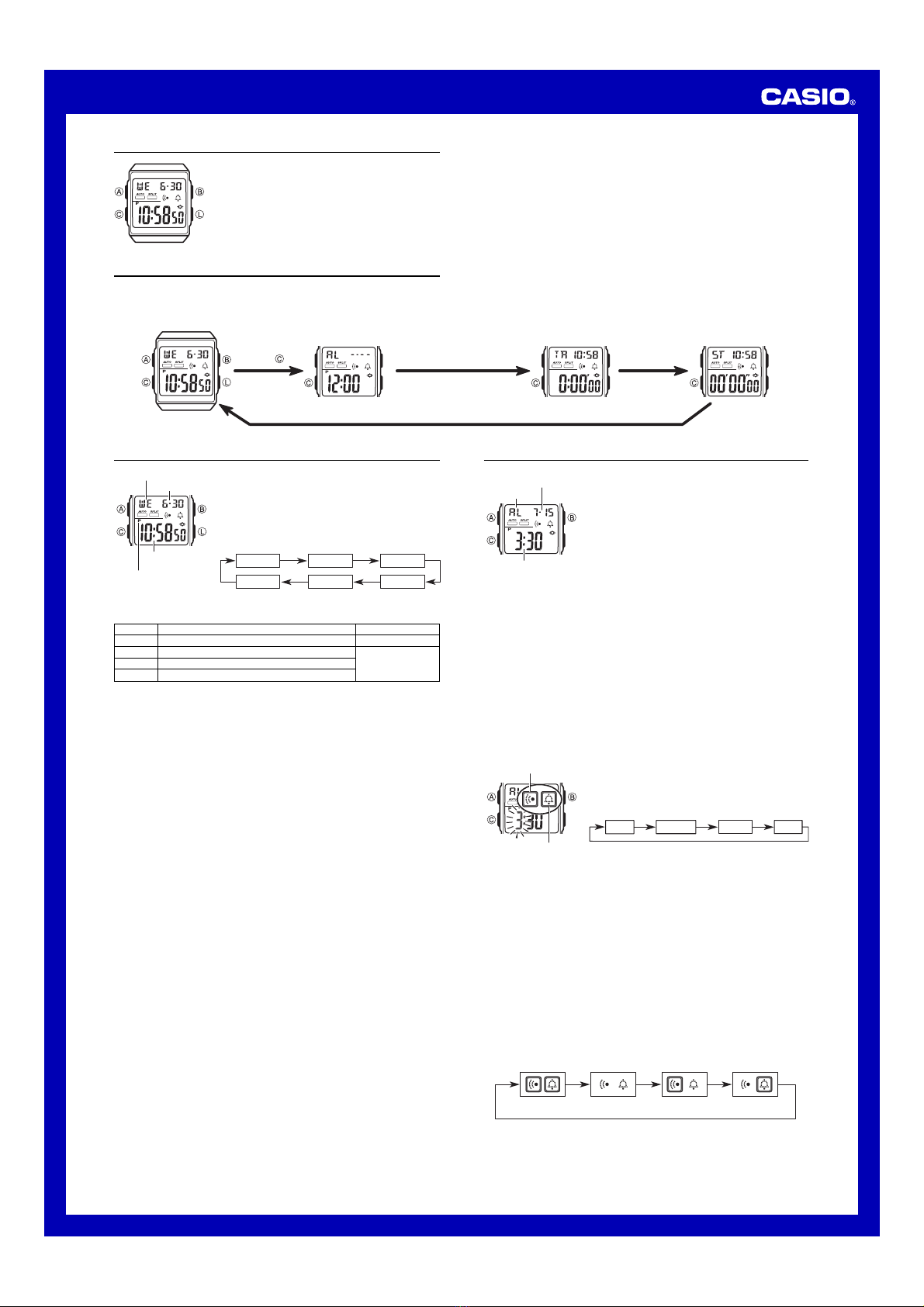
Operation Guide 2902/2952
1
Alarm Types
The alarm type is determined by the settings you make, as described below.
•Daily alarm
Set the hour and minutes for the alarm time. This type of setting causes the alarm to
sound everyday at the time you set.
•Date alarm
Set the month, day, hour and minutes for the alarm time. This type of setting causes
the alarm to sound at the time you set, on the date you set.
•1-month alarm
Set the month, hour and minutes for the alarm time. This type of setting causes the
alarm to sound everyday at the time you set, only during the month you set.
•Monthly alarm
Set the day, hour and minutes for the alarm time. This type of setting causes the
alarm to sound every month at the time you set, on the day you set.
To set an alarm time
1. In the Alarm Mode, press A. This causes the alarm
time hour digits to flash on the display, which indicates
the setting screen.
•This operation automatically turns on the alarm.
2. Press Cto move the flashing in the sequence shown
below to select other settings.
Hour Minutes Month Day
3. While a setting is flashing, press Bto increase it.
•To set an alarm that does not include a month (daily
alarm, monthly alarm), set xfor the month. Press B
until the xmark appears (between 12 and 1) while
month setting is flashing.
•To set an alarm that does not include a day (daily alarm, 1-month alarm), set xx
for the day. Press Buntil the xx mark appears (between the end of the month
and 1) while the day setting is flashing.
•When setting the alarm time using the 12-hour format, take care to set the time
correctly as a.m. (no indicator) or p.m. (Pindicator).
4. Press Ato exit the setting screen.
Alarm Operation
The alarm tone sounds at the preset time for about 20 seconds, regardless of the
mode the watch is in.
To stop the alarm tone after it starts to sound
Press any button.
To turn the alarm and Hourly Time Signal on and off
In the Alarm Mode, press Bto cycle through the on and off settings as shown below.
Alarm On Indicator/Hourly Time Signal On Indicator
Both on
Alarm only Hourly Time
Signal only
Both off
•The alarm on indicator flashes while the alarm sounding.
•The alarm on indicator and Hourly Time Signal on indicator are displayed in all
modes.
Alarm
The multi-function alarm lets you specify the hour,
minutes, month, and day for the alarm. You can set up the
alarm so it sounds once when the alarm time is reached.
You can also turn on an Hourly Time Signal that causes
the watch to beep twice every hour on the hour.
•If you have Flash Alert turned on, display illumination
will also flash while an alarm or the Hourly Time Signal
is sounding.
•All of the operations in this section are performed in the
Alarm Mode, which you enter by pressing C.
About This Manual
•Button operations are indicated using the letters shown
in the illustration.
•Each section of this manual provides you with the
information you need to perform operations in each
mode. Further details and technical information can be
found in the “Reference” section.
(Light)
Timekeeping Mode Alarm Mode Stopwatch ModeCountdown Timer Mode
Press .
General Guide
•Press Cto change from mode to mode. After you perform an operation (except for
L) in any mode, pressing Creturns to the Timekeeping Mode.
•In any mode (except when a setting screen is on the display), press Lto illuminate
the display.
To do this:
Reset the seconds to 00
Change the hour or minutes
Change the year
Change the month or day
Screen
50
P
10:58
04
6-30
Do this:
Press B.
Press B(+).
Hour :
Minutes Seconds
Day of week
PM indicator
Month – Day
Timekeeping
Use the Timekeeping Mode to set and view the current
time and date.
To set the time and date
1. In the Timekeeping Mode, press A. This causes the
seconds digits to flash on the display, which indicates
the setting screen.
2. Press Cto move the flashing in the sequence shown
below to select other settings.
Seconds Hour Minutes
Day Month Year
3. When the setting you want to change is flashing, press Bto change it as
described below.
•Pressing Bwhile the seconds are in the range of 30 to 59 resets them to 00 and
adds 1 to the minutes. In the range of 00 to 29, the minutes are unchanged.
4. Press Ato exit the setting screen.
•The day of the week is automatically displayed in accordance with the date (year,
month, and day) settings.
•The year can be set in the range of 1995 to 2039.
•The watch’s built-in full automatic calendar makes allowances for different month
lengths and leap years. Once you set the date, there should be no reason to change
it except after you have the watch’s battery replaced.
To toggle between 12-hour and 24-hour timekeeping
1. In the Timekeeping Mode, press A. This causes the seconds digits to flash on the
display, which indicates the setting screen.
2. Press Lto toggle between 24-hour (24 indicator appears) and 12-hour (no 24
indicator) timekeeping.
3. Press Ato exit the setting screen.
•With the 12-hour format, the P(PM) indicator appears to the left of the hour digits for
times in the range of noon to 11:59 p.m. and no indicator appears to the left of the
hour digits for times in the range of midnight to 11:59 a.m.
•With the 24-hour format, times are displayed in the range of 0:00 to 23:59. The 24
indicator is on the display while 24-hour format is selected.
•The Pand 24 indicators are not displayed with the Timekeeping Mode time on the
Countdown Timer Mode and Stopwatch Mode screens.
•The 12-hour/24-hour timekeeping format you select in the Timekeeping Mode is
applied in all other modes.
Alarm time
(Hour : Minutes)
Mode indicator
Alarm date
(Month –Day)
Hourly time signal
on indicator
Alarm on indicator
MA0408-EA

Operation Guide 2902/2952
2
Countdown Timer
The countdown timer can be set within a range of one
second to 24 hours. An alarm sounds when the
countdown reaches zero.
•You can also select auto-repeat, which automatically
restarts the countdown from the original value you set
whenever zero is reached.
•If you have Flash Alert turned on, display illumination
will also flash while the countdown alarm is sounding.
•All of the operations in this section are performed in the
Countdown Timer Mode, which you enter by pressing C.
Mode indicator
Timekeeping Mode time
(Hour : Minutes)
Hours
Minutes
Seconds
To use the countdown timer
Press Bwhile in the Countdown Timer Mode to start the countdown timer.
•When the end of the countdown is reached and auto-repeat is turned off, the alarm
sounds for 10 seconds, or until you stop it by pressing any button. The countdown
time is automatically reset to its starting value after the alarm stops.
•The countdown alarm will sound for only one second when the countdown start time
is 10 seconds or less.
•The countdown timer measurement operation continues even if you exit the
Countdown Timer Mode.
•Press Bwhile a countdown operation is in progress to pause it. Press Bagain to
resume the countdown.
•To completely stop a countdown operation, first pause it (by pressing B), and then
press A. This returns the countdown time to its starting value.
To set the countdown start time
1. In the Countdown Timer Mode, press A. This causes
the countdown start time hour digits to flash on the
display, which indicates the setting screen.
2. Press Cto move the flashing in the sequence shown
below to select other settings.
SecondsHour Minutes
3. While a setting is flashing, press Bto increase it.
•To set the starting value of the countdown time to 24
hours, set 0:00.
4. Press Ato exit the setting screen.
To turn auto-repeat on and off
1. In the Countdown Timer Mode, press A. This causes
the countdown start time hour digits to flash on the
display, which indicates the setting screen.
2. Press Lto toggle auto-repeat on (auto-repeat indicator
displayed) and off (auto-repeat indicator not displayed).
3. Press Ato exit the setting screen.
•When the end of the countdown is reached while auto-
repeat is on, the alarm sounds, but the countdown
restarts from the beginning without stopping. You can
stop the countdown by pressing Band manually reset
to the start time by pressing A.
•The auto-repeat indicator appears in the Countdown
Timer Mode only.
Stopwatch
The stopwatch lets you measure elapsed time, split times, and two finishes.
•The display range of the stopwatch is 23 hours, 59 minutes, 59 seconds.
•After the elapsed time reaches one hour, the display changes to show the hours,
minutes, and seconds in 1-second units.
•The stopwatch continues to run, restarting from zero after it reaches its limit, until
you stop it.
•The stopwatch measurement operation continues even if you exit the Stopwatch
Mode.
•Exiting the Stopwatch Mode while a split time is frozen on the display clears the split
time and returns to elapsed time measurement.
•All of the operations in this section are performed in the Stopwatch Mode, which you
enter by pressing C.
1/100 second
Mode indicator Timekeeping Mode time
(Hour : Minutes)
Minutes
Seconds
Times greater
than one hour
Minutes Seconds
Hours
To measure times with the stopwatch
(displayed)
Elapsed time
Start Stop Re-start Stop Clear
Start Split Split release Stop Clear
Start Split Stop Split release Clear
Split time
Two Finishes
First runner
finishes.
Display time of
first runner.
Second runner
finishes. Display time of
second runner.
Auto-repeat indicator
Illumination
An LED (light-emitting diode) and light guide panel illuminate the entire display for
easy reading in the dark.
•See “Illumination Precautions”for other important information.
To illuminate the display
In any mode, press Lto illuminate the display for about
two seconds.
Flash Alert
When Flash Alert is turned on, the display illumination
flashes while a multi-function alarm, Hourly Time Signal,
or countdown alarm is sounding.
To toggle Flash Alert on and off
In the Timekeeping Mode, hold down Bfor about two
seconds to toggle Flash Alert on ( displayed) and off
(not displayed).
Flash alert indicator
Reference
This section contains more detailed and technical information about watch operation.
It also contains important precautions and notes about the various features and
functions of this watch.
Auto return features
If you leave a screen with flashing digits for two or three minutes without performing
any operation, the watch automatically saves any settings you have made up to that
point and exits the setting screen.
Scrolling
The Bbutton is used to scroll through setting screen data on the display. Holding
down this button during a scroll operation scrolls through the data at high speed.
Illumination Precautions
•Illumination may be hard to see when viewed under direct sunlight.
•Frequent use of illumination runs down the battery.