8
8
This generator is built to IP 23 S, meaning:
•
That it is protected against the penetration of solid foreign
bodies with diameters in excess of Ø 12 mm.
•
That it is protected against water spray hitting the surface
with an angle of incidence up to 60°.
• That the welding machine has been tested for withstanding
harmful effects due to water getting in when the moving parts
on the equipment are moving.
How to lift up the machine
The welding machine is fitted with a special belt for manually
lifting and transporting the machine.
NOTE: These hoisting and transportation devices conform to
European standards. Do not use other hoisting and transporta-
tion systems.
Open the packaging
The system essentially consists of:
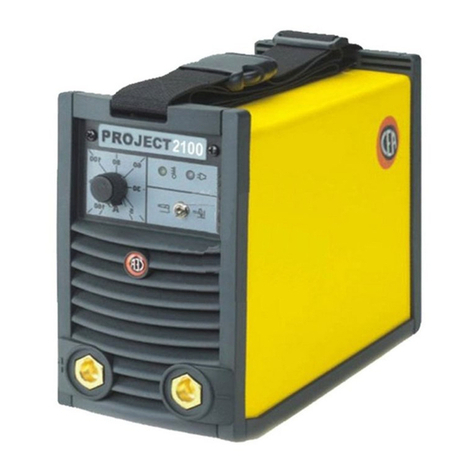
• PROJECT 1300 - 1600 weld unit.
•
Accessory kit comprising clamp and earth cables, a brush-
hammer and a protective screen (optional).
• Case used to transport the welding machine (optional).
Upon receiving the system:
• Remove the welding generator and all the relative accesso-
ries-components from the pack and the case (if present).
•
Check that the weld machine is in good condition, if not report
any problems immediately to the seller-distributor.
• Make sure all ventilation grilles are open and that no foreign
bodies are blocking the air circulation.
Installation
The installation site for the system must be carefully chosen in
order to ensure its satisfactory and safe use.
The user is responsible for the installation and use of the sys-
tem in accordance with the producer’s instructions contai ned
in this manual.
Before installing the system the user must take into considera-
tion the potential electromagnetic problems in the work area.
In particular, we suggest that you should avoid installing the
system close to:
• Signalling, control and telephone cables.
• Radio and television transmitters and receivers.
• Computers and control and measurement instruments.
• Security and protection instruments.
Persons fitted with pace-makers, hearing aids and similar
equipment must consult their doctor before going near a ma-
chine in operation. The equipment’s installation environ ment
must comply to the protection level of the frame i.e. IP 23 S
(IEC 60529 publication). This system is cooled by means of
the forced circulation of air, and must therefore be placed in
such a way that the air may be easily sucked in and expelled
through the apertures made in the frame.
Connection to the electrical supply
Before connecting the welder to the electrical supply,
check that the machine’s plate rating corresponds to the
supply voltage and frequency and that the line switch of
the welder is in the “O” position.
Use the welder’s own plug to connect it up to the main pow-
er supply. Proceed as follows if you have to replace the plug:
•
2 conducting wires are needed for connecting the machine
to the supply
•
The third, which is YELLOW GREEN in colour is used for
making the “EARTH” connection.
Connect a suitable load of normalised plug (2P + e) to
the power cable and provide for an electrical socket com-
plete with fuses or an automatic switch. The earth terminal
must be connected to the earth conducting wire (YELLOW-
GREEN) of the supply.
Table 2 shows the recommended load values for retardant sup-
ply fuses chosen according to the maximum nominal cur rent
supplied to the welder and the nominal supply voltage.
NOTE 1: Any extensions to the power cable must be of a suita-
ble diameter, and absolutely not of a smaller diameter than the
special cable supplied with the machine.
NOTE 2: It is better not to connect the welder to motor genera-
tors, as the voltage supplied by these systems is well known
for its instability.
Usage norms
CONTROL APPARATUS (Fig. A)
Pos. 1 White LED POWER ON. This LED lights up when the
welding machine is powered and ready to work.
Pos. 2 Yellow LED with dual function and protection: THER-
MOSTAT and OVERCURRENT.
• THERMOSTAT function: this LED shines to indi-
cate that the overheating protection has cut in be-
cause the work cycle is not being followed. Wait
a few minutes before continuing with welding, the
welding machine resets automatically.
•
OVERCURRENT function: this LED shines to indi-
cate that the overcurrent protection has cut in be-
cause the current has reached hazardous levels.
The machine stops automatically. Switch off the
machine by pressing the line switch (Pos. 7, Fig. A)
and switch it on again after at least 5 seconds.
Pos. 3 Welding current adjust potentiometer.
Pos. 4 Positive pole snap-on connector.
Pos. 5 Negative pole snap-on connector.
Pos. 6 Selector 2 weld procedures:
• ELECTRODE - For welding basic and rutilic elec-
trodes with the “Arc Force” and “Hot Start” device.
• TIG - For TIG welding with “Lift” type striking.
Pos. 7 Supply switch. In the “O” position the welder is off.
MMA electrode welding (Fig. B)
Electrode welding is used to weld most metals (different types
of steel, etc.) using coated rutilic and basic electrodes with di-
ameters ranging from Ø 1.6 mm to Ø 4 mm.
1) Connecting the welding cables:
•
Disconnect the machine from the mains power supply
and connect the welding cables to the output terminals
(Posi tive and Negative) of the welding machine, attach-
ing them to the clamp and earth with the polarity speci-
fied for the type of electrode being used (Fig. B).
•
Always follow the electrode manufacturer’s instructions.
The welding cables must be as short as possible, they
must be near to one another, positioned at or near floor
level.
2) Adjust the welding current using the potentiometer (Pos. 3,
Fig. A).
3) Adjust the process switch (Pos. 6, Fig. A) to ELECTRODE
(switch lever moved to the right-hand side).
Table 2
Model PROJECT
1300 1600
Power input @ I2 Max kVA 6,3 6,7
Delayed fuse (I2 @ 100%) A 16
Duty cycle @ 25% (40°C) A 130 160
Supply connection cable
Length
Section
m
mm2
3
2,5
Earth cable
Section mm216