1.
2.
3.
Main Charging Station (for CP60 Mobile Computer)
Hauptladestation (für CP60 Terminal)
Main Docking Connector (for CP60 Mobile Computer)
Hauptladebucht (für CP60 Terminal)
Spare Battery Charging Station Status LED
Ladestandsanzeige der Ladekammer für Ersatzakkus
Open Your Box
a
a
CP60 Charging & Communication Cradle
Quick Start Guide
a
a
Micro USB Cable
Adapter plus power cord
www.cipherlab.com
Basics
EN DE
Lieferumfang
a
a
CP60 Lade- und Kommunikationsstation (Cradle)
Kurzanleitung
a
a
Micro-USB Kabel
Adapter und Netzkabel
>
CP60 Charging & Comm. Cradle
Quick Start Guide
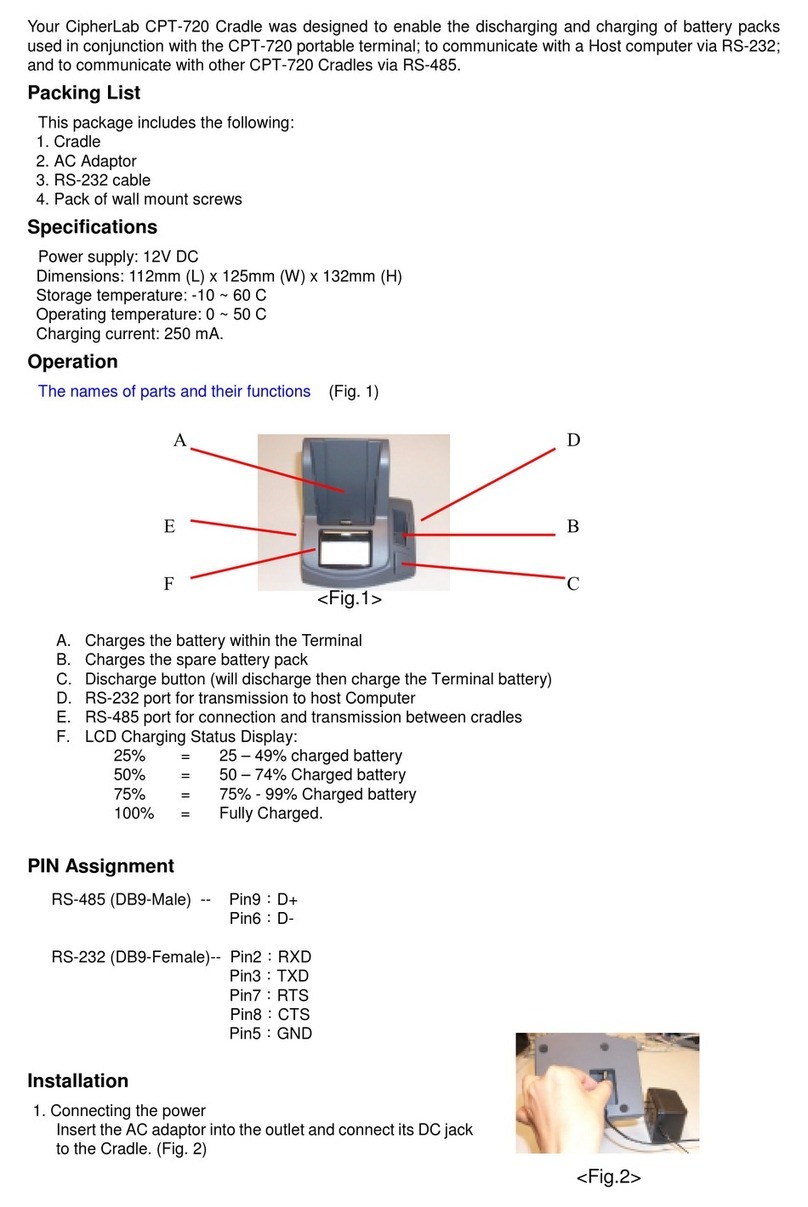
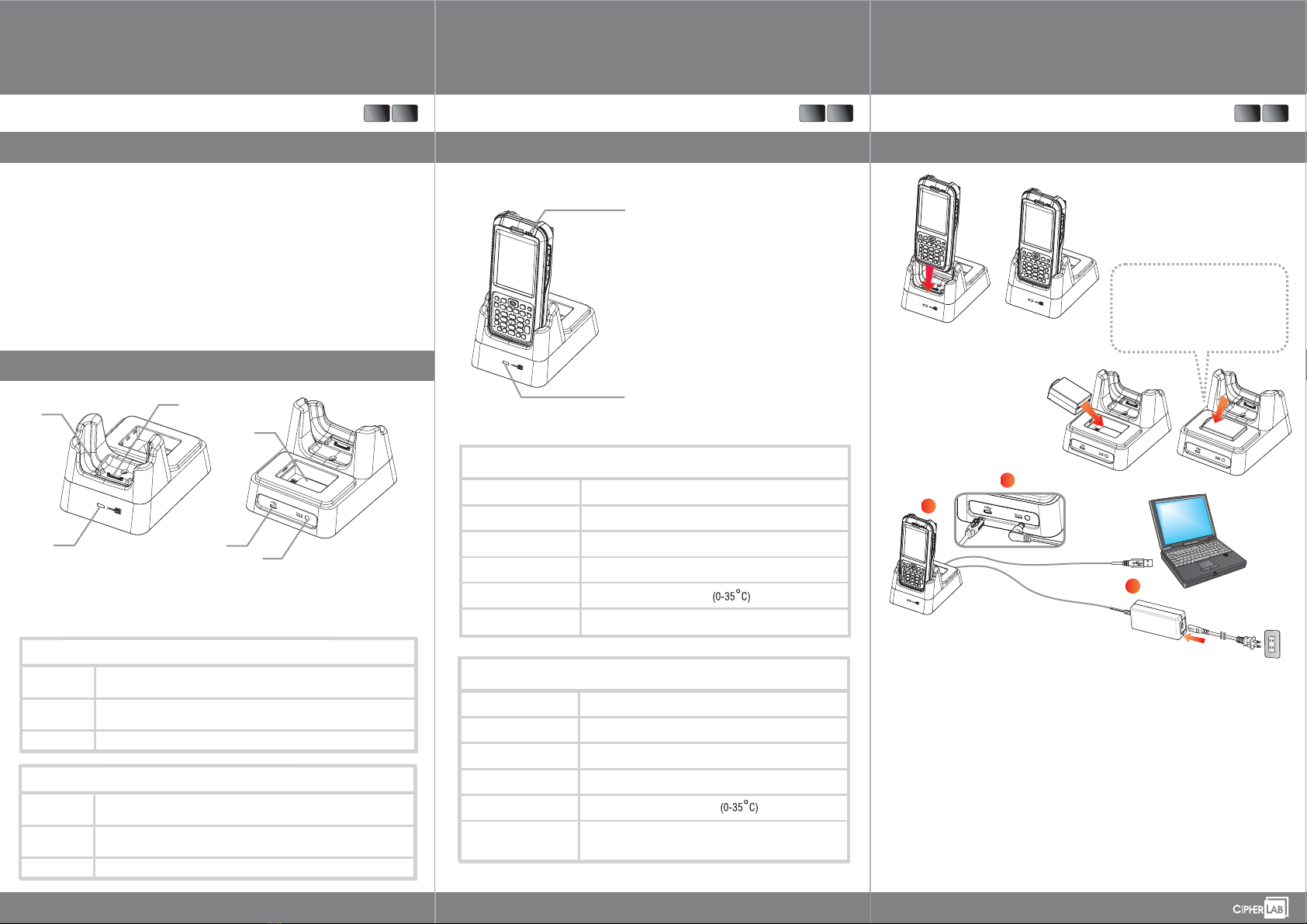
The CP60 Charging & Communication Cradle allows charging and data transmission of the CP60
Mobile Computer. Aside from a main charging station, the Cradle is equipped with a spare battery
chamber, which helps maintain a charged spare battery for your convenient use.
Overview
4.
5.
6.
Spare Battery Charging Station
Ladekammer für Ersatzakkus
Micro USB Receptacle
Micro-USB Buchse
Power Jack
Stromanschluss
Power Supply
Battery Pack
(optional)
Charging Time
Important Charging Information
3.7V, 3600/3.7V, 4400mAh (Standard/Extended) rechargeable Li-ion
CipherLab proprietary
Input: AC 100-240V, 50-60Hz; output: 12V/3.3A
CipherLab approved
Approx. 4 hours/6 hours (Standard/Extended battery)
Netzteil
Akku
(optional)
Ladezeit
Wichtige Information zum Ladevorgang
3.7V, 3600mAh/3.7V, 4400mAh (Standard/Extended) Li-Ion Akku
CipherLab Standard
Eingang: 100-240VAC, 50-60Hz; Ausgang: 12VDC, 3.3A
CipherLab zugelassen
Ca. 4 Stunden/6 Stunden ( )Standard/Extended Akku
Die Lade- und Kommunikationsstation des CP60 dient zum Laden des Terminals und zur
Datenübertragung. Sie verfügt über eine zusätzliche Ladekammer für Ersatzakkus.
>>
EN DE
LED Indicators
For charging status of main charging station, please
see LED on mobile computer.
For charging status of spare battery charging station,
please see LED on Cradle.
CP60 Lade-und Kommunikationsstation
Quick Start Guide
Der Ladestatus der Batterie ist an der LED des
Terminals zu erkennen.
Der Ladestatus des Ersatzakkus ist an der Status-LED
der zusätzlichen Ladekammer abzulesen.
grün
Einmaliges rotes
Aufleuchten
Netzteil eingesteckt, jedoch kein Akku eingesetzt
(nur in der Hauptladestation)
orange
rot
LED Indicator
Ladevorgang wird abgeschlossen
Ladevorgang findet statt
Akku stark entladen, Ladevorgang beginnt
Rot, langsam blinkend
Außerhalb der Ladetemperatur
Rot, schnell blinkend
Fehler beim Ladevorgang
Green, solid
Red, blink once
Adapter plugged in but no battery For Cradle only()
Orange, solid
Red, solid
LED Indicator
Charging nearly complete
Battery charging
Low battery, charging
Red, slow blinking
Out of charging temperature
Red, fast blinking
Battery charging error
To remove battery: Press the clip at the
top of the battery and lift battery up
Akku entfernen: Bügel am oberen Ende
des Akkus drücken und Akku
hochheben
Charging and Communication
EN DE
Step 1:
Step 2:
Step 3:
Place CP60 Mobile Computer in the main charging station.
Insert battery in the spare battery charging station.
Plug in USB connecter for data transmission and/or adapter plug for charging.
For data transmit, connect USB cable to PC.
For charging, connect power cord to adapter and plug power cord to electrical outlet.
LED on Cradle or Mobile Computer will light up in green, orange or red depending on the
battery level at the moment.
Main charging station
Place mobile computer onto Cradle
:
Spare battery charging station
Insert battery with contact pins facing
down and press upper end in
:
Step 1:
Step 2:
Step 3:
Das CP60 Terminal in die Hauptladestation stellen.
Akku in die zusätzliche Ladekammer einsetzen.
USB-Stecker anschließen für einen Datenaustausch und/oder Netzteil einstecken zum Laden.
Zur Datenübertragung noch das USB Kabel an einen PC anschließen.
Zum Laden, das Netzteil mit einem Stromkabel verbinden und in eine Steckdose stecken.
Die LED am Terminal, beziehungsweise an der Ladekammer für den Ersatzakku, leuchtet
grün, orange oder rot auf, entsprechend dem aktuellen Ladestatus.
Zusätzliche Ladekammer:
Akku mit den Kontaktstiften nach
unten einstecken und auf das obere
Ende drücken
Hauptladestation:
Terminal in das Cradle einsetzen