English
GREAT BRITAIN •
for consumer contact, please visit www.clasohlson.co.uk and click on customer service.
Ver. 201107
TV/Monitor Bracket
Art.no 38-4565 Model WLB006N
Please read theentire instruction manual before use and save
it for future reference. Wereserve theright for any errors in text
or images and for making any necessary technical changes to
this document. Ifyou should have any questions concerning
technical problems please contact our Customer Services.
Safety
Before mounting: Note! Makesure thewall you are mounting
thewall bracket on can support theweight of theTFT/LCD
screen you plan to mount.
Note: Do not use thewall bracket for TVs heavier than 15 kg.
For other methods of anchoring into drywall, adrywall an-
chor screws must be used, (wood screws and drywall anchor
screws are not included).
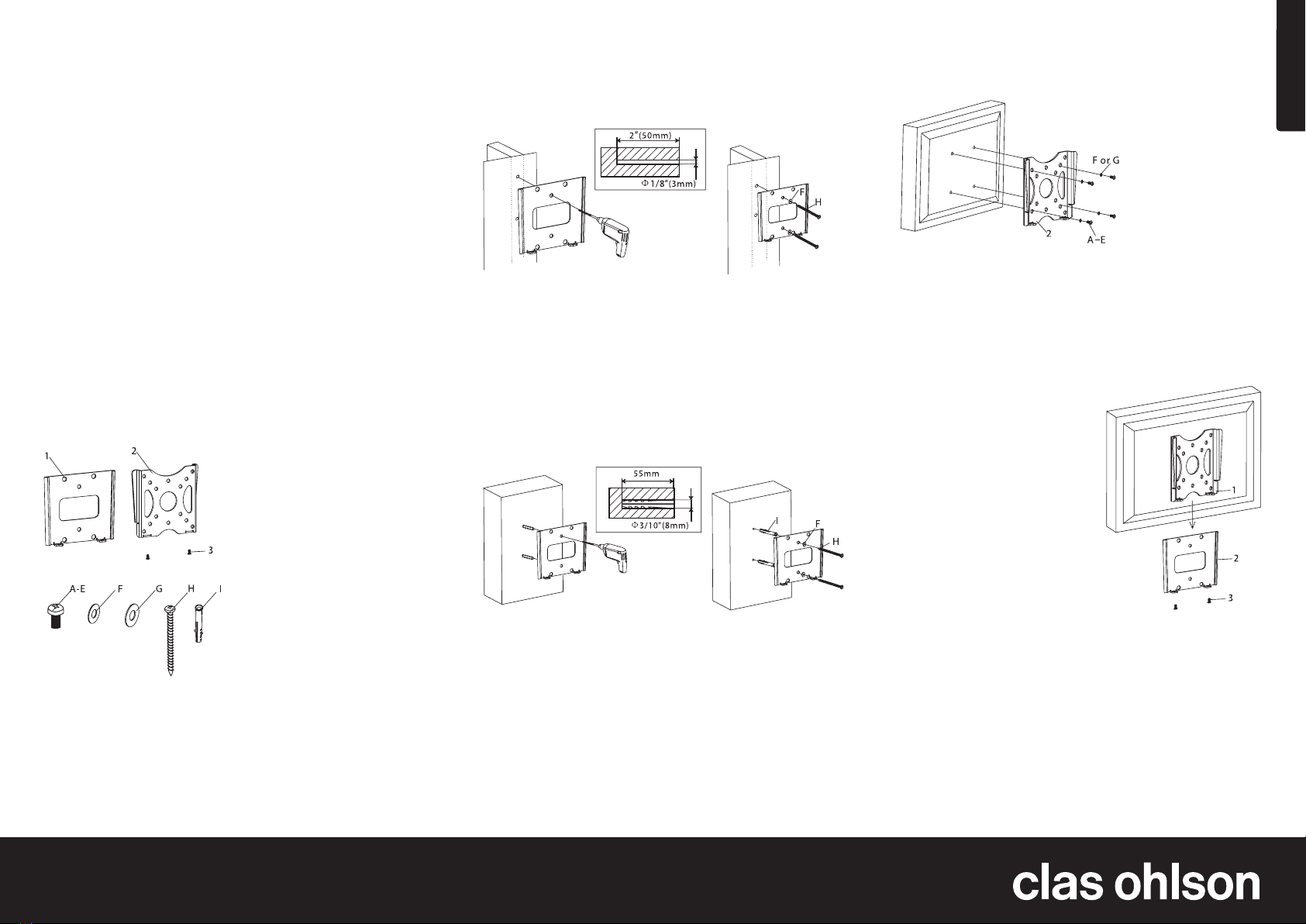
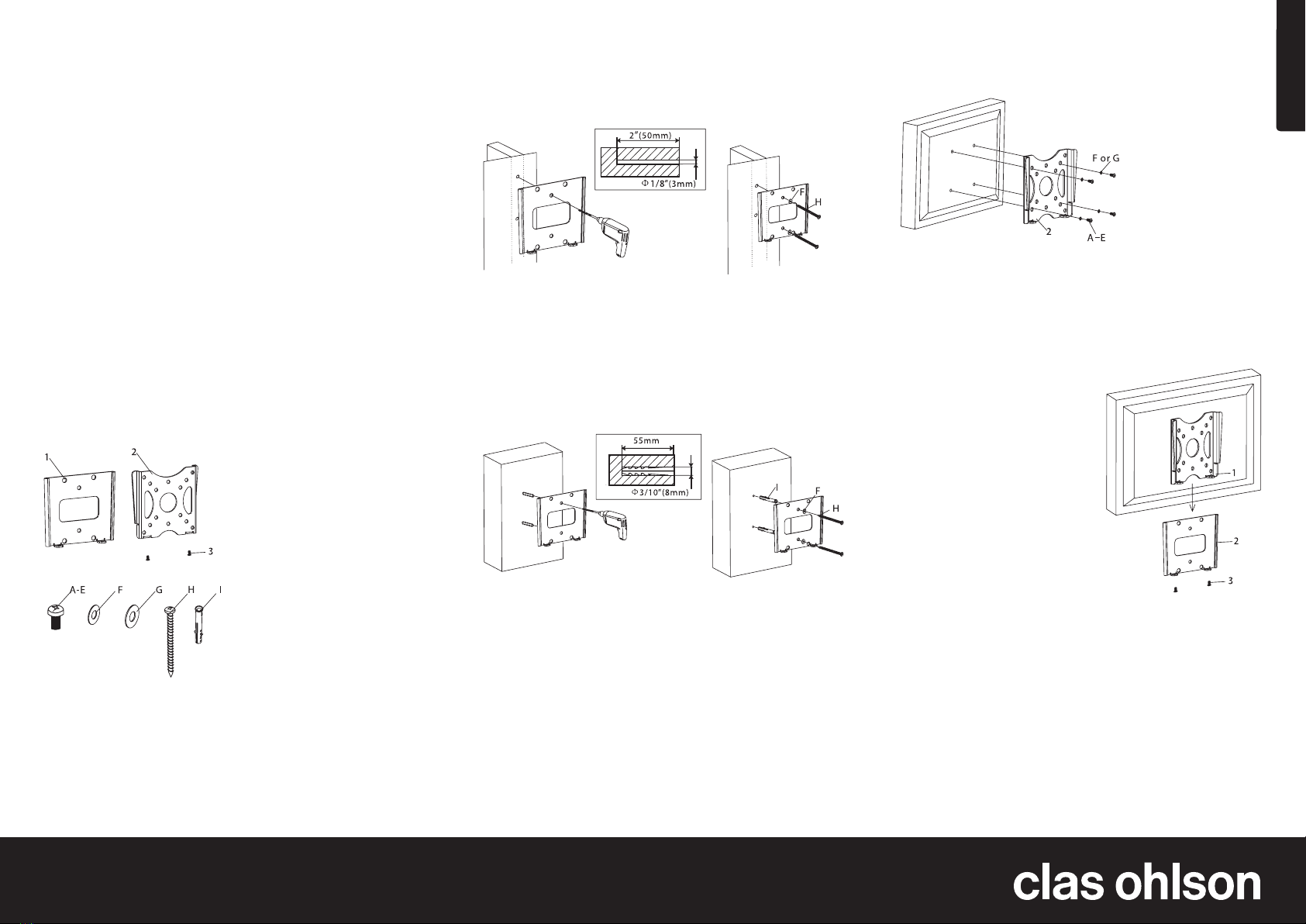
Parts
1. Wall bracket
2. TV mounting plate
3. Safety screws
A. M4X8-screw x 4
B. M4X12-screw x 4
C. M5X8-screw x 4
D. M5X12-screw x 4
E. 1/4″ – 20 x 5/8″-screw x 4
F. M5-washer x 6
G. M6-washer x 4
H. Wall screw x 2
I. Wall plug x 2
Installation
Mounting into wooden wall studs
1. Use thewall bracket as atemplate and make sure that
it is level. Makesure that themounting holes line up with
themiddle of thewall stud.
2. Drill 2 holes (3 mm in diameter) about 5 cm deep.
3. Line up thewall bracket and fasten it securely to thewall
using thewall screws (H) and washers (F). Donot
overlytighten!
Mounting into aconcrete wall
1. Use thewall bracket as atemplate and make sure that it is
level. Makesure that themounting holes line up.
2. Drill 2 holes (8 mm in diameter) about 55 mm deep.
3. Insert 2 plugs (I) into theholes.
4. Line up thewall bracket and fasten it securely to thewall
using thewall screws (H) and washers (F). Donot
overlytighten!
Attaching theTV mounting plate to theback of
theflatscreen
1. Line up themounting plate’s 4 screw holes to theback of
theflatscreen.
2. Select themost appropriate screws (A, B, C, D, E) and
tighten them to theflatscreen together with thewashers
(F,G). Donot overly tighten!
Mounting theTV mounting plate into thewall bracket
1. Place theTV mounting plate
along with themountedTV
into thewall bracket by
slowlylowering it into thebracket.
2. To secure theTV, tighten
the2 safety screws (3)
from underneath. Donot
overlytighten!
Disposal
Disposal of this product should be
in accordance with local regulations.
Ifyou are unsure how to proceed,
contact your local authority.
Specifications
VESA standard 100 x 100, 50 x 50, 75 x 75
Max. load capacity 15 kg