dji BS30 User manual

BS30
Intelligent Battery Station
2022.03v1.0
User Guide
使用说明
使用說明
ユーザーガイド
사용자 가이드
Handbuch
Guía de usuario
Guide d’utilisateur
Guida per l'utente
Gebruiksaanwijzing
Manual do utilizador
Guia do Usuário
Руководство пользователя

© 2022 DJI All Rights Reserved. 1
EN
CHS
CHT
JP
KR
DE
ES
FR
IT
RU
NL
PT
User Guide 2
使用说明 7
使用說明 12
ユーザーガイド 17
사용자 가이드 22
Handbuch 27
Guía de usuario 32
Guide d’utilisateur 37
Guida per l'utente 42
Gebruikershandleiding 47
Manual do utilizador 52
Guia do Usuário 57
Руководство пользователя 62
Contents
Compliance Information 68
PT-BR

EN
2©2022 DJI All Rights Reserved.
Disclaimer
Please read this entire document and all safe and lawful practices DJITM provided carefully before
use. Failure to read and follow instructions and warnings may result in serious injury to yourself
or others, damage to your DJI product, or damage to other objects in the vicinity. By using this
product, you hereby signify that you have read this document carefully and that you understand
and agree to abide by all terms and conditions of this document and all relevant documents of
this product. You agree to use this product only for purposes that are proper. You agree that you
are solely responsible for your own conduct while using this product, and for any consequences
thereof. DJI accepts no liability for damage, injury or any legal responsibility incurred directly or
indirectly from the use of this product.
DJI is a trademark of SZ DJI TECHNOLOGY CO., LTD. (abbreviated as “DJI”) and its affiliated
companies. Names of products, brands, etc., appearing in this document are trademarks or
registered trademarks of their respective owner companies. This product and document are
copyrighted by DJI with all rights reserved. No part of this product or document shall be reproduced
in any form without the prior written consent or authorization of DJI.
This document and all other collateral documents are subject to change at the sole discretion of
DJI. This content is subject to change without prior notice. For up-to-date product information, visit
https://www.dji.com and click on the product page for this product.
This document is available in various languages. In the event of divergence among dierent versions,
the English version shall prevail.
Warnings
1. Keep liquids away from the inside of the BS30 Intelligent Battery Station (abbreviated as “battery
station”).
2. DO NOT close the cover of the battery station during charging. Make sure it is well-ventilated and
able to dissipate heat.
3. The battery station is only compatible with the TB30 Intelligent Flight Battery (abbreviated as “TB30
battery”) and WB37 Intelligent Battery (abbreviated as “WB37 battery”). DO NOT use the battery
station with any other battery models.
4. Place the battery station on a at and stable surface when in use. Make sure the device is properly
insulated to prevent re hazards.
5. DO NOT attempt to touch the metal terminals in the battery station. Clean the metal terminals with
a clean, dry cloth if there is any noticeable buildup after powering o.
6. Take care to avoid injuring your ngers when opening or closing the battery station.
Introduction
The BS30 Intelligent Battery Station features eight TB30 battery ports, two WB37 battery ports, one
USB-C maintenance port, and one USB-A and one USB-C charging port. It can charge two TB30
batteries and one WB37 battery simultaneously.

EN
© 2022 DJI All Rights Reserved. 3
Overview
1. Cover
2. TB30 Battery Ports
3. Power Port
4. WB37 Battery Port
5. TB30 Battery Status LEDs
6. WB37 Battery Status LEDs
7. WB37 Battery Level LEDs
8. Battery Station Status LED
9. Power Button/Indicator
10. USB-C Maintenance Port
11. USB-C Charging Port
(Recommended for Remote
Controller)
12. USB-A Charging Port
13. Charging Mode Switch
14. Padlock Holes
15. Lock Clip
16. Handle
17. Pressure Valve
1
2
3
4
5
7
9
6
8
10
13
14
15
16 17
12 11
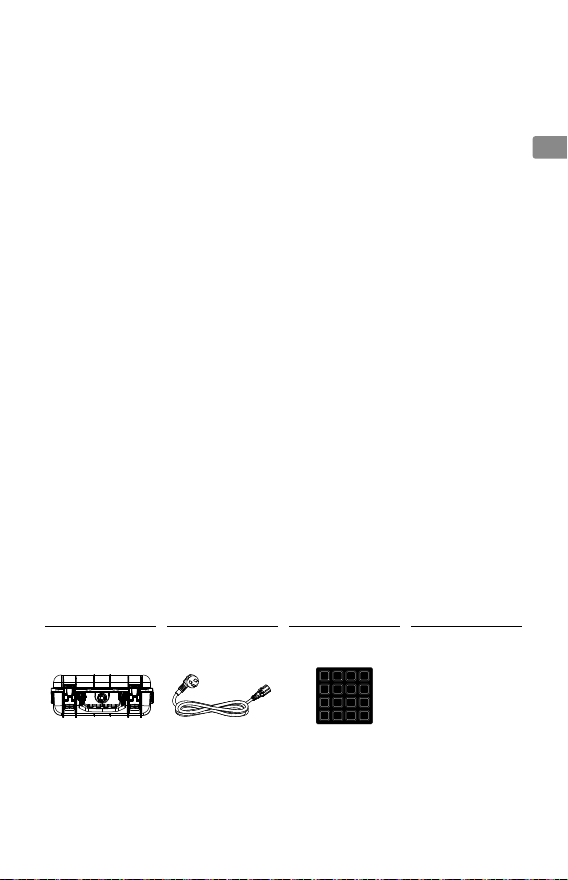
In the Box
Battery Station × 1 AC Power Adaptor
Cable ×1
Paired Batteries Sticker
× 1
Manuals
1 2 3 4
5 6 7 8
1 2 3 4
5 6 7 8
BS30 Intelligent Battery
Station User Guide
The illustrations in this manual may vary from the actual product.

EN
4©2022 DJI All Rights Reserved.
Usage
Charging
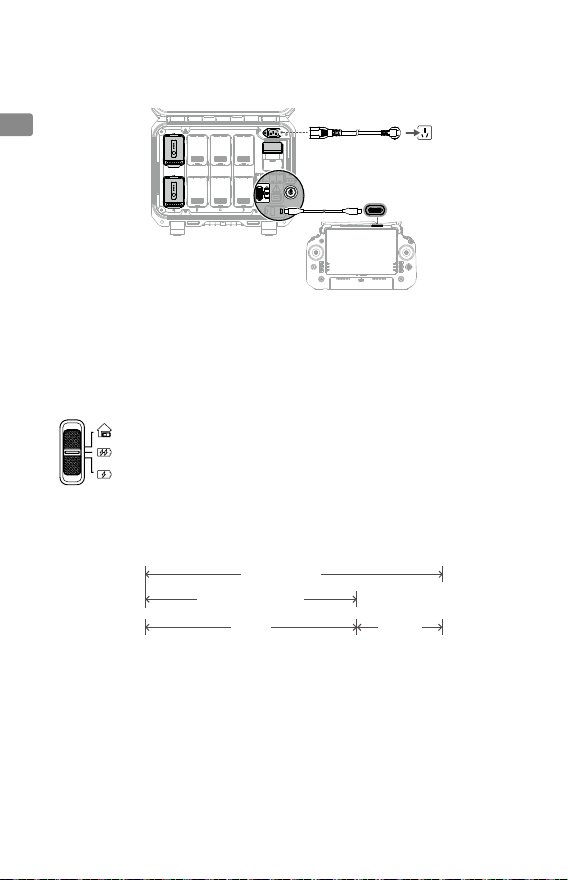
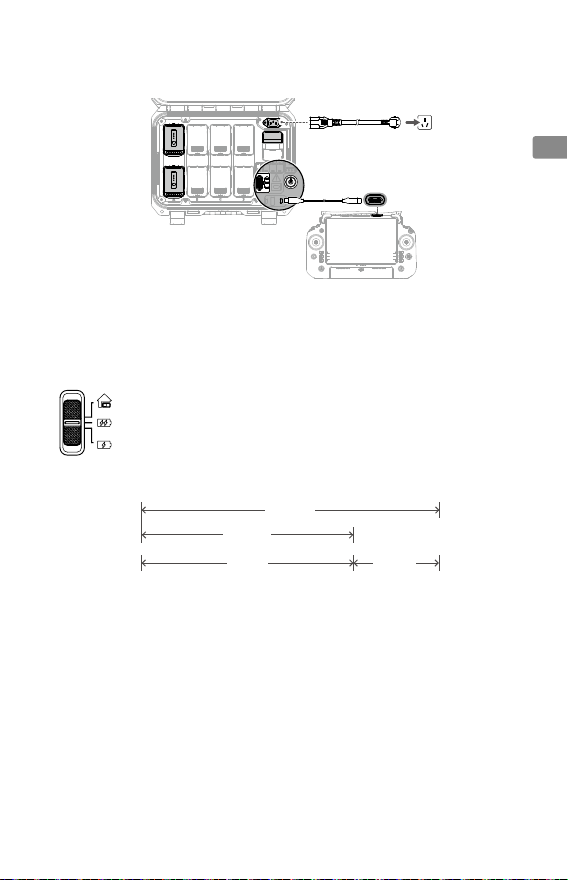
1. Connect the battery station to a power outlet using the AC power adaptor cable.
2. Press the power button once to power on the battery station.
3. To charge the DJI RC Plus remote controller, connect the USB-C ports of the battery station and
remote controller using a USB-C to USB-C cable.
4. For TB30 batteries, make sure the charging mode is set to the mode required. The charging time
is shown in the diagram.
Storage Mode: Each battery pair is charged to 50% in sequence and kept at 50%
after charging. *
Ready-to-Fly Mode: Each battery pair is charged to 90% in sequence and kept at
90% after charging. *
Standard Mode: Each battery pair is charged to 100% in sequence.
* The battery station should be powered on to maintain the battery level in Storage Mode and Ready-to-Fly
Mode. Power o the battery station after charging, except for special situations such as re emergencies.
Maintaining high power level in Ready-to-Fly Mode will aect battery life.
Battery Level: 20%
Standard Mode
Ready-to-Fly Mode
30 min 12 min
90% 100%
5. Insert the batteries into the battery ports to start charging.
A. For WB37 batteries, the battery station will charge the battery with the most power rst.
B. For TB30 batteries, their charging sequence is illustrated below.
a. Between paired and singular batteries, paired batteries will be charged rst. (Figure a)
b. Where there are multiple battery pairs (each formed by a top and bottom battery in the
sequence of A, B, C and D), the pair with the highest power will be charged rst. (Figure b)
c. If none of the batteries are paired, the two batteries with the highest power will be charged
rst. (Figure c)

EN
© 2022 DJI All Rights Reserved. 5
(Figure a) (Figure b) (Figure c)
Will charge rst.
10% 30%
20% 40%30%10%
10% 30%
30%
When the power of the paired batteries are not the same, the battery station will charge
the one with less power rst.
Connect the maintenance port to the remote controller USB-A port to update the
rmware or diagnose the errors for battery station and batteries.
The battery station will automatically warm up a TB30 battery to 18° C (64.4° F) before
charging if the temperature of the battery is lower than 10° C (50° F) when inserted.
When the WB37 battery is charged at the same time, the TB30 battery charging time will
be slightly prolonged.
Battery Station LEDs Description
LEDIndicators Descriptions
PowerButton
Solid green Powered on
BatteryStatusLEDs
Blinks green Charging
Solid green Charging completed
Blinking yellow Cooling down or warming up before charging
Solid yellow Waiting to charge
Blinking red Battery port communication error. Reinsert the battery or try another
battery port.
Solid red Battery error*
BatteryStationStatusLED
Blinking yellow Updating battery station rmware
Solid red Battery station error*
* Connect to the remote controller, run DJI Pilot 2, and tap HMS to diagnose the error.

EN
6©2022 DJI All Rights Reserved.
Buzzer Sound Description
The buzzer beeps to indicate the following errors:
A. When the battery status LED is red and the buzzer is beeping, it means there is an error
with the battery.
B. When the battery station status LED is red and the buzzer is beeping, it means there is an
error with the battery station.
Specications
Model CSX320-550
Dimensions 353×267×148 mm
Net Weight 3.95 kg
Compatible Battery Type TB30 Intelligent Flight Battery
WB37 Intelligent Battery
Input 100-240 VAC, 50/60 Hz
Output
TB30 Battery Port: 26.1 V, 8.9 A (supported up to two outputs
simultaneously)
WB37 Battery Port: 8.7 V, 6 A
Output Power 525 W
USB-C Port Max. output power of 65 W
USB-A Port Max. output power of 10 W (5 V, 2 A)
Power Consumption
(when not charging battery) < 8 W
Output Power
(when warming up battery) Approx. 30 W
Operating Temperature -20° to 40° C (-4° to 104° F)
Ingress Protection Rating IP55 (with the cover closed properly)
Charging Time* Approx. 30 min (charging two TB30 batteries from 20% to 90%)
Approx. 50 min (charging two TB30 batteries from 0% to 100%)
Protection Features
Anti-Backow Protection
Short Circuit Protection
Over Voltage Protection
Over Current Protection
Temperature Protection
* Charging time is tested in a lab environment at room temperature. The value provided should be
used for reference only.

© 2022 大疆创新 版权所有 7
CHS
免责声明
使用本产品之前,请仔细阅读并遵循本文及大疆 TM 创新(DJITM)提供的所有安全与合规操
作指引,否则可能会给您和周围的人带来伤害,损坏本产品或其他周围物品。一旦使用本
产品,即视为您已经仔细阅读本文档,理解、认可和接受本文档及本产品所有相关文档的
全部条款和内容。您承诺仅出于正当目的使用本产品。您承诺对使用本产品以及可能带来
的后果负全部责任。大疆创新(DJI)对于直接或间接使用本产品而造成的损坏、伤害以及
任何法律责任不予负责。
DJI 是深圳市大疆创新科技有限公司及其关联公司的商标。本文出现的产品名称、品牌等,
均为其所属公司的商标。本产品及手册为大疆创新版权所有。未经许可,不得以任何形式
复制翻印。
本文档及本产品所有相关的文档最终解释权归大疆创新(DJI)所有。如有更新,恕不另行
通知。请访问 www.dji.com 官方网站以获取最新的产品信息。
产品注意事项
1. 保持箱内干燥,切勿进入水、油等液体。

2. 请勿合上 BS30 智能电池箱(以下简称“电池箱”)进行充电,并保持通风和散热。
3. 电池箱电池接口仅适用于为 TB30 智能飞行电池(以下简称“TB30 电池”)及 WB37
智能电池(以下简称“WB37 电池”)充电,切勿为其他型号电池充电。
4. 使用时请将电池箱平稳放置,并注意绝缘及防火。
5. 请勿用手或其他物体触碰金属端子。若金属端子附着异物,请在电源关闭状态用干布擦
拭干净。
6. 开合电池箱时小心夹手。
简 介
BS30 电池箱提供 8个TB30 智能飞行电池接口和 2 个WB37 智能电池接口,1个USB-C
维护接口,以及 1个USB-C 和1个USB-A 充电接口。可同时为 2 块TB30 电池和 1 块
WB37 电池进行充电。
物品清单
电池箱 ×1 AC 线×1 电池配组贴纸 ×1 文档
用户所购买产品的实际外观结构,具体以实物为准。
1 2 3 4
5 6 7 8
1 2 3 4
5 6 7 8
BS30 智能电池箱使用说明

8©2022 大疆创新 版权所有
CHS
部件名称
1. 盖子
2. TB30 电池接口
3. 电源接口
4. WB37 电池接口
5. TB30 电池状态指示灯
6. WB37 电池状态指示灯
7. WB37 电量指示灯
8. 电池箱状态指示灯
9. 电源按键 /电源按键指示灯
10. 维护接口(USB-C)
11. 充电接口(USB-C,推荐用
于遥控器充电)
12. 充电接口(USB-A)
13. 充电模式切换开关
14. 挂锁孔
15. 锁扣
16. 提手
17. 压力均衡阀
1
2
3
4
5
7
9
6
8
10
13
14
15
16 17
12 11

© 2022 大疆创新 版权所有 9
CHS
使 用
充 电
1. 使用 AC 线连接电池箱电源接口至交流电源。
2. 按下电源按键开启电池箱。
3. 为DJI RC Plus 遥控器充电时,使用双头 USB-C 数据线连接电池箱的 USB-C 充电接口
至遥控器的 USB-C 接口。
4. 为TB30 电池充电时,需要先将充电模式切换开关拨到所需模式。充电时间如图所示。
存储模式:依次将每组电池充至 50%,充完后保持 50%*;
待命模式:依次将每组电池充至 90%,充完后保持 90%*;
标准模式:依次将每组电池充至 100%。
* 存储模式与待命模式保持电量需要电池箱持续供电。待命模式一直保持高电量将影响电池寿命,非特殊
场景(如消防应急)建议充完电后关闭电池箱电源。
标准模式
待命模式
30 分钟 12 分钟
电量:20% 90% 100%
5. 插入电池进行充电。
A. 为WB37 电池充电时,将选中电量最高的电池优先充电。
B. 为TB30 电池充电时,充电优先顺序举例如下所示:
a. 当存在配组和非配组电池时,优先为配组电池充电。(图 a)
b. 当存在多组配组电池时(ABCD 上下电池自动形成配组),优先为电量最高的一组
进行充电。(图 b)
c. 当电池均未配组时,优先为电量最高的两块电池进行充电。(图 c)
Table of contents
Other dji Camera Accessories manuals
Popular Camera Accessories manuals by other brands

Viltrox
Viltrox EF-NEX Mount instructions

Calumet
Calumet 7100 Series CK7114 operating instructions

Ropox
Ropox 4Single Series User manual and installation instructions

Cambo
Cambo Wide DS Digital Series Main operating instructions

Samsung
Samsung SHG-120 Specification sheet

Ryobi
Ryobi BPL-1820 Owner's operating manual