manuals.online logo
Brands
  1. Home
  2. •
  3. Brands
  4. •
  5. Electro-Voice
  6. •
  7. Speakers System
  8. •
  9. Electro-Voice SX Series SX600 User manual

Electro-Voice SX Series SX600 User manual

Other manuals for SX Series SX600

5

Other Electro-Voice Speakers System manuals

Electro-Voice SxA100+ User manual

Electro-Voice

Electro-Voice SxA100+ User manual

Electro-Voice Phoenix PX1152M User manual

Electro-Voice

Electro-Voice Phoenix PX1152M User manual

Electro-Voice SX Series SX600 User manual

Electro-Voice

Electro-Voice SX Series SX600 User manual

Electro-Voice E-V Sixteen Dimension Guide

Electro-Voice

Electro-Voice E-V Sixteen Dimension Guide

Electro-Voice PRO-8A User manual

Electro-Voice

Electro-Voice PRO-8A User manual

Electro-Voice FRI-152/64 User manual

Electro-Voice

Electro-Voice FRI-152/64 User manual

Electro-Voice Sx80 User manual

Electro-Voice

Electro-Voice Sx80 User manual

Electro-Voice SonicXS User manual

Electro-Voice

Electro-Voice SonicXS User manual

Electro-Voice TL606A User manual

Electro-Voice

Electro-Voice TL606A User manual

Electro-Voice Xi-1122MHA User manual

Electro-Voice

Electro-Voice Xi-1122MHA User manual

Electro-Voice SH-1502ER User manual

Electro-Voice

Electro-Voice SH-1502ER User manual

Electro-Voice E-V 15A Dimension Guide

Electro-Voice

Electro-Voice E-V 15A Dimension Guide

Electro-Voice Phoenix PX1122M User manual

Electro-Voice

Electro-Voice Phoenix PX1122M User manual

Electro-Voice PIM-102 User manual

Electro-Voice

Electro-Voice PIM-102 User manual

Electro-Voice ELX200-BRKT Quick start guide

Electro-Voice

Electro-Voice ELX200-BRKT Quick start guide

Electro-Voice QRx 218S User manual

Electro-Voice

Electro-Voice QRx 218S User manual

Electro-Voice HF12-3 User manual

Electro-Voice

Electro-Voice HF12-3 User manual

Electro-Voice PI115L User manual

Electro-Voice

Electro-Voice PI115L User manual

Electro-Voice EVR-160 User manual

Electro-Voice

Electro-Voice EVR-160 User manual

Electro-Voice Aries Console Speaker System User manual

Electro-Voice

Electro-Voice Aries Console Speaker System User manual

Electro-Voice E-V ELEVEN Dimension Guide

Electro-Voice

Electro-Voice E-V ELEVEN Dimension Guide

Electro-Voice T251i User manual

Electro-Voice

Electro-Voice T251i User manual

Electro-Voice Sx-Series User manual

Electro-Voice

Electro-Voice Sx-Series User manual

Electro-Voice S12 User manual

Electro-Voice

Electro-Voice S12 User manual

Popular Speakers System manuals by other brands

Monster MT-SB21 user manual

Monster

Monster MT-SB21 user manual

Monacor ESP-76AB/ WS manual

Monacor

Monacor ESP-76AB/ WS manual

Samsung HW-J430 user manual

Samsung

Samsung HW-J430 user manual

WILSON AUDIO WATT owner's manual

WILSON AUDIO

WILSON AUDIO WATT owner's manual

Hisense AX3125H user manual

Hisense

Hisense AX3125H user manual

EisSound KBSound iSelect user manual

EisSound

EisSound KBSound iSelect user manual

Boston Acoustics VRi793 manual

Boston Acoustics

Boston Acoustics VRi793 manual

Sven SPS-707bL Operation manual

Sven

Sven SPS-707bL Operation manual

Monacor DSM-26LAN instruction manual

Monacor

Monacor DSM-26LAN instruction manual

JVC CS-SR100 instructions

JVC

JVC CS-SR100 instructions

Samsung HW-C450 user manual

Samsung

Samsung HW-C450 user manual

TaoTronics evatronic ET-SK011 user guide

TaoTronics

TaoTronics evatronic ET-SK011 user guide

JVC HX-D7C instructions

JVC

JVC HX-D7C instructions

Pyle PBMSPG190 user manual

Pyle

Pyle PBMSPG190 user manual

Sven SPS-607 Operation manual

Sven

Sven SPS-607 Operation manual

iSP Technologies LT2 series owner's manual

iSP Technologies

iSP Technologies LT2 series owner's manual

Samsung Crystal Surround Air Track HW-F550 user manual

Samsung

Samsung Crystal Surround Air Track HW-F550 user manual

Bose Acoustimass 6 Series II owner's guide

Bose

Bose Acoustimass 6 Series II owner's guide

manuals.online logo
manuals.online logoBrands
  • About & Mission
  • Contact us
  • Privacy Policy
  • Terms and Conditions

Copyright 2025 Manuals.Online. All Rights Reserved.

Electro-Voice®
Sx600 User Manual
Sx600 User Manual
Electro-Voice®
Sx600 User Manual
Table of Contents
Product Description ................................................................................. 1
Important Features .................................................................................. 1
Product Feature Identification .................................................................. 2
System Acoustic Design Considerations ................................................. 3
Installation Precautions............................................................................ 4
Installation Notes ..................................................................................... 4
Installation Procedure ..............................................................................
Step 1: Selection and Preparation of the Mounting Surface .....................
Step 2: Mounting the SuperSAMTM Bracket ..............................................
Step 3: Completing the Electrical Connections ........................................
Step 4: Mounting the Speaker and Aligning ............................................. 8
Step 5: System Adjustment and Acoustic Tuning ................................... 10
Appendix A: Troubleshooting ................................................................. 10
Appendix B: Warranty Statement ........................................................... 12
Appendix C: Technical Specifiations ...................................................... 13
TOC
Electro-Voice®
Sx600 User Manual
Product Description
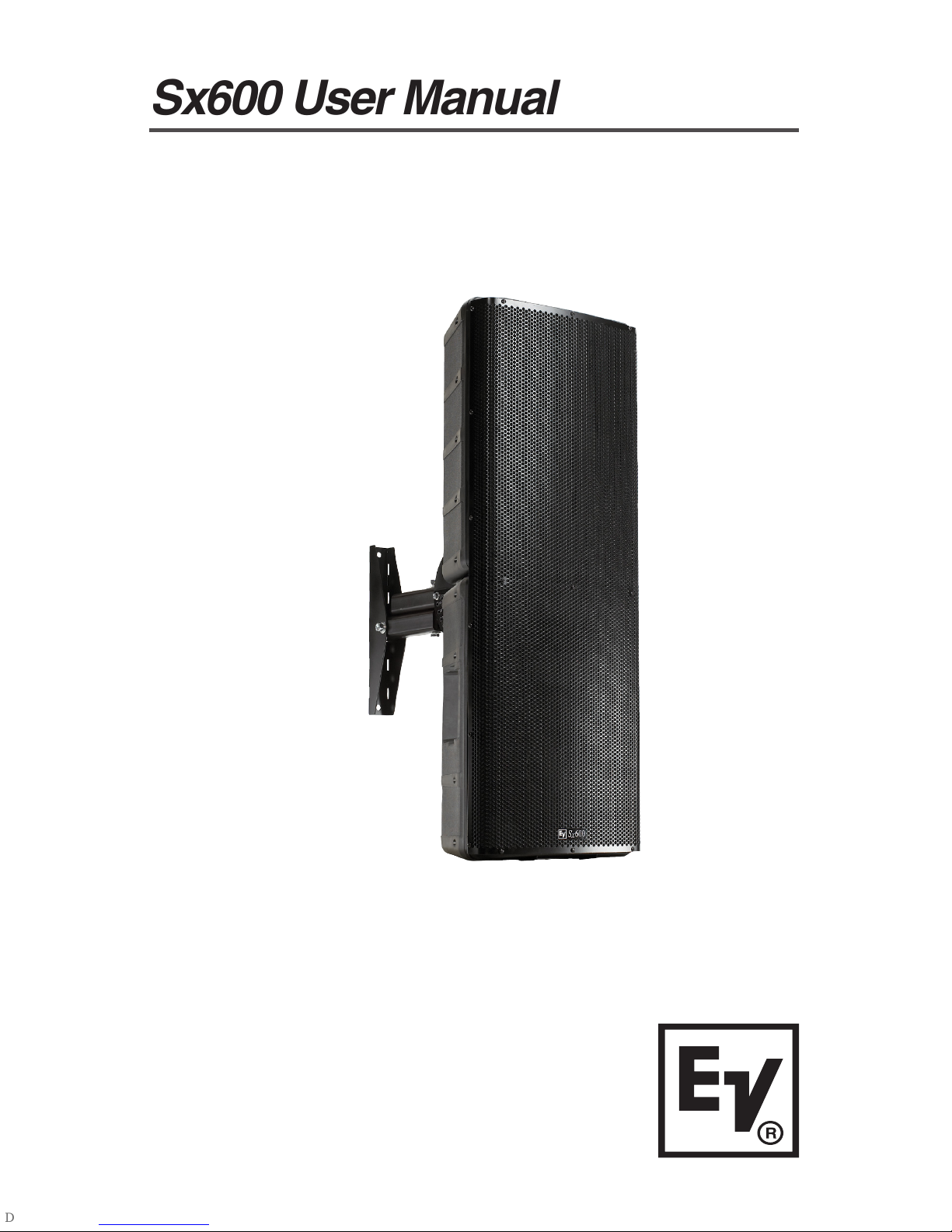
The Sx600 Series is a remarkably flexible indoor/outdoor speaker
system designed to produce high-fidelity high-level audio in distributed
applications such as stadiums, racetracks, amusement parks,
fairgrounds, etc. tilizing a 65° x 65° high frequency horn and a unique
2-element vertical midbass array, Sx600 gives you the clarity of a direct
radiator with the high SPL and directivity of a properly designed horn
system, especially in the important vertical plane. While intended
primarily for vocal applications, the Sx600 accurately reproduces music if
heavy bass is not required.
Important Features
The Sx600 is available as either a conventional 4 ohm low impedance
system, the Sx600PI, or as a constant voltage system, the Sx600PIX.
The PIX version features a 100% duty cycle rated 600 watt full isolation
line transformer for operation with 70volt, 100volt, 140volt, or 200volt
distributed systems.
The Sx600 comes with an all-new Super Strong Arm Mount, called the
SuperSAMTM. This exclusive 2-part EV mounting system allows the
installer to pre-set the exact down angle on the ground, fasten the
separate mounting bracket by itself, and then mount the speaker to the
bracket quickly and easily with a single bolt, setting the pan angle
anywhere within a 180° arc in the process.
The three-layer stainless steel grill design is an acoustically transparent
yet effective barrier to both condensation and heavy rain. The light-
weight polypropylene enclosure has strategically placed internal
passages to conduct moisture that may accumulate internally out to the
side channels where it drains away.
1
Electro-Voice®
Sx600 User Manual
Product Feature Identification
Figure 1: Sx600 Product Features
Stainless Steel
SuperSAMTM
Mounting
Bracket
SuperSAMTM Down
Angle Adjustment
0°- 60° in 5°
Increments)
 Full Face Stainless Steel Grille
with Hydrophobic Backing
Not Shown)
 All Stainless Steel Hardware
Not Shown)
Enclosure
Front View)
Enclosure
Rear View)
2
65° x 65°
VaripathTM
Constant
DirectivityTM HF
Horn with DH2T
Compression
Driver
Nd12A-8
Neodymium
Midbass Driver
DL12BFL
Midbass/LF
Driver
Weather-Resistant Lightweight
Polypropylene Enclosure
All Aluminum
Rigging
All Aluminum
Rigging
SJO Input
Cable
White
+
Black
-
Electro-Voice®
Sx600 User Manual
System Acoustic Design
Considerations
Direct radiator acoustic systems can offer great vocal band clarity but
dont usually offer the efficiency and directivity of horn loaded systems.
Horn loaded systems, if the overall dimensions are large enough, can
offer great directivity control, but typical multi-way horn designs,
particularly high Q co-axial designs, are also naturally resonant.
Resonant systems suffer from poor time domain response and, as a
consequence, can have poor intelligibility. The EV solution is to combine
a two element critically spaced midbass line array with ultra-efficient
neodymium magnetics. This produces the high SPL levels and vertical
directivity of a properly horn loaded low/mid section while maintaining the
clear vocal reproduction of a well damped direct radiator system. The
Electro-Voice ND12A neodymium midbass driver developed for X-Array
has been optimized for ultra high level, high intelligibility 300Hz to 2kHz
response. The ND12A incorporates EVs Ring Mode Decoupling (RMD)
technology to dampen mechanical domain resonances that color vocal
fundamentals in normal direct radiator systems. RMD, found in most EV
drivers, ensures level independent tonal response and produces a level
of intelligibility unique to EV systems. The second 12 inch driver, a
specially modified DL series, works with its own crossover section and
critical spacing to the ND12A to greatly improve midband vertical
directivity and system output below 300Hz. The result is clear, clean
vocals, with the SPL capabilities required for large spaces.
The SX600 also features EVs DH2T medium format compression driver
coupled to our unique Varipath constant directivity high frequency horn.
The HF horn pattern is optimized to a 65° horizontal by 65° vertical
included angle to produce both long throw and wide front to back
audience coverage. The high power handling and low distortion
performance of the DH2T assures excellent vocal articulation with
extended high frequency coverage to beyond 16kHz.
3
Electro-Voice®
Sx600 User Manual
Installation Precautions
This document details general mounting practices appropriate to the
entertainment industry, as they would apply to the mounting of Electro-
Voice Sx600 loudspeaker systems. It is intended to familiarize the reader
with mounting hardware and techniques for suspending Sx600 loud-
speaker systems overhead. Only persons with the knowledge of proper
hardware and safe mounting techniques should attempt to suspend any
sound systems overhead. Prior to suspending any Electro-Voice Sx600
loudspeaker systems overhead, it is essential that the user be familiar
with the strength ratings, mounting techniques and special safety consid-
erations outlined in this manual. The mounting techniques and practices
recommended in this manual are, of necessity, in general terms to
accommodate the many variations in mounting configurations. As such,
the user is expressly responsible for the safety of all specific Sx600
loudspeaker mounting configurations as implemented in practice.
The Sx600 SuperSAMTM Mounting System is intented to support the
Sx600 Speaker System only. Do not use it for any other purpose. Never
set anything on, or hang anything from, the Sx600 SuperSAMTM when
using it for the Sx600 Speaker System.
Installation Notes
The Sx600PI weighs in at 80 lb (36.3 kg.) and the Sx600PIX at 98 lb
(44.5 kg).
It is the installers responsibility to insure that the mounting
surface is stable and sufficiently strong to support the
weight of the unit(s) being mounted.
The SuperSAMTM is made of tough 6061T6 aluminum, and the actual
mounting bracket is stainless steel. DO NOT WELD. Consult and follow
all applicable codes and procedures. se only ½ inch diameter
mounting bolts, 4 per bracket minimum. (all 6 is recommended) When
mounting outdoors, remember to allow for wind, snow and ice load. Do
not locate the Sx600 where it may be subjected to water or snow run-off
from roofs, gutters, etc. NEVER MO NT AN Sx600 ON ITS SIDE.
4
Electro-Voice®
Sx600 User Manual
5
Block Wall Mounting
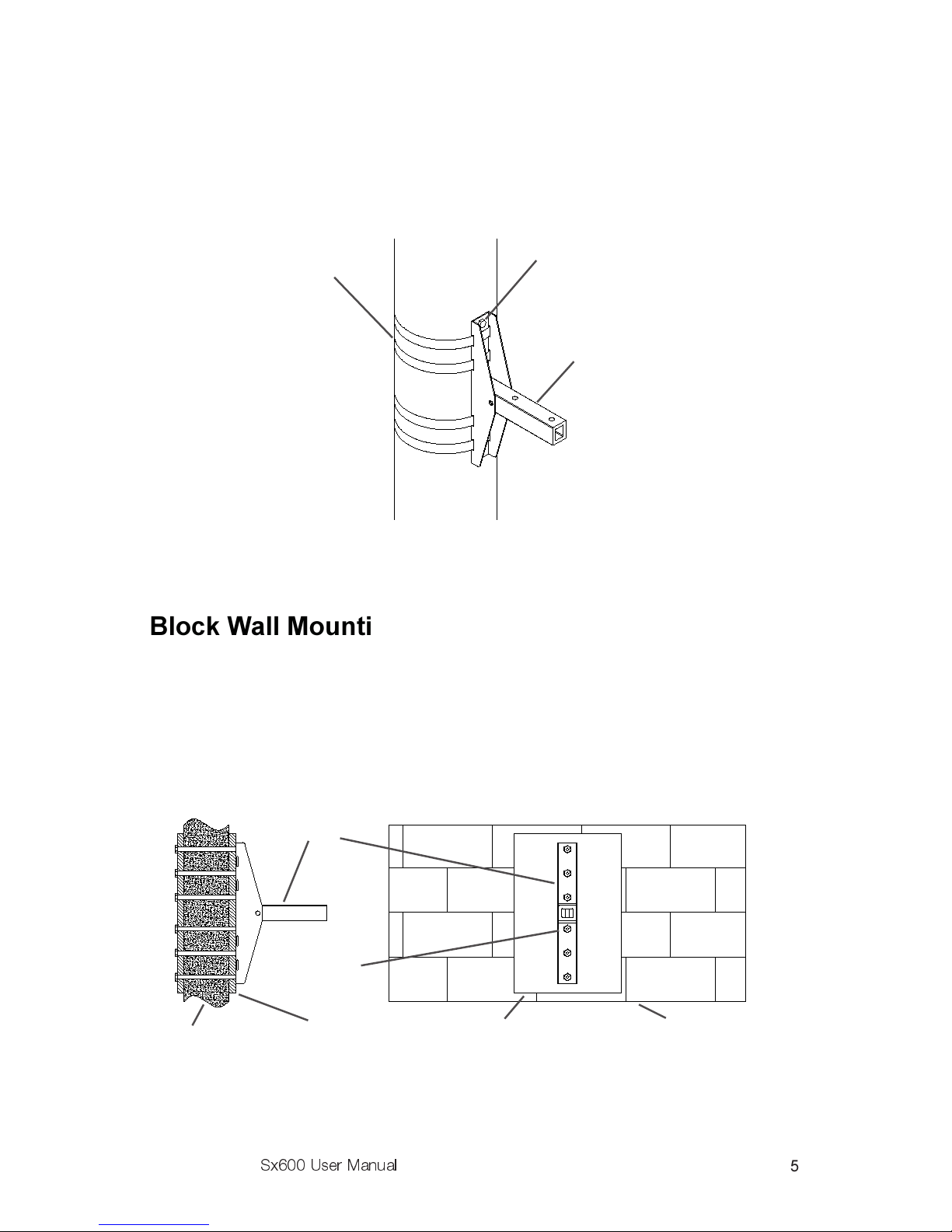
Do not attempt to mount an Sx600 to a block or brick wall without
through-bolts and large, heavy steel backing plates on both sides of the
wall. On poured concrete walls use deep ½ inch diameter anchors that
cannot be pulled out once set. se all 6 mounting holes.
SuperSAMTM
Bracket
1/2 Bolts
6 Reqd)
Approved Straps
4 Reqd)
Figure 2: Pole Mounting
Figure 3: Block Wall Mounting
SuperSAMTM
Bracket
1/2 Bolts
6 Reqd)
Heavy Steel Backing Plates Block Wall
Block Wall
Pole Mounting
Follow the pole manufacturers recommendations when mounting to a
pole. On wooden poles, make sure there is no rot or other deterioration.
Through-bolts with backing plates are highly recommended. Lag bolts
should only be used in conjunction with straps.
Electro-Voice®
Sx600 User Manual
Stud Wall Mounting
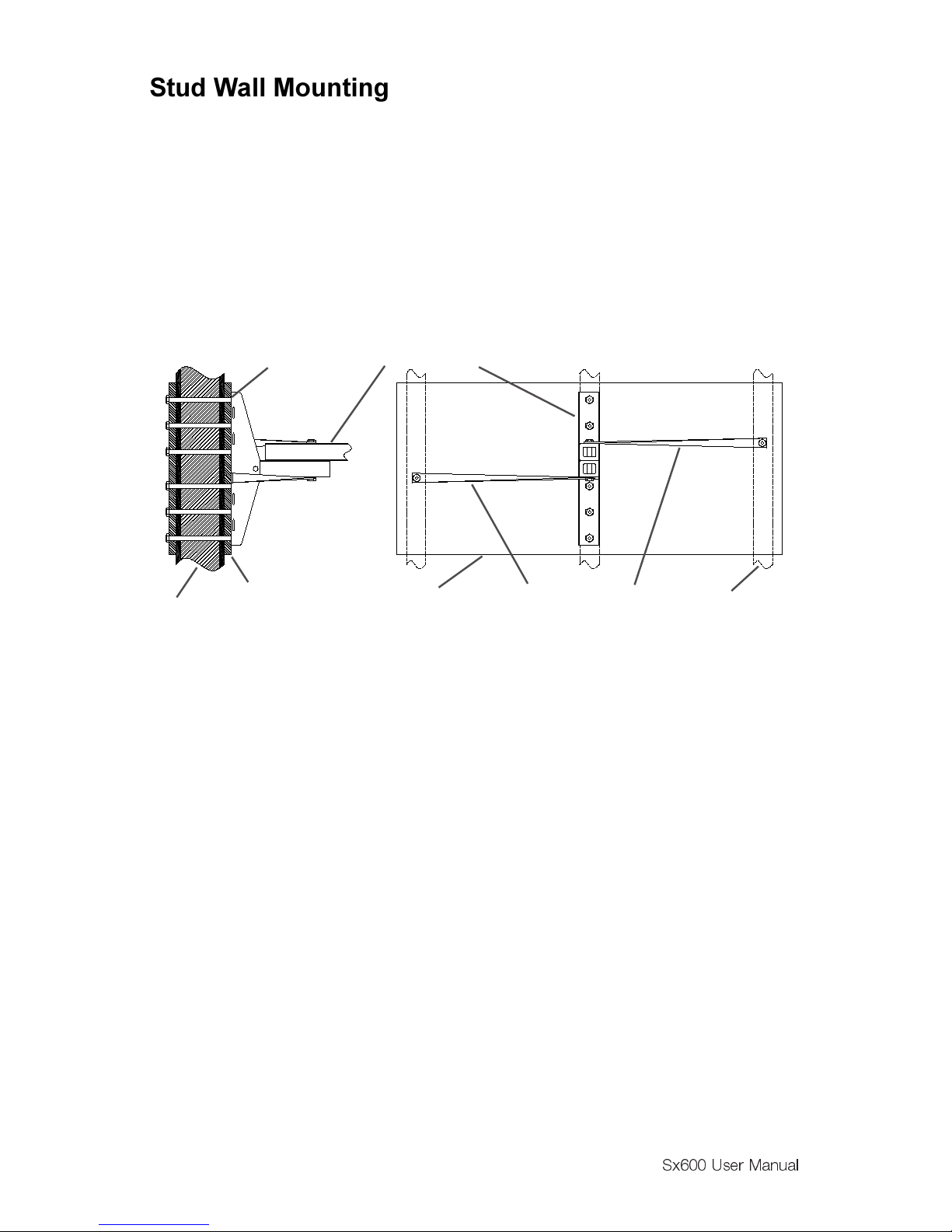
First determine whether the structural members in the wall can withstand
not only the weight of the Sx600, but also the side-to-side stresses of
heavy cross-winds. Reinforce both sides of the wall with heavy plates, ¾
inch marine plywood minimum, and use through bolts. Never rely on lag
bolts alone. Additional side-to-side support may be had by attaching
simple steel outriggers (not included) from the SuperSAMTM pivot bolt to
the next stud on either side of the mounting bracket. Never mount to a
wall containing plaster or drywall without backing plates.
6
I-Beam Mounting
Because of the vast number of sizes and conditions of their use, consult
a licensed structural engineer for the approved method of attaching an
Sx600 to any particular I-Beam or other structural component.
Mounting Surface Reinforcement
If in doubt: Make It Stronger. Strong side winds will exert tremendous
side leverage along the axis of the mounting bolts sufficient to crush
some surfaces. A large backing plate and/or steel outriggers attached
from the pivot bolt to the wall 16" to 24" either side of center makes a
simple and effective reinforcement in most situations.
SuperSAMTM Bracket1/2 Bolts
6 Reqd)
Studs
Stud Steel Outriggers
Large Backing Plates, 3/4
Marine Plywood Min.
Figure 4: Stud Mounting
Electro-Voice®
Sx600 User Manual
Installation Procedure
Step 1: Selection and Preparation of the
Mounting Surface
Surface must be clean and smooth. It must also be a material that is not
easily crushed. While the SuperSAMTM distributes weight evenly over a
relatively large area, strong winds against the side of the Sx600 will exert
significant crowbar-like leverage between the bolts and the side corner
edges of the bracket. For this reason, surfaces of plaster, drywall, soft
wood, cinder block, ceramic, glass or other brittle, crushable materials
must have a large heavy backing plate to prevent the Sx600 from
loosening itself by crushing its mounting surface.
Step 2: Mounting the SuperSAM Bracket
If bolts are to be used, determine the exact location desired for the holes
on the mounting surface. se a center punch to mark the center of each
hole to be drilled and minimize hole drift. Drill holes and DE-BURR. The
bracket M ST sit perfectly flat against the mounting surface. Mount the
bracket using ½ bolts, washers, lock washers and nuts, and tighten
securely. Stainless Steel hardware is recommended.
Step 3: Mounting the Speaker and Aligning
Pre-set the down angle of the speaker (as pre-determined by EASE) by
inserting the 5/16 Stainless Steel bolt through the appropriate holes (See
Figure 5). Tighten it and the ½ pivot bolt securely. (If aiming visually,
tighten bolts finger-tight only until aiming is finalized.) Place the long ½
bolt and washer through the appropriate hole in the mounting bar. Use
the hole nearest the speaker for down-angles of less than 40 degrees and
the farthest hole for angles greater than 40 degrees. Set the speaker on
the already mounted bracket end bar, dropping the ½ pivot bolt through
the hole near the end of the bar. (The second hole is provided as a
convenience for certain close in situations.) Install the flat washer, lock
washer and nut and tighten just enough to pull both bars together.
Determine pan angle by sighting along center groove of enclosure. (Either
top or bottom) Securely tighten pivot bolt to lock in place. Visually check
down angle. Too high an angle will result in poor intelligibility in the near-
field; a too-low angle will cause poor intelligibility far-field and a hot spot
close in. If necessary, re-set the down-angle as follows: Loosen the ½
bolt on the adjusting bracket and remove the 5/16 bolt. Tilt the speaker
to the desired angle and re-insert the 5/16 bolt in the appropriate hole.
Re-tighten all hardware.
7

Electro-Voice®
Sx600 User Manual
Step 4: Completing the Electrical Connections
Trim the SJO cord to a neat length while allowing enough slack for future
aiming adjustments or service. Make electrical connections per all
applicable codes in a weather-tight box and secure the SJO cord through
a weather-tight gland nut. Observe color code for proper polarity: Black
wire from speaker is audio (-), white wire is audio (+).
sing the PIX (Constant Voltage Version)
Constant Voltage Design Considerations
One of the major expenses of any large sound system up-grade is the
cost of running new wiring. For this reason, the Sx600PIX transformer
has taps for use on lines as high as 200volts, which is easily delivered by
an Electro-Voice CPS-4 amplifier in bridge mode. Keeping the current
draw the same, changing from 70volts to 200volts means you can now
pull approximately 3 times the wattage from the same wiring! In new
installations, the higher voltages mean less line loss on long runs, less
current and lighter gauge wire. Always check and comply with all
applicable codes.
8
Figure 5: Mounting the Speaker to the Wall Bracket
Exploded View Fully Assembled View