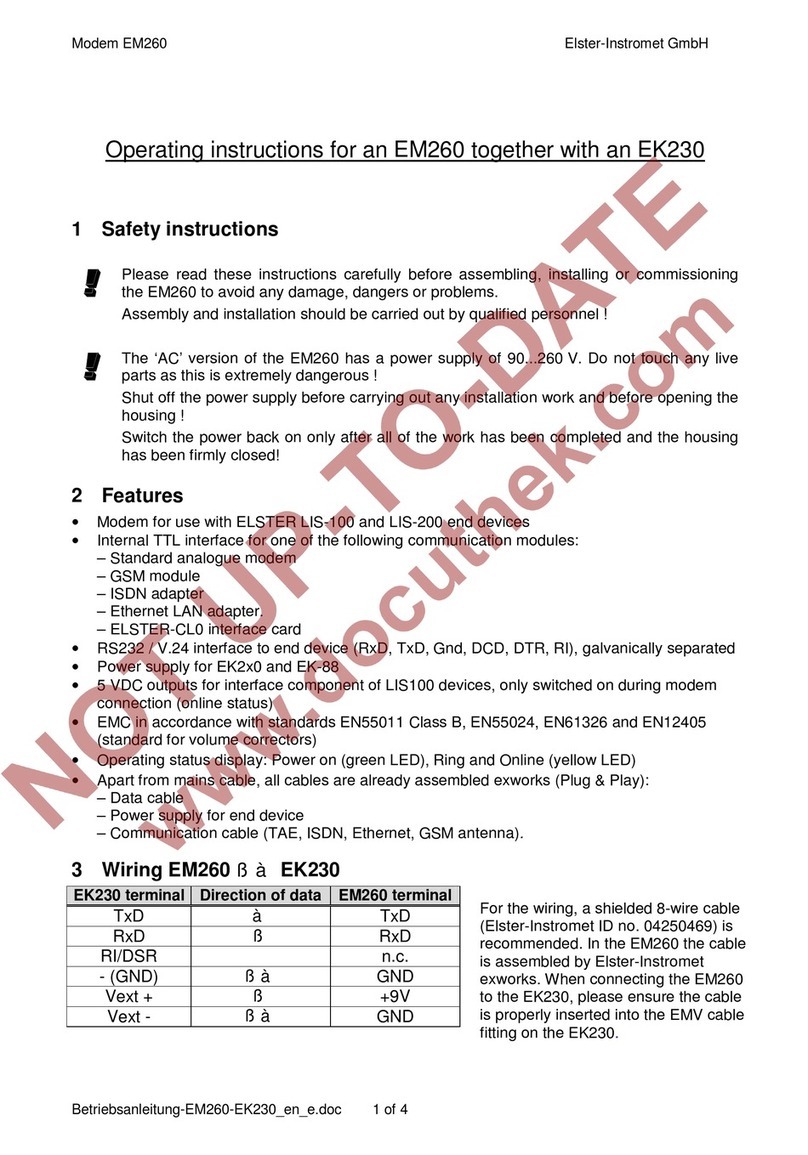
Manual EM260
with Volume Corretor EK260
4 / 8 Betriebsanleitung-EM260-EK260_en_f.doc
Communication
module EK260
SW vers. Md.S2
(2:705) DF.S2
(2:707) Bd.S2
(2:708) -----
(2:709) 1) TypS2
(2:70A) Num.T
(2:720)
Analogue 4) all 2 0 19200 19200 1
1, 2…9
up to 2.3.. 2 0 19200 19200 1 1, 2…9
GSM from 2.4.. 7 0 19200 19200 1 1, 2…9
2.2...2.4 3 2 19200 19200 1 1…3
GPRS-TSC from 2.5.. 7 2 19200 19200 1 1…3
up to 2.3.. 5 0 19200 19200 1 - 3)
ISDN from 2.4.. 2 0 19200 19200 1 1
up to 2.3.. 5 2 19200 19200 1 - 3)
Ethernet from 2.4.. 2 2 19200 19200 1 1
CL from 2.0.. 5 0 od. 2 2) 300...
19200 2) 300...
19200 2) 1 -
3)
1) Not available in menu Ser.IO! Can only be modified with parameter software “WinPADS200-EK“!
2) According to the settings in the CL1 modem and the other devices installed in the current loop (CL).
3) This setting (number of rings) is not used in mode 5. In mode 5 the communication module in the EM260
always picks up an incoming call after the first ring signal.
4) Numbers in bold: Exworks settings performed by Elster-Instromet if the EK260 is delivered without any
modem.
6 Setting the parameters for the communication module
The parameters for the communication module (modem) in the EM260 are set ex-works for use
with an EK260.
If the parameters have to be modified on site, this can be carried out with the help of the
parameter software “WinPADS200-EK“: Menu „File transfer…“, item “Send parameter file…”.
Then you can select the parameter file (*.WPP) which fits to your application (communication
module, version of EK260).
Example: EM260/Analogue modem with EK260 V2.51
Æ“EK260_2v5.. - EM260 & int. Analog-Modem (Insys)_a.WPP“
Before disconnecting, the button “Init modem“ should be pressed (“Interface – Modem
initialisation“). Æafter it is disconnected, the EK260 sends the parameters to the communication
module. The parameters are also sent after switching on the power supply and after “M.INI=1” in
EK260´s menu “Ser.IO”.
The parameterisation of the communication module does not work with all EK260 versions and
also not with all types of communication modules. The following table shows the dependences
(“x“ means: Communication module can be parameterised by the EK260):
Communication module in EM260Software version of
EK260 Analogue GSM ISDN Ethernet CL0 Remarks
1.11 1) 1) 1)
from V2.0.. up to V2.4.. x 1) 3) 1) 3)
from V2.4.. x
1)
x x
2)
1) Parameterisation can be carried out only by Elster-Instromet exworks or by Elster-Instromet customer
service on site with the help of the software tool “ModemIni“ (ID no. 73017249). In the case of a
Wavecom adapter board V1.1 (GSM modem), the modem programming adapter (ID no. 73018295) is
also required.
2) CL0 interface need not be parameterised
3) The modem parameters, of course, can be set by “WinPADS200-EK“ („Interface – String for connected
modem“), but after carrying out the parameterisation (Button „Init modem“, „M.INI=1“ or switching on
power supply) they must be deleted again!!! Otherwise the communication module will not pick up any
further incoming call!!!