manuals.online logo
Brands
  1. Home
  2. •
  3. Brands
  4. •
  5. Ergotron
  6. •
  7. Computer Accessories
  8. •
  9. Ergotron LX Sit-Stand Wall Keyboard Arm User manual

Ergotron LX Sit-Stand Wall Keyboard Arm User manual

Other manuals for LX Sit-Stand Wall Keyboard Arm

1

Other Ergotron Computer Accessories manuals

Ergotron Mouse Shelf User manual

Ergotron

Ergotron Mouse Shelf User manual

Ergotron Neo-Flex User manual

Ergotron

Ergotron Neo-Flex User manual

Ergotron Lockable Tablet Mount User manual

Ergotron

Ergotron Lockable Tablet Mount User manual

Ergotron 85-046-231 User manual

Ergotron

Ergotron 85-046-231 User manual

Ergotron 97-585 User manual

Ergotron

Ergotron 97-585 User manual

Ergotron Dock Locker User manual

Ergotron

Ergotron Dock Locker User manual

Popular Computer Accessories manuals by other brands

Netstor NA255A user manual

Netstor

Netstor NA255A user manual

perixx PERIDUO-610 user manual

perixx

perixx PERIDUO-610 user manual

Cherry PURE JD-0100 operating manual

Cherry

Cherry PURE JD-0100 operating manual

Cool-Icam DICK II user manual

Cool-Icam

Cool-Icam DICK II user manual

Motorola ATRIX user guide

Motorola

Motorola ATRIX user guide

HP USB Media Docking Station specification

HP

HP USB Media Docking Station specification

Cherry B.UNLIMITED 3.0 user manual

Cherry

Cherry B.UNLIMITED 3.0 user manual

Bartec TC 7 Series user guide

Bartec

Bartec TC 7 Series user guide

Philips SPC3540 Specifications

Philips

Philips SPC3540 Specifications

Logitech mk220 user manual

Logitech

Logitech mk220 user manual

Vivo MOUNT-KB05-4DW instruction manual

Vivo

Vivo MOUNT-KB05-4DW instruction manual

SilverStone LC02 manual

SilverStone

SilverStone LC02 manual

Flexispot ML2B installation guide

Flexispot

Flexispot ML2B installation guide

Hamlet UNIVERSAL COVER 101 KBT2 user manual

Hamlet

Hamlet UNIVERSAL COVER 101 KBT2 user manual

Adam Equipment RS-485 manual 

Adam Equipment

Adam Equipment RS-485 manual 

Sven Base 305 сombo instructions

Sven

Sven Base 305 сombo instructions

Hama 108310 Operating	 instruction

Hama

Hama 108310 Operating instruction

SpeechWare FlexyMike FMK03 user manual

SpeechWare

SpeechWare FlexyMike FMK03 user manual

manuals.online logo
manuals.online logoBrands
  • About & Mission
  • Contact us
  • Privacy Policy
  • Terms and Conditions

Copyright 2025 Manuals.Online. All Rights Reserved.

1 of 16
888-45-276-W-02 rev. J • 08/15
LX Sit-Stand Wall Mount Keyboard Arm
User's Guide - English
Guía del usuario - Español
Manuel de l’utilisateur - Français
Gebruikersgids - Deutsch
Benutzerhandbuch - Nederlands
Guida per l’utente - Italiano
Användarhandbok - svenska
ユーザーガイド:日本語
用户指南 : 汉语
ENGLISH
ASSEMBLY INSTRUCTIONS
For the latest User Installation Guide please visit: www.ergotron.com
2 of 16
888-45-276-W-02 rev. J • 08/15
ABCD
1
2
0-5 lbs
(0-2.3 kg)
180°
360°
180°
13 mm
2
1
90°
5°
20"
(508 mm)
3°3°
Ø 3/8” (10mm)
Ø 3/16" (5mm)
ENGLISH
Concrete Wall Mounting
Wood Stud Mounting
Stud Finder
3 of 16
888-45-276-W-02 rev. J • 08/15
ABCD
1
2
3
4
5
6
2x 2x 4x
1x
1x
1x
10-24 x 1/2"
2x
4x 4x
1/8”
1x
1x
5mm
4mm
1x
1x
1x
1x
1x
1x
1x
2x 2x
2x
M8 x 80mm
M8
2x
2x
2x
M6
M6 x 45mm
M4 x 8mm
M4 x 14mm
ENGLISH
4 of 16
888-45-276-W-02 rev. J • 08/15
1
23”
(584mm)
28”
(711mm)
5’0” - 5’9”
(152-175cm)
5’0” - 5’9”
(152-175cm)
20.3”
(516mm)
4.2”
(106mm)
22”
(562mm) 27.6”
(701mm)
1.3”
(32mm)
0.2”
(4.7mm)
10.2”
(259mm)
ENGLISH
Mounting Height for Ergonomic Workstation
Determine mounting location:
Top view showing range of motion when pulled out from the wall.
Front view with arm pushed back against the wall.
This mounting height is a recommendation for an ergonomic workstation that accommodates user heights of 5’0”-5’9”
(152-175cm).
If user heights are dierent than this, you should change mounting height to accommodate user heights. (Change mount-
ing height one inch for every one inch dierence in user heights).
5 of 16
888-45-276-W-02 rev. J • 08/15
23.15"
(80mm)
7.1"
(180mm)
6.5"
(165mm)
1.57"
(40mm)
1.34"
(34mm)
1.14"
(29mm)
5.1"
(129mm)
678
ENGLISH
CAUTION: Make sure the wall mount bracket is level,
ush and snug to the wall surface. DO NOT OVERTIGHT-
EN THE BOLTS.
WARNING: Ensure that the wall structure is capable
of supporting four times the total weight of mounted
equipment. Mounting to wall surfaces that do not meet
this criteria may result in an unstable, unsafe condition
which could lead to personal injury and/or property
damage. Consult a construction professional if you
have any doubt about what this means in regard to
your particular application.
Concrete
Ergotron product
Wood

6 of 16
888-45-276-W-02 rev. J • 08/15
1/8"
1/8"
1/8"
1/8"
4x
10-24 x 1/2"
4x
10-24 x 1/2"
9
9
9
9
4x
10-24 x 1/2"
4x
10-24 x5/8"
ENGLISH
Ergotron product
NOTE: Fasteners may unwind due to vibration caused by move-
ment of mounting solution over time. Inspect mounting solution
for loose fasteners on a routine basis. If desired, apply a light duty
thread locking adhesive to fasteners before installation to prevent
back-out.
When attaching to Pole Clamps, use 10-24 x 5/8”
screws included with pole brackets, Do NOT use
10-24 x 1/2” screws
NOTE: Wall Track and Brackets sold separately.
7 of 16
888-45-276-W-02 rev. J • 08/15
9
3
4
c
b2x
13 mm
M8 x 80mm
2
abc
d
2.75”
Ø 3/16" (5mm)
ENGLISH
Stud Finder
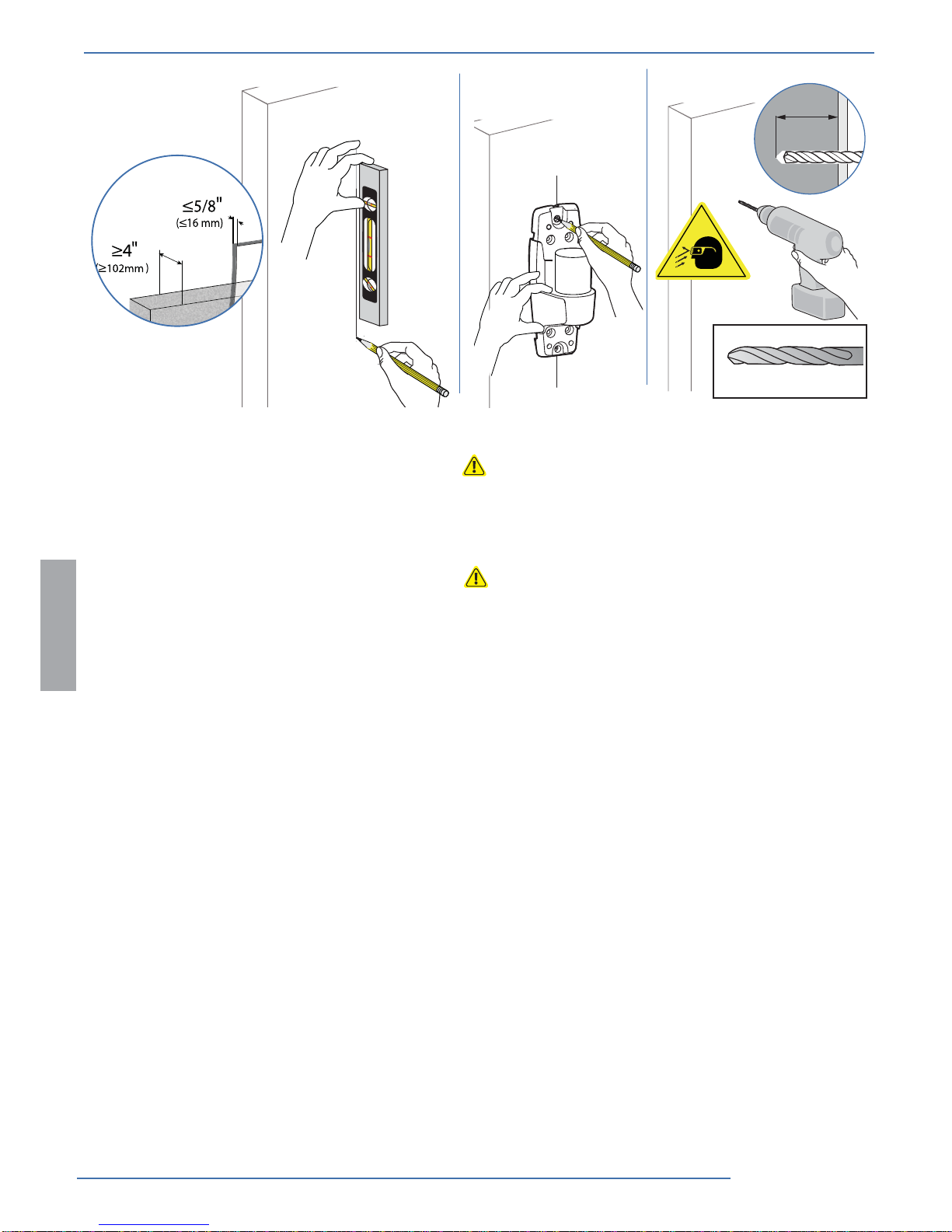
CAUTION: Make sure the wall mount
bracket is level, ush and snug to the
wall surface.
DO NOT OVERTIGHTEN
THE BOLTS.
Optional locking feature
(customer supplied lock)
Wood Stud Mounting
8 of 16
888-45-276-W-02 rev. J • 08/15
2abc
3-1/8"
(80 mm)
Ø 3/8” (10mm)
ENGLISH
WARNING:
Mounting holes must be at least 3-1/8” (80mm) deep and must be located within solid concrete, not mortar or covering material.
If you drill into an area of concrete that is not solid, reposition mounting holes until both anchors can be fully inserted into solid
concrete!
WARNING:
Anchors that are not fully set in solid concrete will not support the applied load resulting in an unstable, unsafe condition which
could lead to personal injury and/or property damage. Consult a construction professional if you have any doubt about what this
means in regard to your particular situation.
Concrete Wall Mounting
9 of 16
888-45-276-W-02 rev. J • 08/15
4
3a
c
b
13 mm
2x
2x
x
9


M8 x 80mm
ENGLISH
Concrete Wall Mounting
Optional locking feature
(customer supplied lock)
CAUTION: Make sure the wall mount
bracket is level, ush and snug to the
wall surface.
DO NOT OVERTIGHTEN
THE BOLTS.
10 of 16
888-45-276-W-02 rev. J • 08/15
4
c
a
b
4mm
4mm
M6
M6
M6 x 45mm
M6 x 45mm
M4 x 8mm
4x
+=
ENGLISH
Sleeve on
Bracket
Rotation Stop
on Bracket Slot
in Sleeve
Top View
NOTE: when
sliding sleeve
on to bracket,
align slot over
rotation stop.
Mount extension and arm to wall bracket.
Do Not
Overtighten
Cap Screw!
Do Not
Overtighten
Cap Screw!