Switch on/off
To start the device, press and hold the function button(2) for
approx. 5 seconds. To switch off, repeat the action and confirm
switching off.
In case when the smartwatch does not start up, try to
charge it.
After start-up
The smartwatch is operated using touch screen,function
button and sport modes button.
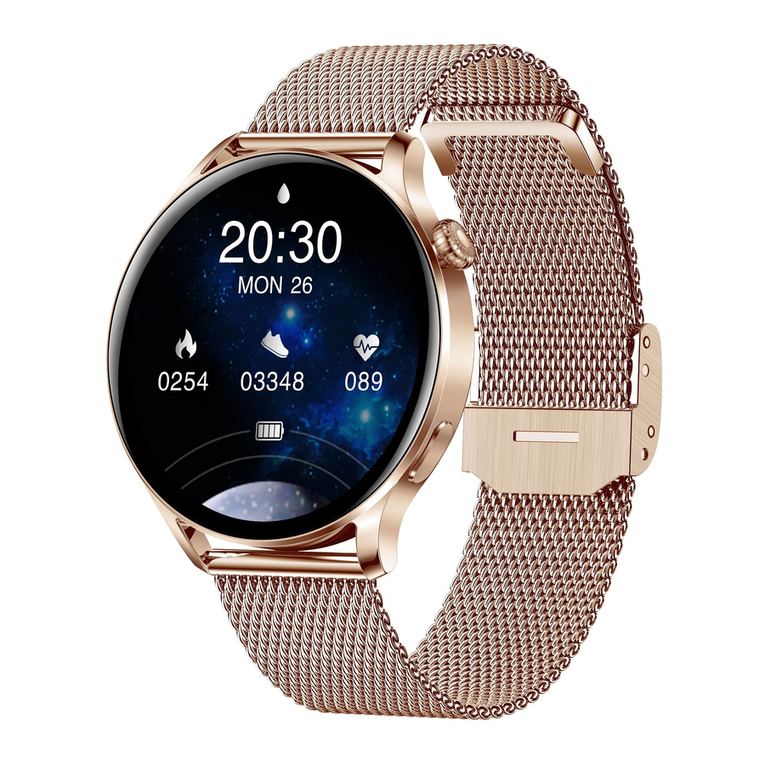
Dial change
Press and hold the home screen to display the menu for
changing the smart watch face. While swiping right/left
choose the dial look and then confirm your choice by clicking
any place on the screen.
More dials available in the Da Fit application.
Navigation
Swipe right on the home screen to access the main menu. By
touching the screen you will enter the selected function. After
entering the function, swiping right allows you to return to the
previous screen or pressing the function button(2) takes you to
the main screen.
Swipe left on the home screen to access the quick menu, i.e .:
daily activity summary, sleep recording, health measurements,
connections, remote camera, player and weather information.
Process of pairing
1. Activate Bluetooth on your phone.
2. Make sure the smartwatch is switched on.
3. Open the Da Fit application, grant it all permissions and enter the
smartwatch user data.
4. Go to the Device tab, click Add Device, then select the device named
AK37.
5. When pairing, place the watch close to the phone you are pairing it with.
6. After successful pairing, the data will be fully synchronized.
The Garett Men Elegance RT smartwatch works with smartphones that
support Bluetooth 5.1 connectivity. It is also compatible with Android 4.4
(and newer) and iOS 9.0 (and newer).
Remember to grant the app the required consents and permissions
before pairing so that it works properly. If you refuse, selected functions
may not work properly or will be unavailable.
Garett
Men Elegance RT
User manual
- 2 - - 3 -
Touchscreen
5
1
2
3
4
5
Function button (on/off/return/wake up/blank/navigation to the
menu)
Set of sensors
Magnetic charging port
Interchangeable strap
- 4 -
PRODUCT DESCRIPTION
INSTALLATION
Put the watch on your wrist and adjust the strap length so as to ensure the
device strap is not too loose.
OPERATION
- 5 -
CHARGING
1. The smartwatch is charged using the magnetic cable supplied with the
device.
2. Attach the end of the magnetic cable so that the contacts of the watch
touch the contacts of the charging cable. Then connect the other end of
the cable to the USB port of a computer or a USB power adapter. When it is
connected properly, the charging animation will appear on the watch
screen.
INSTALLING THE DA FIT APP
The smartwatch works with your smartphone using the Da Fit app. Before
use, you must first download the app from the Google Play Store or the
AppStore and install it on your phone. You can search for the app by entering
"Da Fit" in the store search engine or by scanning the relevant QR code
provided below.
Garett Men Elegance RT smartwatch does not require a permanent
smartphone connection, but in order to fully enjoy the functions of the watch
you need to pair it with the app.
Each time the smartwatch is turned on and paired with the app, the data
synchronise automatically. The smartwatch measures and analyses certain
user data in standby mode. Garett Men Elegance RT has a set of sensors that
monitor movement and the measurements taken in order to determine the
details of sleep and physical activity.
- 6 -
MAIN MENU
- Steps: Daily summary of the number of steps you have taken.
- Sleep: Information about your last sleep.
- Measure HR: Heart rate function. Click anywhere on the screen to
start measurement.
- Training: Sports modes. To start recording an activity, select it from
the list, the recording of the exercise will start automatically. After
completing the training, swipe the left or press the function
button(2) and press End to save the result. The data will be saved
and will be available in the Da Fit application.
- Phone: Ability to dial a number and remotely connect from
the smartwatch. For the proper operation of the function, it is
required to agree to an additional connection of the watch with
the phone from the smartphone settings. In order to synchronize
- 7 -
Swipe down on the home screen to access the settings bar. It
allows you to quickly change selected functions of the
smartwatch
Swipe up on the home screen to access the recent notifications.
It enables viewing/ removing notifications.
If there is no animation, make sure the watch is properly connected.
When the battery is completely discharged, the animation may appear
after several minutes. Before switching on the watch for the first time, it
is recommended to charge it for about 2 hours.
Charging voltage should not exceed 5V.
The recommended charging current is maximum 1A.
PAIRING
- 8 - - 9 -
4
2
1
6
3
6
Sport modes button
iOS
Android
If you want to use additional Bluetooth functions, such as making voice calls
using the smartwatch or synchronizing the phone book from the phone, you
must make an additional connection directly from the phone's Bluetooth
settings.
1. Activate the Bluetooth connectivity on your phone.
2. Activate the Phone function in the smartwatch settings:
Swipe left on the home screen to go to the main menu. Then, find and select
the receiver icon. Make sure the battery level is not too low (otherwise the
function will not start).
3. After activation, the device will start pairing with the phone automatically.
ADDITIONAL PAIRING
(Necessary for optional Bluetooth functions)
4. Give your consent to pair the phone
with the smartwatch, i.e .: AK37_PHONE
or if automatic pairing does not work,
search for it in the phone's Bluetooth
settings and connect to the device.
5. After connecting, grant permission to
sync the contacts for the Bluetooth
functions to work properly.
contacts and calls, you must also grant the permission to
synchronize contacts in the application/ Bluetooth settings of the
phone.
- BP: Blood pressure monitor function. Click anywhere on the
screen to start measurement.
- SPO2: Pulse oximeter function. Click anywhere on the screen
to start measurement.
- Weather: Current weather information the
application.
- Shutter: Take photos remotely by means of your phone's camera.
Shaking your wrist or clicking anywhere on the screen will take a
photo. The camera starts up via the application.
- Player: Music control function on the phone.
- Others:
- Stopwatch: Stopwatch function.
- Alarm: Preview and switching on/off option for previously set
alarms in the application.
- Countdown: Timer function.
- Brightness: Adjust the brightness level of the display.
- Phone: The connection function can be switched on/off.
- Call reset: Clear the data of Connections function.
- Shake: The vibration on the smartwatch can be switched
on/off.
- Theater: Activating this mode mutes notifications and
puts the device on a low display brightness level.
www.garett.eu
EN
Thank you for purchasing the Garett Men Elegance RT
SAFETY ISSUES
Before use, read this user manual carefully and keep it for further
reference. The manufacturer shall bear no liability for any damage/injuries
caused by improper use. Depending on the smartwatch batch, certain
functions may differ from the functions described in this user manual.
Using this device in the vicinity of medical devices may disrupt their
operation. Users should pay special attention when using the smartwatch
in the vicinity of medical devices such as pacemakers, hearing aids and
other electronic medical devices.
Do not dispose of the device in fire. There is a risk of battery explosion and
resulting threat to life and health.
Protect the device from heat sources and direct sunlight.
Do not store the device in damp places or high temperatures, because
it may cause electric shock or fire.
Do not immerse the device in hot water.
Do not dive while wearing the device.
In case of failure/damage, please stop using the product and contact
the Garett service centre. Any attempts to make your own repairs may
damage the device and result in invalidation of the warranty.
The device should only be cleaned with a soft, slightly damp cloth. Do not
use strong detergents or any other stimulants to clean the product.
Garett Men Elegance RT is not a medical device. The smartwatch and
the FitCloudPro app are not designed for medical diagnosis, treatment or
as a preventive measure against illness or disease. You should seek
medical advice first before changing your sleep and physical activity
habits.