Gentherm CCSS User manual

User GuideClimate Control Sleep System

USER GUIDE CopyRIGht © 2012 GENthERM
Table of ConTenTs
ADVISORY.........................................
INSTALLATION...............................
OPERATION.....................................
PROGRAMMING............................
TROUBLESHOOTING..................
WARRANTY.....................................
2
4
8
14
16
17
1
Welcome!
Congratulations on choosing the innovative Climate Control Sleep
System. Get ready to enjoy personalized climate control that will
improve your overall comfort and sleep quality.
If you have any questions while setting up or using your bed, please
visit www.gentherm.com/ccss

USER GUIDE CopyRIGht © 2012 GENthERM
advisory
PLEASE READ THE FOLLOWING INFORMATION
CAREFULLY BEFORE USING THIS PRODUCT.
PLEASE SAvE THESE INSTRUCTIONS.
As with all electrical products, the misuse of this product or failure
to properly follow the instructions may cause overheating, re, or
personal injury.
Be sure the main control unit is used only on an AC supply
current circuit of 110/220 volts. Do not use with an extension
cord.
It is recommended to use a surge protection device (not included)
between the main control unit and the outlet. Failure to use a
surge protector could cause product malfunction in the event of an
electrical surge.
Do not use with damaged cords. Do not remove, trap, fold, cross or
pinch any wires or cords.
The main control unit should be placed on a dry, rm oor, in a
well ventilated place, free from surrounding fabric. Clearance of
at least one (1) foot should be left on all sides.
Do not use the heat/cool feature of this bed with an infant, a child,
an incapacitated person, a paraplegic, a quadriplegic, or if you
are insensitive to heat or cool. Keep all pets away from the main
control unit and wiring.
1.
2.
3.
4.
5.
2
Always unplug the MCU from the electrical outlet
before cleaning.
Keep the cord away from the heated surfaces.
Do not use outdoors.
•
•
•
IMPORTANT SAFETY INSTRUCTIONS
DANGER — To reduce the risk of electric shock:

USER GUIDE CopyRIGht © 2012 GENthERM 3
• Reorient or locate the receiving antenna.
• Increase the separation between the equipment and receiver.
• Connect the equipment into an outlet on a circuit different
from that to which the receiver is connected.
• Consult the dealer or an experienced radio/TV technician for
help.
• The Climate Control Sleep System utilizes 110/220 V, 50/60Hz,
2A
• Manufactured by Gentherm
• Electronics made in China
• For household/residential use only.
FCC Compliance
The remote device complies with part 15 of the FCC rules. Opera-
tion is subject to the following two conditions: (1) This device may not
cause harmful interference, and (2) this device must not accept any
interference received, including interference that may cause unde-
sired operation.
Note: This equipment has been tested and found to comply with the
limits for a Class B digital device, pursuant to part 15 of the FCC
rules. These limits are designed to provide reasonable protection
against harmful interference with a residential installation. This
equipment generates, uses and can radiate frequency energy and,
if not installed and used in accordance with these instructions, may
cause harmful interference to radio communications. There is no
guarantee that interference will not occur in a particular situation.
If this equipment does interfere with TV or radio reception, which
can be determined by turning the device on and then off, the user is
encouraged to try to correct the interference by one or more of the
following measures:
Modications made to the product, unless expressly approved by
Gentherm, could void the user’s authority to operate the equipment.
CAUTION : Exposure to Radio Frequency Radiation. Antenna shall be
mounted in such a manner to minimize the potential for human contact
during normal operation. The antenna should not be contacted during
operation to avoid the possibility of exceeding the FCC radio frequency
exposure limit.
The Climate Control Sleep System conforms to UL Standard 962 test
requirements.


USER GUIDE CopyRIGht © 2012 GENthERM 4
insTallaTion
Before You Begin:
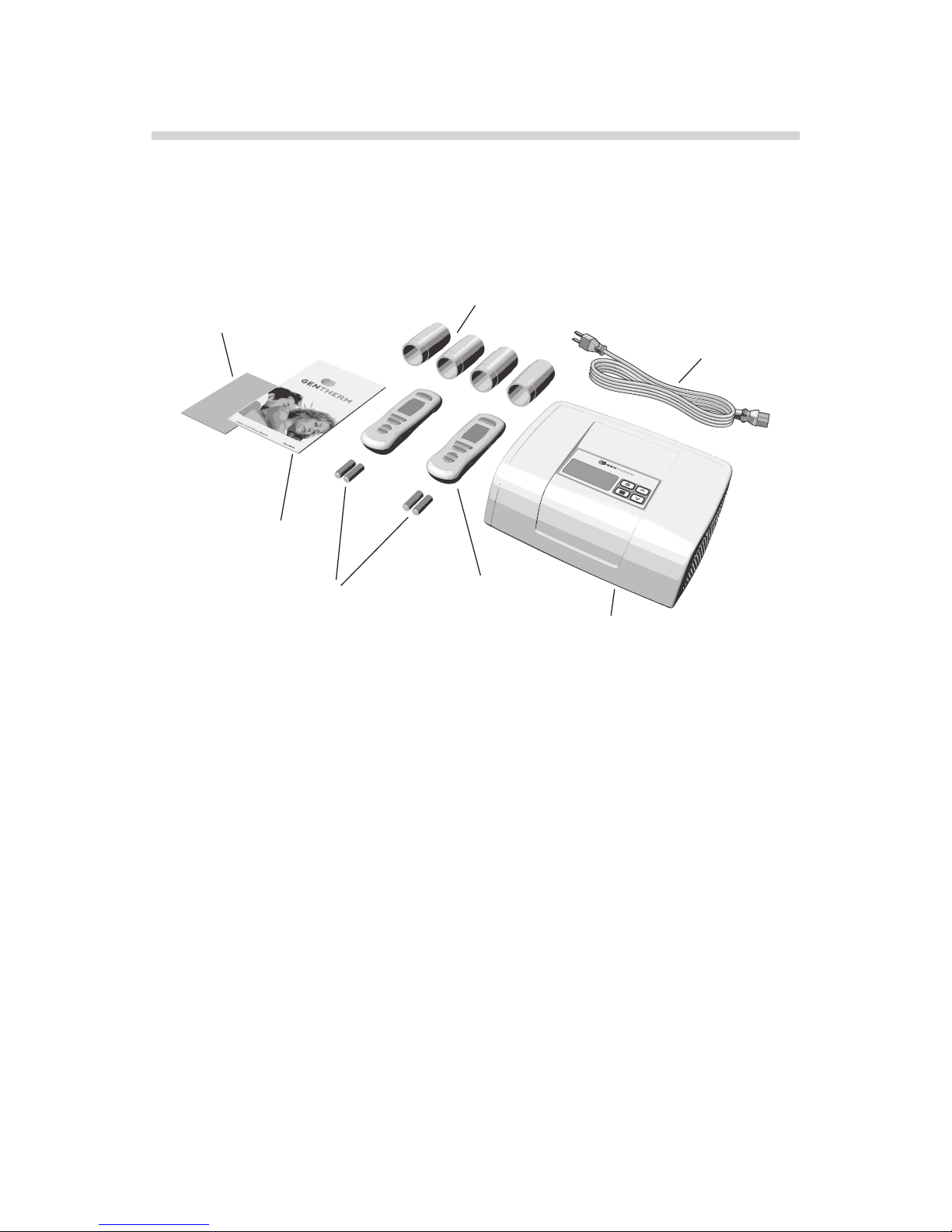
Check the contents of the electronic kit box. It should include:
Decide on a location for your new bed. Consider the following:
Keep the master control unit away from areas that might
become damp or wet, such as an open window.
Do not cover the master control unit; ensure that it is in a well
ventilated area.
Do not store any items under the bed; a well-ventilated space
under the bed is necessary for proper functioning of the climate
control system.
•
•
•
BEDDING CONSIDERATIONS
Main Control Unit (MCU)
Plastic tubes for air ow (4)
Remotes (2)
Power Cord
Instruction manual
Warranty registration card
Four (4) AAA batteries

USER GUIDE CopyRIGht © 2012 GENthERM 5
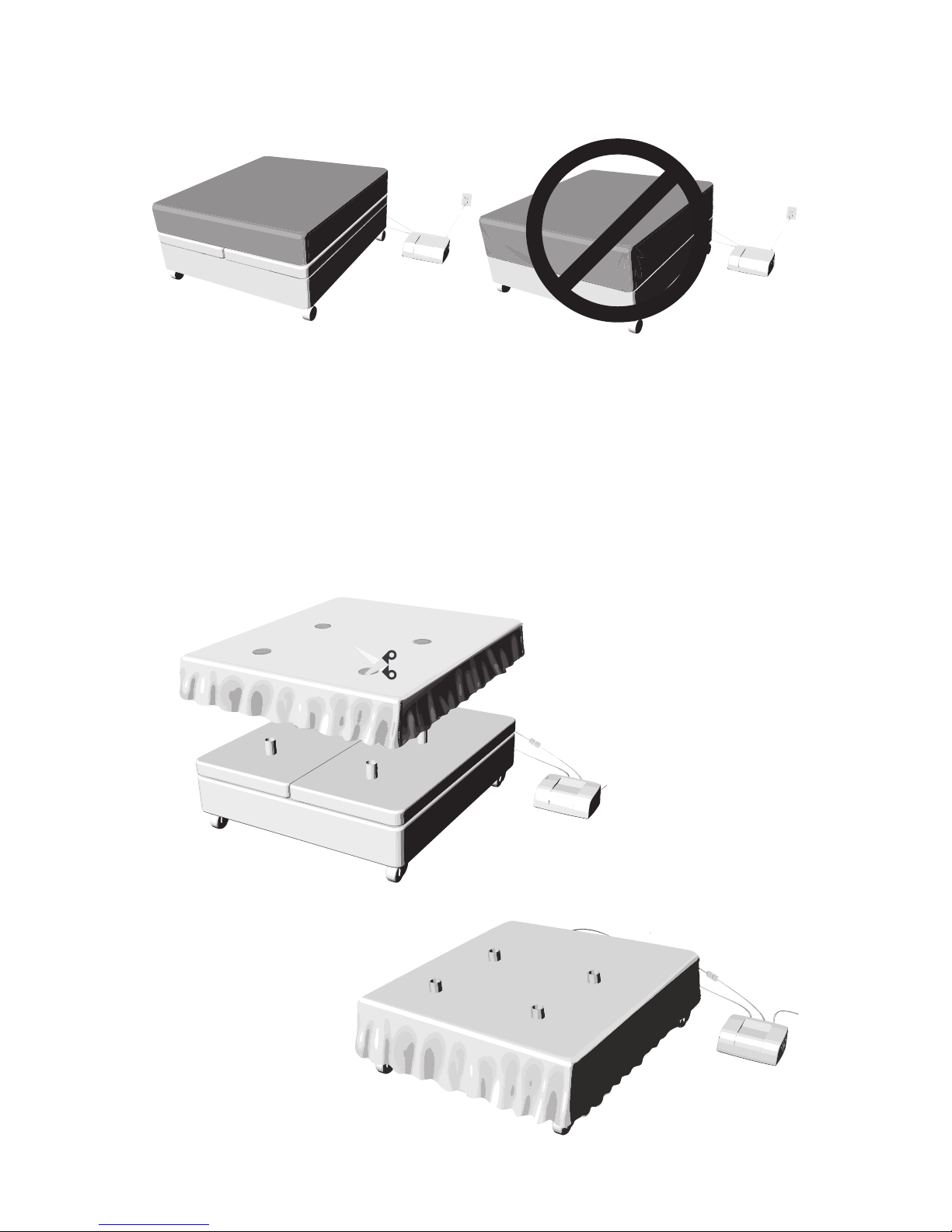
BED SKIRT MODIFICATION (if used)
• Do not cover interlay with tted sheet.
• Do not use a mattress pad on your mattress as it will block air
ow to the surface of the bed.
BEDDING CONSIDERATIONS

USER GUIDE COPYRIGHT © 2012 GENTHERM 6
Note:
• Cords exit the interlay from the head of the bed.
• Queen interlay cords exit from the outside edge of the interlay
from the head end of the bed.
• It is recommended that a surge protection device (not included) is
used between the MCU and the outlet.
• Prior to installation of the mattress, add the four (4) posts and
turn the MCU to high heat (refer to OPERATION section) and
verify that there is air ow coming from the posts. If there is no
air ow, verify all connections are made, then, refer to the trouble-
shooting section.
Extension
(optional)
BED SET UP

USER GUIDE CopyRIGht © 2012 GENthERM
• There are eight (8) holes in the underside of the mattress with
eight plastic inserts covering each hole. Four (4) of these holes are
designed to t over the posts of the interlay. The extra set of holes
on the mattress is to account for rotation of the mattress.
• Take care when lifting the mattress. It is necessary to obtain as-
sistance when placing the mattress onto the interlay.
7

USER GUIDE CopyRIGht © 2012 GENthERM
oPeraTion
Power Button
Level Up/Down
Button
Side Selector
Master Control Unit (MCU) display
Heat Mode
Vent Mode
Cool Mode
Sleep Timer Active
Low Battery
Sleep Timer Button
Level Up/Down Button
Power Button
Heat/Cool Level
Information Window
Program Active
Side Selector
Menu Button
Remote Control
8

USER GUIDE CopyRIGht © 2012 GENthERM 9
Your remote is designed to operate the left, the right, or both sides of
the bed. When rst installing the batteries, ensure that you select
the desired position for the switch.
L B R
L
B
R
Table of contents
Popular Temperature Controllers manuals by other brands

SMC Networks
SMC Networks Thermo-con INR-244-639 Operation manual

eltherm
eltherm Ex-TC It Series operating instructions

Omron
Omron C200H-TV Series Operation manual

industrie technik
industrie technik CA1 instructions

KRAL
KRAL EET 32 operating instructions

dixell
dixell XR420C Installing and operating instructions