10
Cooker hood controls
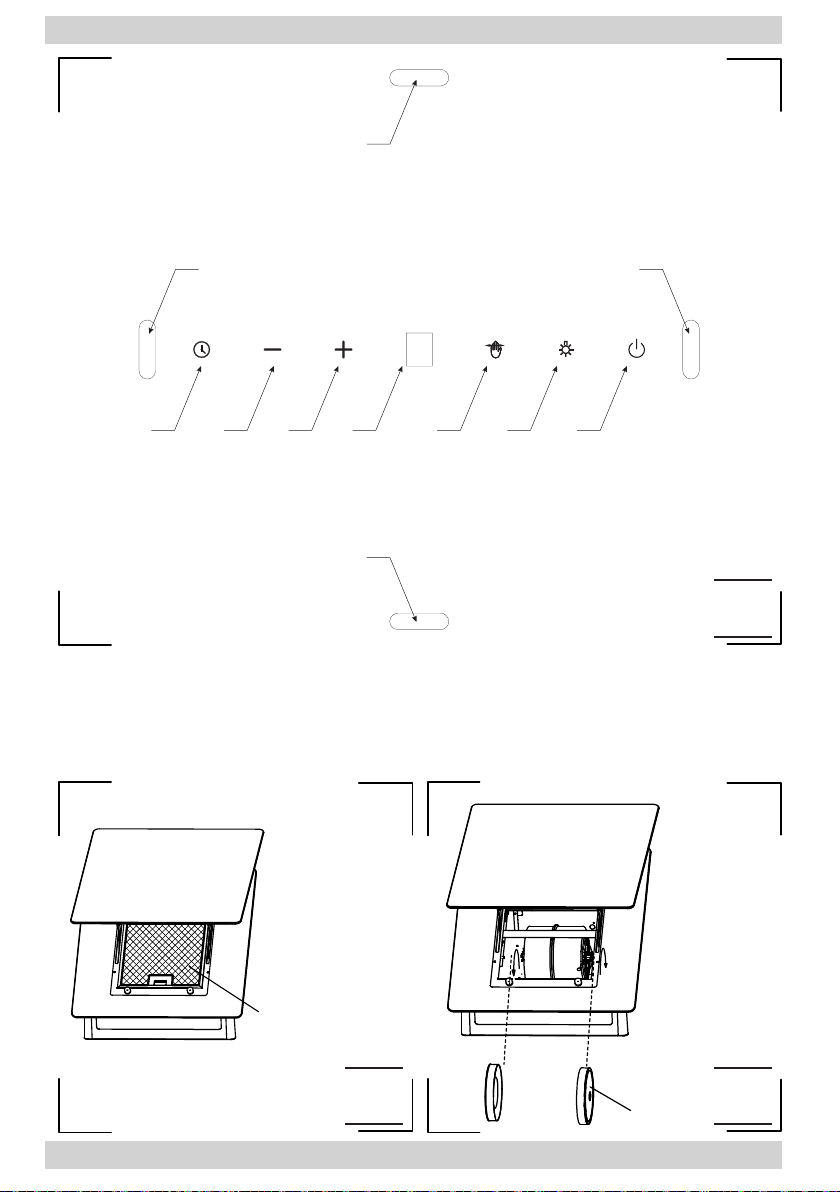
Control Panel is shown in Figure 4, for reference it is also shown below:
This appliance features gesture control:
1. Gesture sensors for switching the
light on/o
2. Gesture sensors for fan speed control
The control panel is equipped with touch
controls: Control functions are described
below:
3- O-Timer sensor
4- Reduce fan speed sensor
5- Increase fan speed sensor
6- Display
7- Gesture control management sensor
8- Light control sensor
9- StandBy mode sensor
When you plug in your appliance, will be shown on the display for a
fraction of a second, then the display will go o. Only the gesture
control sensor is illuminated on the control panel. Touch to activate
the appliance — the pictogram will light up
When activated, touch to start the fan.
Available fan speeds:
• Low speed (1). Use this speed when cooking a little food with hardly
any fumes.
• Medium speeds (2 - 3). Use this speed when cooking multiple dishes
at the same time with moderate amount of fumes.
• Turbo ( ) — use this speed when frying or grilling with large amount
of fumes.
Use the and sensors to increase or reduce fan speed.
Note: The Turbo speed is active only for 5 minutes (the dot on the dis-
play ashes), then the fan speed will be reduced. Turbo speed operation
is time limited. By activating the Turbo speed again and again, you can
use it for a maximum of 30 minutes (including the Turbo o intervals if
shorter than 5 minutes). After this time, Turbo speed will not be avail-
able for the next 30 minutes — during this time, the maximum possible
fan speed is 3.
To turn o the fan, touch repeatedly until fan speed is reduced to
zero , or touch .
OPERATION AND MAINTENANCE