USB
SOURCE
H.LOCK
STILL
ARC
MUTE
S.MODE
TV.MENU
EXIT
REV
ZOOM
VOD
TV/FM
FAV
Fn DDS GAME BUSINESS
SHOCK SLEEP
INTERACTION
INFO CH.LIST
AUDIO GUIDE PAGE+
PAGE-
D.CALL TV.CALLTIME SHIFT
REC
PLAY/PAUSE
BACK
D.MENU
P.MODE
Q.VIEW
* #
OK
.,@ abc def
ghi jkl mno
pqrs tuv wxyz
1
2
3
4
8
11
10
13
15
17
19
21
22
23 25
24 26
27 29
31
32
28 30
33
34
35
38
36
37
P
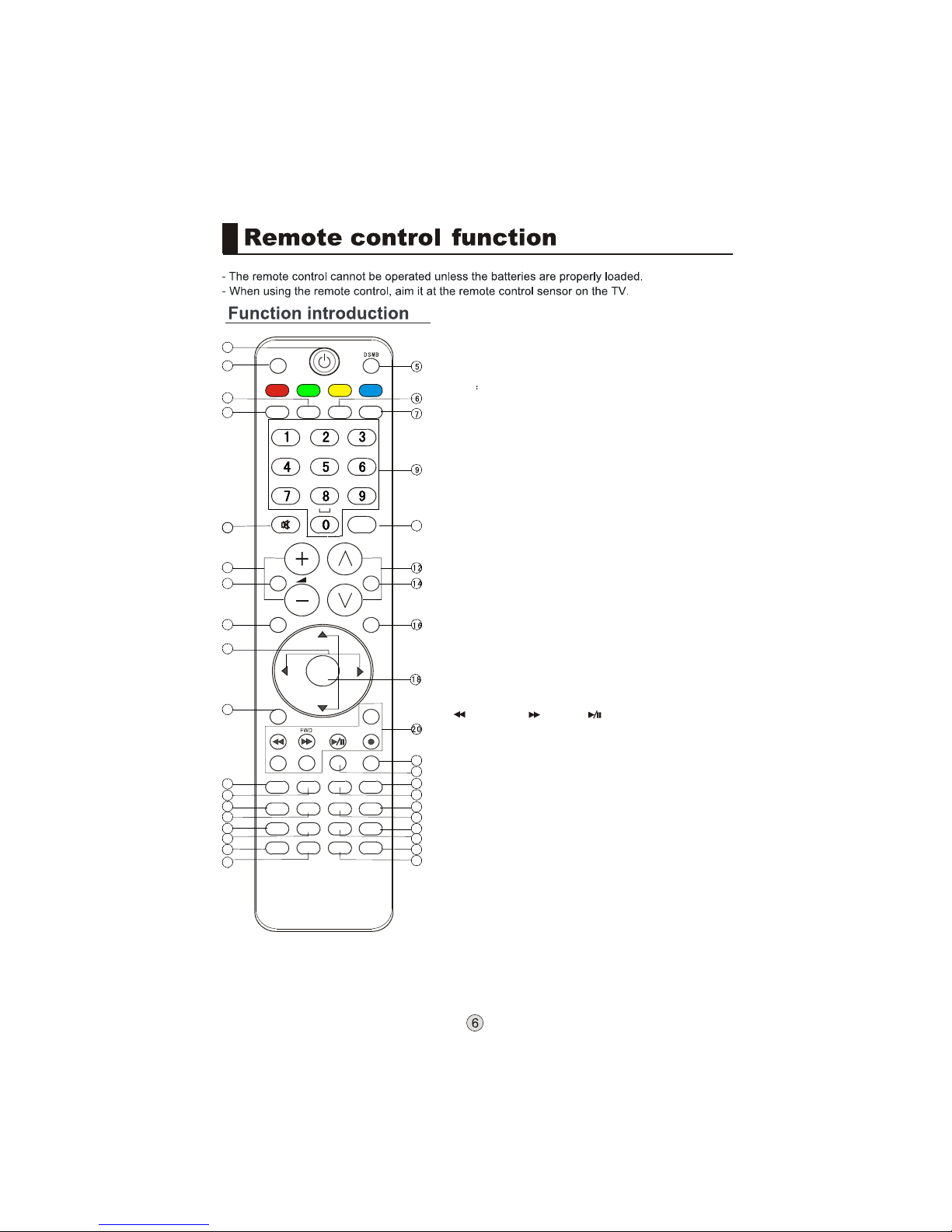
1.POWER: Press thiskey to startTV from standby
mode, press itagain to returnto standby mode.
2.USB: Press thiskey for quickswitching of streamingmedia.
3.H. LOCK: Referto the FunctionalDescription on Page .
4.Press this keyto open/close signalsource options menu.
5.DSMB DSMB
6.Freeze: Press thiskey to freezethe image. Pressit again
to return tonormal screen. (Note:Do not displaya still
picture for along time toprevent the screenfrom burns.)
7.Aspect Ratio: Pressthis key toselect the screendisplay
proportion.
8.MUTE: Press thiskey to mutethe sound, pressit again to
activate the sound.The sound maybe activated by turning
the TV onagain or increasingthe volume.
9.0-9: These keysare used toselect a channel.
10.Q. VIEW: Pressthis key toreturn to the previous TV
program(only work inthe TV mode).
11.VOL+ /-:Used as LEFT/RIGHTkeys in the menu and used
to adjust thevolume when thescreen menu isclosed.
12.CH+/-: A.Used as UP/DOWNkeys in thescreen options
menu; B. Usedto select aTV channel whenthe screen
options menu isclosed, specifically,press CH- to
decrease the channeland press CH+to increase the
channel.
13.Sound Mode: Pressthis key continuouslyto select the
sound mode.
14.Picture Mode: Pressthis key continuouslyto select the
picture mode .
15.MENU: Press thiskey to displayor exit themain menu.
16.Menu Key DSMB:Press this keyto display theSpecial
Function Menu (itfuctions when specialmodules are
inserted).
17.THUMBSTICK (Up/Down/Left/Right)
18.OK: Press thiskey to confirmthe selection.
19.Clears all on-screendisplays and returnsto TV viewing
from any menu.
20.USB Control the USB System.
Backward Forward Play/Pause BACK: Back
REC: no available ZOOM: Press to magnify/minify an image
D.CALL: Press todisplay program information
21.Display on/off
22.no available
23.no available
24.no available
25.no available
26.no available
27.no available
28.no available
29.no available
30.Press this keyto display thefavorite program listmenu
31.no available
32.no available
33.Displaying the sleeptime.
34.no available
35.no available
36.no available
37.no available
38.no available
23
Note: From 21 to 38(except 30 and 33), are belonged to DSMB function button.
It will act when the module installed only. Pls refer to DSMB user's manual.