Hama BRS3 User manual

00004639
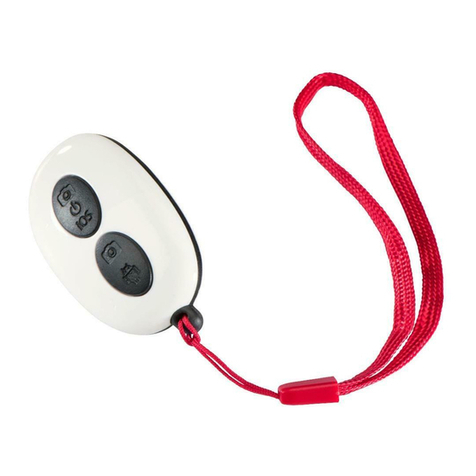
Bluetooth Remote Shutter BRS3
Bluetooth-Fernauslöser
SK
S
RUS
CZ
GR
FIN
TR
BG
P
Návod k použití
Návod na použitie
Manual de instruções
Bruksanvisning
Руководство по эксплуатации
Работна инструкция
Οδηγίες χρήσης
Käyttöohje
Kullanma kılavuzu
E
F
D
GB
I
PL
H
RO
NL
Operating Instructions
Bedienungsanleitung
Mode d‘emploiw
Instrucciones de uso
Gebruiksaanwijzing
Istruzioni per l‘uso
Instrukcja obsługi
Használati útmutató
Manual de utilizare

Change Battery
LED
A
B
31
2
1
Button On/Off
Open Battery
compartment 2Close Battery
compartment
3Battery compartment cover

2
GOperating instruction
Controls and Displays (A)
1. LED indicator light
2. ON / OFF button / Release button
3. Battery compartment cover
1. Explanation of Warning Symbols and Notes
Warning
This symbol is used to indicate safety instructions or to draw your attention to
specific hazards and risks.
Note
This symbol is used to indicate additional information or important notes.
2. Package Contents
• Bluetooth Remote Shutter BRS3
• 1 hand strap
• 1 battery (CR2032)
• These operating instructions
3. Safety Notes
• Protect the product from dirt, moisture and overheating, and only use it in a dry
environment.
• Do not use the product in areas where the use of electronic devices is not permitted.
• Do not use the product in moist environments and avoid splashes.

3
• Do not drop the product and do not expose it to any major shocks.
• Dispose of packaging material immediately according to locally applicable
regulations.
• Do not modify the product in any way. Doing so voids the warranty.
• Use the product for its intended purpose only.
• This product is intended for private, non-commercial use only.
• Do not use the product in the immediate vicinity of heaters or other heat sources
or in direct sunlight.
• Keep this product, as all electrical products, out of the reach of children!
• Do not operate the product outside the power limits given in the specifications.
• Do not attempt to service or repair the product yourself. Leave any and all service
work to qualified experts.
• Do not open the device or continue to operate it if it becomes damaged.
Warning – Batteries
• When inserting batteries, note the correct polarity (+ and - markings) and insert
the batteries accordingly. Failure to do so could result in the batteries leaking
or exploding.
• Only use batteries (or rechargeable batteries) that match the specified type.
• Before you insert the batteries, clean the battery contacts and the polar contacts.
• Do not allow children to change batteries without supervision.
• Do not mix old and new batteries or batteries of a different type or make.
• Remove the batteries from products that are not being used for an extended
period (unless these are being kept ready for an emergency).
• Do not short-circuit batteries.
• Do not charge batteries.
• Do not throw batteries in a fire.

4
Warning – Batteries
• Keep batteries out of the reach of children.
• Never open, damage or swallow batteries or allow them to enter the
environment. They can contain toxic, environmentally harmful heavy metals.
• Immediately remove and dispose of dead batteries from the product.
• Avoid storing, charging or using the device in extreme temperatures and
extremely low atmospheric pressure (for example, at high altitudes).
Warning – Button cells
• Do not ingest battery, risk of burns due to dangerous substances.
• This product contains button cells. If swallowed, the button cell can cause severe
internal burns within just two hours and lead to death.
• Keep new and used batteries out of the reach of children.
• If the battery compartment does not close securely, stop using the product and
keep it out of the reach of children.
• If you think that batteries were swallowed or are in a part of the body, seek
medical assistance immediately.
4. System Requirements
• The Bluetooth remote release supports Bluetooth-capable terminal devices such
as smartphones and tablet PCs that run the iOS 6 or Android 4.2.2 (or newer)
operating systems.
Note
• Note that support of the Bluetooth remote release depends on your terminal device
.
• Please refer to the operating instructions for the device you are using.

55
5. Getting Started (B)
• Open the battery compartment by turning the battery compartment cover (1)
anticlockwise using a coin.
• Remove the battery compartment cover (2) and insert a CR2032 battery with the
correct polarity.
• Close the battery compartment by turning the battery compartment cover (3)
clockwise using a coin.
6. Operation
Note
• The functions described in this section are only available for Bluetooth-capable
terminal devices.
• Note that the maximum range for Bluetooth is 10 metres without obstacles such
as walls, people, etc.
6.1. Bluetooth pairing (A)
Note – Pairing
• Make sure that your Bluetooth-capable terminal device is on and Bluetooth is
activated.
• Make sure that your Bluetooth-capable terminal device is visible for other
Bluetooth devices.
• For more information, please refer to the operating instructions of your terminal
device.

6
• Press and hold the Power/Release button (2) for about 3 seconds to switch on the
Bluetooth remote release. The LED indicator light (1) will begin to flash.
• This means the Bluetooth remote release is searching for a Bluetooth connection.
• Open the Bluetooth settings on your terminal device and wait until Hama BRS3
appears in the list of Bluetooth devices found.
• Select Hama BRS3 and wait until the Bluetooth remote release is listed as connected
in the Bluetooth settings on your terminal device. The LED indicator light (1) goes
out.
• You can now use the Bluetooth remote release.
6.2. Automatic Bluetooth connection (after successful pairing) (A)
Note
• Make sure that your Bluetooth-capable terminal device is on and Bluetooth is
activated.
• Make sure that your Bluetooth-capable terminal device is visible for other
Bluetooth devices.
• For more information, please refer to the operating instructions of your terminal
device.
• The Bluetooth remote release remains connected to the Bluetooth device it was
last paired with.
• Press and hold the Power/Release button (2) for about 3 seconds to switch
on the Bluetooth remote release. The LED indicator light (1) will begin to flash.
• You can now use the Bluetooth remote release.
To switch off, press the Power / Trigger button (2) for approx. 5 seconds.
The LED pilot light (1) goes out.

77
Note – Connection impaired
After the devices have been paired once, the connection is then established
automatically. If the Bluetooth connection is not established automatically, check
the following:
• Check the Bluetooth settings of your terminal device to see whether Hama BRS3
is connected. If not, repeat the steps listed under 6.1. Bluetooth pairing.
• Check whether obstacles are impairing the range. If so, move the devices closer
together.
• The performance can also be affected by a weak battery. Change the battery
if necessary.
• Only one Bluetooth device can be connected at a time. If there is an active
connection to another device, deactivate this connection and try again.
6.3. Replacing the batteries
The battery has been designed to last for up to 2,000 shots, although this depends on
the conditions of use.
If the Bluetooth remote release does not respond after you press the release button (2),
or does not connect to the terminal device, etc., change the battery as follows: See (B).
7. Care and Maintenance
Only clean this product with a slightly damp, lint-free cloth and do not use aggressive
cleaning agents. Make sure that water does not get into the product.
8. Warranty Disclaimer
Hama GmbH & Co. KG assumes no liability and provides no warranty for damage
resulting from improper installation/mounting, improper use of the product or from
failure to observe the operating instructions and/or safety notes.

8
9. Technical Data
Bluetooth Remote Shutter
Bluetooth version 4.1
Bluetooth Class Class 2
Range Max. 10 m
Dimensions (W x L x H) 52 x 30 x 12 mm
Weight Approx. 10 g
Battery type CR2032
10. Declaration of Conformity
Hereby, Hama GmbH & Co KG declares that the radio equipment type
[00004639] is in compliance with Directive 2014/53/EU. The full text
of the EU declaration of conformity is available at the following internet
address: www.hama.com/00004639/Downloads.
Frequency band(s) 2.402 GHz ~ 2.480 GHz
Maximum radio-frequency
power transmitted 1.44 mW E.I.R.P

9
Bedienungselemente und Anzeigen (A)
1. LED-Kontrollleuchte
2. Power-/ Auslösetaste
3. Batteriefachabdeckung
1. Erklärung von Warnsymbolen und Hinweisen
Warnung
Wird verwendet, um Sicherheitshinweise zu kennzeichnen oder um Aufmerksamkeit
auf besondere Gefahren und Risiken zu lenken.
Hinweis
Wird verwendet, um zusätzlich Informationen oder wichtige Hinweise zu
kennzeichnen.
2. Packungsinhalt
• Bluetooth-Fernauslöser BRS3
• 1 Handschlaufe
• 1 Batterie (CR2032)
• diese Bedienungsanleitung
3. Sicherheitshinweise
• Schützen Sie das Produkt vor Schmutz, Feuchtigkeit und Überhitzung und
verwenden Sie es nur in trockenen Umgebungen.
• Benutzen Sie das Produkt nicht in Bereichen, in denen elektronische Produkte nicht
erlaubt sind.
DBedienungsanleitung
Other manuals for BRS3
1
This manual suits for next models
1
Table of contents
Languages:
Other Hama Remote Control manuals