manuals.online logo
Brands
  1. Home
  2. •
  3. Brands
  4. •
  5. Honeywell
  6. •
  7. Thermostat
  8. •
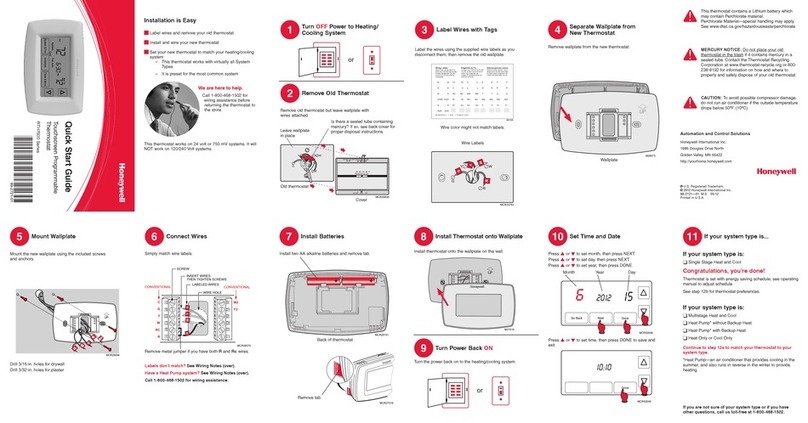
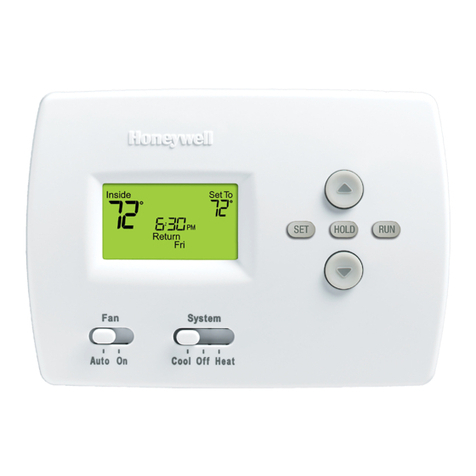
  9. Honeywell RTH8580WF User manual

Honeywell RTH8580WF User manual

Other manuals for RTH8580WF

1

Other Honeywell Thermostat manuals

Honeywell T8665A1002 - Digital Thermostat, 3h User manual

Honeywell

Honeywell T8665A1002 - Digital Thermostat, 3h User manual

Honeywell CT3650 User manual

Honeywell

Honeywell CT3650 User manual

Honeywell T8112 User manual

Honeywell

Honeywell T8112 User manual

Honeywell SuperStat User manual

Honeywell

Honeywell SuperStat User manual

Honeywell Tradeline T8611M User manual

Honeywell

Honeywell Tradeline T8611M User manual

Honeywell T8611G Chmnothern IV User manual

Honeywell

Honeywell T8611G Chmnothern IV User manual

Honeywell Versaguard TG509F User manual

Honeywell

Honeywell Versaguard TG509F User manual

Honeywell RTH111 series User manual

Honeywell

Honeywell RTH111 series User manual

Honeywell RTH5100B User manual

Honeywell

Honeywell RTH5100B User manual

Honeywell T8095A User manual

Honeywell

Honeywell T8095A User manual

Honeywell TC500A-N User manual

Honeywell

Honeywell TC500A-N User manual

Honeywell PCR-100 User manual

Honeywell

Honeywell PCR-100 User manual

Honeywell VisionPRO TH8321 Operation manual

Honeywell

Honeywell VisionPRO TH8321 Operation manual

Honeywell T6861-F User manual

Honeywell

Honeywell T6861-F User manual

Honeywell 2450A Series User manual

Honeywell

Honeywell 2450A Series User manual

Honeywell Lyric User manual

Honeywell

Honeywell Lyric User manual

Honeywell T8001F User manual

Honeywell

Honeywell T8001F User manual

Honeywell TL8130A User manual

Honeywell

Honeywell TL8130A User manual

Honeywell RTH2510 Series User manual

Honeywell

Honeywell RTH2510 Series User manual

Honeywell Lyric T5 Wi-Fi User manual

Honeywell

Honeywell Lyric T5 Wi-Fi User manual

Honeywell VisionPRO TH8000 Series User manual

Honeywell

Honeywell VisionPRO TH8000 Series User manual

Honeywell RTH5100B1009 User manual

Honeywell

Honeywell RTH5100B1009 User manual

Honeywell RTH5100B User manual

Honeywell

Honeywell RTH5100B User manual

Honeywell Easy-To-See POWERPILE TS86A Assembly instructions

Honeywell

Honeywell Easy-To-See POWERPILE TS86A Assembly instructions

Popular Thermostat manuals by other brands

Full Gauge TIC-17C product manual

Full Gauge

Full Gauge TIC-17C product manual

Imit Chronomix S manual

Imit

Imit Chronomix S manual

ChiliTec ST-35 ana instruction manual

ChiliTec

ChiliTec ST-35 ana instruction manual

Salus VS05 Installer's/user's manual

Salus

Salus VS05 Installer's/user's manual

Azel D-500 user guide

Azel

Azel D-500 user guide

Charmeg MP-R user manual

Charmeg

Charmeg MP-R user manual

dixell WING XW40LS Installing and operating instructions

dixell

dixell WING XW40LS Installing and operating instructions

Network Thermostat NetX X7C-WIFI Installation and programming manual

Network Thermostat

Network Thermostat NetX X7C-WIFI Installation and programming manual

Radio Thermostat CT80 Operation guide

Radio Thermostat

Radio Thermostat CT80 Operation guide

HAI Omnistat RC-120 installation manual

HAI

HAI Omnistat RC-120 installation manual

Lennox iComfort E30 Installation and setup guide

Lennox

Lennox iComfort E30 Installation and setup guide

Lux Products PSD011Ba Installation and operating instructions

Lux Products

Lux Products PSD011Ba Installation and operating instructions

Computherm Q20 operating instructions

Computherm

Computherm Q20 operating instructions

Heatmiser neoStat user manual

Heatmiser

Heatmiser neoStat user manual

Mars HEAT CONTROLLER IR Wireless Thermostat user manual

Mars

Mars HEAT CONTROLLER IR Wireless Thermostat user manual

LUX LP0511D user manual

LUX

LUX LP0511D user manual

Saswell SAS920XWHB-7-S-RF User manual and warranty card

Saswell

Saswell SAS920XWHB-7-S-RF User manual and warranty card

Aircalo TFP1-ET85P2 operating manual

Aircalo

Aircalo TFP1-ET85P2 operating manual

manuals.online logo
manuals.online logoBrands
  • About & Mission
  • Contact us
  • Privacy Policy
  • Terms and Conditions

Copyright 2025 Manuals.Online. All Rights Reserved.

M31538
C
C
MCR31537
This thermostat contains a Lithium battery which may contain Perchlorate material.
Perchlorate Material—special handling may apply.
See www.dtsc.ca.gov/hazardouswaste/perchlorate
MERCURY NOTICE: Do not place your old thermostat in the trash if it contains
mercury in a sealed tube. Contact the Thermostat Recycling Corporation at
www.thermostat-recycle.org or 1-800-238-8192 for information on how and
where to properly and safely dispose of your old thermostat.
NOTICE: To avoid possible compressor damage, do not run air conditioner
if the outside temperature drops below 50°F (10°C).
Install your thermostat.
Connect it to your home Wi-Fi network.
Register online for remote access.
Before you begin,you may want to view our
installation video by scanning this QR®Code
specification or visiting wifithermostat.com
Need more help? Visit wifithermostat.com or call 1-855-733-5465 for assistance before
returning the thermostat to the store.
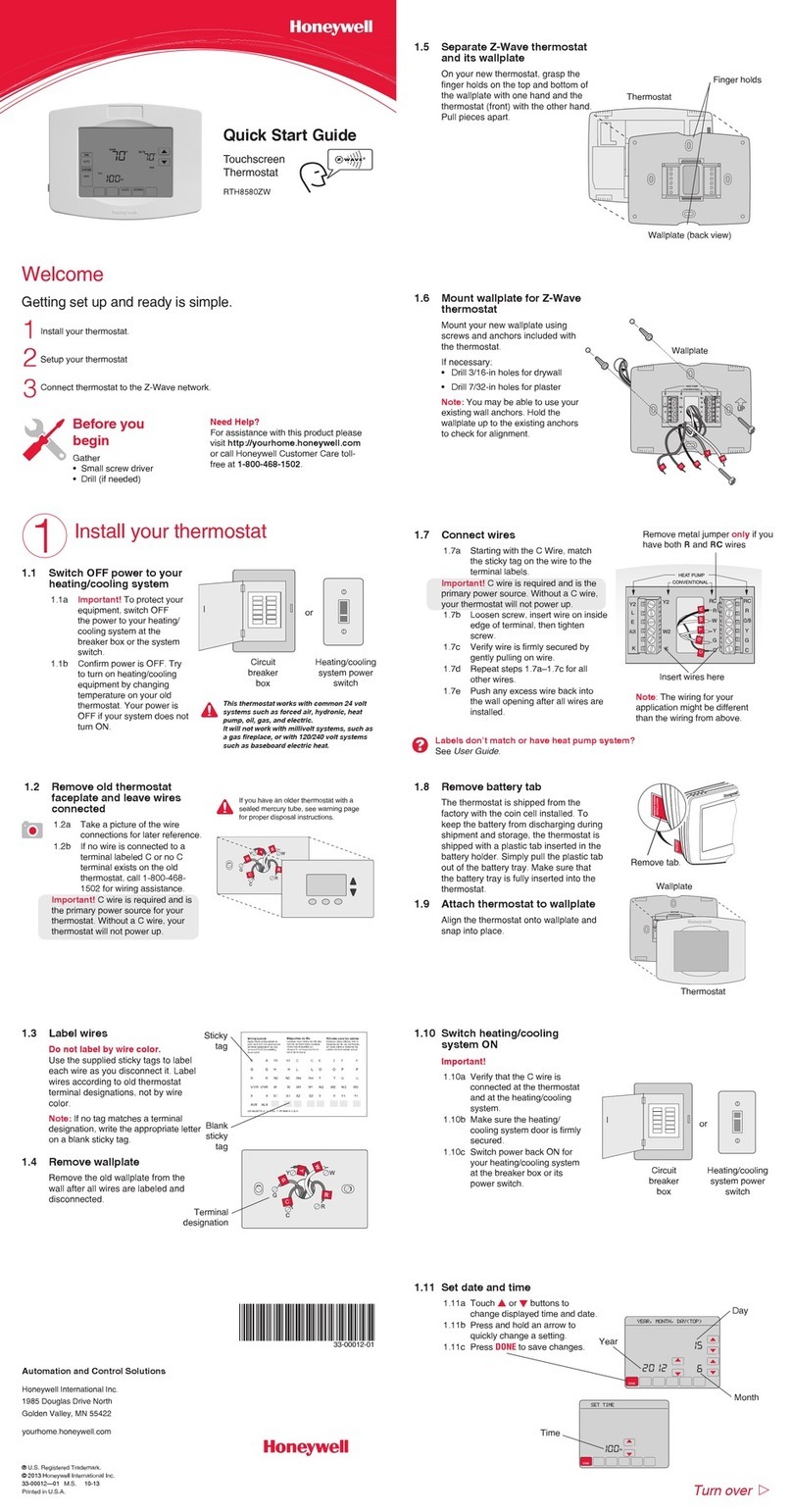
1.1 Switch OFF power
To protect your equipment, switch OFF
the power to your heating/cooling
system at the breaker box or the
system switch.
If you have an older thermostat
with a sealed mercury tube,
see warning page for proper
disposal instructions.
Blank
tags
Terminal
designation
Finger holds
Wallplate
Wallplate (back view)
Thermostat
1.2 Remove old thermostat
Remove the thermostat while leaving
wallplate in place.
Take a picture of
the wires on your
old thermostat for
later reference.
1.3 Label wires
Use the supplied sticky tags to label
each wire as you disconnect it. Label
wires according to old thermostat
terminal designations, not by wire
color.
Note: If no tag matches a label,
write the terminal designation on
a blank tag.
1.4 Remove wallplate
Remove the old wallplate from
the wall after all wires are
labeled and disconnected.
1.5 Separate Wi-Fi thermostat
and its wallplate
On your new thermostat, grasp the
finger holds on the top and bottom of
the wallplate with one hand and the
thermostat (front) with the other
hand. Pull pieces apart.
1.6 Mount wallplate for Wi-Fi
thermostat
Mount your new wallplate using screws
and anchors included with the
thermostat.
If necessary:
 • Drill3/16-inholesfordrywall
 • Drill7/32-inholesforplaster
Setting Up Your Thermostat
This thermostat works
on 24 volt systems.
It will NOT work on
120/240 volt systems.
1
Install your thermostat
1
2
3
69-2717-01
3.3 Register your Wi-Fi thermostat
After you are logged in to your Total
Connect Comfort account, register
your thermostat.
3.3a Follow the instructions on
the screen. After adding
your thermostat location
you must enter your
thermostat’s:
  • MACID
  • MACCRC
These IDs are listed on the
Thermostat ID Card
included with the thermostat.
The IDs are not case sensitive.
3.3b Notice that when the thermostat
is successfully registered, the
Total Connect Comfort
registration screen will display
a SUCCESS message.
In the thermostat message
center you will see:
CONGRATULATIONS
SETUP COMPLETE!
3.3c Also notice that your thermostat
will display its home screen and
wireless signal strength.
You can now control your
thermostat from anywhere
through your laptop, tablet, or
smartphone.
Total Connect Comfort free app
is available for Apple®iPhone®,
iPad®and iPod touch®devices
at iTunes®or at Google Play®
for all Android™devices.
Automation and Control Solutions
Honeywell International Inc.
1985 Douglas Drive North
Golden Valley, MN 55422
wifithermostat.com
® U.S. Registered Trademark.
© 2012 Honeywell International Inc.
69-2717—01 M.S. 05-12
Printed in U.S.A.
Apple, iPhone, iPad, iPod touch and iTunes are
trademarks of Apple Inc. All other trademarks
are the property of their respective owners.
or
Quick Start Guide
Wi-Fi Touchscreen
Programmable
Thermostat
Model RTH8580WF
M31535
C
C
MCR33823
® U.S. Registered Trademark.
© 2012 Honeywell International Inc.
69-2723EFS—01 M.S. 04-12
Printed in U.S.A.
HONEYWELL MODEL: RTH8580WF
MAC ID: MAC CRC:
69-2723EFS-01
Thermostat ID Card
Use the MAC ID and CRC ID to register
this product at mytotalconnectcomfort.com
Carte d’identification de thermostat
Utilisez l’identication MAC et l’identication CRC pour
enregistrer ce produit à mytotalconnectcomfort.com
Tarjeta de identificación del termostato
Utilice la identicación MAC y la identicación CRC para
inscribir este producto en mytotalconnectcomfort.com
M31543
Y2
W2
K
RC
R
W
Y
G
C
RC
R
O/B
Y
G
C
HEAT PUMP
CONVENTIONAL
L
E/AUX
K
R
Y
C
W
G
MCR31539
M31566
MORE
Inside

M31542
Y2
W2
K
RC
R
W
Y
G
C
RC
R
O/B
Y
G
C
R
W
G
C
Y
HEAT PUMP
CONVENTIONAL
L
E/AUX
K
MCR31541
1.7 Connect wires
1.7a Match the labels on the wires to
the terminal labels.
1.7b Loosen screws, insert wires on
inside edge of terminals, then
tighten screws.
1.7c Push any excess wire back into
the wall opening.
Note:The Wi-Fi thermostat requires
a C wire to operate. If you don’t have
a C wire:
 • Lookforanunusedwirepushed
into the wall. Connect that wire to
C and check that it is connected
to the 24VAC common at your
heating/cooling system.
 • Installanewwire.Ifrequired,finda 
contractor at wifithermostat.com
If you get stuck... At any point in
this process, restart the thermostat
by removing the thermostat from
the wallplate, wait for 5 seconds,
and snap it back into place.
Return to 2.1.
Need more help? Find additional
information in the User Guide.
Getting Help
Labels don’t match or have
heat pump system?
See User Guide.
1.8 Install battery
Insert the coin cell battery
(included), observing
the correct polarity.
2.1 Connect to your thermostat
2.1a On the wireless device (laptop,
tablet, smartphone), view the
list of available networks.
2.1b Connect to the network called
NewThermostat_123456
(the number will vary).
Note: If you are asked to specify a home,
public, or office network, select
Home Network.
To complete this step, you must have a
wireless device connected to your home
wireless network. Any of these device
types will work:
• Laptop(recommended)
• Tablet(recommended)
• Smartphone
The message at the top of your
thermostat must say Wi-Fi SETUP.
2.2 Join your home network
2.2a To access the Thermostat Wi-Fi
Setup page, open your browser.
The browser should automatically
direct you to the correct page; if it
does not, go to http://192.168.1.1.
2.2b On the Thermostat Wi-Fi Setup page,
find the name of your home network
and click its Connect button.
2.2c Complete the instructions for joining
the network. Depending on your
network setup, you may see an
instruction such as Enter Password
(your home network password).
2.3 Make sure your thermostat is
connected
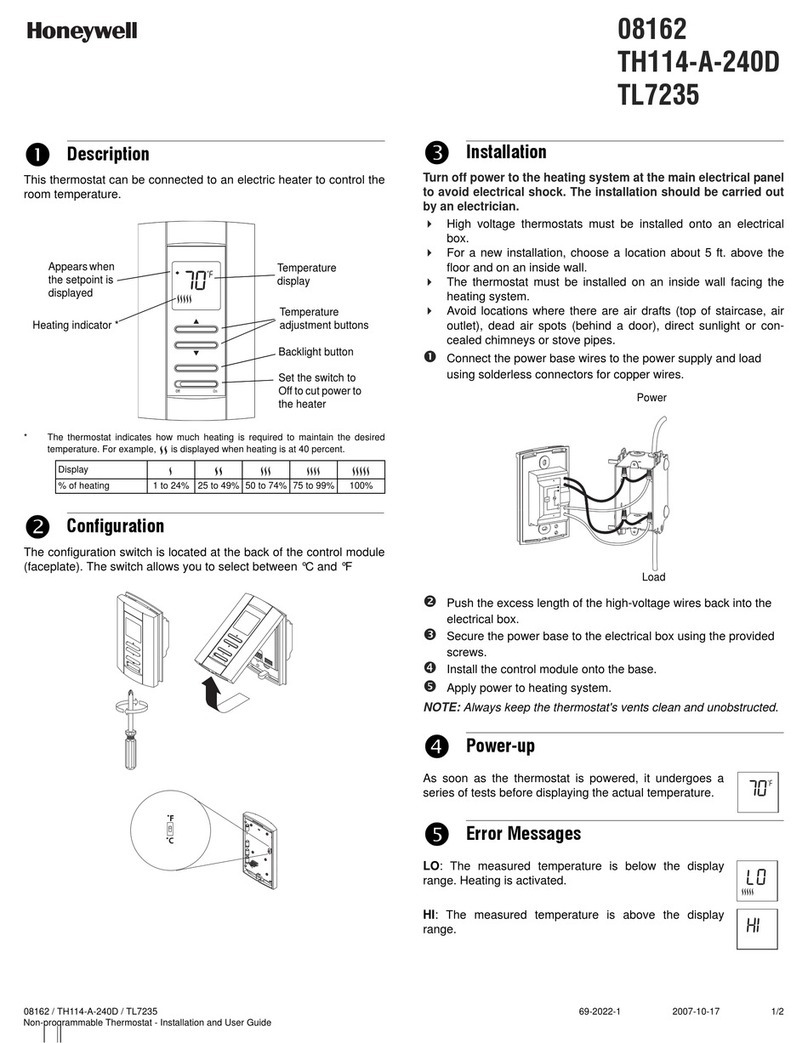
Notice the thermostat message center.
It will display CONNECTING… for up to
30 seconds, then CONNECTION
SUCCESSFUL for one minute.
Then you will see:
YOU ARE ALMOST DONE!
Before you can control the thermostat
remotely, you need to register it online.
Continue to Step 3 .
1.9 Attach thermostat to
wallplate
Align the thermostat onto
wallplate and snap into place.
1.10 Switch heating/cooling
system ON
Switch power back to ON for your
heating/cooling system at the
breaker box or the system switch.
1.11 Set date and time
Touch sor tbuttons to change
displayed time and date.
Press and hold a button to
quickly change a setting.
1.12 Determine your heating/cooling
system type
If your system type is:
 • Conventionalsinglestageheatandcool,
Go to Step 2
If your system is:
 • Conventionalmultistageheatandcool
 • Heatpumpwithoutbackupheat
 • Heatpumpwithbackupheat
 • Heatonly
 • Coolonly
See the User Guide to match your
thermostat to your system type.
If you are not sure of your heating/cooling system type or have other questions,
see User Guide.
To view and set your Wi-Fi thermostat remotely,
you must have a Total Connect Comfort
account. Follow the instructions below.
3.1 Open the Total Connect Comfort
web site
In an Internet browser, go to
www.mytotalconnectcomfort.com
Day
Remove metal jumper if you
have both Rand RC wires
Insert wires here
Time
Month
3.2 Login or create an account
If you have an account,
click Login
– or –
click Create An Account.
3.2a Follow the instructions on the
screen.
3.2b Check your email for a response
from My Total Connect Comfort.
3.2c Follow activation instructions in
the email.
3.2d Log in.
Connect to your Wi-Fi network
2
Register online for remote access
3
Ye ar, Month, Day(To p)
Se t Time
Ye ar, Month, Day(To p)
Se t Time
Year
or
Thermostat interior
Thermostat
Wallplate
Thermostat Wi-Fi-Setup page
Message Center
M31543
Y2
W2
K
RC
R
W
Y
G
C
RC
R
O/B
Y
G
C
HEAT PUMP
CONVENTIONAL
L
AUX
/E
K
M31544
M31568
MORE
Inside

M31569
MORE
Inside