5
EN
CHARGE THE VEHICLE BATTERY
CHARGING WARNINGS
WARNING: Failure to exercise caution while using this
product and comply with the following warnings could
result in product malfunction, electrical issues, excessive
heat, FIRE, and ultimately injury and property damage.
• NEVER LEAVE CHARGING BATTERIES UNATTENDED
DURING USE.
• NEVER CHARGE BATTERIES OVERNIGHT.
• The power supply must deliver power at Safety Extra Low
Voltage (SELV).
• Never attempt to charge dead, damaged or wet battery
packs.
• Never attempt to charge a battery pack containing
dierent types of batteries.
• Never allow children under 14 years of age to charge
battery packs.
• Never charge batteries in extremely hot or cold places or
place in direct sunlight.
• Never charge a battery if the cable has been pinched or
shorted.
• Never connect the charger if the power cable has been
pinched or shorted.
• Never connect the charger to an automobile 12V battery
while the vehicle is running.
• Never attempt to dismantle the charger or use a damaged
charger.
• Never attach your charger to both an AC and a DC power
source at the same time.
• Never connect the input jack (DC input) to AC power.
• Always use only rechargeable batteries designed for use
with this type of charger in the correct programming mode.
• Always inspect the battery before charging.
• Always keep the battery away from any material that could
be aected by heat.
• Always monitor the charging area and have a fire
extinguisher available at all times.Always end the charging
process if the battery becomes hot to the touch or starts
to change form (swell) during the charge process.
• Always connect the charge cable to the charger first, then
connect the battery to avoid short circuit between the
charge leads. Reverse the sequence when disconnecting.
• Always connect the positive red leads (+) and negative
black leads (–) correctly.
• Always disconnect the battery after charging, and let the
charger cool between charges.
• Always charge in a well-ventilated area.
• Always terminate all processes and contact Horizon Hobby
if the product malfunctions.
• Charge only rechargeable batteries. Charging non-
rechargeable batteries may cause the batteries to burst,
resulting in injury to persons and/or damage to property.
• The socket-outlet shall be installed near the equipment
and shall be easily accessible.
WARNING: Never leave charger unattended, exceed
maximum charge rate, charge with non-approved
batteries or charge batteries in the wrong mode. Failure to
comply may result in excessive heat, fire and serious injury.
CAUTION: Always ensure the battery you are
charging meets the specifications of this charger and
that the charger settings are correct. Not doing so can
result in excessive heat and other related product
malfunctions, which can lead to user injury or property
damage. Please contact Horizon Hobby or an authorized
retailer with compatibility questions.
1
2
3
Follow the manufacturer’s directions for your charger to
properly charge the vehicle battery.
CAUTION: Only use chargers designed to charge the
chosen battery type. Using an incorrect charger or
incorrect charger settings could cause the battery to
catch fire or explode.
OPERATING THE INCLUDED S120 SMART CHARGER
(PRO CIRCUIT VERSION, LOS06002 ONLY)
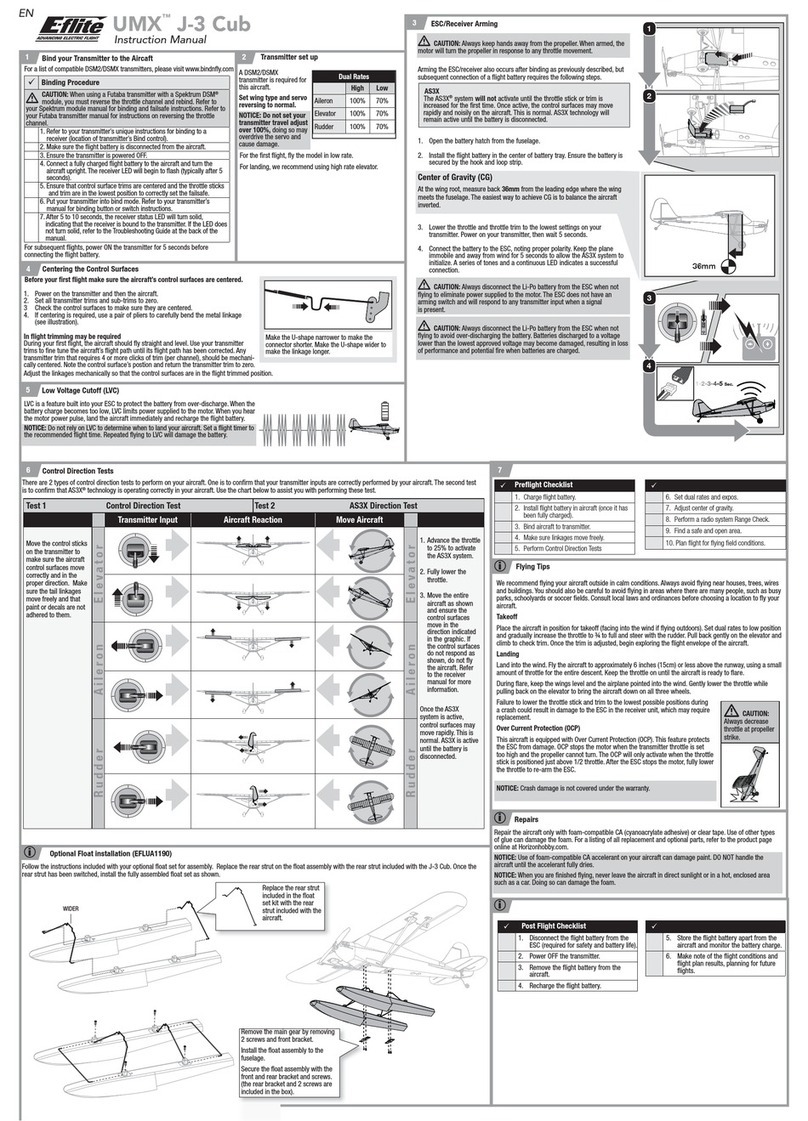
1. Connect the S120 charger to a USB power supply
adapter.
2. Connect the Smart battery lead to the IC5 to IC3 adapter.
3. Connect the IC3 adapter to the charge port on the S120
charger.
TIP: The battery can be disconnected from the charger at
any time to stop the charging process.
4. Refer to the LED Indicator table for charger status.
5. A red LED will illuminate to indicate abnormal charging.
Follow the operation steps to ensure proper connection
is used to charge the battery.
IMPORTANT: Non-Smart batteries will cause the LED to
illuminate red and the S120 will not recognize or charge
the battery.
LED Indicator
Power On –
No Battery Connected USB 5V/1A, 5V/2A: White LED
USB Quick Charge 2.0/3.0: Blue LED
LiPo 2S and 3S
Spektrum Smart
Battery
Battery Capacity Purple LED
Less Than 25% Single Flash
25% – 75% Double Flash
76% – 99% Triple Flash
Charge Complete Green LED (Solid)
Firmware Update Red-Green-Blue Flashing LED
Error Red LED (Solid)