Hunter 28031 User manual

Type 2 ModelsType 2 ModelsType 2 Models
Form# 42679-01
20110119
©2011 Hunter Fan Co.
For Your Records and
Warranty Assistance
For reference, also attach your receipt or a copy
of your receipt to the manual.
__________________________________________
Model Name
__________________________________________
Model No.
__________________________________________
Date Purchased
__________________________________________
Where Purchased
English Francias
Owner’s Guide and Installation Manual

2
42679-01 • 01/19/11 • Hunter Fan Company
© 2011 Hunter Fan Company
Your new Hunter® ceiling fan is an addition to your home or oce that
will provide comfort and performance for many years. is installation
and operation manual gives you complete instructions for installing
and operating your fan.
We are proud of our work. We appreciate the opportunity to supply
you with the best ceiling fan available anywhere in the world.
Before installing your fan, for your records and warranty assistance,
record information from the carton and Hunter nameplate label
(located on the top of the fan motor housing).
Cautions and Warnings
•READ THIS ENTIRE MANUAL CAREFULLY BEFORE BEGINNING
INSTALLATION. SAVE THESE INSTRUCTIONS.
• Use only Hunter replacement parts.
• To reduce the risk of personal injury, attach the fan directly to the
support structure of the building according to these instructions,
and use only the hardware supplied.
• To avoid possible electrical shock, before installing your fan,
disconnect the power by turning o the circuit breakers to the
outlet box and associated wall switch location. If you cannot lock
the circuit breakers in the o position, securely fasten a prominent
warning device, such as a tag, to the service panel.
• All wiring must be in accordance with national and local electrical
codes and ANSI/NFPA 70. If you are unfamiliar with wiring, use a
qualied electrician.
• To reduce the risk of personal injury, do not bend the blade
attachment system when installing, balancing, or cleaning the fan.
Never insert foreign objects between rotating fan blades.
• To reduce the risk of re, electrical shock, or motor damage, do not
use a solid-state speed control with this fan. Use only Hunter speed
controls.
Welcome
Table Of Contents
1 • Getting Ready......................6
2 • Installing the Ceiling Plate . . . . . . . . . . 7
3 • Assembling and Hanging the Fan . . . 8
4 • Securing Fan to Secondary Support
System............................9
5 • Wiring the Fan . . . . . . . . . . . . . . . . . . . . . 10
6 • Installing the Canopy and Canopy Trim
Ring ..............................11
7 • Assembling the Blades. . . . . . . . . . . . . . 12
8 • Completing Your Installation With or
Without a Multi Staked Light Fixture
13
9 • Operating and Cleaning Your Ceiling Fan
16
10 • Troubleshooting . . . . . . . . . . . . . . . . . . 17

3
42679-01 • 01/19/11 • Hunter Fan Company
Preparing the Fan Site
7’ Minimum
Blades to
Floor
8’ Minimum
Ceiling
Height
30” From
Wall or
Nearest
Obstruction
Step 1 - Choose the Fan Site
Proper ceiling fan location and attachment to the building
structure are essential for safety, reliable operation, maximum
eciency, and energy savings.
Choose a fan site where:
• No object can come in contact with the rotating fan blades during
normal operation.
• e fan blades are at least 7 feet above the oor and the ceiling is
at least 8 feet high.
• e fan blades have no obstructions to airow, such as walls or
posts, within 30 inches of the fan blade tips.
• e fan is directly below a joist or support brace that will hold the
outlet box and the full weight of the fan.
Checklist for Existing Fan Site
If you want to use an existing fan site, complete the following checklist to
determine if the site is acceptable and safe for your new Hunter fan. If you
cannot check o every item, prepare a new fan site as described on this
page.
Fan Support System
• Fan attaches directly to building structure.
• Fan support system will hold full weight of the fan and light kit.
Ceiling Hole
• e outlet box clearance hole is directly below the joist or support brace.
Outlet Box
• e outlet box is an UL-approved octagonal 4” x 1-1/2” outlet box (or as
specied by the support brace manufacturer).
• e outlet box is secured to the joist or support brace by wood screws
and washers through the inner holes of outlet box.
• e outer holes of the outlet box are aligned with joist or support brace.
• e bottom of the outlet box is recessed a minimum of 1/16” into
ceiling.
Wiring
• e electrical cable is secured to outlet box by an approved connector.
• Six inches of lead wires extend from outlet box.
If your existing fan site is suitable, skip ahead to Section 2 • Installing the
Ceiling Plate.
Suitable Existing Fan Site
Fan Support
System
Fan Support
System Wiring
Outlet Box

4
42679-01 • 01/19/11 • Hunter Fan Company
Preparing the Fan Site (continued)
CAUTION: All wiring must be in
accordance with national and local
electrical codes and ANSI/NFPA 70. If
you are unfamiliar with wiring, use a
qualied electrician.
Steps 2 – 3
Step 4
Step 5
Step 2 - Cut the Ceiling Hole
2-1. Locate the site for the ceiling hole directly below the joist or support brace that
will hold the outlet box and fan.
2-2. Cut a 4” diameter hole through the drywall or plaster of the ceiling. You will use
the hole to install the support brace and outlet box.
Step 3 - Install a Support Brace, If Necessary
Determine if there is a ceiling joist directly above the ceiling hole. If the joist is there,
determine if it is positioned to allow you to recess the outlet box a minimum of
1/16” into the ceiling. If NOT, install a support brace as follows:
3-1. Attach a 2” x 4” support brace between two joists. Position it to allow you to
recess the bottom of the outlet box a minimum of 1/16” into the ceiling.
3-2. Check the support brace to ensure it will support the full weight of the fan and
light kit.
Step 4 - Install the Outlet Box
4-1. Obtain a UL-approved octagonal 4” x 1-1/2” outlet box, plus two #8 x 1-1/2”
wood screws and washers, available from any hardware store or electrical supply
house.
4-2. Orient the outlet box so that both the inner and outer holes in the box align
with the joist or support brace.
4-3. Drill pilot holes no larger than the minor diameter of the wood screws (5/64”)
through the inner holes of the outlet box.
4-4. Attach the outlet box directly to the support brace or joist with two #8 x 1-1/2”
wood screws and washers. e bottom of the outlet box must be recessed a
minimum of 1/16” into the ceiling.
Step 5 - Prepare the Wiring
5-1. Make sure the circuit breakers to the fan supply line leads and associated wall
switch location are turned o . If you cannot lock the circuit breakers in the
o position, securely fasten a prominent warning device, such as a tag, to the
service panel.
5-2. read the fan supply line through the outlet box so that the fan supply line
extends at least 6” beyond the box.
5-3. Attach the fan supply line to the outlet box with an approved connector,
available at any hardware store or electrical supply house.
5-4. Make certain the wiring meets all national and local standards and ANSI/NFPA
70.
You have now successfully prepared your ceiling fan site. For instructions to install
your ceiling fan, go to your fan manual and continue with Section 2 • Installing the
Ceiling Plate.

5
42679-01 • 01/19/11 • Hunter Fan Company
Installer’s Choice and Optional Accessories
Understanding Mounting and Installer’s Choice®
Hunter’s patented 3-position mounting system provides you maximum
installation exibility and ease. You can install your Hunter fan in one
of three ways, depending on ceiling height and your preference: Low
Prole, Standard, or Angled mounting. e steps in this manual include
instructions for all three Installer’s Choice mounting methods.
Considering Optional Accessories
Consider using Hunter’s optional accessories, including a wall-mounted
or remote speed control. To install and use the accessories, follow
the instructions included with each product. For quiet and optimum
performance of your Hunter fan, use only Hunter speed controls.
For ceilings higher than 8 feet, you can purchase
Hunter extension downrods. All Hunter fans use
sturdy 3/4” diameter pipe to assure stability and
wobble-free performance.
Standard Mounting hangs from the
ceiling by a downrod (included).
Angled Mounting recommended for a
vaulted or angled ceiling
Support Brace
Standard
Mounting
Style
Ceiling
Outlet Box
Support Brace
Ceiling
Outlet Box
Angled
Mounting
Style
Low Profile Mounting ts close to the
ceiling, recommended for ceilings less
than 8 feet high
Support Brace
Low Prole
Mounting
Style
Ceiling
Outlet Box
8
12
CAUTION: To
reduce the risk of
personal injury, attach
the fan directly to the
support structure of
the building according
to these instructions,
and use only the
hardware supplied.

6
42679-01 • 01/19/11 • Hunter Fan Company
To install a ceiling fan, be sure you can do the following:
• Locate the ceiling joist or other suitable support in ceiling.
• Drill holes for and install wood screws.
• Identify and connect electrical wires.
• Lift 40 pounds.
If you need help installing the fan, your Hunter fan dealer can direct
you to a licensed installer or electrician.
Gathering the Tools
You will need the following tools for installing the fan:
• Electric drill with 9/64” bit
• Standard screwdriver (magnetic tip recommended)
• Phillips-head screwdriver (magnetic tip recommended)
• Wrench or pliers
• Ladder (height dependent upon installation site)
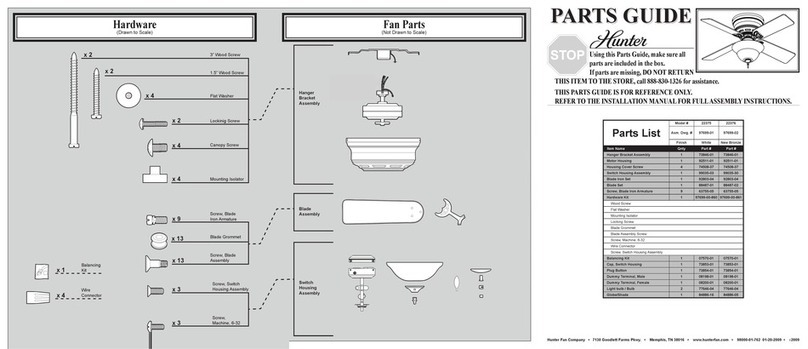
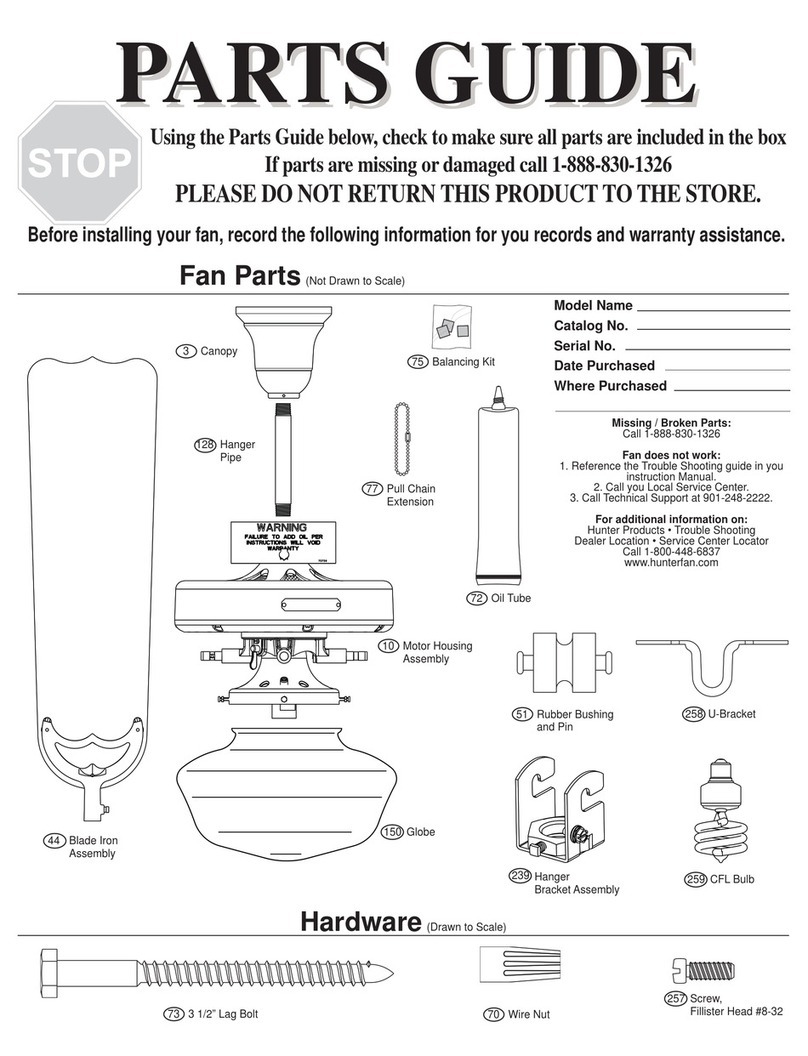
Checking Your Fan Parts
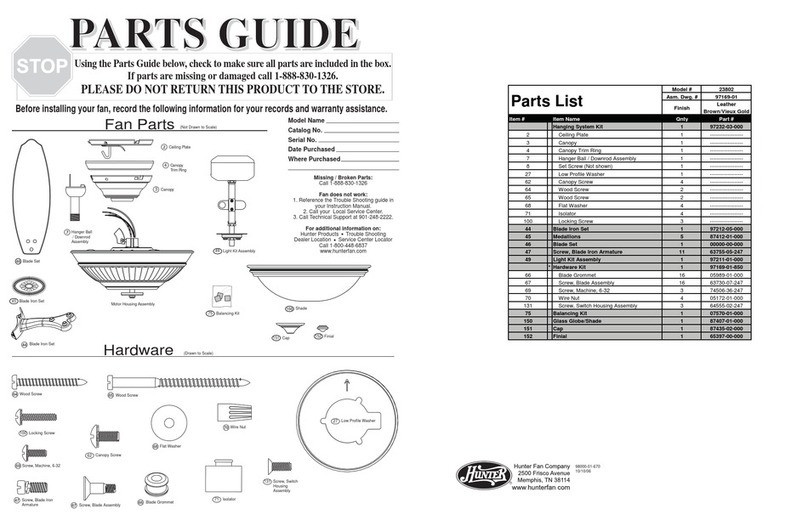
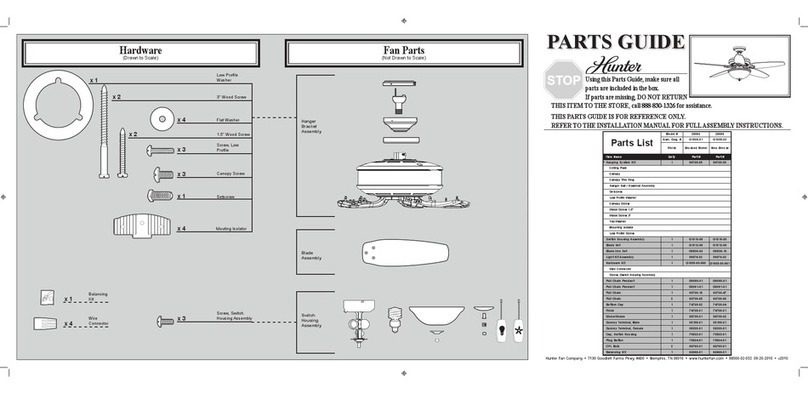
Carefully unpack your fan to avoid damage to the fan parts. Refer to
the included Parts Guide. Check for any shipping damage to the motor
or fan blades. If any parts are missing or damaged, contact your Hunter
dealer or call Hunter Technical Support Department at 866-268-1936.
Installing Multiple Fans?
If you are installing more than
one fan, keep the fan blades and
blade irons (if applicable) in sets,
as they were shipped.
1 • Getting Ready

7
42679-01 • 01/19/11 • Hunter Fan Company
CAUTION: To avoid possible electrical shock, before installing your fan,
disconnect the power by turning o the circuit breakers to the outlet box
and associated wall switch location. If you cannot lock the circuit breakers
in the o position, securely fasten a prominent warning device, such as a
tag, to the service panel.
2-1. Drill two pilot holes into the wood support structure through the
outermost holes in the outlet box. e pilot holes should be 9/64”
in diameter.
For Angled Ceilings: Be sure to orient the ceiling plate so that the
two tabs are pointing toward the ceiling peak.
2-2. Your fan comes with four preinstalled noise isolators. Check to
make sure all four isolators are in place and were not removed
during shipment.
2-3. Place a at washer on each of the two 3” wood screws.
2-4. read the supply wires from the outlet box in the ceiling through
the hole in the center of the ceiling plate.
2-5. Align the slotted holes in the ceiling plate with the pilot holes you
drilled in the wood support structure. For proper alignment use
slotted holes directly across from each other.
Note: e isolators should be ush against the ceiling.
2-6. Pass the screws through the slotted holes in the ceiling plate into
the pilot holes you drilled.
Tighten the screws into the 9/64” pilot holes; do not use lubricants
on the screws. Do not over tighten.
Flat Washer
3” Wood
Screw Steps 2-3 – 2-6
Ceiling
Plate
For Angled Ceilings: Be sure to orient
the ceiling plate so that the two tabs
are pointing toward the ceiling peak.
Toward
Ceiling Peak
2 • Installing the Ceiling Plate

8
42679-01 • 01/19/11 • Hunter Fan Company
WARNING: Fan may fall if not assembled as directed in these
installation instructions.
3-1. Unbundle the wires from the fan.
For Standard or Angled mounting:
3-2. Insert the downrod through the canopy and canopy trim ring.
Feed the wires from the fan through the downrod on one side of
the pin in the ball.
3-3. Loosen the square head setscrew on the adapter to install the pipe
and ball assembly. Note: When the pipe and ball assembly is fully
installed, 2-3 threads on the pipe will still be visible; this is normal.
Securely retighten the setscrew with a wrench or pliers. Skip to
step 3-7.
CAUTION: e adapter has a special coating on the threads. Do
not remove this coating; the coating prevents the downrod from
unscrewing. Once assembled, do not remove the downrod.
For Low Profile mounting:
Note: For low prole mounting, the downrod is replaced with the
low prole washer.
3-4. Remove the setscrew from the adapter.
3-5. Place the low prole washer into the canopy with the lip down.
3-6. Align the holes in the washer with the holes in the adapter.
Assemble securely with three low prole screws.
Hanging the Fan:
Note: To hang the fan, you must tilt the canopy to an almost vertical
position so that the canopy slots sit on the ceiling plate hooks.
3-7. Raise the fan and align the slots in the canopy with the hooks on
the ceiling plate.
3-8. Place the slots over the hooks to hang the fan.
Steps 3-2 – 3-3
Low Prole
Washer
Downrod
Canopy
Setscrew
Low Prole Screw
Canopy
Trim Ring
Green
Ground
Wire
Standard or Angled Mounting
Low Profile Mounting
Low Prole Screws
Canopy
Canopy
Trim Ring
Adapter
Low Prole
Washer
Low Prole Screw
Steps 3-5 – 3-6
Step 3-6 (Detail)
3 • Assembling and Hanging the Fan

9
42679-01 • 01/19/11 • Hunter Fan Company
4-1. Find the looped end of the braided cable and insert it through the
ceiling plate and one of the holes in the outlet box into the ceiling.
4-2. Access the support brace in the ceiling. You may not be able to do
this from below the ceiling depending on your installation site.
4-3. Drive a wood screw and washer into the side of the brace that
holds the outlet box. Leave 3mm (1/8”) of space between the
support brace and the washer.
4-4. Wrap the braided cable around the support brace once creating a
complete circle.
4-5. Hook the looped end of the cable over the wood screw so that the
braided cable lies between the washer and the support brace.
4-6. Tighten the loop and secure the screw and washer all the way
down to the support brace.
4-7. Coil up the excess cable.
4-8. Return to the fan so you can complete the fan wiring.
Step 4-1
3mm (1/8")
Steps 4-2 – 4-3 Steps 4-4 – 4-5 Steps 4-6 – 4-7
Support
Brace
Ceiling
Outlet Box Braided
Cable
4 • Securing Fan to Secondary Support System

10
42679-01 • 01/19/11 • Hunter Fan Company
Dual Switch Wiring
Single Switch Wiring
Wire
Connector
All wiring must be in accordance with national and local electrical
codes and ANSI/NFPA 70. If you are unfamiliar with wiring, use a
qualified electrician.
Wall switches are not included. Select an acceptable general-use switch
in accordance with national and local electrical codes.
5-1. Before attempting installation, make sure the power is still o.
5-2. To connect the wires, hold the bare metal leads together and place
a wire connector over them, then twist clockwise until tight. For
all these connections use the wire connectors provided.
5-3. Connect the bare or green ground wire (grounding) from the
ceiling to the green ground wire (grounding) from the ceiling plate
and the green ground wire (grounding) from the fan. If you chose
the low prole option, the green ground wire from the fan can be
found on the low prole washer.
5-4. Connect the white wire (grounded) from the ceiling to the white
wire (grounded) from the fan.
5-5. Connect the remaining wires as follows:
Dual Switch Wiring:
• e black wire (ungrounded) from the ceiling to the black wire
(ungrounded) from the fan
• e black wire with a white stripe (ungrounded) from the fan
to the wire (ungrounded) for the wall switch
Single Switch Wiring:
• e black wire (ungrounded) from the ceiling to the black
(ungrounded) and the black wire with a white stripe
(ungrounded) from the fan
CAUTION: Be sure no bare wire or wire strands are visible after
making connections.
5-6. Turn the splices upward and push them carefully back through the
ceiling plate into the outlet box.
5-7. Spread the wires apart, with the grounded wires on one side of
the outlet box and the ungrounded wires on the other side of the
outlet box.
5 • Wiring the Fan
Other manuals for 28031
2
Table of contents
Other Hunter Fan manuals

Hunter
Hunter 29562 Instruction Manual

Hunter
Hunter 90400 User manual
Hunter
Hunter Royal Oak 50466 User manual

Hunter
Hunter Viola User manual

Hunter
Hunter Exteriors 90195 User manual

Hunter
Hunter 2nd Century Original User manual
Hunter
Hunter M3571-01 User manual

Hunter
Hunter 50881 User manual
Hunter
Hunter SPA SELECT 90051 User manual
Hunter
Hunter HVLS User manual