sowie das laufende Musikprogramm vor dem Ma-
sterregler (24) abgehört werden (siehe Kap. 5.6).
Den Kopfhörer (Impedanz ≥2 x 8Ω) an die Klin-
kenbuchse (26) auf der Frontplatte anschließen.
8) Zuletzt den Stecker des Netzkabels (27) in eine
Steckdose (230V~/50Hz) stecken.
5 Bedienung
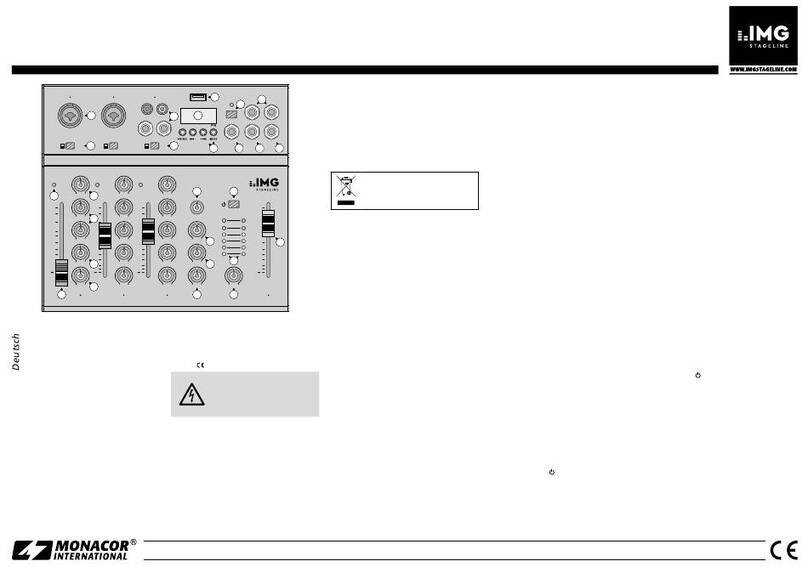
Vor dem Einschalten sollten dieAusgangsregler MA-
STER (24) und BOOTH (25) auf Minimum gestellt
werden, um starke Einschaltgeräusche zu vermei-
den. Dann das Mischpult mit dem Schalter POWER
(15) einschalten. Die Betriebsanzeige über dem
Schalter leuchtet. Anschließend die angeschlosse-
nen Geräte anschalten.
5.1 Grundeinstellungen
5.1.1 Grundeinstellung der Kanäle CH1–CH4
Für eine optimale Pegeleinstellung der an den Ein-
gangskanälen CH1–CH4 angeschlossenen Ton-
quellen alle Gain-Regler (6) und Klangregler (11)
sowie den Crossfader (21) auf Mittelposition stellen.
1) Mit den Umschalttasten (7) die angeschlossenen
Signalquellen anwählen.
Taste nicht gedrückt ( ):
Der Eingang PHONO (bei Kanal CH1 und
CH3) bzw. CD (bei Kanal CH2 und CH4) ist
angewählt.
Taste gedrückt ( ) – LED über der Taste leuchtet:
Der Eingang LINE des Kanals ist angewählt.
2) Mit dem Masterregler (24) wird der Gesamtpegel
aller angeschlossenen Tonquellen eingestellt. Den
Masterregler auf ca. 2/3des Maximums stellen,
z.B. auf Position 7.
3) Die Umschalttaste (20) darf nicht gedrückt sein:
Bei dieser Tastenstellung zeigt das VU-Meter (22)
den Stereo-Ausgangspegel an, der am Master-
ausgang (29) zur Verfügung steht.
4) Zum Aussteuern eines Kanals die Fader (9) der
übrigen Kanäle auf Minimum stellen und die Ton-
signale (Testsignale oder Musikstücke) auf den
jeweiligen Eingangskanal geben.
5) Anhand des VU-Meters mit dem Fader den Pegel
des Kanals ausregeln. Optimale Aussteuerung
liegt vor, wenn bei den lautesten Passagen die
0-dB-LEDs des VU-Meters kurz aufleuchten.
Übersteuerungen werden durch Aufleuchten der
roten LEDs angezeigt.
Der Fader sollte nach der Pegeleinstellung auf
ca. 2/3des Maximums stehen, damit zum Ein- und
Ausblenden genügend Reglerweg vorhanden ist.
6) Bei sehr wenig oder sehr weit aufgezogenem
Fader muß der Pegel durch Regulierung der Ein-
gangsverstärkung angepaßt werden: Den GAIN-
Regler (6) des Kanals entsprechend zurück- bzw.
aufdrehen.
Die Eingangsverstärkung läßt sich durch An-
zeige des Pre Fader-Pegels optimal einstellen.
Dazu das VU-Meter durch Drücken der Taste
(20) in den Anzeigemodus „PFL“ umschalten,
den Regler MIX (18) ganz nach links auf Position
„PFL“ schieben, und die Taste PFL (10) des Ka-
nals drücken: Das VU-Meter zeigt dann den Si-
gnalpegel des Kanals vor dem Kanalfader an.
7) Das VU-Meter durch Lösen der Taste (20) wieder
in denAnzeigemodus „MASTER“ schalten, und mit
den Klangreglern (11) des Kanals – je eine 3fache
Klangreglung für die Kanalgruppe CH1/CH2 und
die Kanalgruppe CH3/CH4 – den gewünschten
Klang einstellen: Mit den drei Reglern lassen sich
dieHöhen(HIGH),Mitten(MID)undTiefen(BASS)
anheben (max. 15dB ) bzw. stark absenken (max.
30dB). Stehen die Regler in Mittelstellung, findet
keine Frequenzgangbeeinflussung statt.
Hinweis: Klangeinstellungen wirken sich auf die
Pegel aus. Deshalb nach einer Klangregulierung
den Kanalpegel anhand der Pegelanzeige kon-
trollieren und ggf. korrigieren.
8) Die Pegel- und Klangeinstellung für die übrigen
belegten Eingangskanäle in der oben beschrie-
benen Weise durchführen.
5.1.2 Grundeinstellung der Mikrofonkanäle
Zum Einschalten eines Mikrofonkanals die Taste ON
AIR (5) des Kanals drücken. Zur Anzeige leuchtet
die LED über der Taste. Die Fader (9) der Eingangs-
kanäle CH1– CH4 auf Minimum stellen, und an-
hand des VU-Meters (22) mit dem Regler GAIN (1)
des Kanals den optimalen Pegel einstellen. Mit den
Klangreglern (2) – HIGH für die Höhen, MID für die
Mitten, BASS für die Tiefen – das Klangbild für das
Mikrofon korrigieren (max. ±15dB).
Die Pegel- und Klangeinstellungen für den zwei-
ten Mikrofonkanal in der gleichen Art durchführen.
5.2 Überblendfunktion
Der Crossfader (21) ermöglicht ein Überblenden
zwischen den beiden Kanalgruppen CH1/CH2 und
CH3/CH 4. Es können jedoch nicht nur die Misch-
signale der beiden Kanalgruppen zum Überblenden
genutzt werden, auch das Überblenden zwischen
zwei Kanälen aus je einer Kanalgruppe ist möglich
(z.B. Kanal 2 und Kanal 4). In diesem Fall muß der
Kanalfader (9) des jeweils nicht beteiligten Kanals
der Kanalgruppe auf Minimum gestellt werden.
1) Die für die Überblendfunktion ausgewählten Ka-
näle optimal aussteuern (siehe Kap. 5.1.1).
2) Zum Einblenden der Kanalgruppe CH1/CH2
(bzw. eines Kanals dieser Kanalgruppe) und
gleichzeitigem Ausblenden der Kanalgruppe
CH3/CH4 (bzw. eines Kanals dieser Kanal-
gruppe) den Crossfader nach links schieben.
Zum Einblenden der Kanalgruppe CH3/CH4
(bzw. eines Kanals dieser Kanalgruppe) und
gleichzeitigem Ausblenden der Kanalgruppe
CH1/CH2 (bzw. eines Kanals dieser Kanal-
gruppe) den Crossfader nach rechts schieben.
Steht der Crossfader in Mittelposition, werden
beide Kanalgruppen gleichzeitig auf die Aus-
gänge gegeben.
3) Mit dem Masterregler (24) den gewünschten Ge-
samtpegel einstellen, der am Masterausgang
(29) zur Verfügung steht. Bei Übersteuerungen
[rote LEDs des VU-Meters (22) leuchten auf] den
Masterpegel reduzieren.
5 Operation
Prior to switching-on, the output controls MASTER
(24) and BOOTH (25) should be set to minimum
position to avoid strong switching noise. Then switch
on the mixer with the POWER switch (15). The
power LED above the switch lights up. Then switch
on the connected units.
5.1 Basic settings
5.1.1 Basic setting of the channels CH1 to CH4
For an optimum level adjustment of the audio sources
connected to the input channels CH1 to CH4, set all
gain controls (6) and equalizer controls (11) as well as
the crossfader (21) to mid-position.
1) Select the connected signal sources with the se-
lector buttons (7).
button not pressed ( ):
the PHONO input (channels CH1 and CH3) or
the CD input (channels CH2 and CH4) is se-
lected.
button pressed ( ) – LED above the button lights
up:
the LINE input of the channel is selected.
2) With the master control (24) the overall level of all
connected audio sources is adjusted. Set the
master control to approx. 2/3of the maximum
position, e.g. to position 7.
3) The selector button (20) must not be pressed:
with this button position the VU meter (22) dis-
plays the stereo output level which is available at
the master output (29).
4) For level control of a channel, set the faders (9) of
the other channels to minimum and feed the
audio signals (test signals or music pieces) to the
respective input channel.
5) By means of the VU meter, control with the fader
the level of the channel. There is optimum level
control if the 0dB LEDs of the VU meter shortly
light up with music peaks. Overload is indicated
by the red LEDs lighting up.
The fader should be at approx. 2/3of the maxi-
mum position after the level adjustment so that
there is sufficient control range for fading in and
out.
6) If the fader is almost at minimum or at maximum
position, the level must be matched by adjusting
the input amplification: turn up or turn back the
GAIN control (6) of the channel accordingly.
The input amplification can be adjusted in an
optimum way by the display of the pre fader level.
For this purpose press the button (20) to switch
the VU meter to the display mode “PFL”, slide the
MIX control (18) to the left stop to position “PFL”,
and press the PFL button (10) of the channel: the
VU meter now shows the signal level of the chan-
nel ahead of the channel fader.
7) Release button (20) to switch the VU meter to the
display mode “MASTER” again, and adjust the
desired sound with the equalizer controls (11) of
the channel – a 3-way equalizer each for the
channel group CH1/CH2 and the channel group
CH3/CH4: with the three controls the high range
(HIGH), the midrange (MID), and the bass range
(BASS) can be boosted (max. 15dB) or attenu-
ated to a large extent (max. 30dB). If the controls
are in mid-position, there is no influence on the
frequency response.
Note: Sound adjustments influence the levels.
Therefore, after a sound adjustment, check the
channel level by means of the level display and
correct it, if necessary.
8) Make the level and sound adjustments for the
other connected input channels as described
above.
5.1.2 Basic setting of the microphone channels
To switch on a microphone channel, press the ON
AIR button (5) of the channel. The LED above the
button lights up as indication. Set the faders (9) of
the input channels CH1 to CH4 to minimum posi-
tion, and adjust the optimum level with the GAIN
control (1) of the channel by means of the VU meter
(22). Correct the sound for the microphone (max.
±15dB) with the equalizer controls (2) – HIGH for
the high range, MID for the midrange, BASS for the
bass range.
For the level and sound adjustments for the sec-
ond microphone channel proceed in the same way.
5.2 Crossfading function
With the crossfader (21) it is possible to fade be-
tween the two channel groups CH1/CH2 and
CH3/CH4. However, not only the mixing signals of
the two channel groups can be used for fading but
fading between two channels of each channel group
is possible as well (e.g. channel 2 and channel 4). In
this case the channel fader (9) of the channel not
concerned of the channel group has to be set to
minimum.
1) Control the levels of the channels selected for the
crossfading function in an optimum way (see
chapter 5.1.1).
2) For fading in the channel group CH1/CH2 (or a
channel of this channel group) and simultaneous
fading out the channel group CH3/CH4 (or a
channel of this channel group), slide the cross-
fader to the left.
For fading in the channel group CH3/CH4 (or
a channel of this channel group) and simulta-
neous fading out the channel group CH1/CH2
(or a channel of this channel group), slide the
crossfader to the right.
If the crossfader is in mid-position, both chan-
nel groups are fed to the outputs at the same time.
3) With the master control (24) adjust the desired
total level which is available at the master output
(29). In case of overload [red LEDs of the VU
meter (22) light up] reduce the master level.
4) To produce special sound effects, it is possible to
suppress certain frequency ranges for each of
the two channel groups with the CUT buttons (19
and 23): button HIGH for the high range, button
MID for the midrange, button BASS for the bass
range. With the button pressed (LED above the
button lights up), the respective frequency band
is attenuated to such a large extent that it can
hardly be noticed in the sound. For switching off
6
GB
D
A
CH