manuals.online logo
Brands
  1. Home
  2. •
  3. Brands
  4. •
  5. Insignia
  6. •
  7. Headset
  8. •
  9. Insignia NS-MCHM25PB User manual

Insignia NS-MCHM25PB User manual

Other Insignia Headset manuals

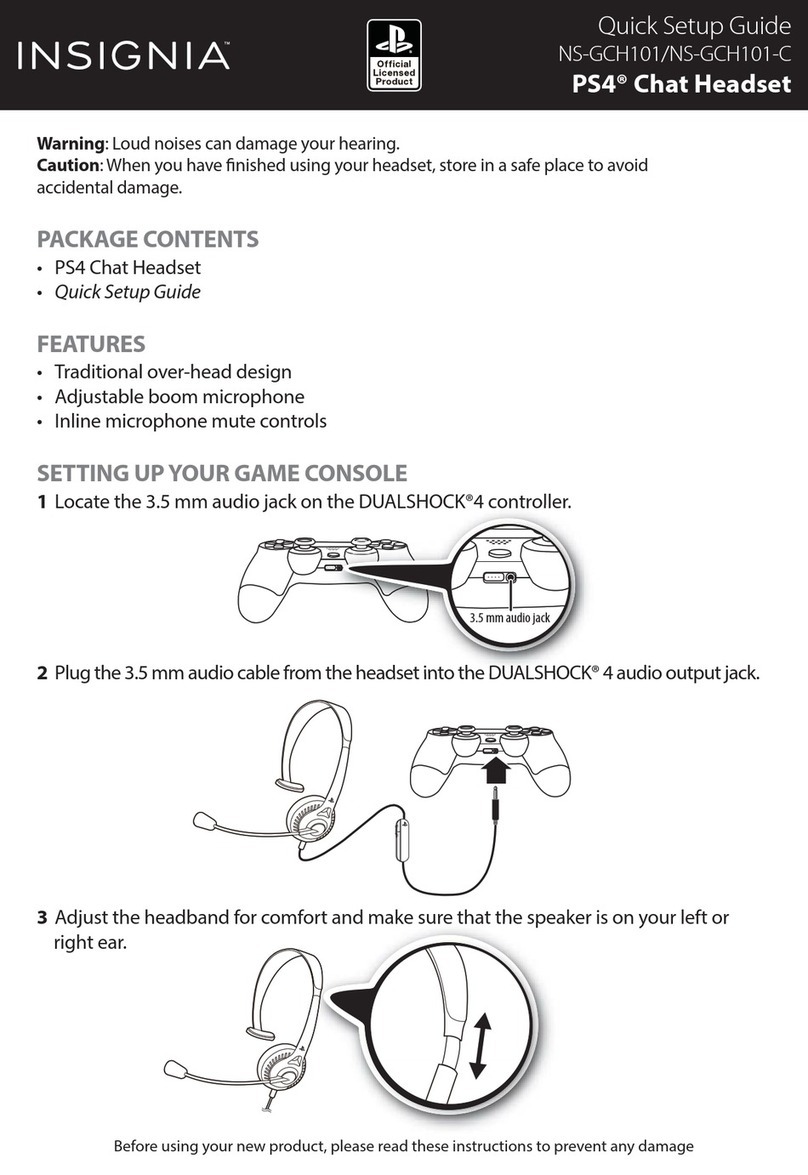
Insignia NS-GCH101 User manual

Insignia

Insignia NS-GCH101 User manual

Insignia NS-CAHBTEB01 User manual

Insignia

Insignia NS-CAHBTEB01 User manual

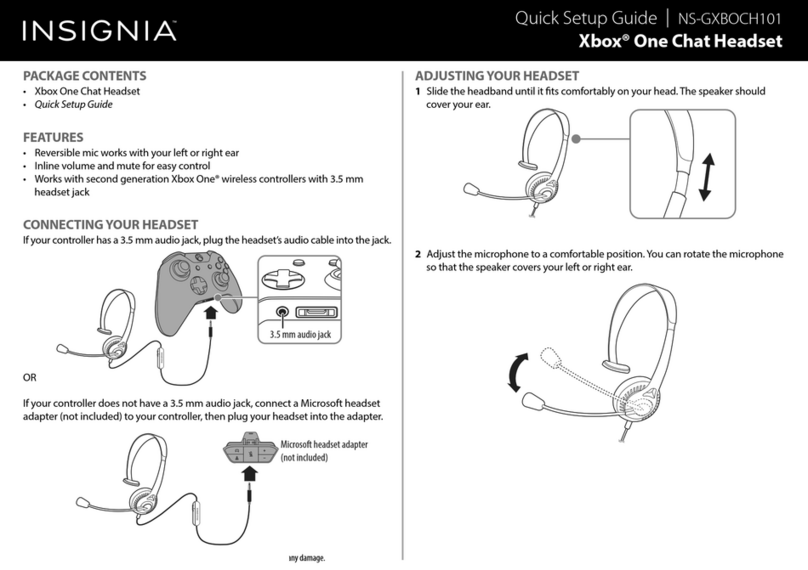
Insignia NS-GXBOCH101 User manual

Insignia

Insignia NS-GXBOCH101 User manual

Insignia NS-CAHBTEB01-B User manual

Insignia

Insignia NS-CAHBTEB01-B User manual

Insignia NS-PCGH User manual

Insignia

Insignia NS-PCGH User manual

Insignia NS-MCHMRJ9P2 User manual

Insignia

Insignia NS-MCHMRJ9P2 User manual

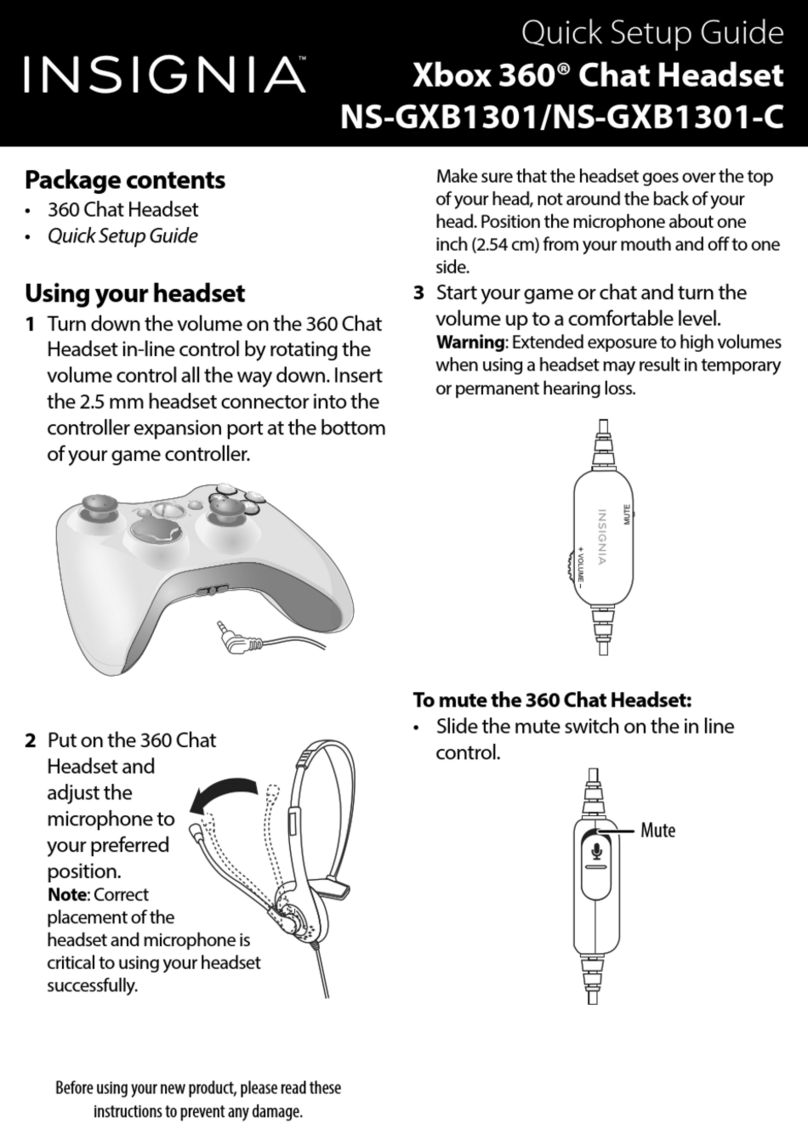
Insignia NS-GXB1301 User manual

Insignia

Insignia NS-GXB1301 User manual

Insignia NS-MCHM25 User manual

Insignia

Insignia NS-MCHM25 User manual

Popular Headset manuals by other brands

Sony WI-SP510 Help guide

Sony

Sony WI-SP510 Help guide

LYSAR INDUSTRIES EQ1 manual

LYSAR INDUSTRIES

LYSAR INDUSTRIES EQ1 manual

Nacon RIG 500 PRO Series user guide

Nacon

Nacon RIG 500 PRO Series user guide

HUHD HW-933M instruction manual

HUHD

HUHD HW-933M instruction manual

H2O Audio Natalie Coughlin Signature Series iSH2-5A1 user guide

H2O Audio

H2O Audio Natalie Coughlin Signature Series iSH2-5A1 user guide

Bose IN-EAR HEADPHONES owner's guide

Bose

Bose IN-EAR HEADPHONES owner's guide

Intaride S-3 manual

Intaride

Intaride S-3 manual

Jabra Elite 7 Pro How do

Jabra

Jabra Elite 7 Pro How do

Sena SMH10 quick start guide

Sena

Sena SMH10 quick start guide

IASUS Stealth  IA-NT4-BASIC-BT manual

IASUS

IASUS Stealth IA-NT4-BASIC-BT manual

Sennheiser EPOS ADAPT 230 user guide

Sennheiser

Sennheiser EPOS ADAPT 230 user guide

Anycom PAROS-10 user manual

Anycom

Anycom PAROS-10 user manual

GE 98971 datasheet

GE

GE 98971 datasheet

Jabra PRO 9460 - PRO 9460-DUO user manual

Jabra

Jabra PRO 9460 - PRO 9460-DUO user manual

Hama 00184070 quick start guide

Hama

Hama 00184070 quick start guide

Plantronics Blackwire 3200 Series user guide

Plantronics

Plantronics Blackwire 3200 Series user guide

Blue Tiger Advantage PLUS user manual

Blue Tiger

Blue Tiger Advantage PLUS user manual

Jabra FR 20 user guide

Jabra

Jabra FR 20 user guide

manuals.online logo
manuals.online logoBrands
  • About & Mission
  • Contact us
  • Privacy Policy
  • Terms and Conditions

Copyright 2025 Manuals.Online. All Rights Reserved.

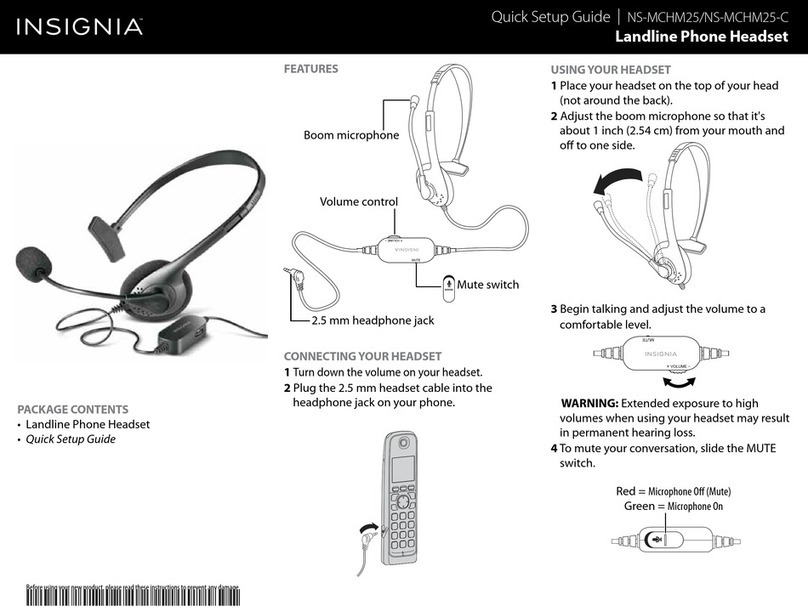
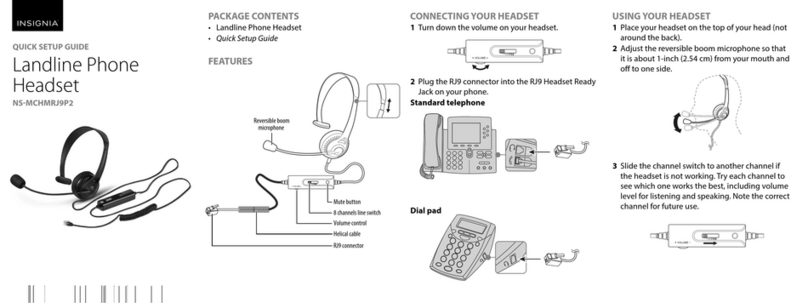
PACKAGE CONTENTS
• Landline Phone Headset
• Quick Setup Guide
FEATURES
CONNECTING YOUR HEADSET
1Turn down the volume on your headset.
2Plug the 2.5 mm headset cable into the jack on your
phone.
USING YOUR HEADSET
1 Place your headset on the top of your head (not
around the back).
2Adjust the reversible boom microphone so that it
is about 1 inch (2.54 cm) from your mouth and
o to one side.
3 Begin talking and adjust the volume to a
comfortable level.
WARNING: Extended exposure to high volumes when
using your headset may result in permanent hearing loss.
4To mute your conversation, slide the MUTE
switch.
Before using your new product, please read these instructions to prevent any damage.
QUICK SETUP GUIDE
Landline Phone
Headset 2.5mm
connector
NSMCHM25PB
ON OFF
Volume DOWN
ON OFF
Volume UPVolume DOWN
Volume DOWNVolume UP
ON OFF
Mute Microphone on
ON OFF Cable clip
Mute switch
Volume control
2.5 mm headphone jack
Boom microphone
V3 ENGLISH 18-0316
LEGAL NOTICES
FCC Statement
This device complies with part 15 of the FCC Rules.
Operation is subject to the following two
conditions: (1) This device may not cause harmful
interference, and (2) this device must accept any
interference received, including interference that
may cause undesired operation.
Caution: Changes or modications to this unit not
expressly approved by the party responsible for
compliance could void the user’s authority to
operate the equipment.
Note: This equipment has been tested and found to
comply with the limits for a Class B digital device,
pursuant to Part 15 of the FCC Rules. These limits
are designed to provide reasonable protection
against harmful interference in a residential
installation. This equipment generates, uses and can
radiate radio frequency energy and, if not installed
and used in accordance with the instructions, may
cause harmful interference to radio
communications. However, there is no guarantee
that interference will not occur in a particular
installation. If this equipment does cause harmful
interference to radio or television reception, which
can be determined by turning the equipment o
and on, the user is encouraged to try to correct the
interference by one or more of the following
measures:
• Reorient or relocate the receiving antenna.
• Increase the separation between the
equipment and receiver.
• Connect the equipment into an outlet on a
circuit dierent from that to which the receiver is
connected.
• Consult the dealer or an experienced radio/TV
technician for help.
ICES-003
This Class B digital apparatus complies with
Canadian ICES-003; Cetappareil numérique de la
classe B est conforme à la normeNMB-003 du
Canada.
ONEYEAR LIMITED WARRANTY
Visit www.insigniaproducts.com for details.
CONTACT INSIGNIA:
For customer service, call 1-877-467-4289 (U.S. and
Canada) or 01-800-926-3000 (Mexico)
www.insigniaproducts.com
INSIGNIA is a trademark of Best Buy and its aliated companies
Distributed by Best Buy Purchasing, LLC
7601 Penn Ave South, Richeld, MN 55423 U.S.A.
©2018 Best Buy. All rights reserved.
Made in China