manuals.online logo
Brands
  1. Home
  2. •
  3. Brands
  4. •
  5. JackManTech
  6. •
  7. Arcade Game Machine
  8. •
  9. JackManTech Happy Island User manual

JackManTech Happy Island User manual

Popular Arcade Game Machine manuals by other brands
Universal Space MR.WOLF Operation manual

Universal Space

Universal Space MR.WOLF Operation manual

Universal Space COCONUT BASH Operation manual

Universal Space

Universal Space COCONUT BASH Operation manual

Bay-Tek EVOLVE installation guide

Bay-Tek

Bay-Tek EVOLVE installation guide

Global VR America's Army Operation & service manual
Global VR

Global VR America's Army Operation & service manual

Universal Space Checky Monkey Operation manual

Universal Space

Universal Space Checky Monkey Operation manual

Atronic Cashline installation manual

Atronic

Atronic Cashline installation manual
falgas CARRUSEL FIESTA user guide

falgas

falgas CARRUSEL FIESTA user guide

Konami DanceDanceRevolution Operator's manual

Konami

Konami DanceDanceRevolution Operator's manual

Bay-Tek quik drop Service manual

Bay-Tek

Bay-Tek quik drop Service manual

Bandai Namco PAC-MAN BATTLE ROYALE CHOMPIONSHIP DELUXE Operation manual

Bandai Namco

Bandai Namco PAC-MAN BATTLE ROYALE CHOMPIONSHIP DELUXE Operation manual

Adrenaline Flying Tickets Operation & service manual

Adrenaline

Adrenaline Flying Tickets Operation & service manual

Swinks Stern Pinball Ghostbusters manual

Swinks

Swinks Stern Pinball Ghostbusters manual

Innovative Concepts in Entertainment MONOPOLY ROLL-N-GO Service manual

Innovative Concepts in Entertainment

Innovative Concepts in Entertainment MONOPOLY ROLL-N-GO Service manual

jakar SPEED CARS Operator's manual

jakar

jakar SPEED CARS Operator's manual

Carmelli HAT TRICK NG1015H Assembly instructions

Carmelli

Carmelli HAT TRICK NG1015H Assembly instructions

Bay-Tek Skee Ball 1908 Alley Service manual

Bay-Tek

Bay-Tek Skee Ball 1908 Alley Service manual

Aristocrat Technologies Mars X Upright Service manual

Aristocrat Technologies

Aristocrat Technologies Mars X Upright Service manual

NAMCO Ridge Racer V Arcade Battle Operator's manual

NAMCO

NAMCO Ridge Racer V Arcade Battle Operator's manual

manuals.online logo
manuals.online logoBrands
  • About & Mission
  • Contact us
  • Privacy Policy
  • Terms and Conditions

Copyright 2025 Manuals.Online. All Rights Reserved.

1
Thank you for choosing our product!
Our machines have been designed in such way, that their use and possible service won't cause problems
even for unskilled staff. We have made every effort to ensure that our devices are safe to use.
Nevertheless, everyone should familiarize themselves with our short instruction that will allow to safely
install and use our machines.
2
Table of contents.
Important Safety Instructions ................................................................................................................ 3
1. GAME BOARD SETTING ................................................................................................................... 4
2. CONSOLE SETTING........................................................................................................................... 6
3
Important Safety Instructions
WARNING:
Failure to follow these safety instructions could result in fire,electric shock,
or other injury or damage.
•Read and follow these instructions to use your Video Amusement Game safely.
•All metal parts are connected together and the machine must be plugged into the socket with
earthing AC 230 V 50 Hz.(or 110 V for US version)
•Do not use this apparatus near water.
•Do not install near any heat sources such as radiators, heat registers, stoves, or other apparatus
that produce heat.
•Protect the power cord from being walked on or pinched, particularly at plugs and at the point
where they exit from the apparatus.
•Protect power cord from exposure to liquids and moisture.
•Refer all servicing to qualified service personnel.
•Tempering with electronic components while machine is switched on may cause electric show,
injury or death.
WARNING:
Failure to follow these safety instructions could result in fire, electric shock, or
other injury or damage.
•Unless proper precautions are used by a qualified personnel, machine should be switched off while
service area is accessed.
•Servicing is required when the apparatus has been damaged in any way, such as power-supply
cord or plug is damaged, liquid has been spilled or objects have fallen into the apparatus, the
apparatus has been exposed to rain or moisture, does not operate normally, or has been dropped.
•This apparatus has an on/off switch. To disconnect this apparatus from power, you must turn off
the machine and disconnect the power cord.
•Make sure the power cord is always easily accessible.
•The Video Amusment Game is for indoor use only.
4
1. GAME BOARD SETTING
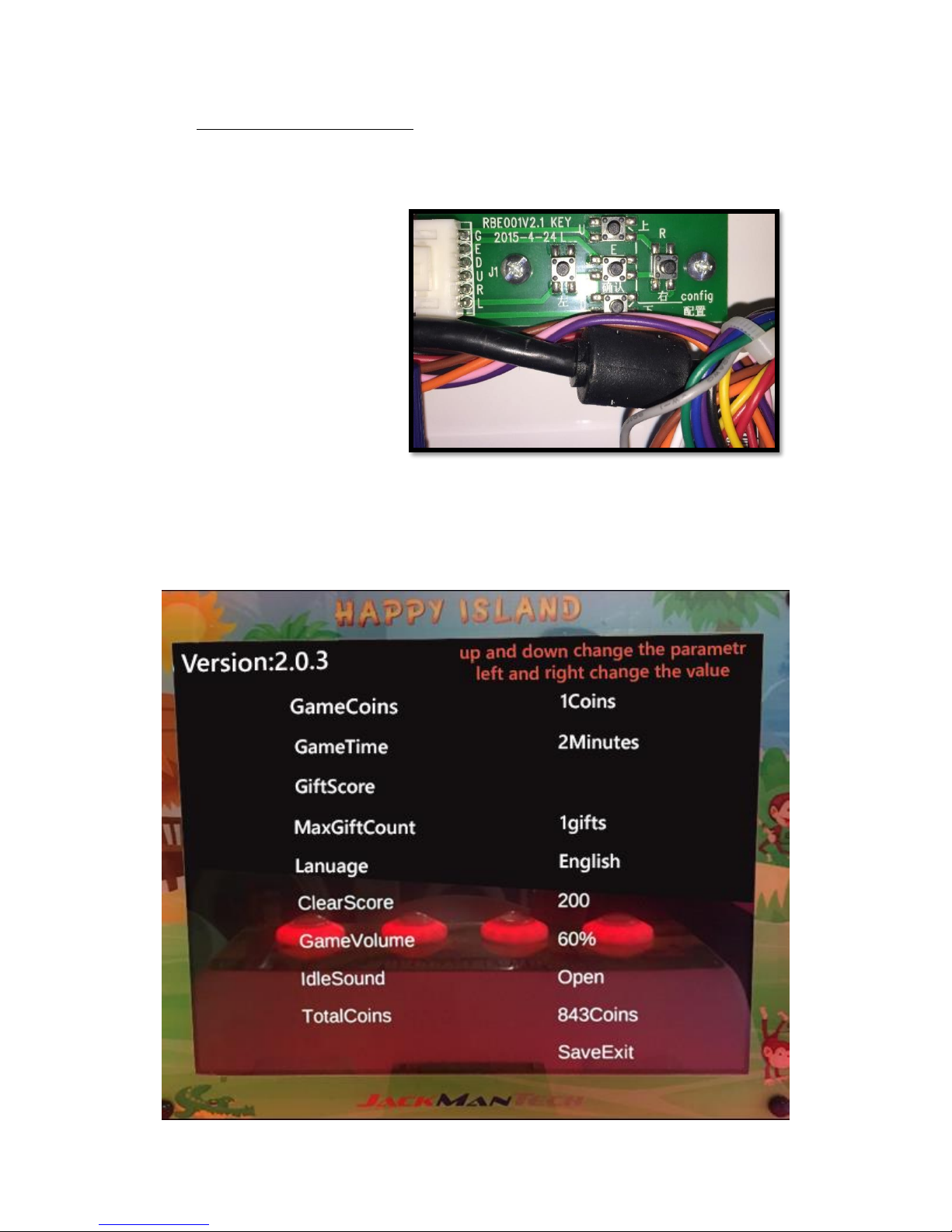
To enter settings mode on the game board use the small board inside to navigate:
UP
LEFT
OK
RIGHT
DOWN
To enter settings press left & right button at the same time
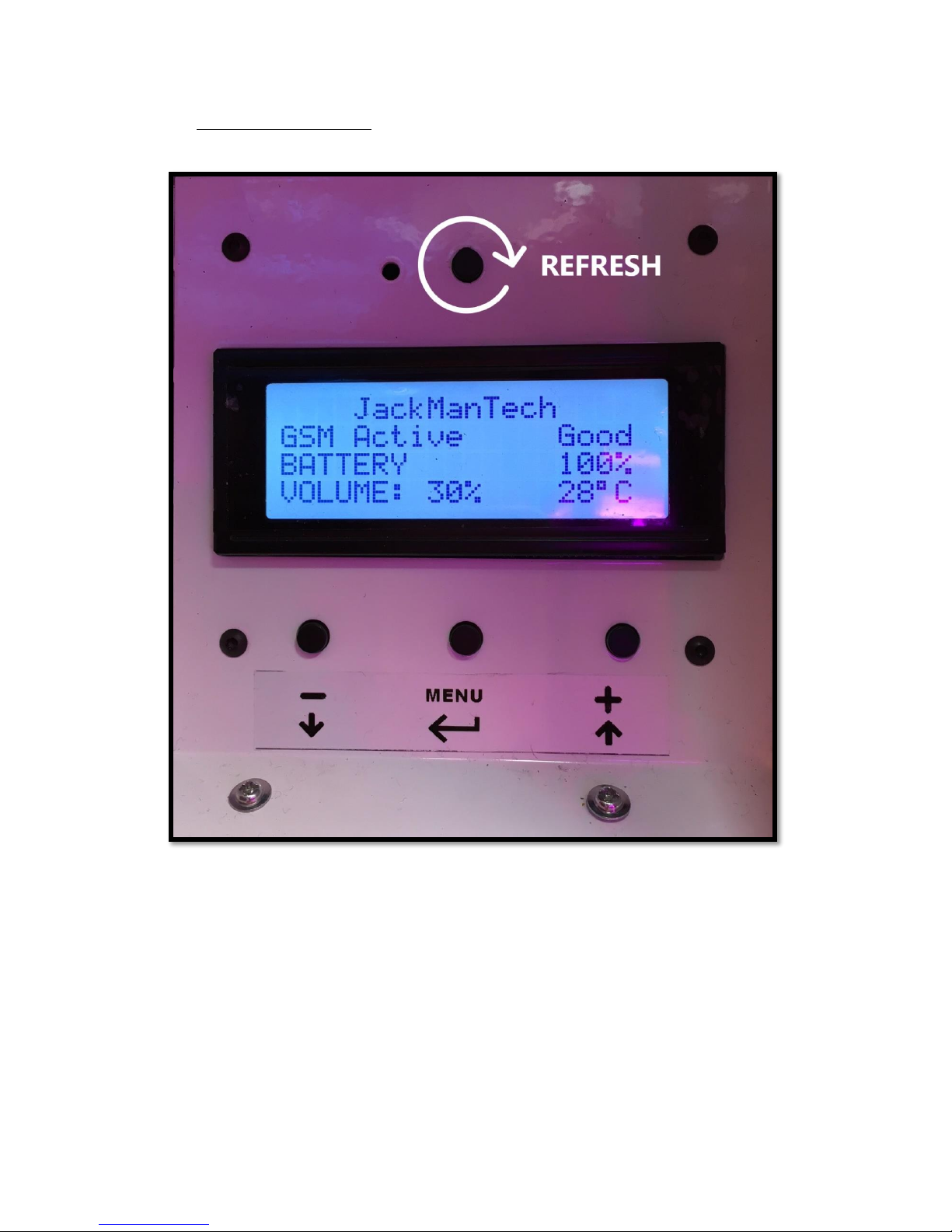
SETTINGS:
5
1. GAME COINS
1 COIN - original settings of the machine is 1 and should remain unchanged (actual
coins required to play one game is regulated in JM Operator Box)
2. GAME TIME
set here the time of the full game, after coin is inserted by player (recommended
and optimal time is 2 minutes)
3. GIFT SCORE
0 - not apply; machine is not manufactured to give out any gifts
4. MAX GIFT COUNT
not apply; 0 is the correct value as machine is not giving out any gifts; if another
value is set it doesn't interfere with game correctness
5. LANGUAGE
not apply; English is the original language of the machine
6. CLEAR SCORE
at the beginning of the game player is choosing a game to play. Set number of
points a player needs to reach to progress to another game (during the time set
before - for example 2 minutes). Recommended value - 200/300.
7. GAME VOLUME
value of 60% is set; actual volume of the game (also during presentation) is
entirely set in JM Operator Box
8. IDLE SOUND
not apply
9. TOTAL COINS
numer of played game, unchangable .
6
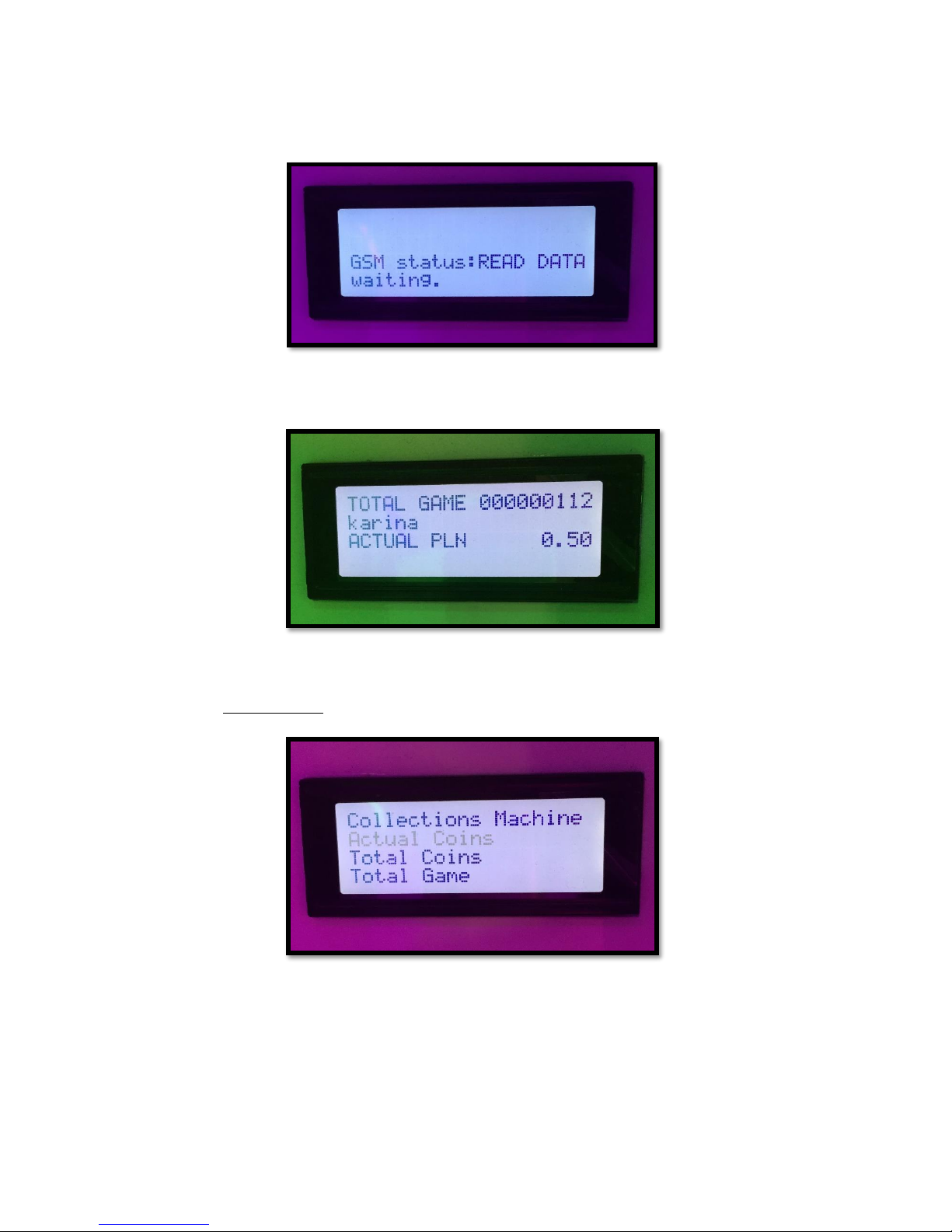
2. CONSOLE SETTING
TOP BUTTON –refresh mode, press it once you finished settings
BOTTOM LEFT –decrease value / go down
BOTTOM CENTRE –go to MENU / confirm
BOTTOM RIGHT –increase value / go up
7
1. COUNTERS
1.1 COLLECTIONS MACHINE
(process of taking out the money from the machine)
- the list of the employees entitled to cash collection will appear
- choose the name of the employee (to confirm press MENU button)
8
- choose YES/NO (when choosing YES, data will be send to the application; process takes
up to 15 seconds)
- amount of money machine has collected since last money collection will be displayed
on the screen
- press MENU button to come back to main menu
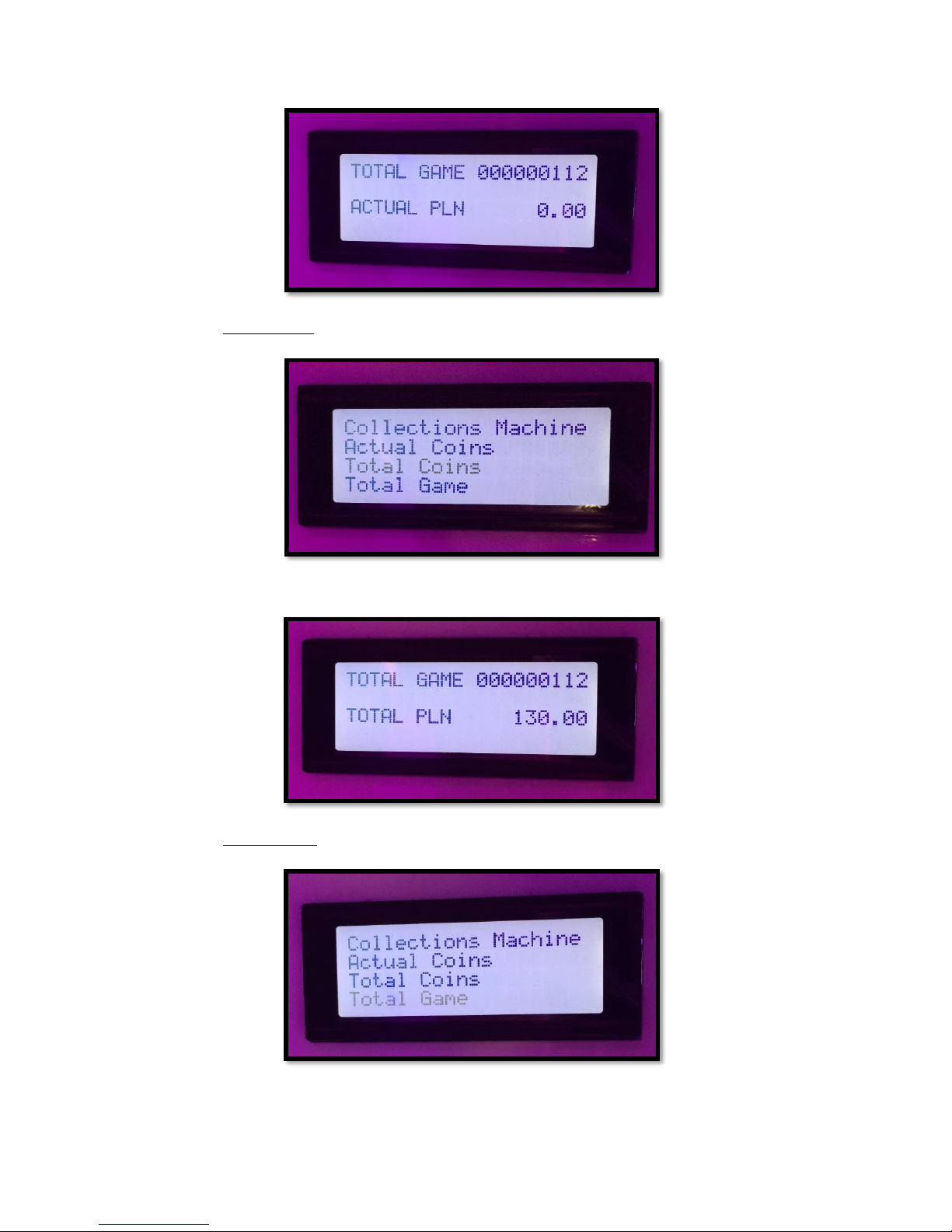
1.2 ACTUAL COINS
(actual amount of money in the collector box at the moment; if the money has just been
collected amount will be 0.00)
9
1.3 TOTAL COINS
(amount of money machine has collected since the beginning of creation)
1.4 TOTAL GAMES
(number of games machine has played since the beginning of creation)