KD-AVX11
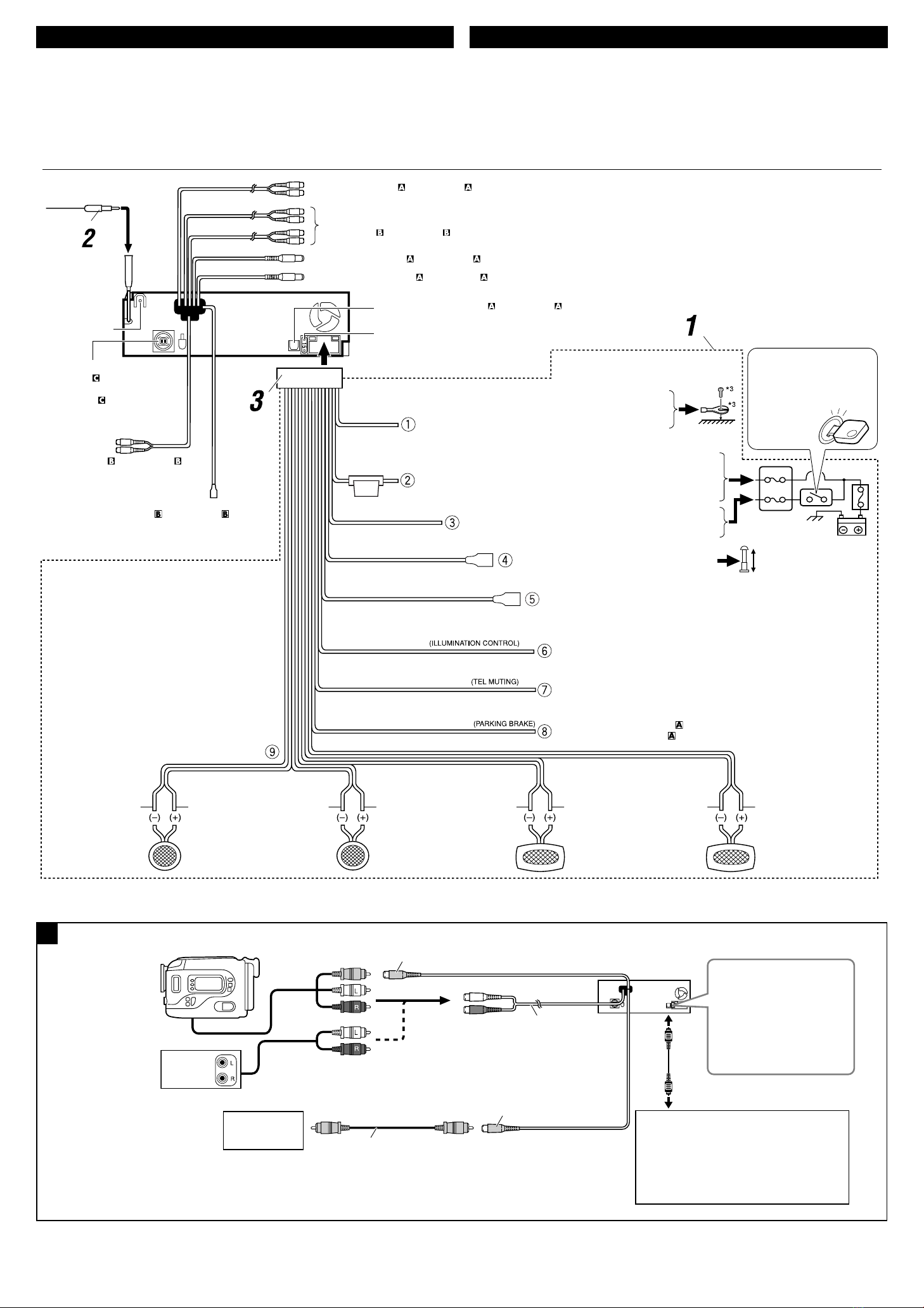
LINE OUT (REAR)
SUBWOOFER
LINE OUT (FRONT)
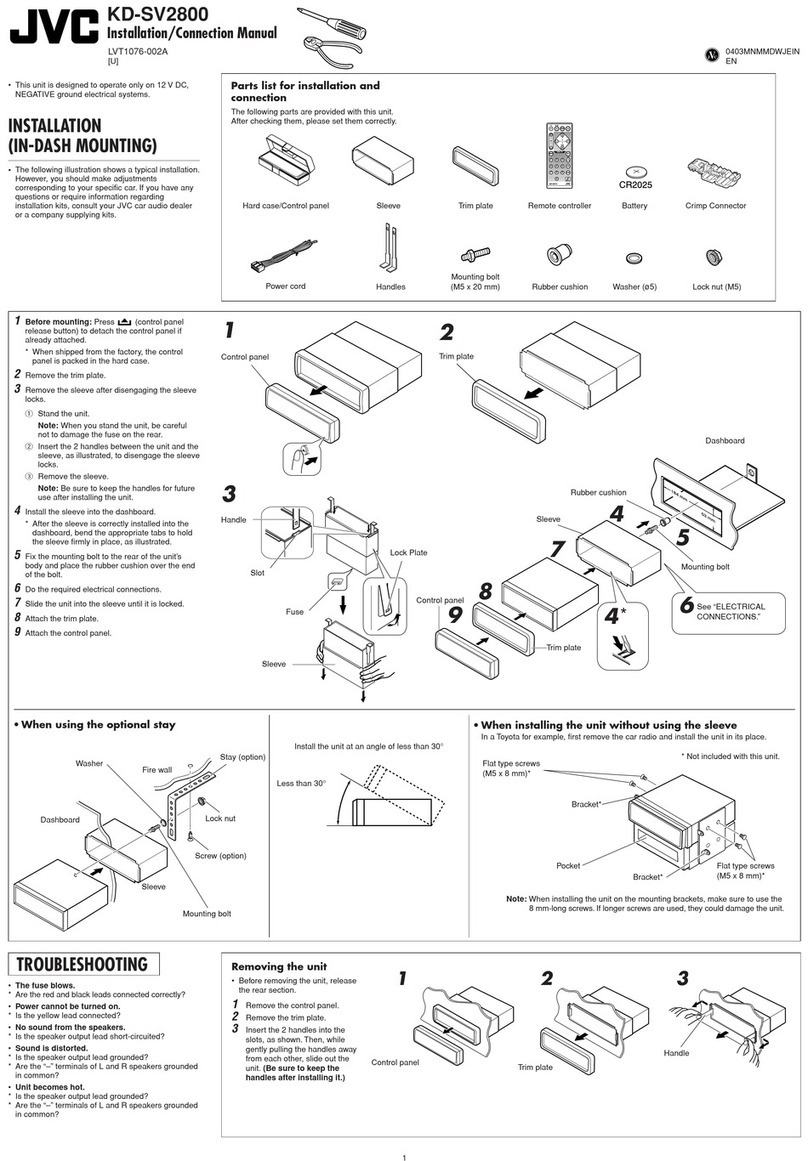
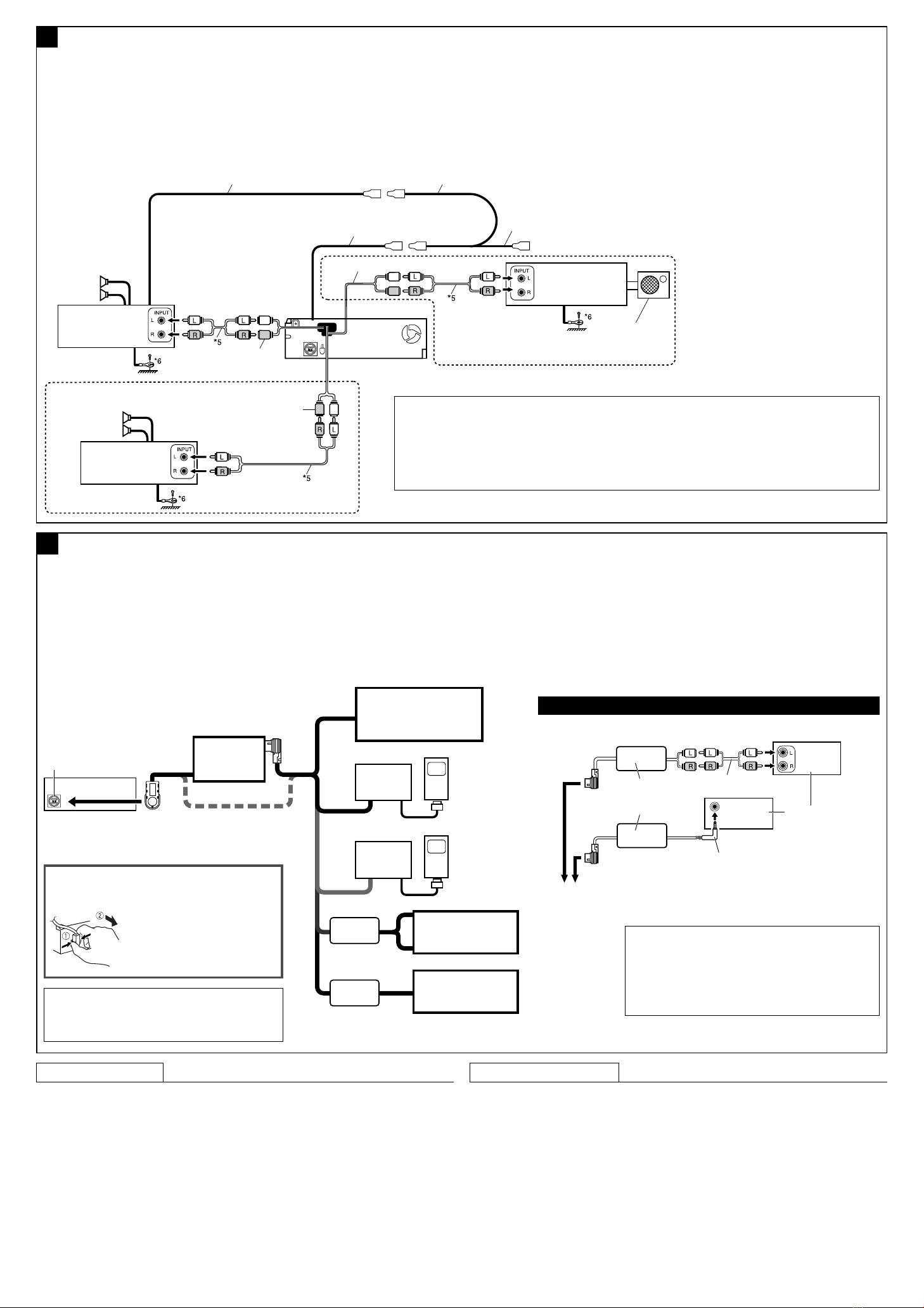
BConnecting the external amplifiers / Penyambungan penguat luar
You can connect amplifiers to upgrade your car stereo system.
• Connect the remote lead (blue with white stripe) to the remote lead of the other equipment so that it
can be controlled through this unit.
• For amplifier only:
– Disconnect the speakers from this unit, connect them to the amplifier. Leave the speaker leads
of this unit unused.
– You can switch off the built-in amplifier and send the audio signals only to the external amplifier(s)
to get clear sounds and to prevent internal heat built-up inside the unit. ee page 40 of the
IN TRUCTION (separate volume).
*5 Audio cord (not supplied)
*5 Kabel audio (tidak disuplai)
*6 Firmly attach the ground lead to the metallic body or to the chassis of the car—to the place uncoated with paint (if
coated with paint, remove the paint before attaching the lead). Failure to do so may cause damage to the unit.
*6 Pasangkan dengan kuat kabel tanah ke bodi besi atau ke casis dari mobil—pada tempat yang tidak dilapisi cat (jika
dilapisi cat, hilangkan cat sebelum memasang kabel). Kegagalan melakukan ini mungkin menyebabkan kerusakan pada
alat penerima tersebut.
C
Other external component / Komponen luar lainnya
External component
Komponen luar
Connecting external components / Menyambung komponen eksternal
Remote lead
Ujung jauh
J C Amplifier
Penguat JVC
Remote lead (Blue with white stripe)
Ujung jauh (Biru dengan strip putih) To the remote lead of other equipment
Ke ujung jauh dari peralatan lain
Y-connector (not supplied for this unit)
Konektor Y (tidak disuplai untuk alat penerima ini)
ubwoofer
ubwoofer
Rear speakers
peker-speker
belakang
Front speakers
peker-speker
depan
3.5 mm stereo mini plug
Konektor stereo mini 3,5 mm
To disconnect the connector /
Untuk memutuskan hubungan konektor
Hold the connector top tightly (1),
then pull it out (2).
Pegang bagian atas konektor dengan
kuat (1), kemudian tarik keluar (2).
4
iPod is a trademark of Apple Computer, Inc., registered
in the U. . and other countries.
iPod adalah merek dagang dari Apple Computer, Inc.,
terdaftar di Amerika erikat dan di negara-negara lain.
J C Amplifier
Penguat JVC
J C Amplifier
JVC Amplifier
J C CD changer
JVC CD changer
*8 Audio cord (not supplied)
*8 Kabel audio (tidak disuplai)
*9 Line Input Adapter K -U57 (separately purchased)
*9 Adapter Jalur Masukan K -U57 (dibeli terpisah)
*10 Aux Input Adapter K -U58 (separately purchased)
*10 Adapter Input Aux K -U58 (dibeli terpisah)
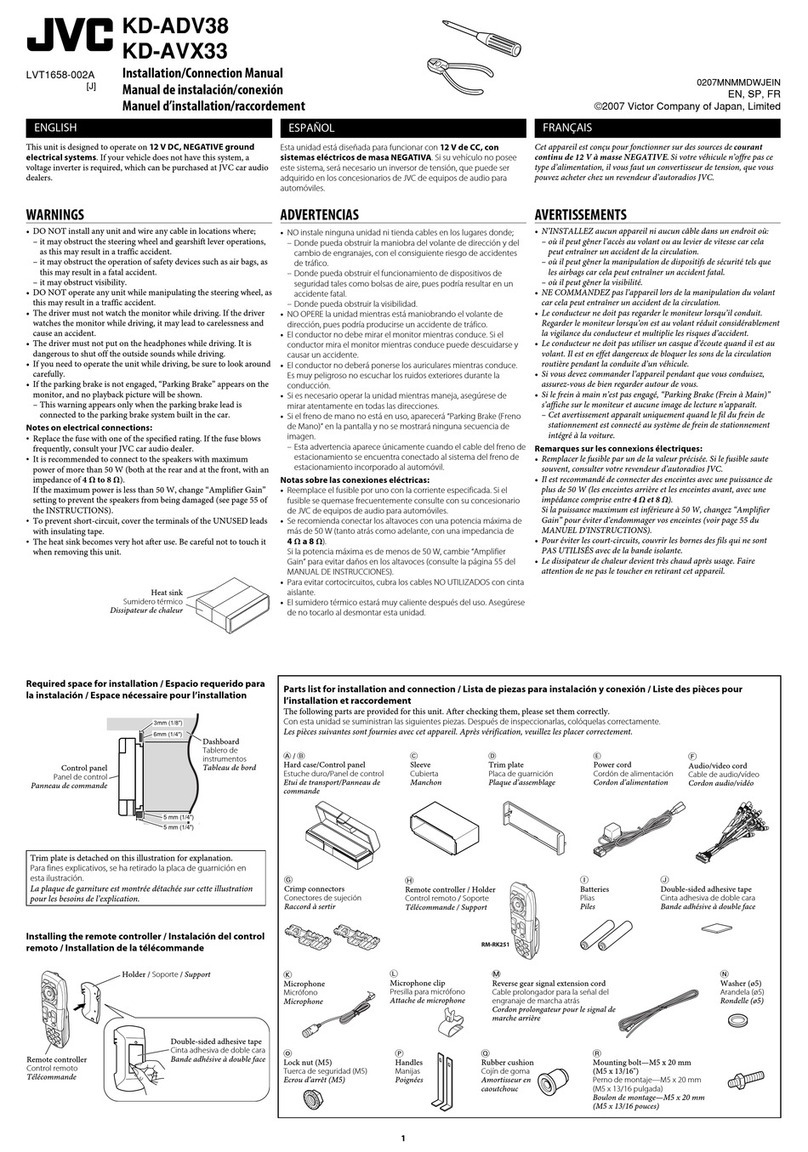
You can connect external components in series as shown in the diagram below.
• All the components, adapters or signal cords need to be purchased separately.
CAUTIO :
Before connecting the external components, make sure that the unit is turned off.
• To use J C CD changer, Apple iPod or J C D. player, set “External Input” to “Changer/iPod/
D. Player” (see page 39 of the INSTRUCTIONS).
• To use other external components via KS-U57 or KS-U58, set “External Input” to “External
Input” (see page 39 of the INSTRUCTIONS).
KS-U57
KS-U58
KS-BTA200*7
KS-PD100
KS-PD500
To K -BTA200 or KD-AVX11
Ke K -BTA200 atau KD-AVX11
KS-U58*10
or / atau
or / atau
or / atau
Anda dapat menyambungkan penguat-penguat untuk meningkatkan sistem stereo mobil anda.
• ambungkan ujung jauh (biru dengan strip putih) ke ujung jauh dari peralatan lain sehingga dapat
dikontrol melalui alat penerima ini.
• Hanya untuk penguat saja:
– Putuskan sambungan speker-speker ari alat penerima ini, sambungkan ini ke penguat. Biarkan
ujung speker ari alat penerima ini ti ak igunakan.
– Anda dapat mematikan penguat (amplifier) yang terpasang tetap dan mengirimkan sinyal audio
hanya ke penguat (amplifier) luar untuk mendapatkan suara yang jelas dan menghindari peningkatan
panas di dalam radio. Lihat halaman 40 dari BUKU PETUNJUK (bagian yang terpisah).
Anda dapat menghubungkan komponen eksternal dalam rangkaian seperti yang ditunjukan pada
diagram di bawah ini.
• emua komponen, adaptor atau kabel sinyal harus dibeli secara terpisah.
PERI GATA :
Sebelum menghubungkan komponen luar, pastikan penerima su ah imatikan.
• Untuk menggunakan JVC CD changer, Apple iPo atau JVC D.player, setel “External Input” ke
“Changer/iPo /D. Player” (lihat halaman 39 ari BUKU PETUNJUK).
• Untuk menggunakan komponen eksternal lainnya melalui KS-U57 atau KS-U58, setel “External
Input” ke “External Input” (lihat halaman 39 ari BUKU PETUNJUK).
CD changer jack
Konektor alat pengganti CD
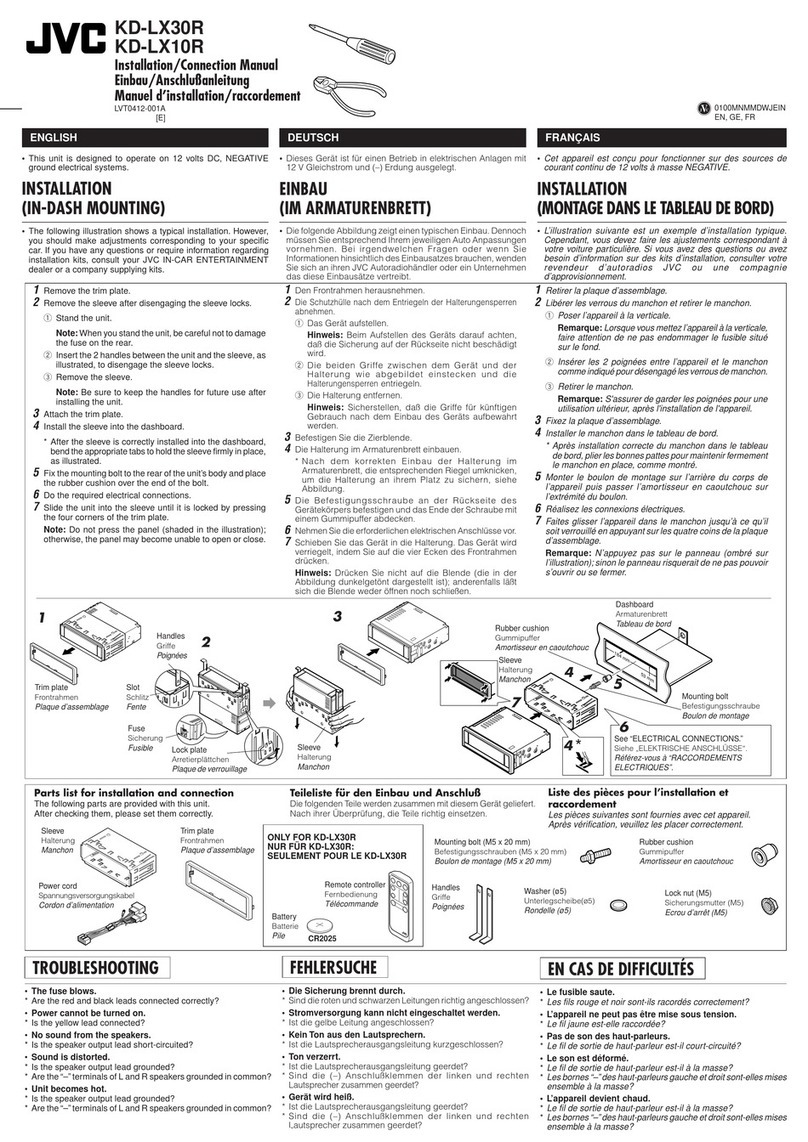
TROUBLESHOOTING
• The fuse blows.
* Are the red and black leads connected correctly?
• Power cannot be turned on.
* Is the yellow lead connected?
• o sound from the speakers.
* Is the speaker output lead short-circuited?
• Sound is distorted.
* Is the speaker output lead grounded?
* Are the “–” terminals of L and R speakers grounded in common?
• oise interfere with sounds.
* Is the rear ground terminal connected to the car’s chassis using shorter and thicker cords?
• Unit becomes hot.
* Is the speaker output lead grounded?
* Are the “–” terminals of L and R speakers grounded in common?
• This unit does not work at all.
* Have you reset your unit?
PEMECAHAN MASALAH
• Sekring meledak.
* Apakah ujung-ujung merah dan hitam tersambung dengan benar?
• Power tidak dapat dihidupkan.
* Apakah ujung kuning sudah tersambung?
• Tidak ada suara dari speker.
* Apakah ujung keluaran speker terhubung pendek?
• Suara terdistorsi.
* Apakah ujung keluaran speker sudah ditanahkan?
* Apakah terminal-terminal “–” dari speker-speker L dan R sudah ditanahkan secara umum?
• Berisik yang mengganggu suara-suara.
* Apakah terminal tanahan belakang tersambung ke casis mobil menggunakan kabel-kabel terpendek dan
tertebal?
• Alat penerima menjadi panas.
* Apakah ujung keluaran speker sudah ditanahkan?
* Apakah terminal-terminal “–” dari speker-speker L dan R sudah ditanahkan secara umum?
• Alat penerima ini tidak bekerja secara keseluruhan.
* Apakah anda sudah reset (memasang kembali) alat penerima anda?
Apple iPod
Apple iPod
JVC D. Player
JVC D. Player
*8
*7 Bluetooth Adapter K -BTA200 (separately purchased)
*7 Bluetooth Adapter K -BTA200 (dibeli terpisah)
External component
Komponen luar
KS-U57*9
or / atau
External component
Komponen luar
Install3-4_AVX11_009A[UN]f.indd 4Install3-4_AVX11_009A[UN]f.indd 4 18/1/07 8:48:49 am18/1/07 8:48:49 am